It is currently Tue Jun 09, 2026 9:52 pm


All times are UTC - 5 hours [ DST ]


Post new topic Reply to topic  [ 64 posts ]  Go to page Previous  1, 2, 3, 4  Next
Author Message
 Post subject: Re: Flowing Text Tutorial
PostPosted: Sat Aug 18, 2012 11:23 am  (#21) 
Offline
GimpChat Member
User avatar

Joined: Oct 07, 2010
Posts: 439
Location: home/Nixnine/.gimp-2.0/scripts/nixnine.scm
molly wrote:
I haven't started it yet Drac. I was busy out at the garden. I have tomatoes coming out my ears.


Tomatoes or corn, hahaha?

_________________
I refuse to be confused, but am often confused at this refusal.


Top
 Post subject: Re: Flowing Text Tutorial
PostPosted: Sat Aug 18, 2012 11:54 am  (#22) 
Offline
GimpChat Member
User avatar

Joined: Apr 07, 2010
Posts: 14182
Both Nixxy

_________________
Image


Top
 Post subject: Re: Flowing Text Tutorial
PostPosted: Sat Aug 18, 2012 5:52 pm  (#23) 
Offline
GimpChat Member
User avatar

Joined: Mar 23, 2012
Posts: 7388
Location: Göteborg at last!
Draconian wrote:
In Step 7 you state "Put the layer into overlay mode and use colours>levels to improve contrast. Remove the selection."

This is the Newspaper copy layer correct?


Yes Drac.


Top
 Post subject: Re: Flowing Text Tutorial
PostPosted: Mon Jul 15, 2013 11:39 am  (#24) 
Offline
GimpChat Member
User avatar

Joined: Jan 10, 2013
Posts: 863
Erisian Wow!
I loved this effect.
I could not get a result so convincing, but I was glad to first experience!
Thank you for the tutorial!
Image

_________________
bbbbbbbbbbbImage
bbbbbbbbbbb Be patient, English is not my language.


Top
 Post subject: Re: Flowing Text Tutorial
PostPosted: Mon Jul 15, 2013 3:31 pm  (#25) 
Offline
Global Moderator
User avatar

Joined: May 16, 2010
Posts: 16023
I have been trying to get this effect for some time now. You have gotten pretty close. :)
viewtopic.php?f=4&t=911&hilit=text

_________________
Image


Top
 Post subject: Re: Flowing Text Tutorial
PostPosted: Tue Jul 16, 2013 11:03 am  (#26) 
Offline
GimpChat Member
User avatar

Joined: Jan 10, 2013
Posts: 863
Rod wrote:
I have been trying to get this effect for some time now. You have gotten pretty close. :)
http://www.gimpchat.com/viewtopic.php?f ... hilit=text

Image
Wow!
Rod was excellent effect in this topic!
I tried to find the original images that were used there, but found only finished images.

Achieve the same effect in this tutorial has not been possible yet. :roll:

But that your post is 2010! Does all this time no one has yet found a technique to get that effect?

Challenger ...

_________________
bbbbbbbbbbbImage
bbbbbbbbbbb Be patient, English is not my language.


Top
 Post subject: Re: Flowing Text Tutorial
PostPosted: Tue Jul 16, 2013 11:08 am  (#27) 
Offline
Global Moderator
User avatar

Joined: May 16, 2010
Posts: 16023
Akros wrote:
Rod wrote:
I have been trying to get this effect for some time now. You have gotten pretty close. :)
viewtopic.php?f=4&t=911&hilit=text

Image
Wow!
Rod was excellent effect in this topic!
I tried to find the original images that were used there, but found only finished images.

Achieve the same effect in this tutorial has not been possible yet. :roll:

But that your post is 2010! Does all this time no one has yet found a technique to get that effect?

Challenger ...


That is correct. :)
But this is very close and the first time i saw this post since it was written. So i will try again using some of these techniques. :bigthup

_________________
Image


Top
 Post subject: Re: Flowing Text Tutorial
PostPosted: Sat Jul 20, 2013 5:41 am  (#28) 
Offline
GimpChat Member
User avatar

Joined: Mar 23, 2012
Posts: 7388
Location: Göteborg at last!
Beautiful work Akros! You have proved that my tutorial is understandable as well.

Rod - it was your challenge that led to this of course.


Top
 Post subject: Re: Flowing Text Tutorial
PostPosted: Sat Jul 20, 2013 3:54 pm  (#29) 
Offline
GimpChat Member
User avatar

Joined: Feb 14, 2013
Posts: 462
Location: Stockholm
Erisian Cool, and thanks for the tut. Look to complicated for me.

_________________
Late 2017 iMac Retina 4K 21,5 inch Mac OS High Sierra version 10.13.4
3,6 GHz Intel Core i7
16 GB Ram 2400 MHz DDR4
Graphic card Radeon Pro 560 4096 MB
Affinity Photo and Affinity Designers.


Top
 Post subject: Re: Flowing Text Tutorial
PostPosted: Wed May 14, 2014 3:02 pm  (#30) 
Offline
GimpChat Member
User avatar

Joined: Apr 08, 2010
Posts: 5420
Location: Northwest Ohio
Argh, seemed to go ok until leaving step 7 on to 8. It just didn't look right and now I can't remember how many steps I need to erase to get back to that! I guess I am not positive what layers to do what to at that point, or what to set the sliders at. Back to square one.


Top
 Post subject: Re: Flowing Text Tutorial
PostPosted: Thu May 15, 2014 3:55 am  (#31) 
Offline
GimpChat Member
User avatar

Joined: Mar 23, 2012
Posts: 7388
Location: Göteborg at last!
I may try and rewrite this because so many people are having problems but I found it difficult the first time so there are no guarantees.


Top
 Post subject: Re: Flowing Text Tutorial
PostPosted: Thu May 15, 2014 8:59 am  (#32) 
Offline
GimpChat Member
User avatar

Joined: Apr 08, 2010
Posts: 5420
Location: Northwest Ohio
Lol, IKR! I can get to step 7 fine, it's after that that I get lost. My results never have enough of the 3-D look and seem to be warping too much around the lips and eyes and not enough on the other contours. I think I am not good at getting the grey tones right for the mapping. I don't really know how to use dodge/burn, not even sure how to switch from dodge to burn, or which one is light (assuming that is the dodge). I also cannot figure out how to do the eyes and mouth without erasing down to another layer…it's a mess, lol. youf result is so nice and rounded looking, and the face is perfect, mine never gets that nice, 3-D depth. This is my latest trial…do not laugh.
Image


Top
 Post subject: Re: Flowing Text Tutorial
PostPosted: Thu May 15, 2014 9:42 am  (#33) 
Offline
GimpChat Member
User avatar

Joined: Apr 07, 2010
Posts: 14182
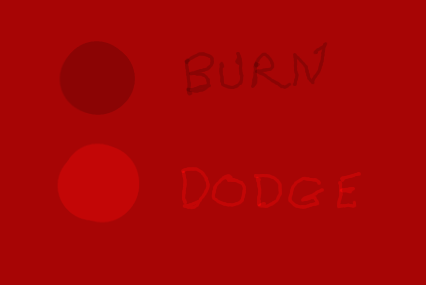
@2-ton, When using the dodge-burn tool, make sure the tool options are open below and there is a dot beside the burn tool. If you want to use the dodge tool, put the dot beside that tool.
Dodge lightens, burn darkens, this is a tool that isn't used a lot because a lot of people don't realize just how much you can do with it, It works very well.
Here is a little demo what I did on a red layer. Image
Image

_________________
Image


Top
 Post subject: Re: Flowing Text Tutorial
PostPosted: Thu May 15, 2014 4:46 pm  (#34) 
Offline
GimpChat Member
User avatar

Joined: Apr 08, 2010
Posts: 5420
Location: Northwest Ohio
Oh so that's how you switch it! Thanks. I do have to options, just never noticed it before. My big problem now would be how to actually do this manually, I am no artist, that is for sure.


Top
 Post subject: Re: Flowing Text Tutorial
PostPosted: Tue Jun 09, 2015 9:21 am  (#35) 
Offline
GimpChat Member
User avatar

Joined: Jun 08, 2015
Posts: 36
:gimp


Attachments:
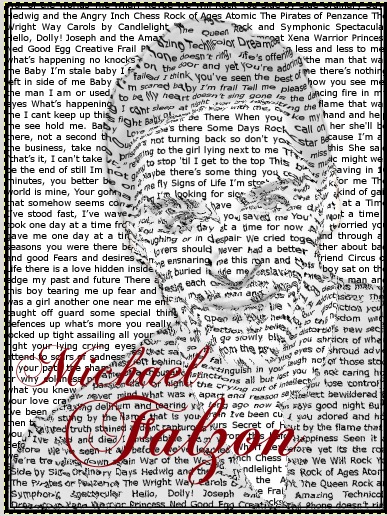
9547_orig.jpg
9547_orig.jpg [ 81.95 KiB | Viewed 2598 times ]
0_c8ceorig.jpg
0_c8ceorig.jpg [ 354.68 KiB | Viewed 2598 times ]

_________________
Image
Top
 Post subject: Re: Flowing Text Tutorial
PostPosted: Thu Aug 06, 2015 2:39 am  (#36) 
Offline
GimpChat Member
User avatar

Joined: Mar 23, 2012
Posts: 7388
Location: Göteborg at last!
Hey, I've only just noticed people are still doing this. Nice results skritnaea.
2-ton, you're getting the idea. I will rewrite this tutorial and try to make it easier but my time is limited at the moment. Watch this space...


Top
 Post subject: Re: Flowing Text Tutorial
PostPosted: Thu Aug 06, 2015 6:28 am  (#37) 
Offline
GimpChat Member
User avatar

Joined: Apr 07, 2010
Posts: 14182
Very nice job skritnaea

_________________
Image


Top
 Post subject: Re: Flowing Text Tutorial
PostPosted: Thu Aug 06, 2015 8:18 am  (#38) 
Offline
GimpChat Member
User avatar

Joined: Apr 08, 2010
Posts: 5420
Location: Northwest Ohio
Thanks, Erisian, I'll keep an eye out for a new version.


Top
 Post subject: Re: Flowing Text Tutorial
PostPosted: Thu Aug 06, 2015 8:23 am  (#39) 
Offline
GimpChat Member
User avatar

Joined: Apr 07, 2010
Posts: 14182
I would appreciated it too Eris. I can't quite get it from the old version. I can't even remember what it was there that I didn't understand it was so long ago. thanks in advance :teeth

_________________
Image


Top
 Post subject: Re: Flowing Text Tutorial
PostPosted: Thu Aug 06, 2015 10:32 am  (#40) 
Offline
GimpChat Member
User avatar

Joined: Aug 16, 2012
Posts: 4271
Location: Göteborg, Sweden
skritnaea: again, beautiful results! :paint
erisian: great if you could rewrite the tutorial! i don't find it hard to understand, i just like to see you work hard *insert red molly-&-erisian-smiley here*

_________________


Top
Post new topic Reply to topic  [ 64 posts ]  Go to page Previous  1, 2, 3, 4  Next

All times are UTC - 5 hours [ DST ]


* Login  


Powered by phpBB3 © phpBB Group