It is currently Tue Aug 25, 2026 9:58 am


All times are UTC - 5 hours [ DST ]


Post new topic Reply to topic  [ 32 posts ]  Go to page Previous  1, 2
Author Message
 Post subject: Re: Black wont go transparent
PostPosted: Mon Jul 22, 2013 7:55 am  (#21) 
Offline
Global Moderator
User avatar

Joined: Apr 01, 2012
Posts: 8462
Location: On the other side of your screen
he4rty wrote:
Sallyanne - Graechan has just done a script of the tutorial, it would be interesting if you ran it and let us know what happens.

It works, so there can't be anything wrong with my gimp. I was positive I was following the tut properly too.

_________________
Image
Free Fun Photo Editing & resources
Poems from the Lord
Gimp Newby
Gimp version 3.2.4 and GMIC-Qt 4.0.2 OS :- Windows 10 Home 64


Top
 Post subject: Re: Black wont go transparent
PostPosted: Mon Jul 22, 2013 7:58 am  (#22) 
Offline
Global Moderator
User avatar

Joined: Apr 01, 2012
Posts: 8462
Location: On the other side of your screen
AnMal wrote:
sallyanne: okay, so it's not that then. hmmm, you don't happen to have an alternative gimp copy to try this on? a portable version for example?

No I don't. I have downloaded the 2.8.6 though, not installed yet. - do you know if I can have 2 versions on my computer or do I have to delete one? ps you may have seen my last post by now - If a script can work it correctly with my gimp you would think I should be able to.

_________________
Image
Free Fun Photo Editing & resources
Poems from the Lord
Gimp Newby
Gimp version 3.2.4 and GMIC-Qt 4.0.2 OS :- Windows 10 Home 64


Top
 Post subject: Re: Black wont go transparent
PostPosted: Mon Jul 22, 2013 8:03 am  (#23) 
Offline
GimpChat Member
User avatar

Joined: Aug 16, 2012
Posts: 4271
Location: Göteborg, Sweden
sallyanne: yes, you're perfectly right of course - if the script runs properly then you should be able to follow the tut without problem. it's such a short and simple tut - do you have the time to go through it step by step and post what you have at each step?

_________________


Top
 Post subject: Re: Black wont go transparent
PostPosted: Mon Jul 22, 2013 9:22 am  (#24) 
Offline
Global Moderator
User avatar

Joined: Apr 01, 2012
Posts: 8462
Location: On the other side of your screen
AnMal wrote:
sallyanne: yes, you're perfectly right of course - if the script runs properly then you should be able to follow the tut without problem. it's such a short and simple tut - do you have the time to go through it step by step and post what you have at each step?

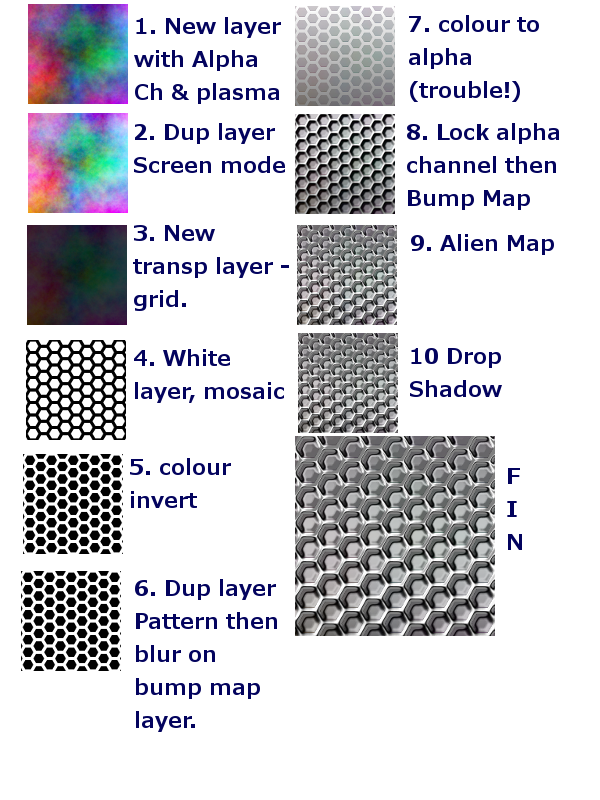
I saved 10 steps
Image

_________________
Image
Free Fun Photo Editing & resources
Poems from the Lord
Gimp Newby
Gimp version 3.2.4 and GMIC-Qt 4.0.2 OS :- Windows 10 Home 64


Top
 Post subject: Re: Black wont go transparent
PostPosted: Mon Jul 22, 2013 9:47 am  (#25) 
Offline
GimpChat Member
User avatar

Joined: Aug 16, 2012
Posts: 4271
Location: Göteborg, Sweden
sallyanne: thanks! i got no new ideas from that, though :(. is this colour to alpha thing only ever happening with black? and have you double checked that the black shade you have in the pattern is the exact same black shade that you have in the colour to alpha dialog box?

_________________


Top
 Post subject: Re: Black wont go transparent
PostPosted: Mon Jul 22, 2013 9:55 am  (#26) 
Offline
Global Moderator
User avatar

Joined: Apr 01, 2012
Posts: 8462
Location: On the other side of your screen
Yes it has only ever happened with black. No I didn't check to make sure it was exactly the same shade of black. I thought black was black. Whenever I change to black all the sliders in the colour box are to the left. I'll have another go tomorrow and try using colour picker.

_________________
Image
Free Fun Photo Editing & resources
Poems from the Lord
Gimp Newby
Gimp version 3.2.4 and GMIC-Qt 4.0.2 OS :- Windows 10 Home 64


Top
 Post subject: Re: Black wont go transparent
PostPosted: Mon Jul 22, 2013 9:56 am  (#27) 
Offline
GimpChat Member
User avatar

Joined: Jul 17, 2012
Posts: 2769
as i said before, you can render the hexagons on a transparent background
that saves you the colour to alpha step


Top
 Post subject: Re: Black wont go transparent
PostPosted: Tue Jul 23, 2013 2:08 am  (#28) 
Offline
Global Moderator
User avatar

Joined: Apr 01, 2012
Posts: 8462
Location: On the other side of your screen
Thanks Esper I missed that.

_________________
Image
Free Fun Photo Editing & resources
Poems from the Lord
Gimp Newby
Gimp version 3.2.4 and GMIC-Qt 4.0.2 OS :- Windows 10 Home 64


Top
 Post subject: Re: Black wont go transparent (Solved)
PostPosted: Tue Jul 23, 2013 2:27 am  (#29) 
Offline
Global Moderator
User avatar

Joined: Apr 01, 2012
Posts: 8462
Location: On the other side of your screen
Esper wrote:
as i said before, you can render the hexagons on a transparent background
that saves you the colour to alpha step

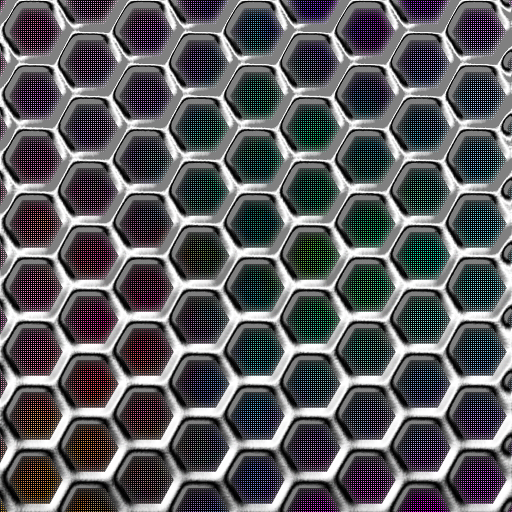
Image

_________________
Image
Free Fun Photo Editing & resources
Poems from the Lord
Gimp Newby
Gimp version 3.2.4 and GMIC-Qt 4.0.2 OS :- Windows 10 Home 64


Top
 Post subject: Re: Black wont go transparent
PostPosted: Tue Jul 23, 2013 2:34 am  (#30) 
Offline
GimpChat Member
User avatar

Joined: Aug 16, 2012
Posts: 4271
Location: Göteborg, Sweden
sallyanne: :yes nice to see that worked for you after all your efforts!


_________________


Top
 Post subject: Re: Black wont go transparent
PostPosted: Tue Jul 23, 2013 2:55 am  (#31) 
Offline
GimpChat Member
User avatar

Joined: Mar 23, 2012
Posts: 7388
Location: Göteborg at last!
nice one sallyanne!


Top
 Post subject: Re: Black wont go transparent
PostPosted: Tue Jul 23, 2013 10:12 am  (#32) 
Offline
GimpChat Member
User avatar

Joined: Aug 30, 2012
Posts: 2174
Nice results.

_________________
Image


Top
Post new topic Reply to topic  [ 32 posts ]  Go to page Previous  1, 2

All times are UTC - 5 hours [ DST ]


* Login  


Powered by phpBB3 © phpBB Group