It is currently Thu Jul 23, 2026 6:22 pm


All times are UTC - 5 hours [ DST ]


Post new topic Reply to topic  [ 20 posts ] 
Author Message
 Post subject: How do i make a perspective text like this?
PostPosted: Sun Aug 04, 2013 1:10 am  (#1) 
Offline
New Member

Joined: Aug 04, 2013
Posts: 4
GIMP Version: 2.8.4
Operating System: Windows
GIMP Experience: Beginner Level


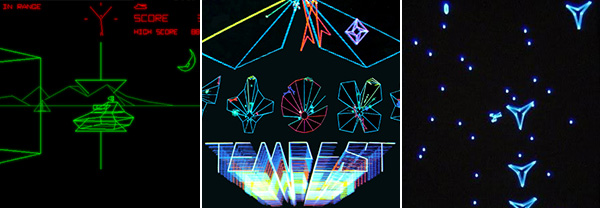
I am trying to figure out how to make the text in this picture the "TEMPEST" text. I am working on a poster and want the text to look like this. How would I go about it?Image


Share on Facebook Share on Twitter Share on Orkut Share on Digg Share on MySpace Share on Delicious Share on Technorati
Top
 Post subject: Re: How do i make a perspective text like this?
PostPosted: Sun Aug 04, 2013 4:11 am  (#2) 
Offline
Script Coder
User avatar

Joined: Oct 25, 2010
Posts: 4812
The picture is a bit small... If the "TEMPTEST" is a line stroked from a path, then I have a script that, given two paths (here, the path for the bigger TEMPEST and the path for the smaller one) will generate all intermediate paths (and I also have a script that will stroke these paths on individual layers). See path-inbetweener and stroke-visble-paths(undocumented but not hard to figure out...). If you ask politely I can extend it to work from a gradient so that you can have a progressive color change...

_________________
Image


Top
 Post subject: Re: How do i make a perspective text like this?
PostPosted: Sun Aug 04, 2013 5:02 am  (#3) 
Offline
GimpChat Member
User avatar

Joined: Aug 16, 2012
Posts: 4271
Location: Göteborg, Sweden
jaybird: maybe these threads could be of help to you?

http://gimpchat.com/viewtopic.php?f=23&t=5355
http://gimpchat.com/viewtopic.php?f=23&t=4462


ofnuts: what if someone else - say, just as a hypethetical example, a swedish gimp chat member - should ask politely...? :mrgreen:
i can be veeeery polite if i know it's worth it!

_________________


Top
 Post subject: Re: How do i make a perspective text like this?
PostPosted: Sun Aug 04, 2013 7:11 am  (#4) 
Offline
Script Coder
User avatar

Joined: Oct 25, 2010
Posts: 4812
AnMal wrote:
jaybird: maybe these threads could be of help to you?

http://gimpchat.com/viewtopic.php?f=23&t=5355
http://gimpchat.com/viewtopic.php?f=23&t=4462


ofnuts: what if someone else - say, just as a hypethetical example, a swedish gimp chat member - should ask politely...? :mrgreen:
i can be veeeery polite if i know it's worth it!

Miracles happen...

_________________
Image


Top
 Post subject: Re: How do i make a perspective text like this?
PostPosted: Sun Aug 04, 2013 9:57 am  (#5) 
Offline
New Member

Joined: Aug 04, 2013
Posts: 4
I would appreciate it greatly, kind sir. I may not be swedish but I can be damn polite. Please, can i have this gradient upgrade?


Top
 Post subject: Re: How do i make a perspective text like this?
PostPosted: Sun Aug 04, 2013 10:47 am  (#6) 
Offline
GimpChat Member
User avatar

Joined: Jul 17, 2012
Posts: 2769
http://gimp-science-labs.blogspot.de/20 ... style.html

Image


Top
 Post subject: Re: How do i make a perspective text like this?
PostPosted: Sun Aug 04, 2013 12:00 pm  (#7) 
Offline
Script Coder
User avatar

Joined: Oct 25, 2010
Posts: 4812
AnMal wrote:
what if someone else - say, just as a hypethetical example, a swedish gimp chat member - should ask politely...? :mrgreen:
i can be veeeery polite if i know it's worth it!


viewtopic.php?f=9&t=4568&p=105520#p105520

Enjoy.

_________________
Image


Top
 Post subject: Re: How do i make a perspective text like this?
PostPosted: Sun Aug 04, 2013 12:29 pm  (#8) 
Offline
Global Moderator
User avatar

Joined: May 16, 2010
Posts: 16128
jaybird wrote:
GIMP Version: 2.8.4
Operating System: Windows
GIMP Experience: Beginner Level


I am trying to figure out how to make the text in this picture the "TEMPEST" text. I am working on a poster and want the text to look like this. How would I go about it?[ Image ]


It really just looks like gradual sized colored text with the opacity set real low.Maybe try a few different layer modes also.

_________________
Image


Top
 Post subject: Re: How do i make a perspective text like this?
PostPosted: Sun Aug 04, 2013 1:31 pm  (#9) 
Offline
GimpChat Member
User avatar

Joined: Jul 17, 2012
Posts: 2769
ofnuts wrote:
http://www.gimpchat.com/viewtopic.php?f=9&t=4568&p=105520#p105520

Enjoy.
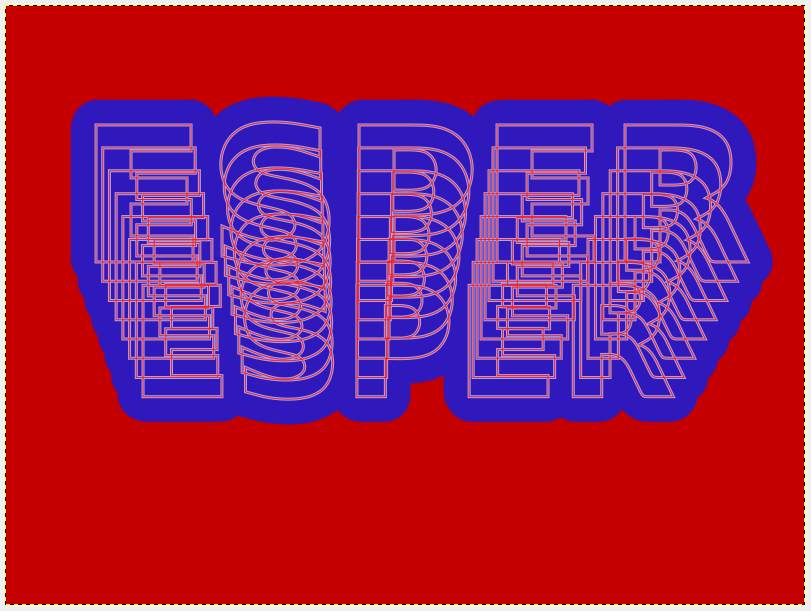
when i stroke the inbetweened paths, i get something like this

what am i doing wrong ?

Image


Top
 Post subject: Re: How do i make a perspective text like this?
PostPosted: Sun Aug 04, 2013 4:35 pm  (#10) 
Offline
Script Coder
User avatar

Joined: Oct 25, 2010
Posts: 4812
You have to use a brush with the actual size you require. The "size" slider of the paintbrush tool isn't taken in account (no way the script code can access it), and the default brushes have a radius of 20 or so.... It's also a good idea to use gradient that is slightly transparent on the left (path are stroked bottom, ie, the first path in path-inbetweener is in the back, and corresponds to the left side of the gradient).

Attachment:
Tempest3D.png
Tempest3D.png [ 106.37 KiB | Viewed 6219 times ]

_________________
Image


Top
 Post subject: Re: How do i make a perspective text like this?
PostPosted: Sun Aug 04, 2013 5:42 pm  (#11) 
Offline
GimpChat Member
User avatar

Joined: Jul 21, 2012
Posts: 103
Attachment:
Senzanomen.png
Senzanomen.png [ 160.6 KiB | Viewed 3332 times ]
:bigthup

_________________
Image


Top
 Post subject: Re: How do i make a perspective text like this?
PostPosted: Sun Aug 04, 2013 6:01 pm  (#12) 
Offline
GimpChat Member
User avatar

Joined: Jul 17, 2012
Posts: 2769
ofnuts wrote:
You have to use a brush with the actual size you require. The "size" slider of the paintbrush tool isn't taken in account (no way the script code can access it), and the default brushes have a radius of 20 or so....
arent all round brushes 50px by default in Gimp 2.8 ?

so i have to make a custom brush for that job, right ?


Top
 Post subject: Re: How do i make a perspective text like this?
PostPosted: Sun Aug 04, 2013 6:39 pm  (#13) 
Offline
GimpChat Member
User avatar

Joined: Apr 07, 2010
Posts: 14182
That is quite nice d4rkheart. I like that skinny font,

_________________
Image


Top
 Post subject: Re: How do i make a perspective text like this?
PostPosted: Sun Aug 04, 2013 7:12 pm  (#14) 
Offline
GimpChat Member
User avatar

Joined: Jul 21, 2012
Posts: 103
:tyspin molly

_________________
Image


Top
 Post subject: Re: How do i make a perspective text like this?
PostPosted: Sun Aug 04, 2013 7:32 pm  (#15) 
Offline
Global Moderator
User avatar

Joined: May 16, 2010
Posts: 16128
After running path-inbetweener you can just combine all paths to one layer, stroke the path text with your brush and then alpha to select the raster text layer and fill with a gradient this way also.

_________________
Image


Top
 Post subject: Re: How do i make a perspective text like this?
PostPosted: Sun Aug 04, 2013 7:52 pm  (#16) 
Offline
Script Coder
User avatar

Joined: Oct 25, 2010
Posts: 4812
Esper wrote:
ofnuts wrote:
You have to use a brush with the actual size you require. The "size" slider of the paintbrush tool isn't taken in account (no way the script code can access it), and the default brushes have a radius of 20 or so....
arent all round brushes 50px by default in Gimp 2.8 ?

so i have to make a custom brush for that job, right ?

Right!

_________________
Image


Top
 Post subject: Re: How do i make a perspective text like this?
PostPosted: Tue Sep 03, 2013 4:29 pm  (#17) 
Offline
New Member

Joined: Aug 04, 2013
Posts: 4
Image


Top
 Post subject: Re: How do i make a perspective text like this?
PostPosted: Tue Sep 03, 2013 4:42 pm  (#18) 
Offline
GimpChat Member
User avatar

Joined: Apr 07, 2010
Posts: 14182
Very nice jaybird

_________________
Image


Top
 Post subject: Re: How do i make a perspective text like this?
PostPosted: Tue Sep 03, 2013 4:58 pm  (#19) 
Offline
GimpChat Member
User avatar

Joined: Jul 17, 2012
Posts: 2769
yes, very nice jaybird !

so did you use ofnuts' script ?


Top
 Post subject: Re: How do i make a perspective text like this?
PostPosted: Tue Sep 03, 2013 5:07 pm  (#20) 
Offline
New Member

Joined: Aug 04, 2013
Posts: 4
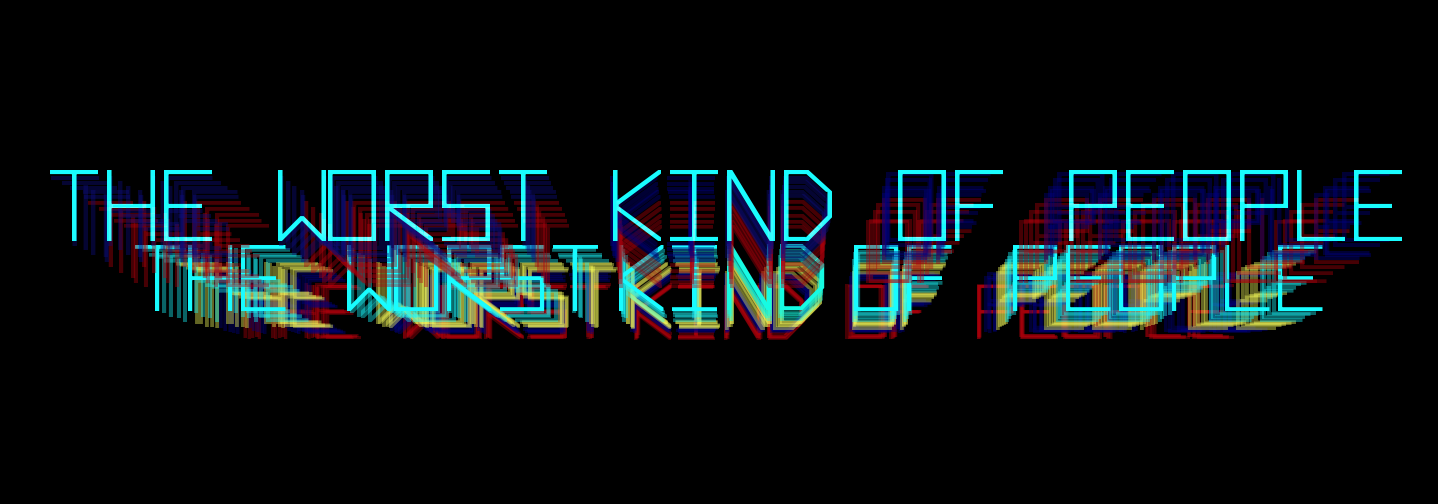
I didn't. I broke up the text into four parts THE WORST, KI, ND, OF PEOPLE and then just scaled the size down with layers, decreased opacity. When it got the second part I just started over, lowering the first layer so it would be parallel to the top layer. I used two layers of white at a low opacity to kind of give it a glow and then repeated my first steps....now i drink beer because the complete poster is done. i'm not sure if any of that makes sense, but there it is. i would upload it but its too big (thats what she said?) anyways...you can find us on facebook if you are so inclined. The Worst Kind of People...we have like 370 likes or something if that helps narrow it down?


Top
Post new topic Reply to topic  [ 20 posts ] 

All times are UTC - 5 hours [ DST ]


* Login  


Powered by phpBB3 © phpBB Group