It is currently Sun Sep 20, 2026 11:13 pm


All times are UTC - 5 hours [ DST ]


Post new topic Reply to topic  [ 5 posts ] 
Author Message
 Post subject: Screen savers?
PostPosted: Sat Oct 05, 2013 2:24 pm  (#1) 
Offline
GimpChat Member
User avatar

Joined: Dec 11, 2011
Posts: 532
I wasn't sure where to post this so i put it in the off topic section. When making a screen saver with gimp, how do you make sure it will just fit into the screen and not have some of the picture cut off the screen?

_________________
Image


Share on Facebook Share on Twitter Share on Orkut Share on Digg Share on MySpace Share on Delicious Share on Technorati
Top
 Post subject: Re: Screen savers?
PostPosted: Sat Oct 05, 2013 3:19 pm  (#2) 
Offline
Administrator
User avatar

Joined: Aug 10, 2012
Posts: 14206
Location: Native to NYC living in Arizona, Gimp 2.8 - 3.0, Win 11 PC.
rdgracer71 wrote:
I wasn't sure where to post this so i put it in the off topic section. When making a screen saver with gimp, how do you make sure it will just fit into the screen and not have some of the picture cut off the screen?


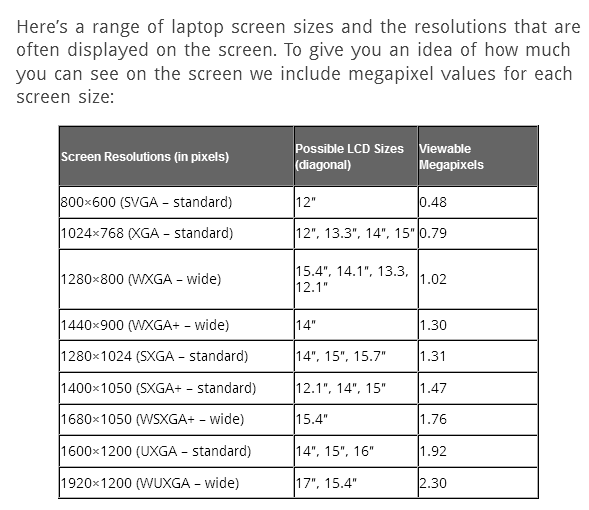
You need to know the screen size/resolution of your monitor/display.
If you have an LCD monitor, check your screen resolution, which helps to determine the clarity of on-screen images and objects. It's a good practice to set LCD monitors to the native resolution—the resolution a monitor was designed to display best, based on its size. The monitor manufacturer or reseller should be able to provide the native resolution. If you can't get this information, you can try setting the monitor to the highest available resolution, which is usually the native resolution.

Laptops

Image


More information on screen resolution...
http://www.chrislongley.com/monitor.htm

_________________
Image
"A wise man learns more from a foolish question than a fool can learn from a wise answer"
Image


Top
 Post subject: Re: Screen savers?
PostPosted: Sat Oct 05, 2013 7:01 pm  (#3) 
Offline
GimpChat Member

Joined: May 23, 2012
Posts: 150
I create a gimp Template canvas
for all screen display resolutions
I have, including phone, tablets,
or friends and relations computers displays
that I might use and I can see how something
looks on other devices displays.
I make them Transparent, labeled with
_T_ to differentiate the ones I added
and regular gimp.

example below

1024x1024_T_clipbrd-gmic


Top
 Post subject: Re: Screen savers?
PostPosted: Sat Oct 05, 2013 9:51 pm  (#4) 
Offline
Administrator
User avatar

Joined: Aug 10, 2012
Posts: 14206
Location: Native to NYC living in Arizona, Gimp 2.8 - 3.0, Win 11 PC.
Mikechat wrote:
I create a gimp Template canvas
for all screen display resolutions
I have, including phone, tablets,
or friends and relations computers displays
that I might use and I can see how something
looks on other devices displays.
I make them Transparent, labeled with
_T_ to differentiate the ones I added
and regular gimp.

example below

1024x1024_T_clipbrd-gmic


That's a really great idea Mikechat. :bigthup

I've also made a 'Template Canvas' of my monitors display screen. So when I'm creating an image that I want to fill my entire screen, I have that kind of canvas available in Gimp. I named this canvas template, "My Screen".
I've also made a few canvas templates for Gimp splash-screen images.
Being able to making canvas templates to fit your work is important and having them available is most convenient.

That's a good Gimper's tip. ;)

_________________
Image
"A wise man learns more from a foolish question than a fool can learn from a wise answer"
Image


Top
 Post subject: Re: Screen savers?
PostPosted: Sun Oct 06, 2013 12:25 am  (#5) 
Offline
GimpChat Member

Joined: May 23, 2012
Posts: 150
Hay
Wallace
I have several start up animated .gif files
I made that I was going to send you, but
they are not scaled to gimp startup size
I just left them the size they were.
They work fine, they are just not to
exact gimp startup size.

I was not going to post them here but,
I could

I have to put them in a zip folder
and if you want them, PM me an address
I will send them to you.


Top
Post new topic Reply to topic  [ 5 posts ] 

All times are UTC - 5 hours [ DST ]


* Login  


Powered by phpBB3 © phpBB Group