It is currently Sat Sep 05, 2026 12:46 pm


All times are UTC - 5 hours [ DST ]


Post new topic Reply to topic  [ 74 posts ]  Go to page Previous  1, 2, 3, 4
Author Message
 Post subject: Re: Graphic Novel Fx gallery (how to & preset )
PostPosted: Sun Jan 23, 2011 4:53 am  (#61) 
Offline
GimpChat Member
User avatar

Joined: Oct 06, 2010
Posts: 4050
Can you go on the Flickr site and address this, David would be the person to ask about this. I'm well aware that many people have discussed the preview not being in sync with the results, especially when zoomed. David could better clarify the issues with this than I could.

http://www.flickr.com/groups/gmic/discuss

_________________
"In order to attain the impossible, one must attempt the absurd."
~ Miguel de Cervantes


Top
 Post subject: Re: Graphic Novel Fx gallery (how to & preset )
PostPosted: Sun Jan 23, 2011 4:56 am  (#62) 
Offline
GimpChat Member

Joined: Jan 08, 2011
Posts: 15
mahvin wrote:
Can you go on the Flickr site and address this, David would be the person to ask about this. I'm well aware that many people have discussed the preview not being in sync with the results, especially when zoomed. David could better clarify the issues with this than I could.

http://www.flickr.com/groups/gmic/discuss


ok i'll go there and comment on this issue thx


Top
 Post subject: Re: Graphic Novel Fx gallery (how to & preset )
PostPosted: Sun Jan 23, 2011 5:34 am  (#63) 
Offline
GimpChat Member

Joined: Jan 08, 2011
Posts: 15
jmontoya21 wrote:
Guys i'd got and issue when i try to apply one of the effects on G'mic: simply when i preview the effects they look beautiful, but when gimp finishes applying them they don't same as the preview window,do you know what may be causing this? thanks


after little digging and playing around with g'mic in gimp, i was able to determine that the size of the image has a lot to do with the results,meaning that the same image with different dimensions will yield much different results. smaller images yield a apparently matching results.


Top
 Post subject: Re: Graphic Novel Fx gallery (how to & preset )
PostPosted: Mon Jan 24, 2011 6:56 pm  (#64) 
Offline
GimpChat Member

Joined: Apr 12, 2010
Posts: 5870
Use the maximize button.

i set the default preview zoom for graphic novel at 1:1 but that seems applied only when the preview is maximized, and anyway the preview is much more close to the final result if the gui is maximized

_________________
My 3D Gallery on Deviantart http://photocomix2.deviantart.com/
Main gallery http://www.flickriver.com/photos/photocomix-mandala/
Mandala and simmetry http://www.flickriver.com/photos/photocomix_mandala/

Image

Mrs Wilbress


Top
 Post subject: Re: Graphic Novel Fx gallery (how to & preset )
PostPosted: Fri Jul 13, 2012 11:28 pm  (#65) 
Offline
GimpChat Member

Joined: Jan 08, 2011
Posts: 15
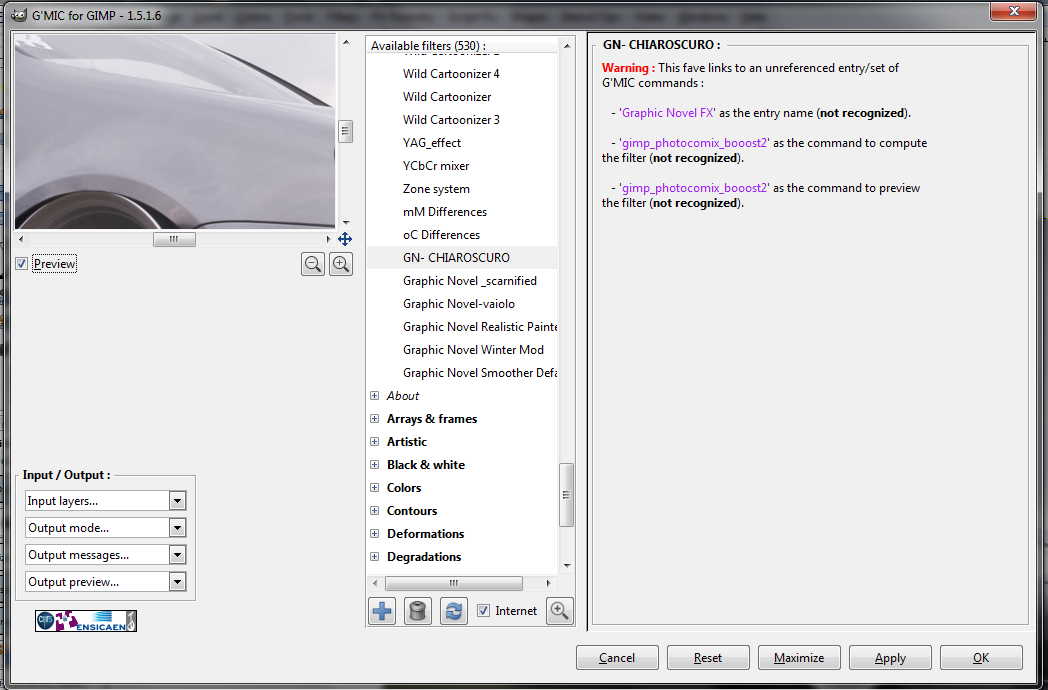
Hi tried adding this presets to the current g'mic but got this error any ideas i used them on a old version of gimp now i got 2.8 any ideas?
thanksImage


Top
 Post subject: Re: Graphic Novel Fx gallery (how to & preset )
PostPosted: Sat Jul 14, 2012 1:07 am  (#66) 
Offline
Global Moderator
User avatar

Joined: May 16, 2010
Posts: 16169
jmontoya21 wrote:
Hi tried adding this presets to the current g'mic but got this error any ideas i used them on a old version of gimp now i got 2.8 any ideas?
thanksImage


Those faves presets will no longer function in GMIC.

_________________
Image


Top
 Post subject: Re: Graphic Novel Fx gallery (how to & preset )
PostPosted: Sat Jul 14, 2012 1:14 am  (#67) 
Offline
GimpChat Member

Joined: Apr 12, 2010
Posts: 5870
update this series of preset was on my to do list from long but i didn't yet , it is not difficult , doesn't require coding but is a very repetitive works .

I explain what i should do to update...as you will see is something that everybody could do

The concept may be used for any preset
on the contrary the lines of 8 in italic apply only to Graphic Novel and Graphic Boost

1 )run preset 1 ( with a old version of gmic , compatible with the presets)
2 ) take a screenshot of the WHOLE gmic windows, all the cursors and box setting should be visible
3) save the screenshoot with the same name of the preset
4) repeat again and again for all preset

5) close gimp, update gmic or open a different version of gimp with gmic updated
6) open gmic...open a viewer to see the screenshoot...pin the viewer on top with something (i use deskpin from years...just a virtual pin) so stay there
7) copy the setting from the screenshot : In the newer Graphic Novel all old options are still available (now there are more added , but no any was removed )

8) once done ..Clic apply to try (or look very well the preview )
more then 50% chances that is right
-...if no just mark, or unmark if was marked ,the "swap layers " box

9) in gmic click the bottom to save the fav
10) sigh..repeat for each preset

humm..maybe we may try a collaborative work ? i mean a few each helping just for few presets would make for me much easier take care of the remaining in a short time

edit

i hope now is more readable, sorry for my still very bad english

_________________
My 3D Gallery on Deviantart http://photocomix2.deviantart.com/
Main gallery http://www.flickriver.com/photos/photocomix-mandala/
Mandala and simmetry http://www.flickriver.com/photos/photocomix_mandala/

Image

Mrs Wilbress


Top
 Post subject: Re: Graphic Novel Fx gallery (how to & preset )
PostPosted: Sat Jul 14, 2012 12:01 pm  (#68) 
Offline
GimpChat Member

Joined: Jan 08, 2011
Posts: 15
Hi PhotoComix
thanks so much for your response and all the work you do for this community.

I think i fully understand your instructions on recreating the presets, and I see what you mean because is time consuming, i'll give it a try when i get a chance since my old computer crashed and im trying to get everything back on the new one,i would have to reinstall the older gimp and gmic and follow your instructions...... not sure if i can run 2 versions of gimp and gmic on the same computer? most likely possible.
if I'm successful i will report back and share.

thanks


Top
 Post subject: Re: Graphic Novel Fx gallery (how to & preset )
PostPosted: Sat Jul 14, 2012 5:48 pm  (#69) 
Offline
GimpChat Member

Joined: Apr 12, 2010
Posts: 5870
you donìt strictly need to have 2 gimp only to run first a old version of gmic and then the last and older version may run also on the last gimp (they may pop out some warning, but harmless)

Usually i install gmic in its own folder so is even easier , i only need to change the content of the folder for change gmic version

anyway you may have 2 version of gimp on the same HD if 1 is portable, or if they have 2 different version number (i.e 2.6 and 2.8.
not 2.8 with 2.8.1

honestly on windows i always use portable ,and with the portable are not limitations

_________________
My 3D Gallery on Deviantart http://photocomix2.deviantart.com/
Main gallery http://www.flickriver.com/photos/photocomix-mandala/
Mandala and simmetry http://www.flickriver.com/photos/photocomix_mandala/

Image

Mrs Wilbress


Top
 Post subject: Re: Graphic Novel Fx gallery (how to & preset )
PostPosted: Sat Jul 14, 2012 8:14 pm  (#70) 
Offline
Script Coder
User avatar

Joined: Feb 18, 2011
Posts: 4826
Location: Bendigo Vic. Australia
Thankyou Photocomix I look forward to seeing these updated presets files

_________________
Image
No matter how much you push the envelope, it'll still be stationery.


Top
 Post subject: Re: Graphic Novel Fx gallery (how to & preset )
PostPosted: Sat Jul 14, 2012 8:51 pm  (#71) 
Offline
GimpChat Member

Joined: Apr 12, 2010
Posts: 5870
i really hope to find the time and the focus to do it

_________________
My 3D Gallery on Deviantart http://photocomix2.deviantart.com/
Main gallery http://www.flickriver.com/photos/photocomix-mandala/
Mandala and simmetry http://www.flickriver.com/photos/photocomix_mandala/

Image

Mrs Wilbress


Top
 Post subject: Re: Graphic Novel Fx gallery (how to & preset )
PostPosted: Sat Jul 14, 2012 9:03 pm  (#72) 
Offline
GimpChat Member

Joined: Jun 21, 2012
Posts: 106
Wow great stuff, out of the OP I particularly like DEPTH and VAIOLO, killer original photo too ;)
Looks like another item on the 'To Lean' list for me.


Top
 Post subject: Re: Graphic Novel Fx gallery (how to & preset )
PostPosted: Sun Jul 15, 2012 11:59 am  (#73) 
Offline
Global Moderator
User avatar

Joined: May 16, 2010
Posts: 16169
steveczajka wrote:
i read this briefly, but how do I download the .scm? or is this a part of G'MIC?

Cheers
Steve


These are GMIC files Steve. :)

_________________
Image


Top
 Post subject: Re: Graphic Novel Fx gallery (how to & preset )
PostPosted: Sun Jul 15, 2012 3:22 pm  (#74) 
Offline
GimpChat Member

Joined: Apr 12, 2010
Posts: 5870
yes are no scripts calling gmic but preset for filters
(as you may obtain saving filter setting in gmic using the fav botttom

But alas are all to be updated , not to the new gimp but to the new version of gmic.

Another reason i never updated is that many preset screw up the gmic menu, because can not be organized in a tree with subfolders but only listed in alphabetical order:
Even if i took care to name them so remain sort of grouped (preset for Graphic Novel start with GN_preset-name that for Graphic Boost with GB_preset-name ) i have a lot, more then 60 for Graphic Novel same for graphic boot and about 270 for all the other filter i wrote.

and without a chance to group them in subfolder, they may really screw up the filter menu
(also the gmic filters are hundreds, but they can be grouped in subfolders avoiding the chaos )

_________________
My 3D Gallery on Deviantart http://photocomix2.deviantart.com/
Main gallery http://www.flickriver.com/photos/photocomix-mandala/
Mandala and simmetry http://www.flickriver.com/photos/photocomix_mandala/

Image

Mrs Wilbress


Top
Post new topic Reply to topic  [ 74 posts ]  Go to page Previous  1, 2, 3, 4

All times are UTC - 5 hours [ DST ]


* Login  


Powered by phpBB3 © phpBB Group