It is currently Thu Jun 04, 2026 11:08 pm


All times are UTC - 5 hours [ DST ]


Post new topic Reply to topic  [ 10 posts ] 
Author Message
 Post subject: Can't Quite Figure This One Out - Animation GIF
PostPosted: Sun Dec 08, 2013 11:26 pm  (#1) 
Offline
GimpChat Member

Joined: Dec 08, 2013
Posts: 6
GIMP Version: 2.6
Operating System: Windows
OS Version: Windows 7
GIMP Experience: Intermediate Level


Hi guys! I need a little bit of help. I am pretty good at gimp and I make a lot of banners and graphics for my online business, but I can't quite figure this one out. I am currently making a banner (468x60) and the effect I want to create is a large picture rising up inside the banner (like it is scrolling upwards). I take the picture and paste it on my banner, but since it is a floating image I cannot move it upwards a bit on each layer so that I can make it into a gif unless I anchor it first. Does anyone know of a way I can do this?

_________________
Krista


Share on Facebook Share on Twitter Share on Orkut Share on Digg Share on MySpace Share on Delicious Share on Technorati
Top
 Post subject: Re: Can't Quite Figure This One Out - Animation GIF
PostPosted: Mon Dec 09, 2013 12:58 am  (#2) 
Offline
Administrator
User avatar

Joined: Aug 10, 2012
Posts: 14011
Location: Native to NYC living in Arizona, Gimp 2.8 - 3.0, Win 11 PC.
krista wrote:
GIMP Version: 2.6
Operating System: Windows
OS Version: Windows 7
GIMP Experience: Intermediate Level


Hi guys! I need a little bit of help. I am pretty good at gimp and I make a lot of banners and graphics for my online business, but I can't quite figure this one out. I am currently making a banner (468x60) and the effect I want to create is a large picture rising up inside the banner (like it is scrolling upwards). I take the picture and paste it on my banner, but since it is a floating image I cannot move it upwards a bit on each layer so that I can make it into a gif unless I anchor it first. Does anyone know of a way I can do this?

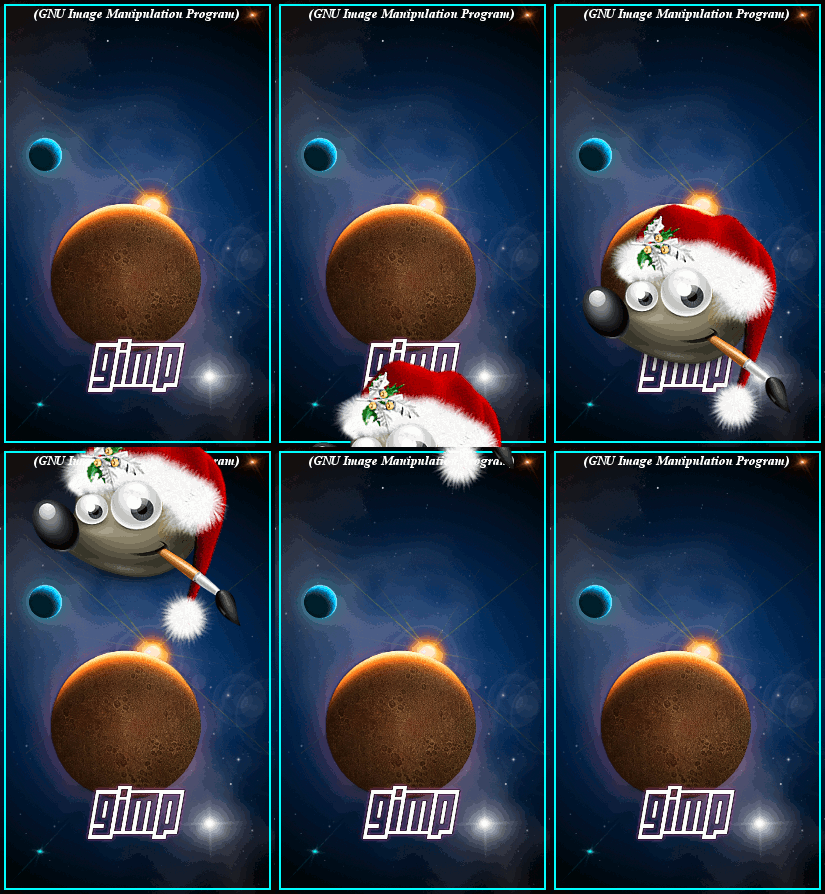
I put together the image below by first opening the background image. Then I opened the image of Wilber as a layer. I changed this layer by doing a "layer to image size". The image of Wilber was opened as a layer so it will already be anchored in place.
I then moved Wilber all the way down to the bottom, until I could just see the the top of his hat. I duplicated this layer and moved it up. Doing this about 10 times, until Wilber's image went out of view at the top.
Once this was completed, I then combined all the layers with the background.
Image

_________________
Image
"A wise man learns more from a foolish question than a fool can learn from a wise answer"
Image


Top
 Post subject: Re: Can't Quite Figure This One Out - Animation GIF
PostPosted: Mon Dec 09, 2013 1:13 am  (#3) 
Offline
Script Coder
User avatar

Joined: Feb 18, 2011
Posts: 4826
Location: Bendigo Vic. Australia
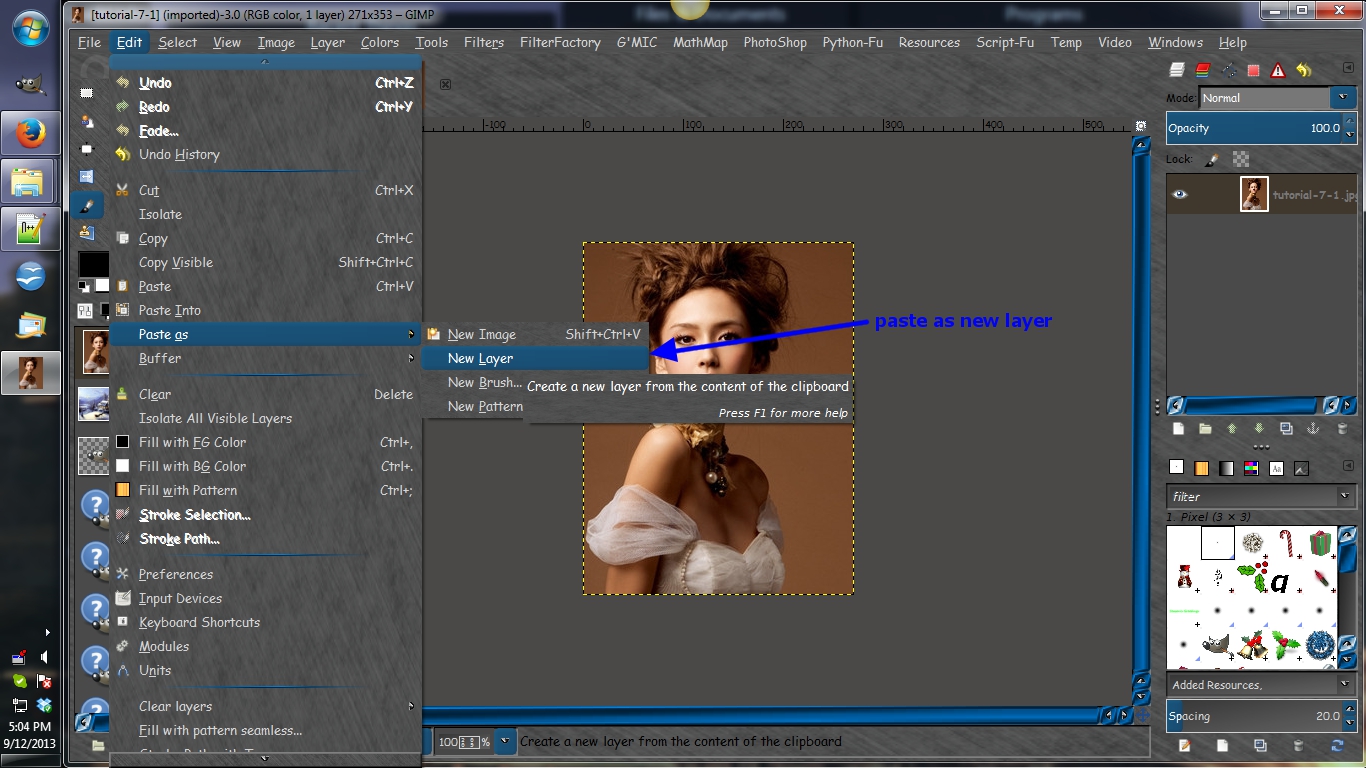
krista copy you image then paste as new layer on your banner Image then you can adjust that layer as you like

Image

there is a script that can help with your sort of animation called move layers
when installed it can be found under Filters/Animation/move layers
Attachment:
fp-script-fu-move-layer-anim.scm [10 KiB]
Downloaded 133 times

_________________
Image
No matter how much you push the envelope, it'll still be stationery.


Top
 Post subject: Re: Can't Quite Figure This One Out - Animation GIF
PostPosted: Mon Dec 09, 2013 1:47 am  (#4) 
Offline
GimpChat Member

Joined: Dec 08, 2013
Posts: 6
Thank you both so much! It works!

_________________
Krista


Top
 Post subject: Re: Can't Quite Figure This One Out - Animation GIF
PostPosted: Mon Dec 09, 2013 1:59 am  (#5) 
Offline
Administrator
User avatar

Joined: Aug 10, 2012
Posts: 14011
Location: Native to NYC living in Arizona, Gimp 2.8 - 3.0, Win 11 PC.
Graechan wrote:
krista copy you image then paste as new layer on your banner Image then you can adjust that layer as you like

[ Image ]

there is a script that can help with your sort of animation called move layers
when installed it can be found under Filters/Animation/move layers
Attachment:
fp-script-fu-move-layer-anim.scm

Didn't know this was scripted, what a time saver it should be.
Thanks Greachan! :bigthup
krista wrote:
Thank you both so much! It works!

:coolthup

_________________
Image
"A wise man learns more from a foolish question than a fool can learn from a wise answer"
Image


Top
 Post subject: Re: Can't Quite Figure This One Out - Animation GIF
PostPosted: Mon Dec 09, 2013 2:18 am  (#6) 
Offline
Script Coder
User avatar

Joined: Feb 18, 2011
Posts: 4826
Location: Bendigo Vic. Australia
Wallace The move layers script is another of Fencposts Gems and it's easy to use containing everything you need

_________________
Image
No matter how much you push the envelope, it'll still be stationery.


Top
 Post subject: Re: Can't Quite Figure This One Out - Animation GIF
PostPosted: Mon Dec 09, 2013 4:47 am  (#7) 
Offline
Administrator
User avatar

Joined: Aug 10, 2012
Posts: 14011
Location: Native to NYC living in Arizona, Gimp 2.8 - 3.0, Win 11 PC.
Graechan wrote:
Wallace The move layers script is another of Fencposts Gems and it's easy to use containing everything you need

That's a good thing to hear!
I'm sure I'll be using it sooner or later.
This Fencepost person, or whatever the name is. Seems to have made some really awesome contributions to Gimp and it's communities. It's strange to me how I only just recently became aware of this person. I guess this stems form me not paying all that much attention to who's making the scripts.
I'll make it a point now to have a good look at where this kind of stuff is coming from, and not just blindly downloading. :oops:

_________________
Image
"A wise man learns more from a foolish question than a fool can learn from a wise answer"
Image


Top
 Post subject: Re: Can't Quite Figure This One Out - Animation GIF
PostPosted: Mon Dec 09, 2013 5:26 am  (#8) 
@Wallace, krista: there are a bunch of animation related scripts around that automate many multi-layer tasks.

May I suggest Wallace, you create a new topic in Gimp discussions, asking Animators to post their favourite time saving animation based scripts. ;)


Top
 Post subject: Re: Can't Quite Figure This One Out - Animation GIF
PostPosted: Mon Dec 09, 2013 7:33 am  (#9) 
Offline
GimpChat Member
User avatar

Joined: Jan 20, 2013
Posts: 590
Excellent idea, fluffybunny.

_________________
Image


Top
 Post subject: Re: Can't Quite Figure This One Out - Animation GIF
PostPosted: Mon Dec 09, 2013 2:38 pm  (#10) 
Offline
Administrator
User avatar

Joined: Aug 10, 2012
Posts: 14011
Location: Native to NYC living in Arizona, Gimp 2.8 - 3.0, Win 11 PC.
fluffybunny wrote:
@Wallace, krista: there are a bunch of animation related scripts around that automate many multi-layer tasks.

May I suggest Wallace, you create a new topic in Gimp discussions, asking Animators to post their favourite time saving animation based scripts. ;)

Thanks for your suggestion FB, I'll do that. ;)

_________________
Image
"A wise man learns more from a foolish question than a fool can learn from a wise answer"
Image


Top
Post new topic Reply to topic  [ 10 posts ] 

All times are UTC - 5 hours [ DST ]


* Login  


Powered by phpBB3 © phpBB Group