It is currently Tue Jun 23, 2026 12:27 am


All times are UTC - 5 hours [ DST ]


Post new topic Reply to topic  [ 9 posts ] 
Author Message
 Post subject: .iss
PostPosted: Tue Dec 17, 2013 6:04 pm  (#1) 
Offline
GimpChat Member

Joined: Dec 16, 2013
Posts: 33
I found another thing I would like to use. Wavelet denoise.

I have found the file and downloaded it but it is a .iss file and I don't know where to put it.

Any advice would be great, maybe its not the right file for me...idk!

Cheers x


Share on Facebook Share on Twitter Share on Orkut Share on Digg Share on MySpace Share on Delicious Share on Technorati
Top
 Post subject: Re: .iss
PostPosted: Tue Dec 17, 2013 6:17 pm  (#2) 
Offline
GimpChat Member

Joined: Aug 05, 2011
Posts: 606
Location: limestone,ny
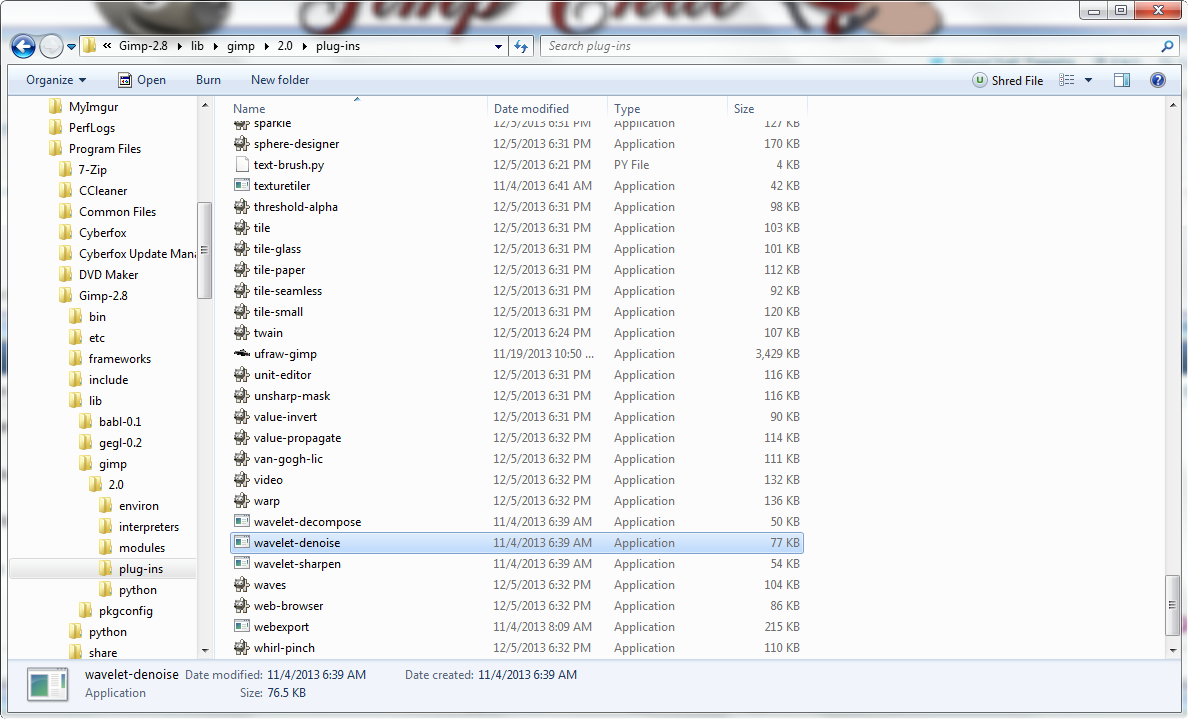
It's an .exe
wavelet denoise

Image


Top
 Post subject: Re: .iss
PostPosted: Tue Dec 17, 2013 6:23 pm  (#3) 
Hi jess,
What OS and version are you running Gimp on. 32bit or 64 bit?
It should just be an exe file so I would be careful just downloading and running everything you find on the net.
I have Win 7 64bit. I can upload the exe file you need if that suits your OS.
If not once you post your details, another member can upload the correct version.
One you receive it, just place the exe file in your gimp user plugins folder.


Top
 Post subject: Re: .iss
PostPosted: Tue Dec 17, 2013 6:27 pm  (#4) 
Offline
GimpChat Founder
User avatar

Joined: May 22, 2008
Posts: 5241
Location: Gimpville
Quote:
Files that contain the .iss file extension are InstallShield silent response files. These files are used by the Windows InstallShield software application. Windows InstallShield is a program that helps users install software applications on their systems and also allows developers to use a seamless installation process for their software products. link

Samj has compiled both 32bit and 64bit versions of this plug-in for Windows.

Get it here

_________________
“If you reach for the stars, you just might land on a decently sized hill.” - Stuart Hill


Top
 Post subject: Re: .iss
PostPosted: Tue Dec 17, 2013 6:35 pm  (#5) 
Offline
GimpChat Member
User avatar

Joined: Apr 07, 2010
Posts: 14182
I had a tutorial I wanted to use about a year ago and it called for wavelet. After a lot of searching, I found one and with help of a real techie, I found that this plug-in was way outdated.
Needless to say I didn't do the tute. Anyway, wasn't it for smoothing skin and removing moles, or something like that? I thought there was a wavelet plug-in in GMIC too.

_________________
Image


Top
 Post subject: Re: .iss
PostPosted: Tue Dec 17, 2013 6:42 pm  (#6) 
Offline
GimpChat Member

Joined: Dec 16, 2013
Posts: 33
Hi Yep, on windows 7 and I think its 32 bit.
I wanted it to lighten a photograph, as seen in another youtube tutorial. I got half way through it and didn't have the tool!


Top
 Post subject: Re: .iss
PostPosted: Tue Dec 17, 2013 6:43 pm  (#7) 
Offline
GimpChat Member
User avatar

Joined: Nov 16, 2011
Posts: 5127
Location: Metro Vancouver, BC
molly wrote:
I had a tutorial I wanted to use about a year ago and it called for wavelet. After a lot of searching, I found one and with help of a real techie, I found that this plug-in was way outdated.
Needless to say I didn't do the tute. Anyway, wasn't it for smoothing skin and removing moles, or something like that? I thought there was a wavelet plug-in in GMIC too.
G'MIC | Repair | Smooth [wavelets]

_________________
Image
Gimp 2.8.18, Linux, median user
Gimp Chat Tutorials Index
Spirit Bear (Kermode)


Top
 Post subject: Re: .iss
PostPosted: Tue Dec 17, 2013 7:38 pm  (#8) 
Offline
GimpChat Member
User avatar

Joined: Apr 07, 2010
Posts: 14182
What does that one do Odin, or do I have to look it up? :teeth

_________________
Image


Top
 Post subject: Re: .iss
PostPosted: Tue Dec 17, 2013 9:18 pm  (#9) 
jess wrote:
Hi Yep, on windows 7 and I think its 32 bit.
I wanted it to lighten a photograph, as seen in another youtube tutorial. I got half way through it and didn't have the tool!

To check whether you have 32 or 64 bit Windows, Open your Control Panel, then select System.
Then I would use the link shown in GnuTux's response above from samj.
Download the 32 bit or 64 bit version and put the exe file in your /Username/.gimp-2.8/plugins folder.
Restart Gimp and you should be ready to go.
You will find it in the Filters menu under Enhance.
:)


Top
Post new topic Reply to topic  [ 9 posts ] 

All times are UTC - 5 hours [ DST ]


* Login  


Powered by phpBB3 © phpBB Group