@ MollyLOL... yaaa this IS a soap opera
'The Dumb and Da' Gimpless' or
'These R The Gimps of Our Lives'... and since i started it I want my royalties

OK folks....
Happy New Year!@ K1TesseraEnaYou mentioned Partha was a member here and creates builds, why don't we just ask him?(I will... what's his username guys?)
Also, where can I get a "Virgin copy of Gimp?" (for Mac) What makes 2.8 such a slut? (eh hem..non virginish)
"I see what you mean Wallace.
The only reason I keep 2.6 is to have a virgin version of a program. I don't change anything there,
install no plugins, scripts, whatsoever. Pure academic interest, when I can compare 2.6 and 2.8.
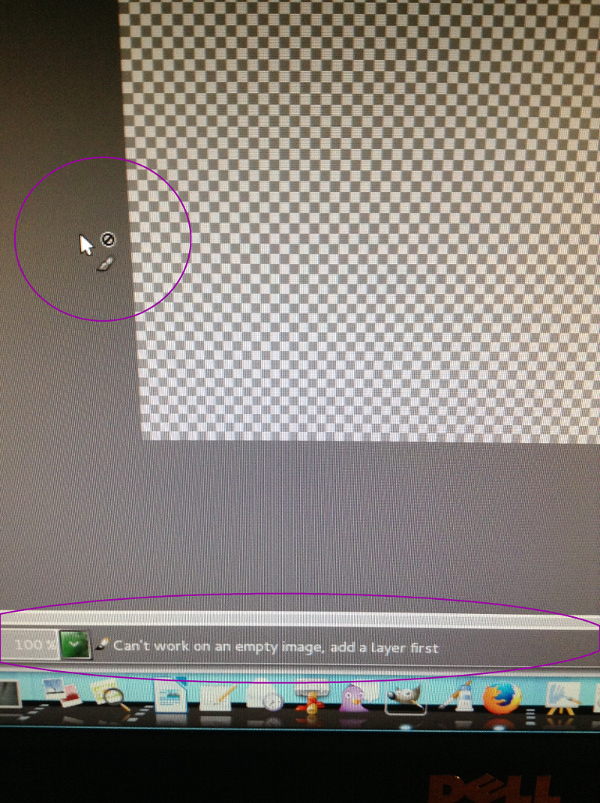
I may forget about some changes I made to 2.8 but my 2.6 is as untouched as Joan of Arc."@ sallyanne"I have seen this icon in gimp but not enough for it to become an annoyance."I had seen it too every now and then (although I don't honestly recall seeing it years prior to at all... then again i've never really gotten deep into Gimp and have only just here recently decided to start using it as my main graphics tool. So perhaps, it appeared in the past and I never paid it any attentioned as it didn't stop my flow of work i was engaged in...)
Still, it ONLY became this annoying when I suddenly could not move layers around and I started to notice this ALWAYS happened when the small circle icon was present... irritating

)
@ Molly"Looks like this one is solved, strange as it is.
I made a layer and duped it 3 or 4 times, then I deleted them and left behind the checkerboard. As soon as I did that the cursor changed."@ Wallace"Yes and your right.
I just never open a document, deleted it and continued working with nothing there. It's something I've never done before, so I've never seen this icon.
Does that make sense?
So... this icon only appears after a document with all it's layers are deleted, leaving the canvas blank or without any layers?
Why would anyone do this, is what I can't understand.
So it's not a mystery after all, It just seems kind of strange to me."
Wallace wrote:
molly wrote:
I had something going that I didn't like so I thought I could just delete it and start over, I thought if I got back to a blank checker board I could start from scratch. told you I was a dummy Wallace. Anyway, don't we learn from mistakes. The next time we know how to fix them.
Okay already, so you're a dummy. Isn't being a dummy the new average now?
Go to the store for milk, buy the milk, pore the milk down the drain, and put the empty container in the refrigerator.
Hmmm.... let me think about this folks.
This all started to come to a head when I started working on the displacement mapping project
while learning and searching for solutions to follow the tutorial (from a Gimp perspective...) that brought me to this wonderful forum in the first place (
http://layersmagazine.com/designing-a-layers-t-shirt-in-photoshop.html) remember?
Below Are The Steps I Took1. Open my .xcf file (t-shirt file)
2. Insert either another (or .png image) as a layer (t-shirt design)
3. Duplicate the t-shirt design and desaturate it (to be used for the displacement map)
Along the way I wouldn't doubt if duplicate layers were deleted, in fact I know I did several times.
Still, why would this cause the icon to appear? More importantly, why would the issue of not being able to move layers around within the pallette area begin to happen?
At the end of the day, I'd be interested in asking Partha this. Although I have not installed his build yet I will today though. I would suspect that if anyone would have a straight answer it would be a developer, right guys?
I gotta get this empty container outta my refrigerator it's a New Year!

 Login
Login Register
 Tweets
 FAQ
FAQ Advanced Search









 by sallyanne...