It is currently Wed Aug 19, 2026 11:58 am


All times are UTC - 5 hours [ DST ]


Post new topic Reply to topic  [ 129 posts ]  Go to page Previous  1, 2, 3, 4, 5, 6, 7  Next
Author Message
 Post subject: Re: Pseudo Stippling in G'MIC
PostPosted: Mon Feb 07, 2011 7:34 am  (#81) 
Offline
Global Moderator
User avatar

Joined: May 16, 2010
Posts: 16164
So do you place the executable along with the dll file in Gimps plug-in folder?

_________________
Image


Top
 Post subject: Re: Pseudo Stippling in G'MIC
PostPosted: Mon Feb 07, 2011 9:17 am  (#82) 
Offline
GimpChat Member
User avatar

Joined: Sep 24, 2010
Posts: 12833
No Rod; this one's a stand-a-lone. I just wish the GPU option would work on my PC, but alas, the onboard MB GPU pretty much sucks; trust me. Still acceptable (though slow) on my system. :)

_________________
Lyle

Psalm 109:8

Image


Top
 Post subject: Re: Pseudo Stippling in G'MIC
PostPosted: Mon Feb 07, 2011 10:11 am  (#83) 
Offline
Global Moderator
User avatar

Joined: May 16, 2010
Posts: 16164
Mine opens a command window then stalls. :\

_________________
Image


Top
 Post subject: Re: Pseudo Stippling in G'MIC
PostPosted: Mon Feb 07, 2011 10:15 am  (#84) 
Offline
GimpChat Member
User avatar

Joined: Sep 24, 2010
Posts: 12833
You need to either run it as a command prompt option and do all the pertinent things, or copy my batch file and then create a short cut to it on your desktop and then do a drag and drop. :)

_________________
Lyle

Psalm 109:8

Image


Top
 Post subject: Re: Pseudo Stippling in G'MIC
PostPosted: Mon Feb 07, 2011 10:53 am  (#85) 
Offline
Global Moderator
User avatar

Joined: May 16, 2010
Posts: 16164
okay i got it to run in a command window, but i really prefer the interface method better.Where is your batch file?
Microsoft Windows XP [Version 5.1.2600]
(C) Copyright 1985-2001 Microsoft Corp.

C:\Documents and Settings\Compaq_Owner.FAMILY-ROOM\Desktop\FDM\vo
ronoi-20091013>cd voronoi

C:\Documents and Settings\Compaq_Owner.FAMILY-ROOM\Desktop\FDM\vo
ronoi-20091013\voronoi>voronoi.exe

C:\Documents and Settings\Compaq_Owner.FAMILY-ROOM\Desktop\FDM\vo
ronoi-20091013\voronoi>Input and output file must be specified
Basic Options:
-a [ --algorithm ] arg Chooses which Stippling Algorithm will
be used
-s [ --stipples ] arg Number of Stipple Points to use
-t [ --threshold ] arg How long to wait for Voronoi diagram t
o converge
-I [ --input-file ] arg Name of input file
-O [ --output-file ] arg Name of output file
-l [ --log ] arg Determines output verbosity

I'll have to play with this later, right now im having too much fun with Grow_Cut. :)
(GML_Matting)

_________________
Image


Top
 Post subject: Re: Pseudo Stippling in G'MIC
PostPosted: Mon Feb 07, 2011 12:10 pm  (#86) 
Offline
GimpChat Member
User avatar

Joined: Sep 24, 2010
Posts: 12833
I copied it as code on the my first reply related to this remake Rod. I also concur with GML Matting. Sure you figured out already that if you hold down the shift key and use mouse clicks, you can make long draw selections (especially useful for folk without a tablet like me). :)

_________________
Lyle

Psalm 109:8

Image


Top
 Post subject: Re: Pseudo Stippling in G'MIC
PostPosted: Mon Feb 07, 2011 1:07 pm  (#87) 
Offline
Global Moderator
User avatar

Joined: May 16, 2010
Posts: 16164
Oh i am loving this plug-in!
I love the way it spreads to the edges when you click an area. :)

This is going to make rendering so much easier.

_________________
Image


Top
 Post subject: Re: Pseudo Stippling in G'MIC
PostPosted: Mon Feb 07, 2011 1:20 pm  (#88) 
Offline
GimpChat Member
User avatar

Joined: Jul 04, 2010
Posts: 2253
Location: Retired Moderator Slowly Returning to the Living.
I tried the script from the command prompt and it blows up. Drag and drop just pops up a command box for a fraction of a second. I tried compatability modes but it still blew up. Win 7 sucks!!!!!!!!!!!!!!!!!!!!!!!

_________________
Artists aren't crazy! We're eccentric! ~G.M. Ross

Image

My Sigs = My Photos
Check out my work at http://www.flickr.com/photos/photomastergreg.


Top
 Post subject: Re: Pseudo Stippling in G'MIC
PostPosted: Mon Feb 07, 2011 1:33 pm  (#89) 
Offline
GimpChat Member
User avatar

Joined: Sep 24, 2010
Posts: 12833
I'm using Win7 64-bit PM. Did you save the batch file in the same directory where the program is located? Only the shortcut to the batch file should be at the desktop. I'm going ahead and zipping up the bat file so I can post it here. Just place it in the same location where the voronoi program is located at and then copy a shortcut of the batch program to your desktop. :)


Attachments:
vstip.zip [194 Bytes]
Downloaded 141 times

_________________
Lyle

Psalm 109:8

Image
Top
 Post subject: Re: Pseudo Stippling in G'MIC
PostPosted: Mon Feb 07, 2011 2:04 pm  (#90) 
Offline
GimpChat Member
User avatar

Joined: Jul 04, 2010
Posts: 2253
Location: Retired Moderator Slowly Returning to the Living.
Yeah. It's in the right place and it runs. It just blows up violently!

_________________
Artists aren't crazy! We're eccentric! ~G.M. Ross

Image

My Sigs = My Photos
Check out my work at http://www.flickr.com/photos/photomastergreg.


Top
 Post subject: Re: Pseudo Stippling in G'MIC
PostPosted: Mon Feb 07, 2011 7:48 pm  (#91) 
Offline
GimpChat Member
User avatar

Joined: Jul 04, 2010
Posts: 2253
Location: Retired Moderator Slowly Returning to the Living.
I found the problem! The file I was using was a jpg. The program wants to see a png.
In the script it has an algorithm "c". What other algorithm's are there??


Attachments:
StippleTest.png
StippleTest.png [ 1.99 MiB | Viewed 2984 times ]

_________________
Artists aren't crazy! We're eccentric! ~G.M. Ross

Image

My Sigs = My Photos
Check out my work at http://www.flickr.com/photos/photomastergreg.


Last edited by PhotoMaster on Mon Feb 07, 2011 7:56 pm, edited 1 time in total.
Top
 Post subject: Re: Pseudo Stippling in G'MIC
PostPosted: Mon Feb 07, 2011 7:50 pm  (#92) 
Offline
GimpChat Member
User avatar

Joined: Sep 24, 2010
Posts: 12833
g (gpu) Greg, but it won't work for me unfortunately. The default algorithm is c (cpu). Maybe you can get the gpu version to work on your platform. Just replace a- c with -a g in the batch file. Thought I mentioned that you have to use PNG file but might have forgotten to mention that. :)

_________________
Lyle

Psalm 109:8

Image


Top
 Post subject: Re: Pseudo Stippling in G'MIC
PostPosted: Mon Feb 07, 2011 8:14 pm  (#93) 
Offline
GimpChat Member
User avatar

Joined: Jul 04, 2010
Posts: 2253
Location: Retired Moderator Slowly Returning to the Living.
gpu? I know that gpu runs faster (based on the website charts). Does gpu allow it to use the multiple cores of the processor? Global Processing Unit??

I have experimented with the threshhold setting, up to 3. I need to play some more.

_________________
Artists aren't crazy! We're eccentric! ~G.M. Ross

Image

My Sigs = My Photos
Check out my work at http://www.flickr.com/photos/photomastergreg.


Top
 Post subject: Re: Pseudo Stippling in G'MIC
PostPosted: Mon Feb 07, 2011 8:34 pm  (#94) 
Offline
GimpChat Member
User avatar

Joined: Jul 04, 2010
Posts: 2253
Location: Retired Moderator Slowly Returning to the Living.
Here it is using the GPU algorithm, a threshhold of 3 and set S=10000.
I then placed the original image as the layer below it, in Gimp, and set the mode to screen.
This is my result:


Attachments:
GPU Test 2.jpg
GPU Test 2.jpg [ 1.23 MiB | Viewed 2984 times ]

_________________
Artists aren't crazy! We're eccentric! ~G.M. Ross

Image

My Sigs = My Photos
Check out my work at http://www.flickr.com/photos/photomastergreg.
Top
 Post subject: Re: Pseudo Stippling in G'MIC
PostPosted: Mon Feb 07, 2011 8:45 pm  (#95) 
Offline
GimpChat Member
User avatar

Joined: Sep 24, 2010
Posts: 12833
Lucky you that you can gpu Greg. I need a new video card. lol

:)

_________________
Lyle

Psalm 109:8

Image


Top
 Post subject: Re: Pseudo Stippling in G'MIC
PostPosted: Mon Feb 07, 2011 8:48 pm  (#96) 
Offline
GimpChat Member
User avatar

Joined: Jul 04, 2010
Posts: 2253
Location: Retired Moderator Slowly Returning to the Living.
Finally something works on this machine.

_________________
Artists aren't crazy! We're eccentric! ~G.M. Ross

Image

My Sigs = My Photos
Check out my work at http://www.flickr.com/photos/photomastergreg.


Top
 Post subject: Re: Pseudo Stippling in G'MIC
PostPosted: Mon Feb 07, 2011 8:56 pm  (#97) 
Offline
GimpChat Member
User avatar

Joined: Sep 24, 2010
Posts: 12833
Curious though; running same settings on cpu then gpu, how much faster is it on you PC Greg? I'm sure noticeably faster. Not sure why it doesn't work on my MB's onboard gpu video (GForce 2x equivalent chipset). I had a lot of issues before finding a hack that allows Pixelbender (gpu accelerated) filters to work in PS too, but there is one. Still Pixelbender will crash more often then I would like anyway, so I know I need a video card. Maybe my b-day in April will get me enough funds to get a better video card. :)

_________________
Lyle

Psalm 109:8

Image


Top
 Post subject: Re: Pseudo Stippling in G'MIC
PostPosted: Mon Feb 07, 2011 9:11 pm  (#98) 
Offline
GimpChat Member
User avatar

Joined: Jul 04, 2010
Posts: 2253
Location: Retired Moderator Slowly Returning to the Living.
I didn't time it, but it seemed like it was about half the time with the gpu.

_________________
Artists aren't crazy! We're eccentric! ~G.M. Ross

Image

My Sigs = My Photos
Check out my work at http://www.flickr.com/photos/photomastergreg.


Top
 Post subject: Re: Pseudo Stippling in G'MIC
PostPosted: Mon Feb 07, 2011 11:13 pm  (#99) 
Offline
Global Moderator
User avatar

Joined: May 16, 2010
Posts: 16164
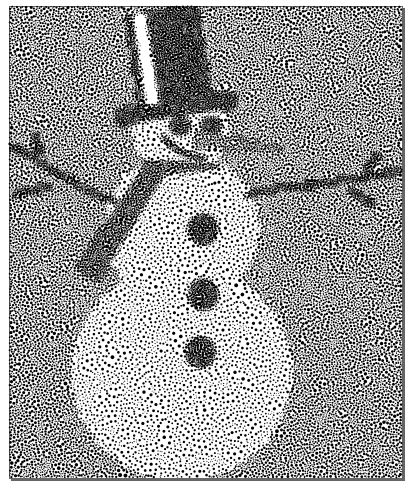
I tried gpu and cpu both
gpu didnt work for me, or it was just real slow


Generating 4000 stipples.
completed in 9.641 seconds.
RESULTS:SVG-size-2.43 kb
Image


Generating 25000 stipples.
Displacement Threshold is 0.3.
Took about 43 seconds to render the SVG file
RESULTS: SVG-size- 1.51 mb -
Image

I like the way it saves in SVG so you can size it to your discretion too. :)
Don't dare go over 25,000 stipples right now - tried 100,000 and almost froze my machine :lol
It saved the SVG at 6.43 mb - and would not open in Inkscape (i gave up on it and closed Inkscape via task manager) :rofl

_________________
Image


Top
 Post subject: Re: Pseudo Stippling in G'MIC
PostPosted: Mon Feb 07, 2011 11:54 pm  (#100) 
Offline
GimpChat Member
User avatar

Joined: Sep 24, 2010
Posts: 12833
Need more memory Rod (I have 6 Gigs). I've done a 100K version already but at that rez, the result starts to look like dithered graphics. Much more appealling at lower sampling points imo. Man, I'm envious of Greg and his new PC. I do need a new graphics card; that I know. I have an older PCIe bus though (1x by 16) but I believe the new cards will just downclock. Fast enough for me. I just need the onboard GPU engine. :)

_________________
Lyle

Psalm 109:8

Image


Top
Post new topic Reply to topic  [ 129 posts ]  Go to page Previous  1, 2, 3, 4, 5, 6, 7  Next

All times are UTC - 5 hours [ DST ]


* Login  


Powered by phpBB3 © phpBB Group