It is currently Mon Aug 10, 2026 1:32 am


All times are UTC - 5 hours [ DST ]


Post new topic Reply to topic  [ 90 posts ]  Go to page Previous  1, 2, 3, 4, 5  Next
Author Message
 Post subject: Re: Pattern From Image rel3 Script
PostPosted: Tue Apr 15, 2014 9:38 pm  (#61) 
Offline
Script Coder
User avatar

Joined: Feb 18, 2011
Posts: 4826
Location: Bendigo Vic. Australia
this message say's it is there Couldn't recognize the image file format for file 'C:\Users\Susan\.gimp-2.8\patterns\Thumbs.db'
this is what the file looks like
Image

"A real head scratcher"

_________________
Image
No matter how much you push the envelope, it'll still be stationery.


Top
 Post subject: Re: Pattern From Image rel3 Script
PostPosted: Tue Apr 15, 2014 9:51 pm  (#62) 
Offline
Global Moderator
User avatar

Joined: Apr 01, 2012
Posts: 8454
Location: On the other side of your screen
Graechan wrote:
this message say's it is there Couldn't recognize the image file format for file 'C:\Users\Susan\.gimp-2.8\patterns\Thumbs.db'

I just put the highlighted area in search and it says the same thing."No items match your search"

Also made sure my view was as tiles in the patterns folder and there were no gear files - nearly all wilbers except the irfanview ones.

_________________
Image
Free Fun Photo Editing & resources
Poems from the Lord
Gimp Newby
Gimp version 3.2.4 and GMIC-Qt 4.0.2 OS :- Windows 10 Home 64


Top
 Post subject: Re: Pattern From Image rel3 Script
PostPosted: Tue Apr 15, 2014 10:01 pm  (#63) 
Offline
Script Coder
User avatar

Joined: Feb 18, 2011
Posts: 4826
Location: Bendigo Vic. Australia
Sallyanne could you move the folders inside the patterns folder to the desktop and try refreshing your patterns again if you still get an error take a screen shot of your patterns folder and post

_________________
Image
No matter how much you push the envelope, it'll still be stationery.


Top
 Post subject: Re: Pattern From Image rel3 Script
PostPosted: Tue Apr 15, 2014 11:10 pm  (#64) 
Offline
Global Moderator
User avatar

Joined: Apr 01, 2012
Posts: 8454
Location: On the other side of your screen
Think I have it in two files for you. I only have a small laptop screen and it wouldn't all fit in one.
Attachment:
Patterns foldern.png
Patterns foldern.png [ 191.57 KiB | Viewed 1866 times ]

Attachment:
Patterns folder2.png
Patterns folder2.png [ 106.28 KiB | Viewed 1866 times ]

_________________
Image
Free Fun Photo Editing & resources
Poems from the Lord
Gimp Newby
Gimp version 3.2.4 and GMIC-Qt 4.0.2 OS :- Windows 10 Home 64


Top
 Post subject: Re: Pattern From Image rel3 Script
PostPosted: Tue Apr 15, 2014 11:21 pm  (#65) 
Offline
Script Coder
User avatar

Joined: Feb 18, 2011
Posts: 4826
Location: Bendigo Vic. Australia
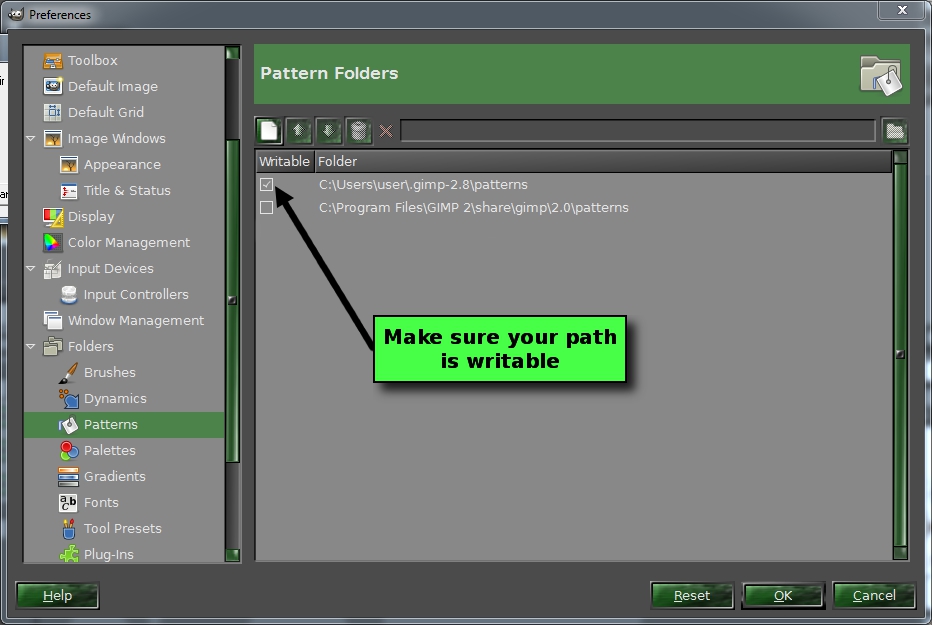
Sallyanne could you go to Edit>Preferences>Folders and check this↓
Image

_________________
Image
No matter how much you push the envelope, it'll still be stationery.


Top
 Post subject: Re: Pattern From Image rel3 Script
PostPosted: Tue Apr 15, 2014 11:23 pm  (#66) 
Offline
Global Moderator
User avatar

Joined: Apr 01, 2012
Posts: 8454
Location: On the other side of your screen
It is checked.

_________________
Image
Free Fun Photo Editing & resources
Poems from the Lord
Gimp Newby
Gimp version 3.2.4 and GMIC-Qt 4.0.2 OS :- Windows 10 Home 64


Top
 Post subject: Re: Pattern From Image rel3 Script
PostPosted: Tue Apr 15, 2014 11:27 pm  (#67) 
Offline
Script Coder
User avatar

Joined: Feb 18, 2011
Posts: 4826
Location: Bendigo Vic. Australia
and yet you still get the error when you refresh, maybe one of your patterns is corupted

_________________
Image
No matter how much you push the envelope, it'll still be stationery.


Top
 Post subject: Re: Pattern From Image rel3 Script
PostPosted: Tue Apr 15, 2014 11:35 pm  (#68) 
Offline
Global Moderator
User avatar

Joined: Apr 01, 2012
Posts: 8454
Location: On the other side of your screen
How do I find out which one - do I remove them one by one until I don't get an error message?
Or is there a quicker way?


By the way I put my 'Show online status to allow' Can you see it? It still says offline to me.

_________________
Image
Free Fun Photo Editing & resources
Poems from the Lord
Gimp Newby
Gimp version 3.2.4 and GMIC-Qt 4.0.2 OS :- Windows 10 Home 64


Top
 Post subject: Re: Pattern From Image rel3 Script
PostPosted: Wed Apr 16, 2014 12:04 am  (#69) 
Offline
Script Coder
User avatar

Joined: Feb 18, 2011
Posts: 4826
Location: Bendigo Vic. Australia
You can quickly check if it's a corrupted pattern by emptying your recycle bin then do a Cntl a to select all your patterns then press the Del key, this will put them in the recycle bin.
refresh your patterns again and see if error is gone
Note! :you can restore your patterns by opening the recycle bin and click on restore all items


to change your notification light setting maybe you have to log out and back on again

_________________
Image
No matter how much you push the envelope, it'll still be stationery.


Top
 Post subject: Re: Pattern From Image rel3 Script
PostPosted: Wed Apr 16, 2014 12:26 am  (#70) 
Offline
Global Moderator
User avatar

Joined: Apr 01, 2012
Posts: 8454
Location: On the other side of your screen
Still there :(

_________________
Image
Free Fun Photo Editing & resources
Poems from the Lord
Gimp Newby
Gimp version 3.2.4 and GMIC-Qt 4.0.2 OS :- Windows 10 Home 64


Top
 Post subject: Re: Pattern From Image rel3 Script
PostPosted: Wed Apr 16, 2014 12:37 am  (#71) 
Offline
Script Coder
User avatar

Joined: Feb 18, 2011
Posts: 4826
Location: Bendigo Vic. Australia
your lights working 'Great'
after you deleted all did you get an error when refreshing patterns

_________________
Image
No matter how much you push the envelope, it'll still be stationery.


Top
 Post subject: Re: Pattern From Image rel3 Script
PostPosted: Wed Apr 16, 2014 12:53 am  (#72) 
Offline
Global Moderator
User avatar

Joined: Apr 01, 2012
Posts: 8454
Location: On the other side of your screen
Yes, still there. Patterns are still in the recycle bin.....Just incase I need to do something else now.

_________________
Image
Free Fun Photo Editing & resources
Poems from the Lord
Gimp Newby
Gimp version 3.2.4 and GMIC-Qt 4.0.2 OS :- Windows 10 Home 64


Top
 Post subject: Re: Pattern From Image rel3 Script
PostPosted: Wed Apr 16, 2014 1:01 am  (#73) 
Offline
Script Coder
User avatar

Joined: Feb 18, 2011
Posts: 4826
Location: Bendigo Vic. Australia
Please don't forget to restore your patterns before turning of computer

You are a problem child today :hehe

_________________
Image
No matter how much you push the envelope, it'll still be stationery.


Top
 Post subject: Re: Pattern From Image rel3 Script
PostPosted: Wed Apr 16, 2014 1:04 am  (#74) 
Offline
Global Moderator
User avatar

Joined: Apr 01, 2012
Posts: 8454
Location: On the other side of your screen
I won't forget. Just waiting for you to tell me 'what now'. I'll go and do it now.

_________________
Image
Free Fun Photo Editing & resources
Poems from the Lord
Gimp Newby
Gimp version 3.2.4 and GMIC-Qt 4.0.2 OS :- Windows 10 Home 64


Top
 Post subject: Re: Pattern From Image rel3 Script
PostPosted: Wed Apr 16, 2014 1:20 am  (#75) 
Offline
Script Coder
User avatar

Joined: Feb 18, 2011
Posts: 4826
Location: Bendigo Vic. Australia
I see this is not the only problem you have with your gimp
2 files in your patterns folder did look suspicious but after you deleted all the files you still got the same error
you could go to Edit>Preferances>Folders and delete the path to C:\Users\Susan\.gimp-2.8\patterns\ then restart gimp and refresh patterns and paste any error messages here for me to check

_________________
Image
No matter how much you push the envelope, it'll still be stationery.


Top
 Post subject: Re: Pattern From Image rel3 Script
PostPosted: Wed Apr 16, 2014 1:56 am  (#76) 
Offline
Global Moderator
User avatar

Joined: Apr 01, 2012
Posts: 8454
Location: On the other side of your screen
No different.
I also tried the script again and got the same error as before.

_________________
Image
Free Fun Photo Editing & resources
Poems from the Lord
Gimp Newby
Gimp version 3.2.4 and GMIC-Qt 4.0.2 OS :- Windows 10 Home 64


Top
 Post subject: Re: Pattern From Image rel3 Script
PostPosted: Wed Apr 16, 2014 2:53 am  (#77) 
Offline
Script Coder
User avatar

Joined: Feb 18, 2011
Posts: 4826
Location: Bendigo Vic. Australia
You could rename your .gimp-2.8 folder to old-.gimp-2.8 and restart gimp (this should generate a completely new set of empty folders)

_________________
Image
No matter how much you push the envelope, it'll still be stationery.


Top
 Post subject: Re: Pattern From Image rel3 Script
PostPosted: Wed Apr 16, 2014 3:23 am  (#78) 
Offline
GimpChat Member

Joined: May 23, 2012
Posts: 150
i would go to the gimp global pattern folder, Gimp\share\gimp\2.0\pattern
and make sure there is no Thumb.db file, that might have been accidentally
copied there, if not there, i would fire up notepad++ and see if my user gimprc
had only the two paths under pattern, the checked marked one, and gimp global
Gimp/share/gimp/2.0/pattern.
after that
search the computer and find out the path to Thumb.db, might be more than one,
paste the paths so we could possibly see, how gimp is finding it.

but i don't know how fluent you are with, notepad++ or .gimp-2.8\gimprc file.
check with Graechan to see if some of this might help


Top
 Post subject: Re: Pattern From Image rel3 Script
PostPosted: Wed Apr 16, 2014 4:33 am  (#79) 
Offline
Global Moderator
User avatar

Joined: Apr 01, 2012
Posts: 8454
Location: On the other side of your screen
Mike I searched my C drive and 'no items matched search'
Searched my Computer before too and the only hting associated with gimp that had a thumbs db was in themes.

_________________
Image
Free Fun Photo Editing & resources
Poems from the Lord
Gimp Newby
Gimp version 3.2.4 and GMIC-Qt 4.0.2 OS :- Windows 10 Home 64


Top
 Post subject: Re: Pattern From Image rel3 Script
PostPosted: Wed Apr 16, 2014 4:55 am  (#80) 
Offline
GimpChat Member

Joined: May 23, 2012
Posts: 150
sally

you could download notepad++ here http://www.notepad-plus-plus.org/
then you have to install it, it is not hard to do, but that will note fix your problem,
and you could just as well use regular windows notepad to open your
.gimp-2.8\gimprc and see if there are only the two folders under pattern.

also try a search for Thumb
also try a search for *.db

maybe this will help


Top
Post new topic Reply to topic  [ 90 posts ]  Go to page Previous  1, 2, 3, 4, 5  Next

All times are UTC - 5 hours [ DST ]


* Login  


Powered by phpBB3 © phpBB Group