It is currently Sat Aug 15, 2026 3:05 pm


All times are UTC - 5 hours [ DST ]


Post new topic Reply to topic  [ 84 posts ]  Go to page Previous  1, 2, 3, 4, 5  Next
Author Message
 Post subject: Re: sharing outcomes
PostPosted: Tue Jun 24, 2014 7:43 am  (#21) 
Offline
GimpChat Member

Joined: Oct 02, 2012
Posts: 84
Location: Germany
Good topic


Last edited by SkyRoma on Sat Jun 28, 2014 2:37 pm, edited 1 time in total.

Top
 Post subject: Re: sharing outcomes
PostPosted: Tue Jun 24, 2014 8:00 am  (#22) 
Offline
GimpChat Member
User avatar

Joined: Jun 24, 2010
Posts: 504
Location: Western Vic Australia
dinasset wrote:
Let's assume we can re-post SallyAnne's images.
One of those -imo- could be a nice challenge for photo enhancement.
I'm talking of this one (original)

Attachment:
1831_E~2893360-original.jpg


Why I'm saying it's a challenge?
Because the skin on the face looks more like plastic than like skin.
How can we restore a good skin texture?
One way -an easy way, a too easy way- to change the overall look, could be to simulate a printing on canvas.
Here is my experiment, using G'mic, Patterns, Canvas texture + duplicate + overlay

Attachment:
1831_E~2893360-canvas.jpg


But I hope other chatters will try in a better way to restore the skin look, without bypassing the problem -like I did- with the canvas texture!


Perhaps, apart from the film grain filter which basically adds noise like the HSV noise filter.
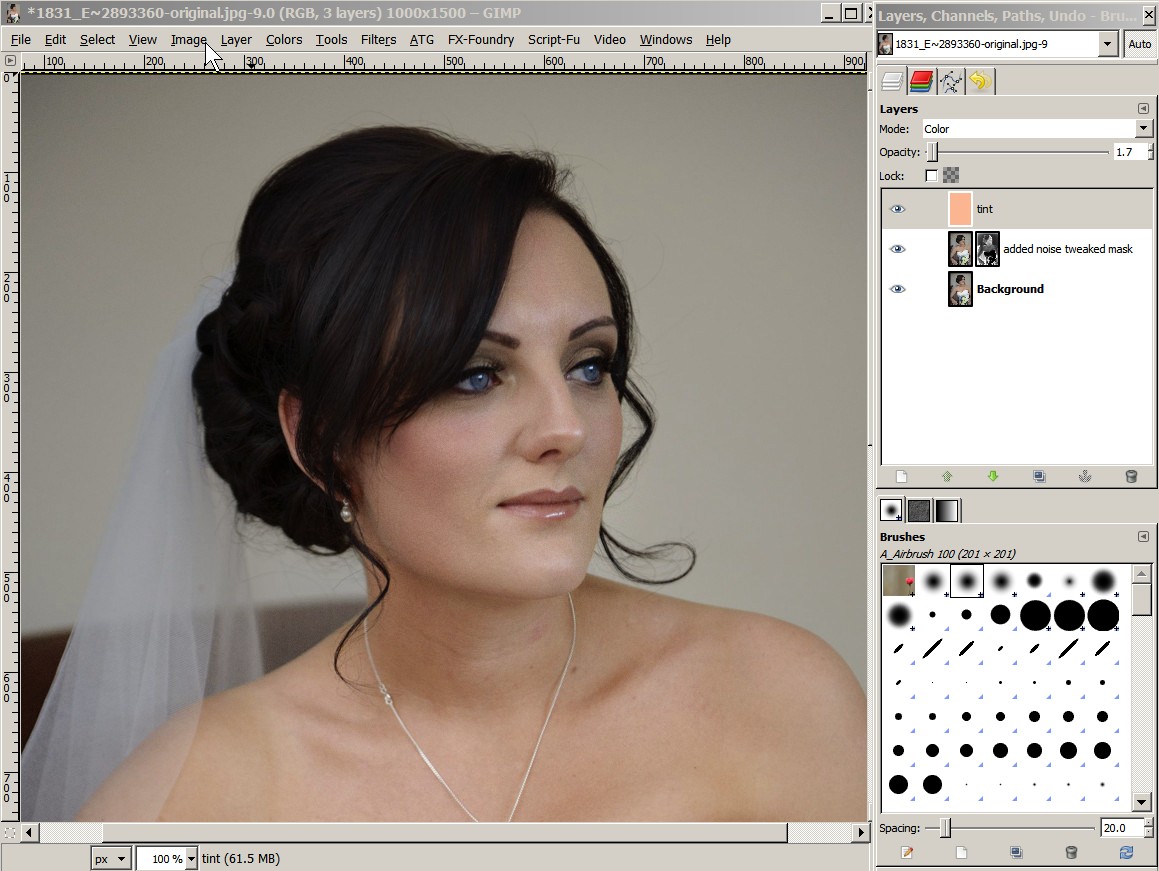
I used the HSV noise filter on copy in overlay mode and played with the mask to take the shine off the face. Add a tint in color mode
Image

_________________
Image


Top
 Post subject: Re: sharing outcomes
PostPosted: Tue Jun 24, 2014 8:24 am  (#23) 
Offline
GimpChat Member
User avatar

Joined: Jan 20, 2013
Posts: 14831
Location: roma, italy
looks good, wbool63

_________________
"Where am I ?"


Top
 Post subject: Re: sharing outcomes
PostPosted: Tue Jun 24, 2014 9:40 am  (#24) 
Offline
Global Moderator
User avatar

Joined: Apr 01, 2012
Posts: 8457
Location: On the other side of your screen
She does look to have a lot of makeup on. I just made her skin a little darker
Image

_________________
Image
Free Fun Photo Editing & resources
Poems from the Lord
Gimp Newby
Gimp version 3.2.4 and GMIC-Qt 4.0.2 OS :- Windows 10 Home 64


Top
 Post subject: Re: sharing outcomes
PostPosted: Tue Jun 24, 2014 4:31 pm  (#25) 
Offline
GimpChat Member
User avatar

Joined: Jan 10, 2013
Posts: 863
dinasset wrote:
Why I'm saying it's a challenge?
Because the skin on the face looks more like plastic than like skin.
How can we restore a good skin texture?

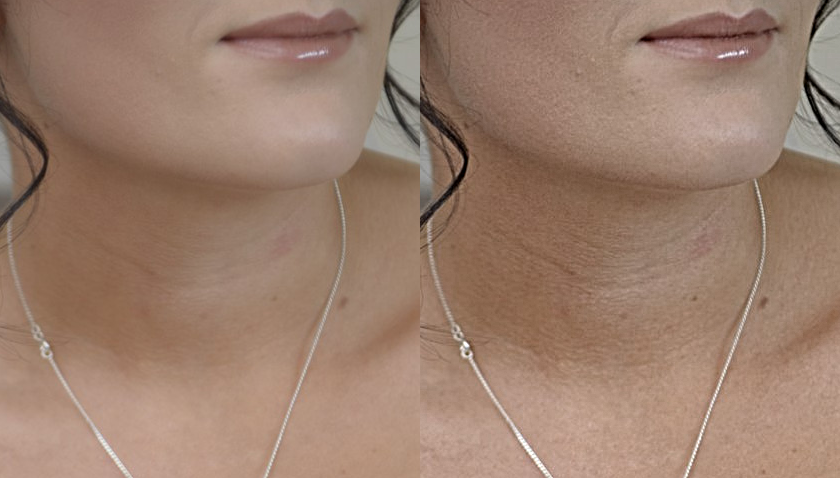
To post, reduced by more than 50% the size of the image.
For the details would not be lost with this reduction, featured you can see the before and after, a less reduced selection.

Used high pass filter, masks, and grain merge to this result.
Image
Image

_________________
bbbbbbbbbbbImage
bbbbbbbbbbb Be patient, English is not my language.


Top
 Post subject: Re: sharing outcomes
PostPosted: Wed Jun 25, 2014 12:00 am  (#26) 
Offline
GimpChat Member
User avatar

Joined: Aug 30, 2012
Posts: 2174
I either read about this technique here or on Pat David's site. but the best way to make an image greyscale is to use the Colour>Map>Sample Colourise filter. If you greyscale an image using the desaturate filter or by changing the image mode to grescale and then check the number of unique colours in the image by going Colour>info>ColourCube Analysis you'll find that only 255 colours are used.

So download your image into gimp and create a new layer with a black to white gradient along the layer, using the colourcube tool as mentioned above you should have at least 1786 colours, if not then you layer may be to small and needs to be bigger, then select your image and run the sample colourise filter selecting your gradient layer as output source.

Image

Image

Once the filter has run you can again check your colour values, in this example I ended up with a greyscale image made up of 1970 unique colours.

_________________
Image


Top
 Post subject: Re: sharing outcomes
PostPosted: Wed Jun 25, 2014 1:00 am  (#27) 
Offline
GimpChat Member
User avatar

Joined: Nov 16, 2011
Posts: 5127
Location: Metro Vancouver, BC
he4rty wrote:
I either read about this technique here or on Pat David's site.
Your right it could have been either, True PseudoGrey in GIMP or Gimp Chat True Pseudogrey in GIMP. :)

_________________
Image
Gimp 2.8.18, Linux, median user
Gimp Chat Tutorials Index
Spirit Bear (Kermode)


Top
 Post subject: Re: sharing outcomes
PostPosted: Wed Jun 25, 2014 4:03 am  (#28) 
Offline
Global Moderator
User avatar

Joined: Apr 01, 2012
Posts: 8457
Location: On the other side of your screen
Just had a search and found 24 Public Domain Photos for you to play with.
should be in two separate attachments

_________________
Image
Free Fun Photo Editing & resources
Poems from the Lord
Gimp Newby
Gimp version 3.2.4 and GMIC-Qt 4.0.2 OS :- Windows 10 Home 64


Last edited by sallyanne on Wed Jun 25, 2014 4:29 am, edited 1 time in total.

Top
 Post subject: Re: sharing outcomes
PostPosted: Wed Jun 25, 2014 4:29 am  (#29) 
Offline
Global Moderator
User avatar

Joined: Apr 01, 2012
Posts: 8457
Location: On the other side of your screen
Another

_________________
Image
Free Fun Photo Editing & resources
Poems from the Lord
Gimp Newby
Gimp version 3.2.4 and GMIC-Qt 4.0.2 OS :- Windows 10 Home 64


Top
 Post subject: Re: sharing outcomes
PostPosted: Wed Jun 25, 2014 9:22 am  (#30) 
Offline
Global Moderator
User avatar

Joined: Apr 01, 2012
Posts: 8457
Location: On the other side of your screen
Tried to sharpen this one but couldn't get the blur out of it.
Sharpened and used texture enhance. may have tried deblur also.
This photo is in one of the attachments in the last couple of posts.
Image

_________________
Image
Free Fun Photo Editing & resources
Poems from the Lord
Gimp Newby
Gimp version 3.2.4 and GMIC-Qt 4.0.2 OS :- Windows 10 Home 64


Top
 Post subject: Re: sharing outcomes
PostPosted: Wed Jun 25, 2014 10:21 am  (#31) 
Offline
GimpChat Member
User avatar

Joined: Jun 24, 2010
Posts: 504
Location: Western Vic Australia
he4rty wrote:
I either read about this technique here or on Pat David's site. but the best way to make an image greyscale is to use the Colour>Map>Sample Colourise filter. If you greyscale an image using the desaturate filter or by changing the image mode to grescale and then check the number of unique colours in the image by going Colour>info>ColourCube Analysis you'll find that only 255 colours are used.

So download your image into gimp and create a new layer with a black to white gradient along the layer, using the colourcube tool as mentioned above you should have at least 1786 colours, if not then you layer may be to small and needs to be bigger, then select your image and run the sample colourise filter selecting your gradient layer as output source.

[ Image ]

[ Image ]

Once the filter has run you can again check your colour values, in this example I ended up with a greyscale image made up of 1970 unique colours.


Thanks He4rty for a reminder about this pseudogrey. I installed the filter and played around with it. I can definitely see the difference when I go to pixel level between the two methods (simple desaturation and using the pseudogrey filter). At a normal viewing levels I can not see a difference but perhaps in some circumstances it may well be visible. I used Sallyanne's bride image.
Interestingly, if you place both methods in layers above each other at say 10,000 magnification (1.5 cm pixel sizes) in difference mode there is no difference noted. (no highlighted difference pixels). Yet individual color pick tool info window comparison on the two layers show a difference.
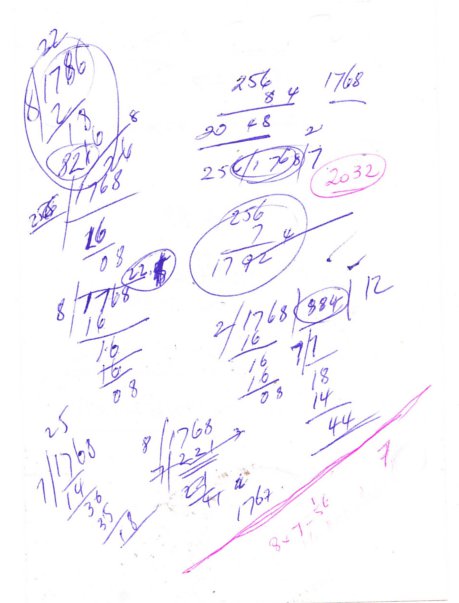
That may be due to the differences in colour maths (probably 8 bit wide) I really don't know. But my biggest problem is where the magic figure of 1768 is derived from.
More work to be done on luminosity masks with this filter to see if this extra colour gradation can assist in better duo or tritone images.

@Sallyanne, thank you for finding those images , I have downloaded the lot

_________________
Image


Top
 Post subject: Re: sharing outcomes
PostPosted: Thu Jun 26, 2014 6:21 am  (#32) 
Offline
GimpChat Member
User avatar

Joined: Jan 20, 2013
Posts: 14831
Location: roma, italy
just another trial (very quickly done)
one of the layers used maxRGB

Attachment:
1831_E~2893360_DNvar.jpg
1831_E~2893360_DNvar.jpg [ 283.54 KiB | Viewed 2121 times ]

_________________
"Where am I ?"


Top
 Post subject: Re: sharing outcomes
PostPosted: Thu Jun 26, 2014 6:39 am  (#33) 
Offline
GimpChat Member
User avatar

Joined: Jan 20, 2013
Posts: 14831
Location: roma, italy
another one
playing with pseudogrey, colorize, saturation, smooth a little (various layers)
still a quick go...

Attachment:
1831_E~2893360_DNvar2.jpg
1831_E~2893360_DNvar2.jpg [ 294.83 KiB | Viewed 2117 times ]

_________________
"Where am I ?"


Top
 Post subject: Re: sharing outcomes
PostPosted: Thu Jun 26, 2014 7:50 am  (#34) 
Offline
Script Coder
User avatar

Joined: Apr 23, 2010
Posts: 1553
Location: not from Guildford after all
wbool63 wrote:
But my biggest problem is where the magic figure of 1768 is derived from.

A gray color is one where the values for the the red, green, and blue components are all equal. A "pseudo-gray" color relaxes this requirement and allows the components to either be equal or differ by one; the idea being that such a small change in the resulting hue will not be very noticeable to the human eye (which is more sensitive to the intensity of light than the color).

So for a given gray value (where r=g=b), we can produce six additional "pseudo-gray" colors as follows:
r   g   b+1
r+1 g   b
r+1 g   b+1
r   g+1 b
r   g+1 b+1
r+1 g+1 b

Of course, the next color to follow this pseudo-gray sequence would be (r+1 g+1 b+1), but that is actually a "true gray" color and so starts the next sequence of seven pseudo-grays.

So for 256 gray colors having values of 0 to 255, there will be 1792 (7*256) pseudo-grays -- except that for the lightest gray (255 255 255, AKA white) it is not possible to increase the component values to generate the six pseudo-grays, thus only 1786 different pseudo-grays are possible.

_________________
Any sufficiently primitive technology is indistinguishable from a rock.


Top
 Post subject: Re: sharing outcomes
PostPosted: Thu Jun 26, 2014 2:35 pm  (#35) 
Offline
GimpChat Member
User avatar

Joined: Jan 20, 2013
Posts: 14831
Location: roma, italy
playing with another of the SallyAnne's images

(retinex)

Attachment:
1831_11_4_14-dn.jpg
1831_11_4_14-dn.jpg [ 174.05 KiB | Viewed 2099 times ]

_________________
"Where am I ?"


Top
 Post subject: Re: sharing outcomes - various themes
PostPosted: Fri Jun 27, 2014 3:36 am  (#36) 
Offline
GimpChat Member

Joined: Jan 20, 2014
Posts: 66
Seems sharpening helps adding some texture back.

I tried with shadow recovery, color enhanced, sharpening, contrast enhanced, edge enhanced

Attachment:
1831_E~2893360_e.jpg
1831_E~2893360_e.jpg [ 1.53 MiB | Viewed 2084 times ]


Top
 Post subject: Re: sharing outcomes
PostPosted: Fri Jun 27, 2014 3:57 am  (#37) 
Offline
GimpChat Member
User avatar

Joined: Jun 24, 2010
Posts: 504
Location: Western Vic Australia
saulgoode wrote:
wbool63 wrote:
But my biggest problem is where the magic figure of 1768 is derived from.

A gray color is one where the values for the the red, green, and blue components are all equal. A "pseudo-gray" color relaxes this requirement and allows the components to either be equal or differ by one; the idea being that such a small change in the resulting hue will not be very noticeable to the human eye (which is more sensitive to the intensity of light than the color).

So for a given gray value (where r=g=b), we can produce six additional "pseudo-gray" colors as follows:
r   g   b+1
r+1 g   b
r+1 g   b+1
r   g+1 b
r   g+1 b+1
r+1 g+1 b

Of course, the next color to follow this pseudo-gray sequence would be (r+1 g+1 b+1), but that is actually a "true gray" color and so starts the next sequence of seven pseudo-grays.

So for 256 gray colors having values of 0 to 255, there will be 1792 (7*256) pseudo-grays -- except that for the lightest gray (255 255 255, AKA white) it is not possible to increase the component values to generate the six pseudo-grays, thus only 1786 different pseudo-grays are possible.


Thank You Saulgoode , I tried all sorts of little divisions by 8, by 7, by 255, by 256 . nothing made sense. But your explanation makes perfect sense.
Image

_________________
Image


Top
 Post subject: Re: sharing outcomes - various themes
PostPosted: Sat Jun 28, 2014 3:22 am  (#38) 
Offline
GimpChat Member
User avatar

Joined: Mar 01, 2014
Posts: 14128
Location: Spain, Aragón
You all are great masters of photography. I think I may learn something as you help giving relevant explanations. Thank you my friends. :tyspin
I love the rose, wbool63. it's a beautiful transformation. :clap
Dinasset, the final result of the bride photography is fantastic! :clap
Here my try, Firstly I corrected the background by colour levels and corrected its horizontality. Then I applied desaturation to the woman layer and set the layer at grain merge.


Attachments:
JapaneseEmperorTimes-original.jpg
JapaneseEmperorTimes-original.jpg [ 2.07 MiB | Viewed 2061 times ]
JapaneseEmperorTimes.jpg
JapaneseEmperorTimes.jpg [ 2.66 MiB | Viewed 2061 times ]

_________________
Image

Gimp 2.10.30(samj) portable _ OS Windows 10 Home_ 64bits
Don’t be afraid to start over. It’s a new chance to rebuild what you want.
Top
 Post subject: Re: sharing outcomes - various themes
PostPosted: Sat Jun 28, 2014 4:43 am  (#39) 
Offline
GimpChat Member
User avatar

Joined: Jan 20, 2013
Posts: 14831
Location: roma, italy
dream of Japan!
you started playing with difficult tasks, Issabella, go on!

_________________
"Where am I ?"


Top
 Post subject: Re: sharing outcomes - various themes
PostPosted: Sat Jun 28, 2014 8:08 am  (#40) 
Offline
GimpChat Member
User avatar

Joined: Mar 01, 2014
Posts: 14128
Location: Spain, Aragón
Thanks dinasset. You're very kind. :)

_________________
Image

Gimp 2.10.30(samj) portable _ OS Windows 10 Home_ 64bits
Don’t be afraid to start over. It’s a new chance to rebuild what you want.


Top
Post new topic Reply to topic  [ 84 posts ]  Go to page Previous  1, 2, 3, 4, 5  Next

All times are UTC - 5 hours [ DST ]


* Login  


Powered by phpBB3 © phpBB Group