It is currently Sat Aug 15, 2026 6:15 am


All times are UTC - 5 hours [ DST ]


Post new topic Reply to topic  [ 84 posts ]  Go to page Previous  1, 2, 3, 4, 5  Next
Author Message
 Post subject: Re: sharing outcomes - various themes
PostPosted: Tue Jul 01, 2014 7:42 am  (#41) 
Offline
Global Moderator
User avatar

Joined: Apr 01, 2012
Posts: 8457
Location: On the other side of your screen
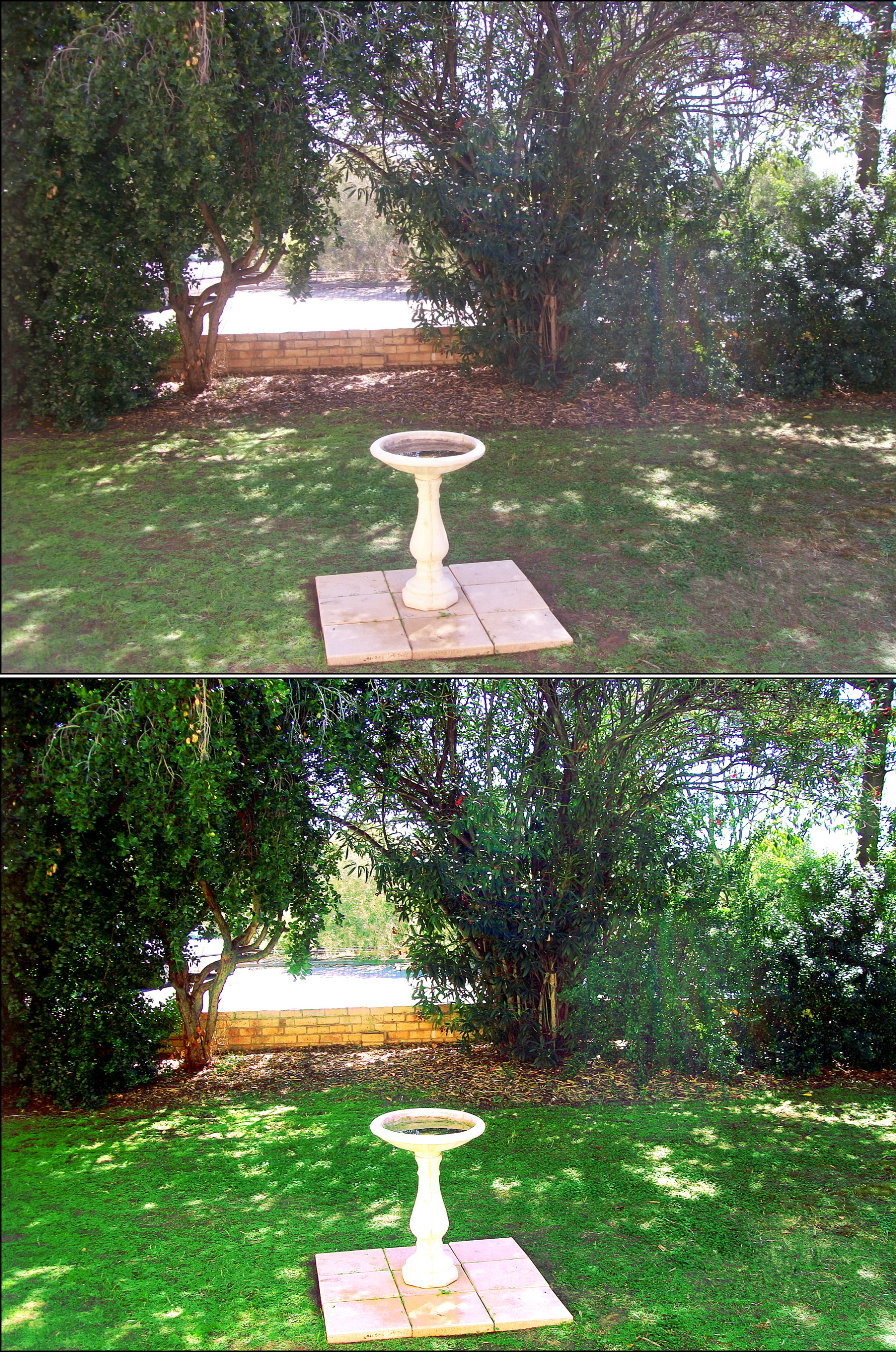
I took this photo in 2010. It was a very sunny day - which would explain why there are so many burnt out areas but I cannot get rid of all the extra light from the sun through the trees. Mostly the middle - right area.
Image

_________________
Image
Free Fun Photo Editing & resources
Poems from the Lord
Gimp Newby
Gimp version 3.2.4 and GMIC-Qt 4.0.2 OS :- Windows 10 Home 64


Top
 Post subject: Re: sharing outcomes - various themes
PostPosted: Tue Jul 01, 2014 10:36 am  (#42) 
Offline
GimpChat Member
User avatar

Joined: Jan 20, 2013
Posts: 14831
Location: roma, italy
SallyAnne,
this is my tentative outcome
using masks, painting with soft brush...

Attachment:
1831_frontyard-DN.jpg
1831_frontyard-DN.jpg [ 1023.27 KiB | Viewed 2107 times ]

_________________
"Where am I ?"


Top
 Post subject: Re: sharing outcomes - various themes
PostPosted: Tue Jul 01, 2014 11:46 am  (#43) 
Offline
Global Moderator
User avatar

Joined: Apr 01, 2012
Posts: 8457
Location: On the other side of your screen
Vary good dinasett. Much better than mine. Thank you.

_________________
Image
Free Fun Photo Editing & resources
Poems from the Lord
Gimp Newby
Gimp version 3.2.4 and GMIC-Qt 4.0.2 OS :- Windows 10 Home 64


Top
 Post subject: Re: sharing outcomes - various themes
PostPosted: Fri Jul 04, 2014 1:02 am  (#44) 
Offline
GimpChat Member
User avatar

Joined: Sep 24, 2010
Posts: 12831
Pseudo-gray has been a quest of mine for many years and folk have helped me a lot to create these over the years. You can find a script-fu that Patdavid created these at link below. :)

http://registry.gimp.org/node/26515

Also, G'MIC can do Pseudo-gray too. :)

_________________
Lyle

Psalm 109:8

Image


Top
 Post subject: Re: sharing outcomes - various themes
PostPosted: Fri Jul 04, 2014 1:36 am  (#45) 
Offline
GimpChat Member
User avatar

Joined: Jan 10, 2013
Posts: 863
lylejk wrote:
Pseudo-gray has been a quest of mine for many years and folk have helped me a lot to create these over the years. You can find a script-fu that Patdavid created these at link below. :)

http://registry.gimp.org/node/26515

Also, G'MIC can do Pseudo-gray too. :)

lylejk,
The explaining the He4rty in post #26 was easy to get the Pseudo-gray.

My doubt is on Hold intensity and Original Intensity settings.
At post # 26 they are activated.
But the blog PatDavid they should be deselected.

I tested both ways and got at least 1786 colors.

There is actually a more accurate way? Point out or not (hold / Original)?
Thx!

_________________
bbbbbbbbbbbImage
bbbbbbbbbbb Be patient, English is not my language.


Top
 Post subject: Re: sharing outcomes - various themes
PostPosted: Fri Jul 04, 2014 1:59 am  (#46) 
Offline
GimpChat Member
User avatar

Joined: Sep 24, 2010
Posts: 12831
Not sure what you are asking for Akros. Pat's blog link on the subject works for me. More info on Pseudogray should be read from the source itself:

http://r0k.us/graphics/pseudoGrey.html

_________________
Lyle

Psalm 109:8

Image


Top
 Post subject: Re: sharing outcomes - various themes
PostPosted: Fri Jul 04, 2014 2:52 am  (#47) 
Offline
GimpChat Member
User avatar

Joined: Jan 10, 2013
Posts: 863
Oh .. you indirectly answered me! :hehe
In http://justpaste.it/pseudog_gimp have the information I was looking for:

". Below's the tutorial Note the settings for the Sample Colorize plugin (Hold Intensity and Intensity Original unchecked; very important)."

This information is similar to that given in the blog PatDavid.

But in post #26 the orientation was different.

Image
That was my question.
I do not understand why the British and Americans speak English .... Portuguese is so much easier. :rofl :) (joking)
Happy 4th of July :grill

_________________
bbbbbbbbbbbImage
bbbbbbbbbbb Be patient, English is not my language.


Top
 Post subject: Re: sharing outcomes - various themes
PostPosted: Fri Jul 04, 2014 9:26 am  (#48) 
Offline
GimpChat Member
User avatar

Joined: Sep 24, 2010
Posts: 12831
Yes; all that matters is the target gradient contain 1786 tones. Patdavid's gradient is generated and optimized. He does this real time each time the script-fu is ran. I created the gradient using the gradient tool (black to white). Note, if you create a gradient perfectly (not going to be able to always do so all the time; you will normally get slightly less) you'll get 1786 unique tones (hence my passion w/ pseudo-grey since how can going from black to white gradient give you these tones when standard b/w conversions only has 256 unique tones?). :)

_________________
Lyle

Psalm 109:8

Image


Top
 Post subject: Re: sharing outcomes - various themes
PostPosted: Tue Jul 08, 2014 9:36 am  (#49) 
Offline
GimpChat Member
User avatar

Joined: Mar 01, 2014
Posts: 14128
Location: Spain, Aragón
Dinaset, here my pic to get the right manipulation with max. RGB. :tyspin


Attachments:
Daisy.jpg
Daisy.jpg [ 80.07 KiB | Viewed 2026 times ]

_________________
Image

Gimp 2.10.30(samj) portable _ OS Windows 10 Home_ 64bits
Don’t be afraid to start over. It’s a new chance to rebuild what you want.
Top
 Post subject: Re: sharing outcomes - various themes
PostPosted: Tue Jul 08, 2014 10:48 am  (#50) 
Offline
GimpChat Member
User avatar

Joined: Jan 20, 2013
Posts: 14831
Location: roma, italy
(why not under Flowers?)

here is my outcome
the name says what I did:
dup layer
max RGB
gauss blur 25 (that's the "smooth" action I talked previously)
overlay

Attachment:
Daisy_MaxRGB_BlurG25_Ovlay.jpg
Daisy_MaxRGB_BlurG25_Ovlay.jpg [ 78.26 KiB | Viewed 2022 times ]


maybe you like it
maybe not...

_________________
"Where am I ?"


Top
 Post subject: Re: sharing outcomes - various themes
PostPosted: Tue Jul 08, 2014 10:52 am  (#51) 
Offline
GimpChat Member
User avatar

Joined: Jan 20, 2013
Posts: 14831
Location: roma, italy
should you prefere to keep the white colour of the daisy:
go to Colours
Levels
click White pipette
click on the daisy petals
et voilà

Attachment:
Daisy_MaxRGB_BlurG25_Ovlay_WHTpipette.jpg
Daisy_MaxRGB_BlurG25_Ovlay_WHTpipette.jpg [ 85.17 KiB | Viewed 2033 times ]

_________________
"Where am I ?"


Top
 Post subject: Re: sharing outcomes - various themes
PostPosted: Tue Jul 08, 2014 11:39 am  (#52) 
Offline
GimpChat Member
User avatar

Joined: Mar 01, 2014
Posts: 14128
Location: Spain, Aragón
Thank you Dinasset. I put the photo here because I thought it was most important the method to process the image than the subject of the content.
In any case there are times that a photo can belong to two issues or topics.
I now understand the steps you have explained. Thank you very much again. I like the outcome with max.RGB :tyspin


Attachments:
Max.RGB+gaussian.jpg
Max.RGB+gaussian.jpg [ 327.37 KiB | Viewed 2028 times ]

_________________
Image

Gimp 2.10.30(samj) portable _ OS Windows 10 Home_ 64bits
Don’t be afraid to start over. It’s a new chance to rebuild what you want.
Top
 Post subject: Re: sharing outcomes - various themes
PostPosted: Sat Jul 19, 2014 12:05 pm  (#53) 
Offline
GimpChat Member
User avatar

Joined: Nov 16, 2011
Posts: 5127
Location: Metro Vancouver, BC
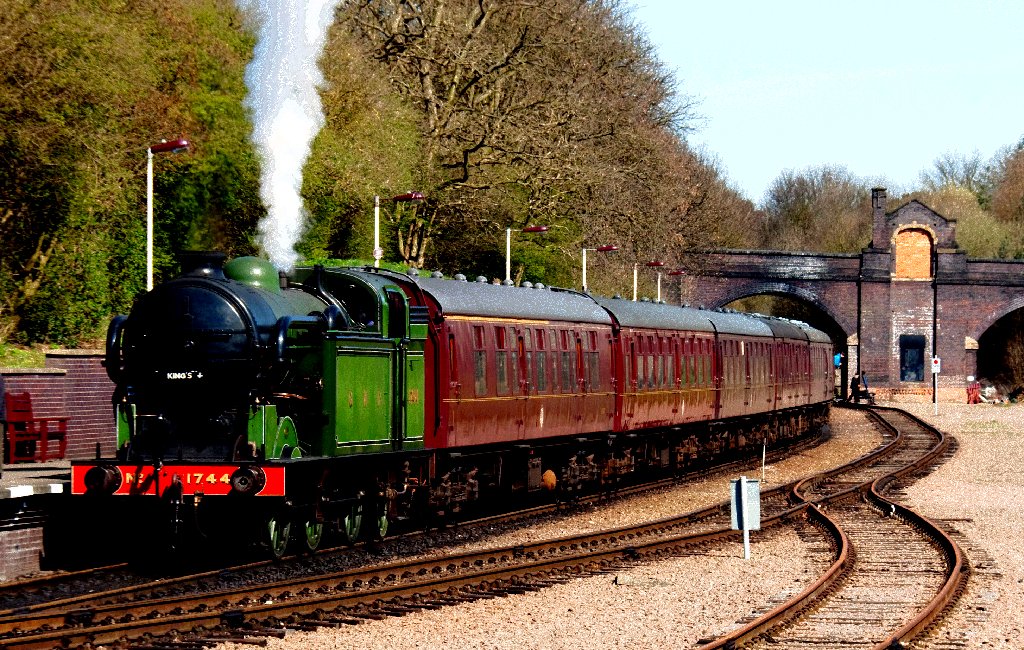
Issabella's (how to emulate ) Ink Wash At Leicester-North train.

Image

Image

_________________
Image
Gimp 2.8.18, Linux, median user
Gimp Chat Tutorials Index
Spirit Bear (Kermode)


Top
 Post subject: Re: sharing outcomes - various themes
PostPosted: Sat Jul 19, 2014 12:11 pm  (#54) 
Offline
GimpChat Member
User avatar

Joined: Mar 01, 2014
Posts: 14128
Location: Spain, Aragón
Odin, that is wonderful! I love your outcome, the colours and details :clap :bigthup

_________________
Image

Gimp 2.10.30(samj) portable _ OS Windows 10 Home_ 64bits
Don’t be afraid to start over. It’s a new chance to rebuild what you want.


Top
 Post subject: Re: sharing outcomes - various themes
PostPosted: Sat Jul 19, 2014 1:20 pm  (#55) 
Offline
GimpChat Member
User avatar

Joined: Jan 10, 2013
Posts: 863
Issabella wrote:
Odin, that is wonderful! I love your outcome, the colours and details :clap :bigthup

:yesnod :bump

_________________
bbbbbbbbbbbImage
bbbbbbbbbbb Be patient, English is not my language.


Top
 Post subject: Re: sharing outcomes - various themes
PostPosted: Sat Jul 19, 2014 1:29 pm  (#56) 
Offline
GimpChat Member
User avatar

Joined: Nov 16, 2011
Posts: 5127
Location: Metro Vancouver, BC
Thanks Issabella & Akros, I love that train picture.
I used a limited Gimp Palette Map on the middle layer set to Darken Only/Opacity 60. Top layer Hard Light. The colors came out pretty good but while doing that the train smoke became grainy. I should have blurred/smudged the smoke a bit or an overlay of the original smoke part.
It was all in fun, just experimenting! :)

We have a few steam engines in my area the most famous one is Royal Hudson 2860.

_________________
Image
Gimp 2.8.18, Linux, median user
Gimp Chat Tutorials Index
Spirit Bear (Kermode)


Top
 Post subject: Re: sharing outcomes - various themes
PostPosted: Sat Jul 19, 2014 2:14 pm  (#57) 
Offline
GimpChat Member
User avatar

Joined: Jan 10, 2013
Posts: 863
Odin,
This technique is totally new to me! :shock:
I think I had never used pallete map.
Try some palettes needed to get a good result.

I used the palette Nature_wood
Using the technique demonstrated by Odin.
Image

Thanks for sharing this new and interesting technique! :tyspin

In http://imagenes.4ever.eu/lo-mejor/trans ... renes?pg=1 there are some good pictures of trains.

_________________
bbbbbbbbbbbImage
bbbbbbbbbbb Be patient, English is not my language.


Top
 Post subject: Re: sharing outcomes - various themes
PostPosted: Sat Jul 19, 2014 2:47 pm  (#58) 
Offline
GimpChat Member
User avatar

Joined: Nov 16, 2011
Posts: 5127
Location: Metro Vancouver, BC
Start experimenting with Import Palette dialog | Image.

_________________
Image
Gimp 2.8.18, Linux, median user
Gimp Chat Tutorials Index
Spirit Bear (Kermode)


Top
 Post subject: tmp
PostPosted: Sat Jul 19, 2014 9:40 pm  (#59) 
Offline
GimpChat Founder
User avatar

Joined: May 22, 2008
Posts: 5241
Location: Gimpville
Here's another variation on the train. I used my wisps technique, along with some layer mode stacking and color manipulation, to get this result.

Image

_________________
“If you reach for the stars, you just might land on a decently sized hill.” - Stuart Hill


Top
 Post subject: Re: sharing outcomes - various themes
PostPosted: Thu Jul 24, 2014 2:23 am  (#60) 
Offline
GimpChat Member
User avatar

Joined: Dec 08, 2013
Posts: 1088
:oops:


Attachments:
Issabella-iw-train-mod.jpg
Issabella-iw-train-mod.jpg [ 1.22 MiB | Viewed 1813 times ]

_________________
Image
Top
Post new topic Reply to topic  [ 84 posts ]  Go to page Previous  1, 2, 3, 4, 5  Next

All times are UTC - 5 hours [ DST ]


* Login  


Powered by phpBB3 © phpBB Group