It is currently Fri Aug 21, 2026 5:57 pm


All times are UTC - 5 hours [ DST ]


Post new topic Reply to topic  [ 256 posts ]  Go to page Previous  1, 2, 3, 4, 5, 6, 7 ... 13  Next
Author Message
 Post subject: Re: [G'MIC] Smart foreground extraction tool
PostPosted: Sun Sep 14, 2014 2:50 am  (#61) 
Offline
Script Coder
User avatar

Joined: Feb 18, 2011
Posts: 4826
Location: Bendigo Vic. Australia
Quote:
Funny thing is the tar file on G'MIC's download page compiled as 64 bit just crashes after clicking Apply or OK.
Totally different results.

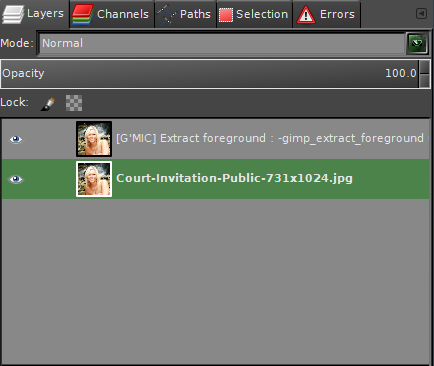
that is the tar file I compiled and when I clicked Apply gmic returned a new layer as below
Image

_________________
Image
No matter how much you push the envelope, it'll still be stationery.


Top
 Post subject: Re: [G'MIC] Smart foreground extraction tool
PostPosted: Sun Sep 14, 2014 3:36 am  (#62) 
Offline
GimpChat Member
User avatar

Joined: Jan 03, 2011
Posts: 1656
I suspect you have forgot to remove the compilation flag '-Dcimg_display=0' when compiling the plug-in. You need also to add the flag '-lgdi32' for the link.
Sorry to be so concise, but I can't help more right now.


Top
 Post subject: Re: [G'MIC] Smart foreground extraction tool
PostPosted: Sun Sep 14, 2014 8:45 am  (#63) 
Offline
GimpChat Member
User avatar

Joined: Mar 15, 2014
Posts: 115
Location: Brooklyn, NY
@Molly
Using the code pulled from git @ Sat Sep 13 23:38:06 2014 +0200
Image using a mask purely generated by Contours->Foreground extraction:
Image

For comparison, a composite mask where hair masking came from a high contrast, luminance channel:

Image

This is the hinting pattern fed to Foreground extract:
Image
Ah. I suppose I should touch upon cheating.
In both cases, I did not work at size, but on 5X images, as is my wont in all masking work, and since my interest centered on a principle edge, I did not wish to confuse the extraction tool (or myself) with irrelevant detail, so I suppressed interior features where it was easy to do with a quick plotting using the lasso tool, and then blurring irrelevant features into uniform obscurity.

I think with this tool, working oversize is mandatory, not just for the increased dexterity in plotting hints, but also the nature of watershed algorithms, which depend on connectivity - think flood fill or flood select tools - which try to join as many pixels of a particular character as possible without crossing over or including pixels of a different character. That is an intrinsically difficult problem with like pixels forming single pixel wide regions and joining at corners. Are two pixels touching at a corner, but otherwise disjoint, forming one region or two? You can argue both ways, making you a High Connectedness Fellow if you think one region, otherwise a Low Connectedness Fellow if you think two. Better to rise above the debate by enlarging the image five- or ten-fold.

Hair challenges this and any automated masking tool. I think Molly provided a nice test case because the depth of field was only narrow enough to keep the girl's face in focus; her hairstrands were already slightly out of focus and bleeding into the green vegetation behind her. Specular flares here but not there, slightly translucent hair also picking up green here, but not there. Single hair strands wisping off, disappearing and reappearing as the play of light changed. Watershed algorithms like to decide if a pixel is in this basin or that basin, so by nature tend to produce hard-edge masks. Hair looks terrible with hard edged masks - especially slightly de-focussed hair - but hard-edge masks make definite edges seem better.

So at the end of a day, it comes down to the same question of tirage. How much can I get away with an automated mask that, maybe gets me more than half the way home? I'd be happier still if it takes me two thirds of the way home, less happy if it only takes me a third of the way home, but, in any case, I'm happier than if I had to work the entire mask by hand.

For that reason, I'm very glad the tool is here, for however far it can carry me, and it is an interesting enough technical problem to keep a fair number of programmers busy. I think David has bought it along quite a ways, but Molly is right when she says there is quite a ways still to go.

GRO


Top
 Post subject: Re: [G'MIC] Smart foreground extraction tool
PostPosted: Sun Sep 14, 2014 8:55 am  (#64) 
Offline
GimpChat Member
User avatar

Joined: Apr 07, 2010
Posts: 14182
Thank you very much for your well explained reasoning. I will use the plug-in for now with less difficult tasks and leave the hairline particles for the programmers to figure out. :teeth
Thank you David for bringing it this far.

_________________
Image


Top
 Post subject: Re: [G'MIC] Smart foreground extraction tool
PostPosted: Sun Sep 14, 2014 9:21 am  (#65) 
Offline
GimpChat Member
User avatar

Joined: Nov 09, 2011
Posts: 726
Yeah, hair detection it's a real challenge for programmers.
The question is why the human brain can so easily detect hair in a photo and how to try to mimic the brain from the code. I have no idea about programming, but I think detecting patterns of continuous lines/edges with similar color might help.

_________________
Image
Be patient, English is not my language.


Top
 Post subject: Re: [G'MIC] Smart foreground extraction tool
PostPosted: Sun Sep 14, 2014 10:15 am  (#66) 
Offline
GimpChat Member
User avatar

Joined: Apr 07, 2010
Posts: 14182
Go for it YAFU... :teeth

_________________
Image


Top
 Post subject: Re: [G'MIC] Smart foreground extraction tool
PostPosted: Sun Sep 14, 2014 1:10 pm  (#67) 
Offline
GimpChat Member
User avatar

Joined: Nov 09, 2011
Posts: 726
Ok, I know. I just can collaborate saying stupid things like I said before. But perhaps David gets some inspiration from the stupid things that others say, like Dr. House :mrgreen:

_________________
Image
Be patient, English is not my language.


Top
 Post subject: Re: [G'MIC] Smart foreground extraction tool
PostPosted: Sun Sep 14, 2014 1:11 pm  (#68) 
Offline
GimpChat Member
User avatar

Joined: Apr 07, 2010
Posts: 14182
hey, nothing you say is stupid.

_________________
Image


Top
 Post subject: Re: [G'MIC] Smart foreground extraction tool
PostPosted: Sun Sep 14, 2014 1:30 pm  (#69) 
Offline
GimpChat Member
User avatar

Joined: Nov 09, 2011
Posts: 726
molly not worry, it is. Perhaps the word "stupid" is hard (I was only kidding), perhaps "obvious" is the word :bigthup

_________________
Image
Be patient, English is not my language.


Top
 Post subject: Re: [G'MIC] Smart foreground extraction tool
PostPosted: Sun Sep 14, 2014 1:38 pm  (#70) 
Offline
GimpChat Member
User avatar

Joined: Apr 07, 2010
Posts: 14182
:teeth me too

_________________
Image


Top
 Post subject: Re: [G'MIC] Smart foreground extraction tool
PostPosted: Sun Sep 14, 2014 3:13 pm  (#71) 
Offline
GimpChat Member
User avatar

Joined: Jan 03, 2011
Posts: 1656
I'm quite happy to say it, but I think the zoom feature is now completed for this filter :)

Now, you can zoom into the image using CTRL+mouse wheel, and navigate inside the zoomed view with the arrow keys.
I've just updated the filter few minutes ago, you are welcome to test this new version.

Beware that the 'ENTER' key now validates your extraction (so it quits the interactive window), while now the 'TAB' key is used to switch between the different view modes.

Please let me know if it works for you :)


Top
 Post subject: Re: [G'MIC] Smart foreground extraction tool
PostPosted: Sun Sep 14, 2014 4:49 pm  (#72) 
Offline
GimpChat Member
User avatar

Joined: Apr 07, 2010
Posts: 14182
Here is my next go. I had to do some touch ups but I am not really on to it yet.
Image

Image

_________________
Image


Top
 Post subject: Re: [G'MIC] Smart foreground extraction tool
PostPosted: Sun Sep 14, 2014 7:30 pm  (#73) 
Offline
GimpChat Member
User avatar

Joined: Nov 09, 2011
Posts: 726
Everything is working pretty well. I only have problems with "Ctrl+Mouse wheel". Sometimes it works fine, but it's like the Ctrl key stopped working and it start to move position in zoomed view instead of just zoom in/out. Something similar happens with Shift+Wheel, sometimes moves the image on the sides, but then it starts to move up/down whith Shift key pressed. Kubuntu linux 64 bits. Genius USB mouse.

_________________
Image
Be patient, English is not my language.


Top
 Post subject: Re: [G'MIC] Smart foreground extraction tool
PostPosted: Mon Sep 15, 2014 2:39 am  (#74) 
Offline
GimpChat Member
User avatar

Joined: Jan 03, 2011
Posts: 1656
You are right YAFU, I have the same problem sometimes. It made me realize that there was something missing in G'MIC : a way to 'flush' one user event directly in a G'MIC script.
I've done it now, but it means I need to rebuild new beta packages. I'll do it this morning.


Top
 Post subject: Re: [G'MIC] Smart foreground extraction tool
PostPosted: Mon Sep 15, 2014 2:53 am  (#75) 
Offline
GimpChat Member
User avatar

Joined: Jan 20, 2013
Posts: 14831
Location: roma, italy
@Molly

very well done, imo!

_________________
"Where am I ?"


Top
 Post subject: Re: [G'MIC] Smart foreground extraction tool
PostPosted: Mon Sep 15, 2014 6:33 am  (#76) 
Offline
GimpChat Member
User avatar

Joined: Apr 07, 2010
Posts: 14182
Thanks, it is still a bit ragged around the arms and hair but it is getting there.

_________________
Image


Top
 Post subject: Re: [G'MIC] Smart foreground extraction tool
PostPosted: Mon Sep 15, 2014 7:21 am  (#77) 
Offline
GimpChat Member
User avatar

Joined: Jan 03, 2011
Posts: 1656
I've done a small video to show all the improvements I've made these last days on this filter :

www.youtube.com Video from : www.youtube.com


It should be really easier to use. By the way, if you want to test the new version, you have to install the latest binaries of 1.6.0.1_beta,
posted today (at : https://sourceforge.net/projects/gmic/files/beta/).


Top
 Post subject: Re: [G'MIC] Smart foreground extraction tool
PostPosted: Mon Sep 15, 2014 8:10 am  (#78) 
Offline
GimpChat Member
User avatar

Joined: Sep 22, 2012
Posts: 2089
Location: US
Downloading as I write, although I haven't had any problems described by YAFU on my system.
Thanks for the new vid David! And the new handy tool.

15min later - Works smoothly :bigthup


Top
 Post subject: Re: [G'MIC] Smart foreground extraction tool
PostPosted: Mon Sep 15, 2014 8:27 am  (#79) 
Offline
GimpChat Member
User avatar

Joined: Nov 09, 2011
Posts: 726
It is the most easy and intuitive foreground extraction tool I've tried.
Apparently the problems with ctrl + wheel was solved installing the new beta and updating the filter.
Two requests. Would it be possible to modify the sliders (Feathering-Dilation) while the window is open with the photo and be able to refresh the changes in real time?
Would it be possible to obtain as result and in one step the Foreground and Background on separate layers?

_________________
Image
Be patient, English is not my language.


Top
 Post subject: Re: [G'MIC] Smart foreground extraction tool
PostPosted: Mon Sep 15, 2014 8:29 am  (#80) 
Offline
GimpChat Member
User avatar

Joined: Apr 07, 2010
Posts: 14182
the foreground and background on separate layers is a good idea YAFU.

_________________
Image


Top
Post new topic Reply to topic  [ 256 posts ]  Go to page Previous  1, 2, 3, 4, 5, 6, 7 ... 13  Next

All times are UTC - 5 hours [ DST ]


* Login  


Powered by phpBB3 © phpBB Group