It is currently Wed Aug 19, 2026 5:24 am


All times are UTC - 5 hours [ DST ]


Post new topic Reply to topic  [ 27 posts ]  Go to page 1, 2  Next
Author Message
 Post subject: new IAIN's filter SAVENOISEPRINT
PostPosted: Tue Nov 11, 2014 2:46 pm  (#1) 
Offline
GimpChat Member
User avatar

Joined: Jan 20, 2013
Posts: 14831
Location: roma, italy
Hi Iain,

just seen your new filter and tried immediately. It looks very good!

Input: old noisy image
Attachment:
Chiesa-A1_SANY0006.JPG
Chiesa-A1_SANY0006.JPG [ 361.09 KiB | Viewed 5356 times ]

2nd input: same image denoised
Attachment:
Chiesa-A1_SANY0006-denoised.JPG
Chiesa-A1_SANY0006-denoised.JPG [ 202.35 KiB | Viewed 5356 times ]


output of your new filter
Attachment:
Chiesa-A1_SANY0006-OUTnewIAINfilter.JPG
Chiesa-A1_SANY0006-OUTnewIAINfilter.JPG [ 195.84 KiB | Viewed 5356 times ]


nice result!
I will continue tomorrow with new tests.
Thanks, Iain

_________________
"Where am I ?"


Share on Facebook Share on Twitter Share on Orkut Share on Digg Share on MySpace Share on Delicious Share on Technorati
Top
 Post subject: Re: new IAIN's filter SAVENOISEPRINT
PostPosted: Wed Nov 12, 2014 5:07 am  (#2) 
Offline
GimpChat Member
User avatar

Joined: Jan 20, 2013
Posts: 14831
Location: roma, italy
a new experiment, Iain:

first note: the input images were originally quite big (2592*4608)
with these dimensions I get an execution error (first step), which says:
GIMP Error
Calling error for procedure 'gimp-drawable-width':
Procedure 'gimp-drawable-width' has been called with an invalid ID for argument 'drawable'. Most likely a plug-in is trying to work on a layer that doesn't exist any longer.

GIMP Error
Calling error for procedure 'gimp-drawable-height':
Procedure 'gimp-drawable-height' has been called with an invalid ID for argument 'drawable'. Most likely a plug-in is trying to work on a layer that doesn't exist any longer.

GIMP Error
Calling error for procedure 'gimp-drawable-bpp':
Procedure 'gimp-drawable-bpp' has been called with an invalid ID for argument 'drawable'. Most likely a plug-in is trying to work on a layer that doesn't exist any longer.


tried many times, same result

hence, I decided to downscale both
the filter ran correctly, no errors

input original:
Attachment:
2012-03-31_SAM_0080_original.JPG
2012-03-31_SAM_0080_original.JPG [ 561.1 KiB | Viewed 5252 times ]


input denoised (anisotropic):
Attachment:
2012-03-31_SAM_0080_denoised.JPG
2012-03-31_SAM_0080_denoised.JPG [ 494.73 KiB | Viewed 5252 times ]


output new filter:
Attachment:
2012-03-31_SAM_0080_afterIAINnewf.JPG
2012-03-31_SAM_0080_afterIAINnewf.JPG [ 518.21 KiB | Viewed 5252 times ]


the comparison is "subtle" with this experiment, because I started with a more "acceptable" image, nevertheless we can appreciate how the face (look at the glasses) has been restored in many details; good filter, Iain!

_________________
"Where am I ?"


Top
 Post subject: Re: new IAIN's filter SAVENOISEPRINT
PostPosted: Wed Nov 12, 2014 8:04 pm  (#3) 
Offline
GimpChat Member

Joined: Feb 13, 2013
Posts: 86
Thanks for testing. :hi5 I always worry it's not going to work for other people.

I'd also like to point out that the filter removes some of the artifacts from the smoothing. If you look at the white areas of the stained glass, the smoothed version sometimes has a subtle dark halo in the white area which my filter removes (by coincidence, not by design). It's most noticeable on the stylized clouds at the top.


Top
 Post subject: Re: new IAIN's filter SAVENOISEPRINT
PostPosted: Thu Nov 13, 2014 5:44 am  (#4) 
Offline
GimpChat Member
User avatar

Joined: Jan 20, 2013
Posts: 14831
Location: roma, italy
I like your filter, Iain!
For me, it works and works well.
Thanks

(btw: did you check why I got that strange gimp error when using the original big images?)

_________________
"Where am I ?"


Top
 Post subject: Re: new IAIN's filter SAVENOISEPRINT
PostPosted: Thu Nov 13, 2014 5:50 pm  (#5) 
Offline
GimpChat Member

Joined: Feb 13, 2013
Posts: 86
dinasset wrote:

(btw: did you check why I got that strange gimp error when using the original big images?)


Sorry, I got distracted by the results.

The filter has no output to gimp when analyzing the noise (pass 1) so you need to set the filter to 'new layers' to avoid the error. Or it tries to remove your layers.

At least that works for me when I tried and image of 2592*4608


Top
 Post subject: Re: new IAIN's filter SAVENOISEPRINT
PostPosted: Fri Nov 14, 2014 1:58 am  (#6) 
Offline
GimpChat Member
User avatar

Joined: Jan 20, 2013
Posts: 14831
Location: roma, italy
Thanks, Iain!
Yes, with "new active layer(s)" as output the filter works without any error.

(still for me it remains a mistery while the interface gives that error only if the images are large, with small it worked without any error... boh!)

_________________
"Where am I ?"


Top
 Post subject: Re: new IAIN's filter SAVENOISEPRINT
PostPosted: Sat Nov 15, 2014 12:28 am  (#7) 
Offline
GimpChat Member

Joined: Feb 13, 2013
Posts: 86
Just added MS_Patch_NR to my testing folder, which is an excellent noise reduction to do before Savenoiseprint. Have fun.


Top
 Post subject: Re: new IAIN's filter SAVENOISEPRINT
PostPosted: Sat Nov 15, 2014 5:25 am  (#8) 
Offline
GimpChat Member
User avatar

Joined: Jan 20, 2013
Posts: 14831
Location: roma, italy
OK, Iain
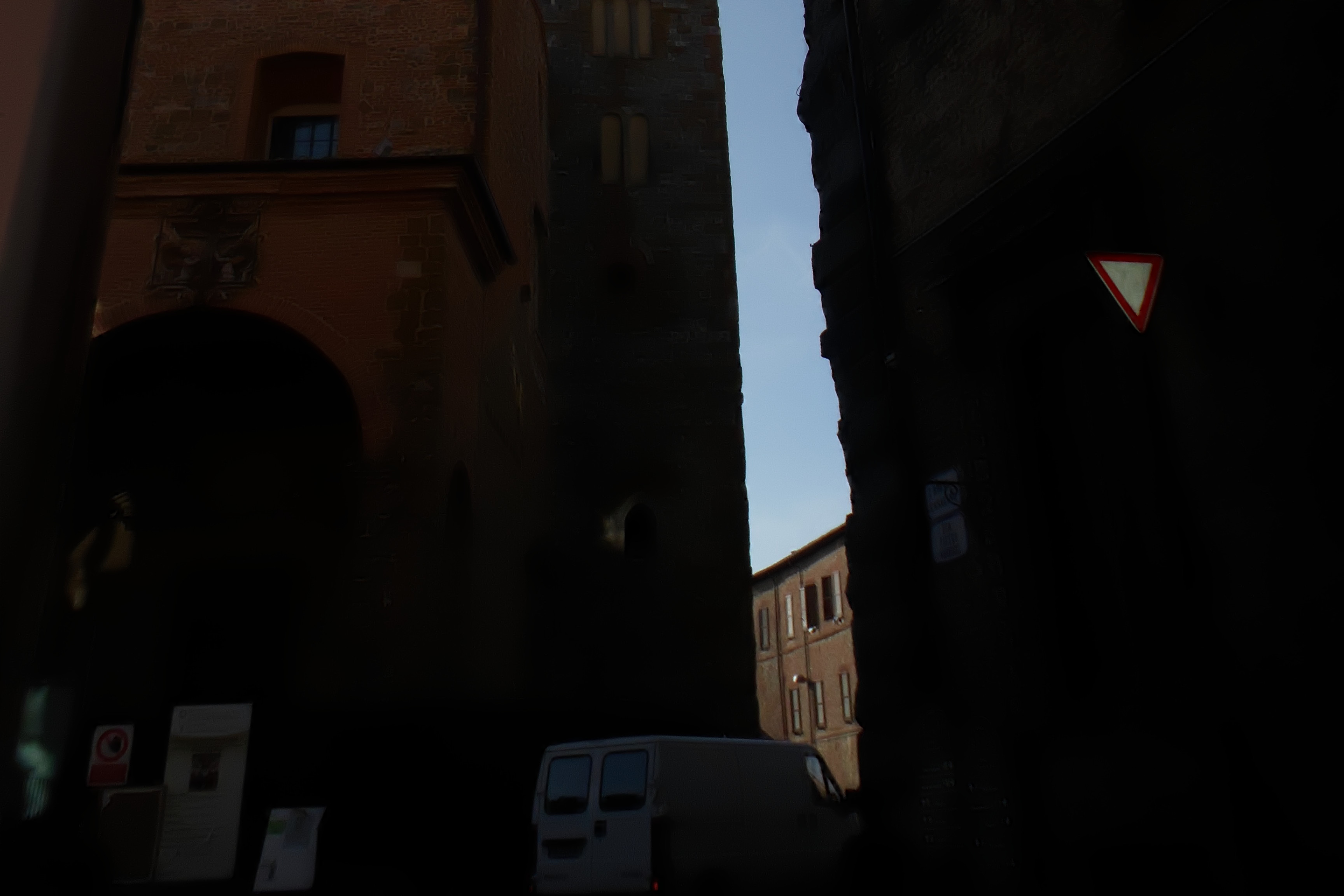
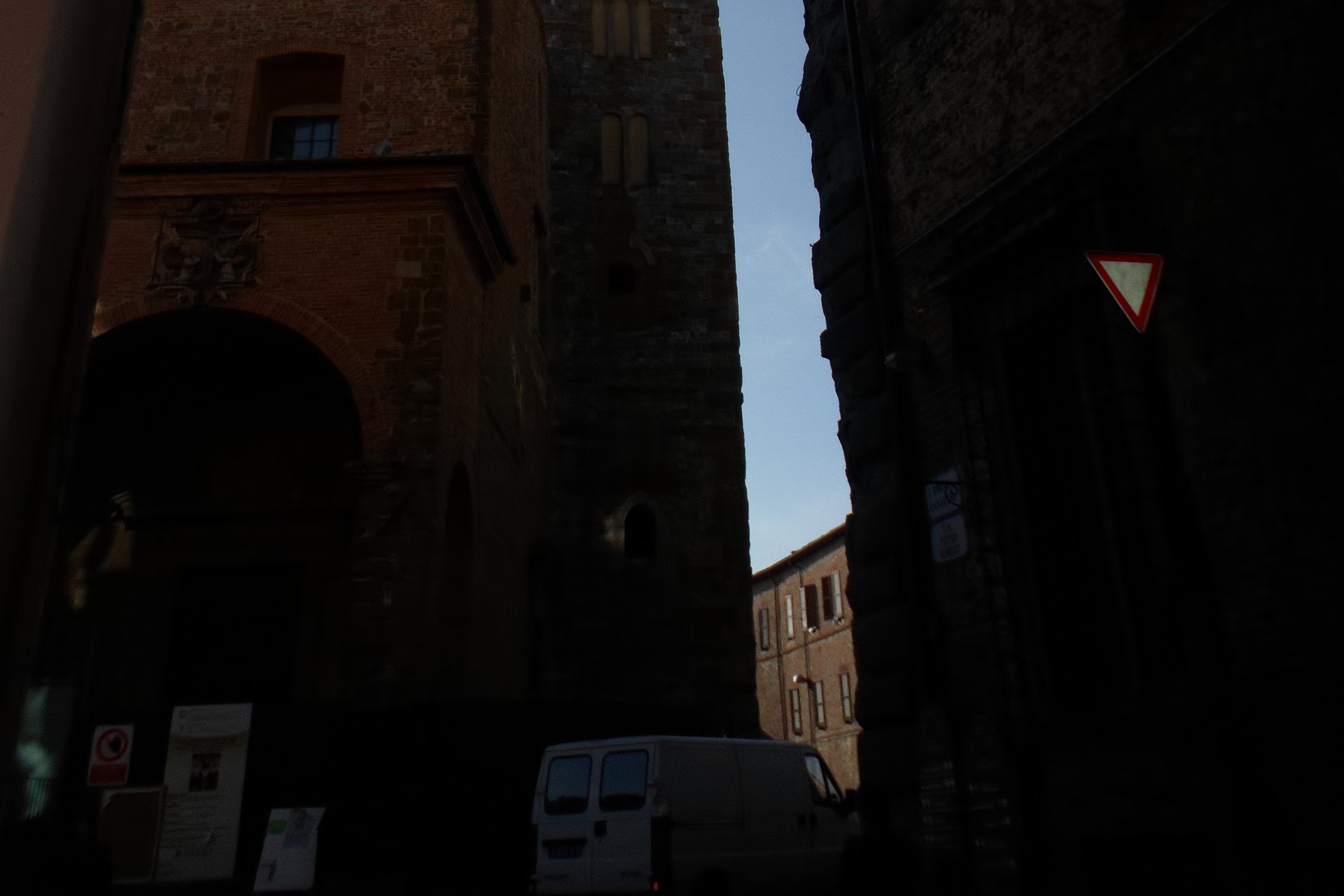
Back to my attempts:

original image (taken only the bottom part, not resized, not edited)
Attachment:
SAM_0564_bottom-original.JPG
SAM_0564_bottom-original.JPG [ 857.52 KiB | Viewed 5050 times ]


outcome after applying the new MS_patch_NR (parms=6,12,18,6,12)
Attachment:
SAM_0564_bottom-MSpatchNR.JPG
SAM_0564_bottom-MSpatchNR.JPG [ 506.84 KiB | Viewed 5050 times ]


outcome after applying avenoiseprint (on the two images, denoised on top of the original)
Attachment:
SAM_0564_bottom-savenoiseprint.JPG
SAM_0564_bottom-savenoiseprint.JPG [ 641.75 KiB | Viewed 5050 times ]


as one can see the second filter has restored the brick structure that was partially "destroyed" by the denoising filter; hence: EXCELLENT

A few notes:
1-I selected those parameters on the denoising filter to get an acceptable van at the bottom
2-it would be nice to have one (better: three) presets (if one: to use on photos with average noise; if three: to use on photos having light, average, strong noise)
I know that trying to find the correct parameters values is almost totally dependant on the photo itself and on the user's taste, but IMHO a filter should have defaults, which the user can anyhow modify, but which can be reset after each attempt)

Thanks Iain for your always excellent filters!

_________________
"Where am I ?"


Top
 Post subject: Re: new IAIN's filter SAVENOISEPRINT
PostPosted: Sat Nov 15, 2014 4:33 pm  (#9) 
Offline
GimpChat Member
User avatar

Joined: Nov 15, 2014
Posts: 875
My first attempt at SAVENOISEPRINT is part of the process of trying to make something of very poor quality family photographs of nearly 100 years old.
Attachment:
ketchyarmouth.jpg
ketchyarmouth.jpg [ 576.37 KiB | Viewed 5029 times ]

This is the original scanned photograph.
I applied a contrast mask, a curve adjustment to the base layer, then merged down.
Duplicated the base layer, then Iain's noise reduction, used savenoiseprint, reduced opacity to 59% and merged layers.
Here is the result. (I'm sure others can do much better!)
Attachment:
ketchyarmouthresult.jpg
ketchyarmouthresult.jpg [ 1.15 MiB | Viewed 5029 times ]


Top
 Post subject: Re: new IAIN's filter SAVENOISEPRINT
PostPosted: Sun Nov 16, 2014 2:59 am  (#10) 
Offline
GimpChat Member
User avatar

Joined: Jan 20, 2013
Posts: 14831
Location: roma, italy
my attempt, David
applied many "personal" filters (G'MIC based) to create the noisy base; out=A
then applied IAIN's new denoise; out=B
then applied IAIN's new savenoiseprint on (B) over (A); out=C
then applied again IAIN's savenoiseprint on (C) over (A)
final outcome

Attachment:
ketchyarmouthresult_DN.jpg
ketchyarmouthresult_DN.jpg [ 494.71 KiB | Viewed 5010 times ]


IDK if somehow acceptable

_________________
"Where am I ?"


Top
 Post subject: Re: new IAIN's filter SAVENOISEPRINT
PostPosted: Sun Nov 16, 2014 9:55 am  (#11) 
Offline
GimpChat Member
User avatar

Joined: Nov 15, 2014
Posts: 875
Good result - but I did say I was certain others could produce better results than I!!


Top
 Post subject: Re: new IAIN's filter SAVENOISEPRINT
PostPosted: Sun Nov 16, 2014 10:10 am  (#12) 
Offline
GimpChat Member
User avatar

Joined: Apr 07, 2010
Posts: 14182
david wrote:
My first attempt at SAVENOISEPRINT is part of the process of trying to make something of very poor quality family photographs of nearly 100 years old.
Attachment:
ketchyarmouth.jpg

This is the original scanned photograph.
I applied a contrast mask, a curve adjustment to the base layer, then merged down.
Duplicated the base layer, then Iain's noise reduction, used savenoiseprint, reduced opacity to 59% and merged layers.
Here is the result. (I'm sure others can do much better!)
Attachment:
ketchyarmouthresult.jpg

Very nice work David

_________________
Image


Top
 Post subject: Re: new IAIN's filter SAVENOISEPRINT
PostPosted: Sun Nov 16, 2014 10:47 am  (#13) 
Offline
GimpChat Member
User avatar

Joined: Jan 20, 2013
Posts: 14831
Location: roma, italy
david wrote:
Good result -...

Thanks David.

_________________
"Where am I ?"


Top
 Post subject: Re: new IAIN's filter SAVENOISEPRINT
PostPosted: Sun Nov 16, 2014 10:54 am  (#14) 
Offline
GimpChat Member
User avatar

Joined: Jan 20, 2013
Posts: 14831
Location: roma, italy
another attempt on using the two new Iain's filters on an image taken by myself.

original (simply reduced by cutting out the surrounding area, otherwise the image was too big; but no modification applied)
Attachment:
SAM_0558_cut_original.JPG
SAM_0558_cut_original.JPG [ 1.02 MiB | Viewed 2145 times ]


after applying the new denoising filter
Attachment:
SAM_0558_cut_ MS_Patch_NR 1.3,0,12.5,0,3,5.JPG
SAM_0558_cut_ MS_Patch_NR 1.3,0,12.5,0,3,5.JPG [ 976.09 KiB | Viewed 2145 times ]


after applying savenoiseprint on the two images above
Attachment:
SAM_0558_cut_savenoiseprint 1,0.5,1.4.JPG
SAM_0558_cut_savenoiseprint 1,0.5,1.4.JPG [ 1.02 MiB | Viewed 2145 times ]


details have been restored (look at the portal of the church); well done, Iain!

_________________
"Where am I ?"


Top
 Post subject: Re: new IAIN's filter SAVENOISEPRINT
PostPosted: Sun Nov 16, 2014 10:58 am  (#15) 
Offline
GimpChat Member
User avatar

Joined: Jan 20, 2013
Posts: 14831
Location: roma, italy
on the Iain's outcome, I then applied some personal filters -still using GMIC- to improve -to my taste- colours
here it is

Attachment:
SAM_0558_cut_final.JPG
SAM_0558_cut_final.JPG [ 1.02 MiB | Viewed 2145 times ]


but this has nothing to do with the topic, just for my pleasure

_________________
"Where am I ?"


Top
 Post subject: Re: new IAIN's filter SAVENOISEPRINT
PostPosted: Sun Nov 16, 2014 11:57 am  (#16) 
Offline
GimpChat Member
User avatar

Joined: Mar 01, 2014
Posts: 14136
Location: Spain, Aragón
I like your outcome Dinasset. I find so much improvement on the photo in definition, colours, light... Well done! :clap

_________________
Image

Gimp 2.10.30(samj) portable _ OS Windows 10 Home_ 64bits
Don’t be afraid to start over. It’s a new chance to rebuild what you want.


Top
 Post subject: Re: new IAIN's filter SAVENOISEPRINT
PostPosted: Sun Nov 16, 2014 2:41 pm  (#17) 
Offline
GimpChat Member
User avatar

Joined: Jan 20, 2013
Posts: 14831
Location: roma, italy
thanks Issabella, glad to know your taste is close to mine
(in case we are in the near future again co-teamer for some new plug-in/script, it's even more important, hehehe...)

_________________
"Where am I ?"


Top
 Post subject: Re: new IAIN's filter SAVENOISEPRINT
PostPosted: Thu Nov 20, 2014 9:32 am  (#18) 
Offline
GimpChat Member
User avatar

Joined: Jan 20, 2013
Posts: 14831
Location: roma, italy
I made another attempt on removing noise-restoring details

the original is almost bad
Attachment:
Pana_20061210_111_original.png
Pana_20061210_111_original.png [ 3.92 MiB | Viewed 2069 times ]


as first step, I used G'MIC smooth-skin (+ removing red-eyes simply desaturating)
Attachment:
Pana_20061210_111_smoothskin.png
Pana_20061210_111_smoothskin.png [ 4.12 MiB | Viewed 2069 times ]


then I used G'MIC smooth-wavelets (instead of Iain new MS patch nr)
Attachment:
Pana_20061210_111_haarsmoothing.png
Pana_20061210_111_haarsmoothing.png [ 1.99 MiB | Viewed 2069 times ]


(continuing...)

_________________
"Where am I ?"


Top
 Post subject: Re: new IAIN's filter SAVENOISEPRINT
PostPosted: Thu Nov 20, 2014 9:37 am  (#19) 
Offline
GimpChat Member
User avatar

Joined: Jan 20, 2013
Posts: 14831
Location: roma, italy
finally I run the new Iain's filter SAVENOISEPRINT having the last two outcomes previously shown an input layers
here the result

Attachment:
Pana_20061210_111_savenoiseprint.png
Pana_20061210_111_savenoiseprint.png [ 2.33 MiB | Viewed 2069 times ]


my comments:
A) details on the hair have been restored (good!)
B) details on the pull structure have not

could this be a useful info for the author (Iain)?

_________________
"Where am I ?"


Top
 Post subject: Re: new IAIN's filter SAVENOISEPRINT
PostPosted: Thu Nov 20, 2014 8:50 pm  (#20) 
Offline
GimpChat Member

Joined: Feb 13, 2013
Posts: 86
Thanks, dinasset. I appreciate you taking the time to test the filters.

I've been testing the filter on very lightly processed raw images and your images seem to be out of camera jpegs. This means that they already have a little bit of noise reduction on them so some of the details are already missing. It's helpful to see the results for completely different images, even if those results aren't quiet as good as I would like.

Another problem to overcome is the different amount of noise in the different tonal ranges of the image. I have used 'gamma' to bias the noise reduction towards the shadows (or not). savenoiseprint will work best if the gamma setting matches the gamma setting of the original noise reduction. If no gamma setting exists, use gamma = 1.

Another thing to consider is that once you have used savenoiseprint you can use a layer mask in GIMP to limit the visibility of the detail recovery to certain areas, which might mean you can use a lower setting than you would have before.


Top
Post new topic Reply to topic  [ 27 posts ]  Go to page 1, 2  Next

All times are UTC - 5 hours [ DST ]


* Login  


Powered by phpBB3 © phpBB Group



