It is currently Wed Jun 03, 2026 9:20 pm


All times are UTC - 5 hours [ DST ]


Post new topic Reply to topic  [ 5 posts ] 
Author Message
 Post subject: Trying to understand McGimp
PostPosted: Sun Nov 23, 2014 7:08 pm  (#1) 
Offline
Script Coder
User avatar

Joined: Feb 18, 2011
Posts: 4826
Location: Bendigo Vic. Australia
GIMP Version: 2.8.10
Operating System: Windows
GIMP Experience: Beginner Level


Could someone show me in McGimp what is listed in Edit/preferences/folders/brushes

_________________
Image
No matter how much you push the envelope, it'll still be stationery.


Share on Facebook Share on Twitter Share on Orkut Share on Digg Share on MySpace Share on Delicious Share on Technorati
Top
 Post subject: Re: Trying to understand McGimp
PostPosted: Sun Nov 23, 2014 8:24 pm  (#2) 
Offline
GimpChat Member
User avatar

Joined: Apr 08, 2010
Posts: 5420
Location: Northwest Ohio
I posted mine in the 'extrude from path' conversation.


Top
 Post subject: Re: Trying to understand McGimp
PostPosted: Sun Nov 23, 2014 8:43 pm  (#3) 
Offline
GimpChat Member

Joined: Mar 14, 2011
Posts: 998
Graechan wrote:
GIMP Version: 2.8.10
Operating System: Windows
GIMP Experience: Beginner Level


Could someone show me in McGimp what is listed in Edit/preferences/folders/brushes

Also, it's not Windows, it's Max OSX.


Top
 Post subject: Re: Trying to understand McGimp
PostPosted: Sun Nov 23, 2014 9:22 pm  (#4) 
Offline
Script Coder
User avatar

Joined: Feb 18, 2011
Posts: 4826
Location: Bendigo Vic. Australia
Partha I'm aware it's not Win,so that is why I'm trying to understand how it's system and user folders are set up

_________________
Image
No matter how much you push the envelope, it'll still be stationery.


Top
 Post subject: Re: Trying to understand McGimp
PostPosted: Mon Nov 24, 2014 12:37 am  (#5) 
Offline
Script Coder
User avatar

Joined: Feb 18, 2011
Posts: 4826
Location: Bendigo Vic. Australia
2Ton's brushes preferences were set up as below,this resulted in him having 3 copies of some brushes
Image
When he deleted 1 of the duplicated locations he was left with 2 copies,
I asked him to go to his userfolder/brushes and delete these folders if they are there this will hopefully leave him with 1 copy
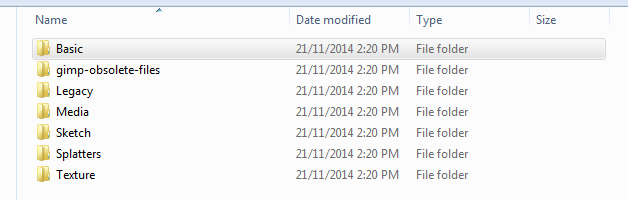
Image
Ideally he should only have his own added brushes in userfolder/brushes and his Preferences/Folders/brushes should look something like this↓
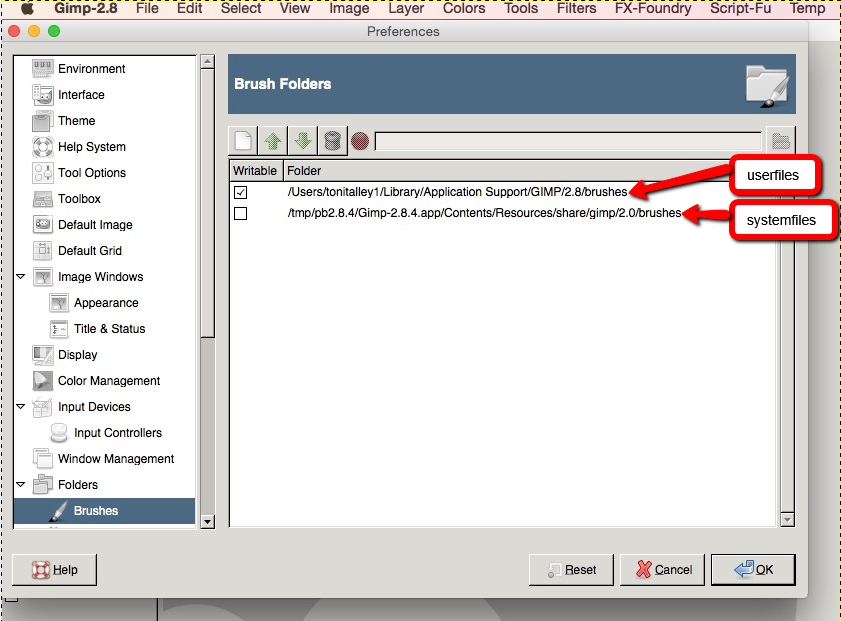
Image

_________________
Image
No matter how much you push the envelope, it'll still be stationery.


Top
Post new topic Reply to topic  [ 5 posts ] 

All times are UTC - 5 hours [ DST ]


* Login  


Powered by phpBB3 © phpBB Group


