It is currently Sun Aug 30, 2026 11:56 am


All times are UTC - 5 hours [ DST ]


Post new topic Reply to topic  [ 91 posts ]  Go to page 1, 2, 3, 4, 5  Next
Author Message
 Post subject: Any idea to do this in Gimp? (solved)
PostPosted: Tue Jan 20, 2015 2:09 am  (#1) 
Offline
GimpChat Member
User avatar

Joined: Mar 01, 2014
Posts: 14158
Location: Spain, Aragón
I've always liked this kind of graphics outcomes. Could somebody in the forum to do it in Gimp? It would be nice to learn how to do it. ;)


Attachments:
pelota-de-letras.jpg
pelota-de-letras.jpg [ 83.48 KiB | Viewed 4887 times ]

_________________
Image

Gimp 2.10.30(samj) portable _ OS Windows 10 Home_ 64bits
Don’t be afraid to start over. It’s a new chance to rebuild what you want.


Last edited by Issabella on Fri Jan 23, 2015 1:54 am, edited 1 time in total.
Share on Facebook Share on Twitter Share on Orkut Share on Digg Share on MySpace Share on Delicious Share on Technorati
Top
 Post subject: Re: Any idea to do this in Gimp?
PostPosted: Tue Jan 20, 2015 2:15 am  (#2) 
Offline
Administrator
User avatar

Joined: Aug 10, 2012
Posts: 14182
Location: Native to NYC living in Arizona, Gimp 2.8 - 3.0, Win 11 PC.
Issabella wrote:
I've always liked this kind of graphics outcomes. Could somebody in the forum to do it in Gimp? It would be nice to learn how to do it. ;)

That looks interesting.
I have a few ideas, but all of them seem very involved.
I think this could be something that Lyle might be able to figure out, using his knowledge of G'MIC and scripts of course.

_________________
Image
"A wise man learns more from a foolish question than a fool can learn from a wise answer"
Image


Top
 Post subject: Re: Any idea to do this in Gimp?
PostPosted: Tue Jan 20, 2015 3:22 am  (#3) 
Offline
GimpChat Member
User avatar

Joined: Jan 20, 2013
Posts: 14831
Location: roma, italy
sorry my friend, no ideas, it's not my area of interest (I'm more limited than you in exploring possibilities of gimp+gmic; mainly prone to photo-manipulation than objects-texts creations...)

_________________
"Where am I ?"


Top
 Post subject: Re: Any idea to do this in Gimp?
PostPosted: Tue Jan 20, 2015 3:30 am  (#4) 
Offline
GimpChat Member
User avatar

Joined: Mar 01, 2014
Posts: 14158
Location: Spain, Aragón
Thank you my friends. We will wait for Lyle's ideas. :)

_________________
Image

Gimp 2.10.30(samj) portable _ OS Windows 10 Home_ 64bits
Don’t be afraid to start over. It’s a new chance to rebuild what you want.


Top
 Post subject: Re: Any idea to do this in Gimp?
PostPosted: Tue Jan 20, 2015 6:41 am  (#5) 
Offline
Global Moderator
User avatar

Joined: Apr 01, 2012
Posts: 8466
Location: On the other side of your screen
I still cant do 3D letters without a script :oops: and it looks like a sphere (map to object) that is mostly transparent.


_________________
Image
Free Fun Photo Editing & resources
Poems from the Lord
Gimp Newby
Gimp version 3.2.4 and GMIC-Qt 4.0.2 OS :- Windows 10 Home 64


Top
 Post subject: Re: Any idea to do this in Gimp?
PostPosted: Tue Jan 20, 2015 6:49 am  (#6) 
Offline
Global Moderator
User avatar

Joined: May 16, 2010
Posts: 16168
I don't see how you could do this in GIMP, or even in MathMap because the fonts show all the different sides. Other than doing it all manually with a 3D program like Blender. You could probably do it in Hexagon also.

_________________
Image


Top
 Post subject: Re: Any idea to do this in Gimp?
PostPosted: Tue Jan 20, 2015 6:57 am  (#7) 
Offline
GimpChat Member
User avatar

Joined: Mar 01, 2014
Posts: 14158
Location: Spain, Aragón
Thank you Sallyanne and Rod. I thought that making lettering random and then en 3d. we'd get a square 3d-letter layer, and then to do the sphere. After that duplicate the layer and reduce the size to do the same process for the inner sphere and like that until to get the shape. So, I'm talking for talking as I have no idea about the process. :) :oops:

_________________
Image

Gimp 2.10.30(samj) portable _ OS Windows 10 Home_ 64bits
Don’t be afraid to start over. It’s a new chance to rebuild what you want.


Top
 Post subject: Re: Any idea to do this in Gimp?
PostPosted: Tue Jan 20, 2015 7:02 am  (#8) 
Offline
Global Moderator
User avatar

Joined: May 16, 2010
Posts: 16168
sallyanne wrote:
I still cant do 3D letters without a script :oops:

Very simple tutorial for you. :)

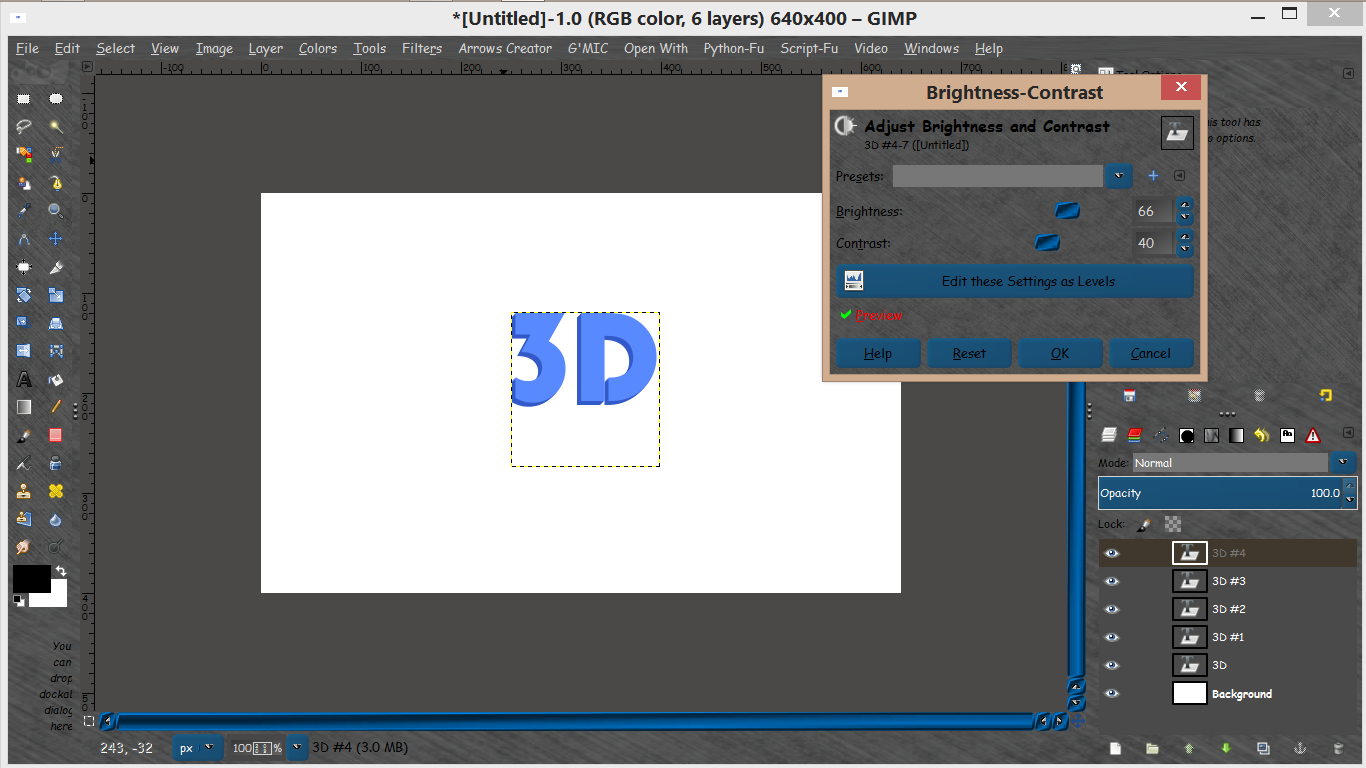
Create your text.
Duplicate the text and move it 1 pixel whichever way you want it to 3D from. For instance 1 pixel up and 1 pixel right would make the 3D from the bottom left. :bigthup
Lastly on the top text layer just go to Colors> brightness and contrast. Play with the settings.
You could also stroke the top text layer and fade the opacity a bit.
Results after 5 layers -
Image

_________________
Image


Top
 Post subject: Re: Any idea to do this in Gimp?
PostPosted: Tue Jan 20, 2015 9:27 am  (#9) 
Offline
Global Moderator
User avatar

Joined: Apr 01, 2012
Posts: 8466
Location: On the other side of your screen
Thanks Rod. I only tried with one extra layer. Didn't realize it had to be done a few times. Will try again soon.


Hope Lyle shows us how to do this orb with letters or other soon.

Will have to give him a challenge - or maybe it will be easy for him

_________________
Image
Free Fun Photo Editing & resources
Poems from the Lord
Gimp Newby
Gimp version 3.2.4 and GMIC-Qt 4.0.2 OS :- Windows 10 Home 64


Top
 Post subject: Re: Any idea to do this in Gimp?
PostPosted: Tue Jan 20, 2015 9:52 am  (#10) 
Offline
GimpChat Member
User avatar

Joined: Mar 01, 2014
Posts: 14158
Location: Spain, Aragón
Yes Sallyanne, it would be a huge challenge. Even without orientation of the lettering, it'd be very nice and cool. I've tried it but no success. :(

_________________
Image

Gimp 2.10.30(samj) portable _ OS Windows 10 Home_ 64bits
Don’t be afraid to start over. It’s a new chance to rebuild what you want.


Top
 Post subject: Re: Any idea to do this in Gimp?
PostPosted: Tue Jan 20, 2015 9:57 am  (#11) 
Offline
GimpChat Member
User avatar

Joined: Aug 30, 2012
Posts: 2174
I think there could be a way to achieve this though not without a loss of quality, I'm up for the challenge.

I'm thinking random font script, G'mics packed sprite script and then a 3d script. create several layers this way and then use the map object script but manipulate the image with polar coordinates first prior to mapping.

I shall have a look when I get chance.

_________________
Image


Top
 Post subject: Re: Any idea to do this in Gimp?
PostPosted: Tue Jan 20, 2015 10:04 am  (#12) 
Offline
GimpChat Member
User avatar

Joined: Mar 01, 2014
Posts: 14158
Location: Spain, Aragón
That could work he4rty! I think. :hi5

_________________
Image

Gimp 2.10.30(samj) portable _ OS Windows 10 Home_ 64bits
Don’t be afraid to start over. It’s a new chance to rebuild what you want.


Top
 Post subject: Re: Any idea to do this in Gimp?
PostPosted: Tue Jan 20, 2015 10:44 am  (#13) 
Offline
GimpChat Member
User avatar

Joined: Aug 30, 2012
Posts: 2174
I've had a very quick play, maybe more spacing between the letters, but the hardest part is trying to get the quality of the image back.

Image

_________________
Image


Top
 Post subject: Re: Any idea to do this in Gimp?
PostPosted: Tue Jan 20, 2015 11:09 am  (#14) 
Offline
Global Moderator
User avatar

Joined: Apr 01, 2012
Posts: 8466
Location: On the other side of your screen
very good he4rty :bigthup

Have followed your tut now Rod and I think I got it. Have to do it better though yet.

_________________
Image
Free Fun Photo Editing & resources
Poems from the Lord
Gimp Newby
Gimp version 3.2.4 and GMIC-Qt 4.0.2 OS :- Windows 10 Home 64


Top
 Post subject: Re: Any idea to do this in Gimp?
PostPosted: Tue Jan 20, 2015 11:33 am  (#15) 
Offline
GimpChat Member
User avatar

Joined: Mar 01, 2014
Posts: 14158
Location: Spain, Aragón
That is fantastic! he4rty you almost got it! :clap
what a tutorial do you mean, Sallyanne? I haven't seen it. Thanks

_________________
Image

Gimp 2.10.30(samj) portable _ OS Windows 10 Home_ 64bits
Don’t be afraid to start over. It’s a new chance to rebuild what you want.


Top
 Post subject: Re: Any idea to do this in Gimp?
PostPosted: Tue Jan 20, 2015 1:34 pm  (#16) 
Offline
GimpChat Member
User avatar

Joined: Sep 24, 2010
Posts: 12840
Cool Hearty; not sure why you think I know how to do this. lol

Maybe, start with a fill of random overlapping text like this then run Mathmap's Distort>Sphere might work too. :)

_________________
Lyle

Psalm 109:8

Image


Top
 Post subject: Re: Any idea to do this in Gimp?
PostPosted: Tue Jan 20, 2015 2:12 pm  (#17) 
Offline
Global Moderator
User avatar

Joined: May 16, 2010
Posts: 16168
he4rty wrote:
I've had a very quick play, maybe more spacing between the letters, but the hardest part is trying to get the quality of the image back.

[ Image ]

An excellent start though! :bigthup

_________________
Image


Top
 Post subject: Re: Any idea to do this in Gimp?
PostPosted: Tue Jan 20, 2015 5:27 pm  (#18) 
Offline
GimpChat Member
User avatar

Joined: Sep 24, 2010
Posts: 12840
The problem I'm seeing now that I've tried to do this is the cylinder rotation ability of the characters on the side of the sphere desired. That cannot be done really in bitmap editors like GIMP easily if at all. I did try by creating selections then stroking with varying size and jitter (distorted aspect ratio out the outside smaller characters). First I created a character brush using these characters. I then created a seamless texture and sphere mapped the texture, but, as mentioned, the distortion was bad. I then commenced to stroke the sphere shell as stated. Now if some how skew and size stroking selections can be automated, then maybe you can get a good result in the GIMP. Anyway, I included the seamless texture and gih in the attached zip file. Below's my sorry result. lol

:)


Attachments:
text_sphere.png
text_sphere.png [ 1.4 MiB | Viewed 2289 times ]
Colorful 3D Alphabet.7z [1.81 MiB]
Downloaded 119 times

_________________
Lyle

Psalm 109:8

Image
Top
 Post subject: Re: Any idea to do this in Gimp?
PostPosted: Tue Jan 20, 2015 5:35 pm  (#19) 
Offline
GimpChat Member
User avatar

Joined: Aug 30, 2012
Posts: 2174
I'm liking the results Lyle.

_________________
Image


Top
 Post subject: Re: Any idea to do this in Gimp?
PostPosted: Tue Jan 20, 2015 5:45 pm  (#20) 
Offline
GimpChat Member
User avatar

Joined: Sep 24, 2010
Posts: 12840
Thanks he4rty; I'm thinking now that if you used two different brushes (edge inferred alphabet for the outer ring and then skewed aspect ration as you close in to the center until the aspect ration is 1 to 1 at the center would get you the sphere result desired, but then again, I could be wrong. lol

:)

_________________
Lyle

Psalm 109:8

Image


Top
Post new topic Reply to topic  [ 91 posts ]  Go to page 1, 2, 3, 4, 5  Next

All times are UTC - 5 hours [ DST ]


* Login  


Powered by phpBB3 © phpBB Group