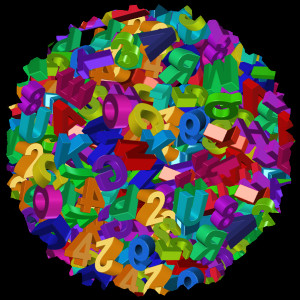
Ok here is the Wallace brush (sized at 75 -spaced at 144) on a transparent layer.
I created the one layer by making (painting with the brush) a sort of spiral from the outside in. DONT overlap any letters.

Now Filters>Map>Map Object. Map to sphere - new image - transparent bg.

You get something like this -

now it's cleanup time.

Remove all outside globe imperfections, partial letters, blurs ect..ect.
Until you have something like this image.

Now just duplicate the layer two more times and rotate each layer so their all different.


You could also use Filters>Enhance>Unsharp mask before duping. It may be sharper that way.
If you need to fill the center and other areas like i did, just use the brush on 3 new transparent layers at the sizes you need.
Place each new brush size layer above the corresponding distance ratio (xcf included so you understand that better).
And volia! You have a pretty decent looking letter/number globular cluster.

This was a quicky. With first brush computations you may be able to get a starting globe with NO imperfections and no blurs! I am sure this can be done in GIMP now with just GIMP tools and of course Wallace's brush. Thanks Wallace!.
Have fun with it.
XCF workspace file-
 Login
Login Register
 Tweets
 FAQ
FAQ Advanced Search