It is currently Tue Jun 23, 2026 6:19 pm


All times are UTC - 5 hours [ DST ]


Post new topic Reply to topic  [ 130 posts ]  Go to page Previous  1, 2, 3, 4, 5, 6, 7  Next
Author Message
 Post subject: Re: Request beta-testers for upcoming G'MIC 1.6.1.0
PostPosted: Wed Mar 04, 2015 10:34 am  (#81) 
Offline
GimpChat Member
User avatar

Joined: Sep 24, 2010
Posts: 12780
Just downloaded the new beta David. Noticed that there were fewer support dlls (cool). It does appear spiffier for anisotrophic smoothing anyway. Thanks for the update. :)

_________________
Lyle

Psalm 109:8

Image


Top
 Post subject: Re: Request beta-testers for upcoming G'MIC 1.6.1.0
PostPosted: Wed Mar 04, 2015 1:17 pm  (#82) 
Offline
GimpChat Member
User avatar

Joined: Nov 15, 2014
Posts: 875
I have just downloaded G'MIC 1.6.1.0. (Linux - 32 Bit).

I ran the "Extract Foreground" filter and had a peculiar result. The upper layer (foreground) is displaced to the left and up with respect to the background layer.
I have tried this on three photographs with similar results.
Is it something I am doing wrong, or is their a problem?
I used the previous version earlier today with no problems.

I have attached a screen shot of the result.

david.


Attachments:
Screenshot.png
Screenshot.png [ 1.68 MiB | Viewed 1706 times ]
Top
 Post subject: Re: Request beta-testers for upcoming G'MIC 1.6.1.0
PostPosted: Wed Mar 04, 2015 4:38 pm  (#83) 
Offline
GimpChat Member

Joined: Jan 21, 2013
Posts: 33
Hello everyone,

G'mic 1.6.1.0 beta (win64.exe) on Windows 7 - 64 bit (Gimp 2.8.14)

I have just discovered a regression regarding the extract foreground interactive tool.
Whenever I close this filter (that is, its window) to apply the effect a window with an error always pops up (Invalid selection [points] (undefined label 'points').
Needless to say, this filter is not applied to my image (the one opened with Gimp).
I have tried several times and this error always occurs on my computer.

I have recorded a video with all my steps:
https://dl.dropboxusercontent.com/u/309 ... _ERROR.avi

Here is the log regarding this error on Windows 7 - 64 bit:
https://dl.dropboxusercontent.com/u/309 ... ound_error


Top
 Post subject: Re: Request beta-testers for upcoming G'MIC 1.6.1.0
PostPosted: Wed Mar 04, 2015 4:42 pm  (#84) 
Offline
GimpChat Member
User avatar

Joined: Nov 15, 2014
Posts: 875
Since my last message (above) I have replaced gmic_gimp with version 1.6.0.4 and run foreground extract on the same photograph with perfect results.
The Gimp was telling me that there was an update available, which of course was 1.6.1.0 beta. I downloaded this and installed it. (In case I had a bad download previously.)
When I ran foreground extract I had the same problem as previously.

I hate to be the bringer of bad news!

david.

edit: I should have added that it looks perfect in the preview window.


Top
 Post subject: Re: Request beta-testers for upcoming G'MIC 1.6.1.0
PostPosted: Wed Mar 04, 2015 5:02 pm  (#85) 
Offline
GimpChat Member
User avatar

Joined: Jan 03, 2011
Posts: 1656
Thanks David, thanks Silvio.
Indeed, I confirm a regression for the 'Extract Foreground' filter. I'm working on a fix.
I think this can be fixed simply, just by updating the filters, no needs to reinstall a new binary.
Thanks a lot for your report !
I'll post a message when the fix is ready.


Top
 Post subject: Re: Request beta-testers for upcoming G'MIC 1.6.1.0
PostPosted: Wed Mar 04, 2015 5:09 pm  (#86) 
Offline
GimpChat Member
User avatar

Joined: Jan 03, 2011
Posts: 1656
OK, so please press the 'Filter update' button, the filter should work again, as in the previous version.


Top
 Post subject: Re: Request beta-testers for upcoming G'MIC 1.6.1.0
PostPosted: Wed Mar 04, 2015 5:31 pm  (#87) 
Offline
GimpChat Member

Joined: Jan 21, 2013
Posts: 33
yep (just updated): now extract foreground (Windows 7 - 64 bit) works again :-)


Top
 Post subject: Re: Request beta-testers for upcoming G'MIC 1.6.1.0
PostPosted: Thu Mar 05, 2015 1:03 am  (#88) 
Offline
GimpChat Member

Joined: Feb 13, 2013
Posts: 86
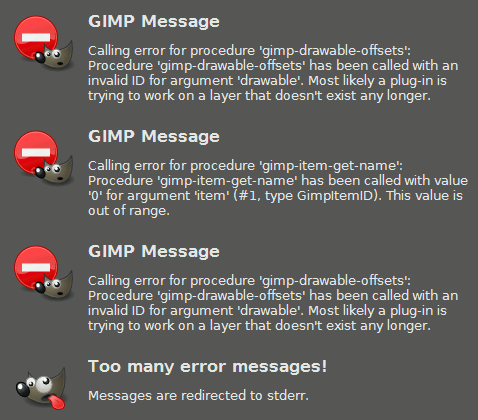
Not sure if mentioned already but, when 'new layer' is set as output and it outputs multiple layers I get this error:

Image


Top
 Post subject: Re: Request beta-testers for upcoming G'MIC 1.6.1.0
PostPosted: Thu Mar 05, 2015 2:38 am  (#89) 
Offline
GimpChat Member
User avatar

Joined: Jan 03, 2011
Posts: 1656
Indeed Iain, nice catch !
I'll fix this and post updated plug-in binaries today !


Top
 Post subject: Re: Request beta-testers for upcoming G'MIC 1.6.1.0
PostPosted: Thu Mar 05, 2015 3:38 am  (#90) 
Offline
GimpChat Member
User avatar

Joined: Jan 03, 2011
Posts: 1656
Binaries have been updated, the bug should be fixed now :)


Top
 Post subject: Re: Request beta-testers for upcoming G'MIC 1.6.1.0
PostPosted: Thu Mar 05, 2015 4:05 am  (#91) 
Offline
GimpChat Member
User avatar

Joined: Nov 15, 2014
Posts: 875
Ronounours,

Downloaded, installed and tested. Extract foreground is perfect again.

Many thanks for all your hard work.

david.


Top
 Post subject: Re: Request beta-testers for upcoming G'MIC 1.6.1.0
PostPosted: Thu Mar 05, 2015 4:58 am  (#92) 
Offline
GimpChat Member
User avatar

Joined: Jan 20, 2013
Posts: 14831
Location: roma, italy
I do not know whether this behaviour is typical of this beta version or of any version:
I am referring to gimp-g'mic plug-in as called inside a gimp script
(plug-in-gmic 1 inImage inLayer 1 .....)
I noticed that the layer indicated in the call is irrelevant, the G'MIC plug-in is in any case applied to the active layer whatsoever.
To get really the G'MIC plug-in work on the mentioned layer one has to previously enter a gimp script command to set that layer as the active layer.
I -repeat- do not know whether this is and has to be the correct behavoiur.
I just noticed this fact today.
If so, then the interface could remove the layer name from the parameters to avoid generating (at least initial) confusion to the user-scripter.
If not, then there is maybe a correction to apply to the beta.
(I can't perform a regression, I just have installed and running only the beta).
Thanks

_________________
"Where am I ?"


Top
 Post subject: Re: Request beta-testers for upcoming G'MIC 1.6.1.0
PostPosted: Thu Mar 05, 2015 7:25 am  (#93) 
Offline
GimpChat Member
User avatar

Joined: Jan 03, 2011
Posts: 1656
Yes dinasset, the 'drawable' argument has been unused since the beginning.


Top
 Post subject: Re: Request beta-testers for upcoming G'MIC 1.6.1.0
PostPosted: Thu Mar 05, 2015 9:41 am  (#94) 
Offline
GimpChat Member
User avatar

Joined: Jan 20, 2013
Posts: 14831
Location: roma, italy
Ronounours wrote:
Yes dinasset, the 'drawable' argument has been unused since the beginning.

thanks!
(I have to double-check some old call, until today probably I used it on the last generated -active- layer)

_________________
"Where am I ?"


Top
 Post subject: Re: Request beta-testers for upcoming G'MIC 1.6.1.0
PostPosted: Thu Mar 05, 2015 6:01 pm  (#95) 
Offline
GimpChat Member

Joined: Jan 21, 2013
Posts: 33
Hello everyone,

G'MIC 1.6.1.0 - beta (win64.exe) - Gimp 2.8.14
Windows 7 - 64 bit

1)
Filter > Circle abstraction always crashes when I apply it (no matter the jpeg image I have tried to work with)

Here is a video with all my steps until the final error:
https://dl.dropboxusercontent.com/u/309 ... _CRASH.mp4

Here is the log for this oroblem:
https://dl.dropboxusercontent.com/u/309 ... tion_crash

2)
Filter > Layer to colors always fail to extract the red color on my image (tried many settings of this filter with different number of layers: 8 - 16 etc):
https://dl.dropboxusercontent.com/u/309 ... _IMAGE.jpg

With other jpg - png images this filter works extremely fine (every RGB color is extracted correctly on its layer).
However with this image (color_layer_gmic_image), which has been created with Gimp previously to test this filter, the red circle is never extracted and it is always contained on the same layer with the white background color:
Image

I have tried to extract this red circle with Krita 2.9 (split layer feature and its works as expected in its own layer).

As regards this second problem (regarding the layers to colors filter), I suppose it is not a real "regression" concerning G'MIC 1.6.1.0 :)

My best regards !


Top
 Post subject: Re: Request beta-testers for upcoming G'MIC 1.6.1.0
PostPosted: Fri Mar 06, 2015 3:37 am  (#96) 
Offline
GimpChat Member
User avatar

Joined: Jan 03, 2011
Posts: 1656
Thanks again Silvio for your report.
I've been able to reproduce the bug on my Win7 64bits too, so I'll try to find what is going on (no idea right now :) ).
Concerning the 'Colors to layers' filter, I'm not surprised. Your input image contains anti-aliased colors, which actually means a lot of pixels with different colors, and potentially a lot of output layers (each output layer contains a 'pure' color only).
As there is a limit in the number of output layers, the filter does not have the time to output the layer with the red circle, because before reaching the corresponding pixels, it has already detected pixels with at least 16 different colors, and when the maximum number of layers is reached, it stops the decomposition.


Top
 Post subject: Re: Request beta-testers for upcoming G'MIC 1.6.1.0
PostPosted: Fri Mar 06, 2015 6:18 am  (#97) 
Offline
GimpChat Member
User avatar

Joined: Jan 03, 2011
Posts: 1656
Hi Silvio,
I've finally figured out why the 'circle-abstraction' bug was happening only on Windows, and only for big images :)
On Windows, 'long integer' are still coded with 32bits, even on a 64bits system, that was a part of the problem.
I've fixed my source code, and I'll release new binaries for Win32/64 and Linux32/64 platforms this afternoon.
So Thanks again !!

Silvio, do you have a webpage or something related (a URL) that I could use to put you in the list of contributors ?
Thanks!


Top
 Post subject: Re: Request beta-testers for upcoming G'MIC 1.6.1.0
PostPosted: Fri Mar 06, 2015 12:56 pm  (#98) 
Offline
GimpChat Member
User avatar

Joined: Apr 08, 2010
Posts: 5420
Location: Northwest Ohio
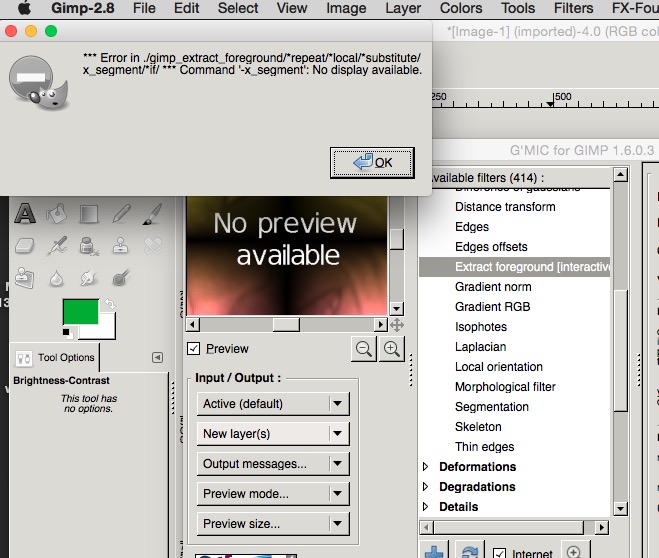
Any clue what this is about? I really had wanted to try out the foreground extract in G'MiC. I was using a one layer photo and did click OK, then nothing happened and I was back with the original photo. I am using Partha's McGimp, currently G'MIC has 414 filters after refresh.
Image


Top
 Post subject: Re: Request beta-testers for upcoming G'MIC 1.6.1.0
PostPosted: Fri Mar 06, 2015 1:26 pm  (#99) 
Offline
GimpChat Member
User avatar

Joined: Jan 03, 2011
Posts: 1656
2ton, I believe the Partha's build does not enable the G'MIC interactive display (it requires X11 on Mac), that is what the error message tells at least.
You won't be able to run any of the interactive filters unfortunately with this build.


Top
 Post subject: Re: Request beta-testers for upcoming G'MIC 1.6.1.0
PostPosted: Fri Mar 06, 2015 2:17 pm  (#100) 
Offline
GimpChat Member

Joined: Jan 21, 2013
Posts: 33
Hello David,

> Silvio, do you have a webpage or something related (a URL) that I could use to put you in the list of contributors ?

I don't own any webpage (or URL).
My full name is: Silvio Grosso (thanks ! ) :-)

> As there is a limit in the number of output layers, the filter (layer to colors) does not have the time to output the layer with the red circle, because before reaching the corresponding pixels, it has already detected pixels with at least 16 different colors, and when the maximum number of layers is reached, it stops the decom

BTW, in order to try to extract my red color circle I have tried to increase to 32 the number of maximum layers in the filter layer to colors.
As soon as I have applied this change (32 layers as maximum number), my computer went completeley crazy (It completely freaked out ):-)
Everything stopped working: even the clock stopped running (it was stucked at 20:30 time...) and the ctr+alt+del (task manager) to Kill Gimp (G'mic) didn't work either.
In the end, after more than 10 minutes, while I was totally unable to run anything, I had to shut down my Windows 7 system altogether :-)

EDIT:
This nasty crash *always* occurs: the "color to layers filter" starts running (to try to insert the 32 layers in tha stack) and, in just a few seconds, it stops also Windows 7 - 64 bit (taskmgr is not working either and you are forced to shut down the system...).
CPU Intel I7 2630QM (plus I have 8 Gb Ram and Geforce GT 540M GPU)

With Krita 2.9 the "split layer" option takes around 20-30 seconds with this same jpeg image (Windows 7 - 64 bit as usual).

Image

Maybe, on Windows (64 bit), this filter should be modified in order to *not* allow (tpye in the filter box) to insert more than a certain amount of layers (just in case some user wants to experiment with its settings...). Or, perhaps, today, you have already fixed this same problem (I am referring to your message regarding Windows long integer still coded with 32 bits) ? :-)


Last edited by slv grosso on Fri Mar 06, 2015 3:38 pm, edited 1 time in total.

Top
Post new topic Reply to topic  [ 130 posts ]  Go to page Previous  1, 2, 3, 4, 5, 6, 7  Next

All times are UTC - 5 hours [ DST ]


* Login  


Powered by phpBB3 © phpBB Group