It is currently Sat Aug 08, 2026 12:24 pm


All times are UTC - 5 hours [ DST ]


Post new topic Reply to topic  [ 36 posts ]  Go to page 1, 2  Next
Author Message
 Post subject: Wavelet-Denoise-jthack-windows 32 and 64 bit
PostPosted: Fri Mar 27, 2015 6:17 am  (#1) 
Offline
Global Moderator
User avatar

Joined: May 16, 2010
Posts: 16152
32 and 64 bit compiles are attached. I did not include the src files.

USE AT YOUR OWN RISK!
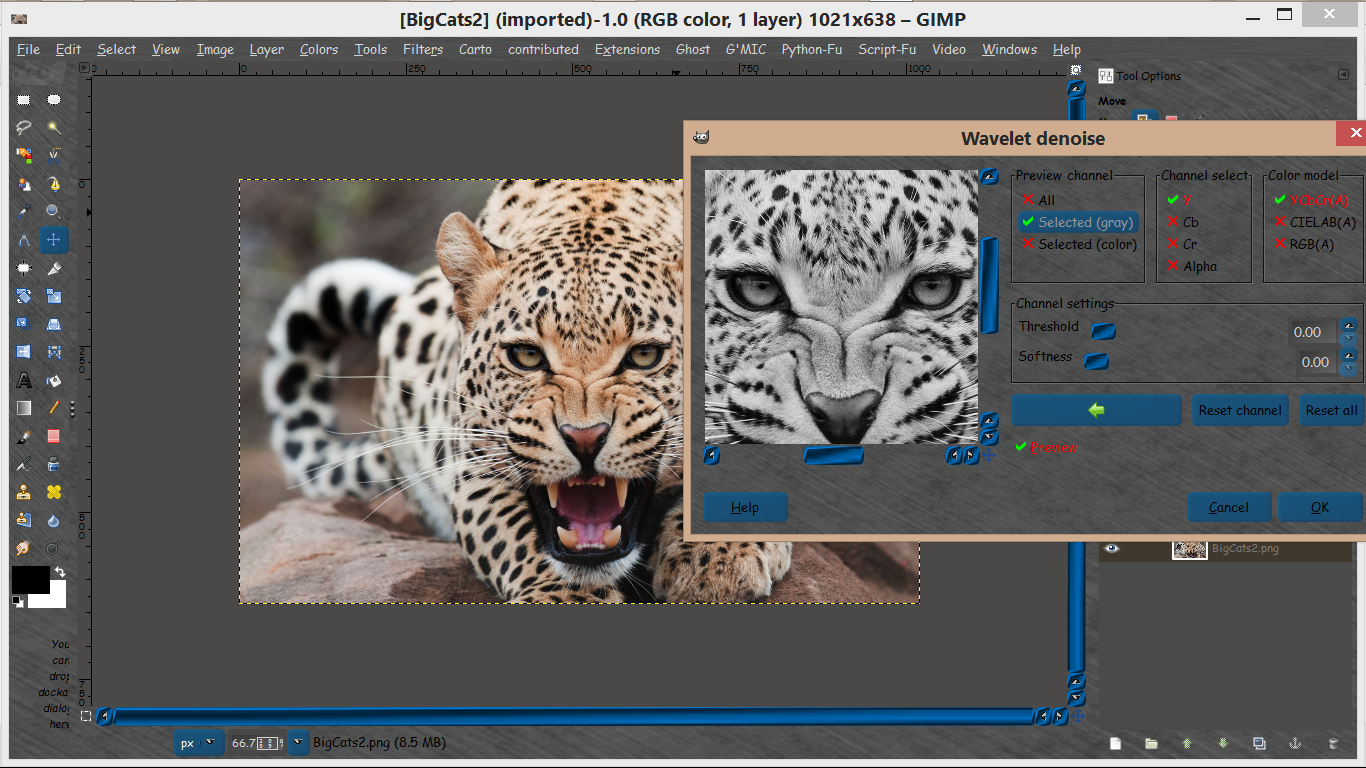
Filters>Enhance>Wavelet Denoise
This is the 64 bit version on my machine in GIMP-2.8.14.
Image

Download here- No DOS popup
viewtopic.php?f=9&t=12220&p=165762#p165762

_________________
Image


Share on Facebook Share on Twitter Share on Orkut Share on Digg Share on MySpace Share on Delicious Share on Technorati
Top
 Post subject: Re: Wavelet-Denoise-jthack-windows 32 and 64 bit
PostPosted: Fri Mar 27, 2015 6:29 am  (#2) 
Offline
GimpChat Member
User avatar

Joined: Sep 24, 2010
Posts: 12825
What's different from the hack then from the original wavelet-denoise (which I do use often) Rod? :)

_________________
Lyle

Psalm 109:8

Image


Top
 Post subject: Re: Wavelet-Denoise-jthack-windows 32 and 64 bit
PostPosted: Fri Mar 27, 2015 6:33 am  (#3) 
Offline
Script Coder
User avatar

Joined: Dec 27, 2014
Posts: 508
This "hack" just allows the filter settings to be passed as parameters if the filter is invoked non-interactively, as requested by Dinasset in this thread:
viewtopic.php?f=8&t=12199


Top
 Post subject: Re: Wavelet-Denoise-jthack-windows 32 and 64 bit
PostPosted: Fri Mar 27, 2015 6:36 am  (#4) 
Offline
Global Moderator
User avatar

Joined: May 16, 2010
Posts: 16152
lylejk wrote:
What's different from the hack then from the original wavelet-denoise (which I do use often) Rod? :)

For scripting i suppose. :)

_________________
Image


Top
 Post subject: Re: Wavelet-Denoise-jthack-windows 32 and 64 bit
PostPosted: Fri Mar 27, 2015 6:39 am  (#5) 
Offline
Script Coder
User avatar

Joined: Dec 27, 2014
Posts: 508
@Rod
Why do you get a Dos window pop up when you run it?
I'm sure that didn't happen with the stable version on Windoze.
Are you sure you compiled this right?


Top
 Post subject: Re: Wavelet-Denoise-jthack-windows 32 and 64 bit
PostPosted: Fri Mar 27, 2015 6:42 am  (#6) 
Offline
Global Moderator
User avatar

Joined: May 16, 2010
Posts: 16152
jontait2 wrote:
@Rod
Why do you get a Dos window pop up when you run it?
I'm sure that didn't happen with the stable version on Windoze.
Are you sure you compiled this right?

Yes i did i just forgot to add something to the makefile for windows compiles. :) The window can be minimized if it's in the way.
I actually could not get the 32 bit to compile until i used a different bat file to run msys.

_________________
Image


Top
 Post subject: Re: Wavelet-Denoise-jthack-windows 32 and 64 bit
PostPosted: Fri Mar 27, 2015 7:17 am  (#7) 
Offline
GimpChat Member
User avatar

Joined: Jan 20, 2013
Posts: 14831
Location: roma, italy
many many thanks, Rod! this completes the gift from jontait2 (source modified)
and allows me to perform tests in a much more comfortable manner...

_________________
"Where am I ?"


Top
 Post subject: Re: Wavelet-Denoise-jthack-windows 32 and 64 bit
PostPosted: Fri Mar 27, 2015 7:34 am  (#8) 
Offline
Global Moderator
User avatar

Joined: May 16, 2010
Posts: 16152
dinasset wrote:
many many thanks, Rod! this completes the gift from jontait2 (source modified)
and allows me to perform tests in a much more comfortable manner...

No problem. Glad to help. :)

_________________
Image


Top
 Post subject: Re: Wavelet-Denoise-jthack-windows 32 and 64 bit
PostPosted: Fri Mar 27, 2015 9:13 am  (#9) 
Offline
GimpChat Member
User avatar

Joined: Jan 20, 2013
Posts: 14831
Location: roma, italy
jontait2 wrote:
This "hack" just allows the filter settings to be passed as parameters if the filter is invoked non-interactively, as requested by Dinasset in this thread:
http://gimpchat.com/viewtopic.php?f=8&t=12199

jontait2, I would like to check my understanding about the parameters (according to your explanations on previous topic)

assuming to work on colour images I have to:

- select colour-mode (0=YCBCR, 1=RGB, 2=LAB), that's apparently easy except for
my first question: online the sequence is YCRCB, CIELAB, RGB
which one of the two sequences is correct? or both because the online CIELAB is set as 2 in the program and RGB as 1?
- ignore the following 4 parameters because related to grey images
- insert the threshold value on colour-thresholds 0,1,2 either for (respectively)
Y,Cb,Cr if YCBCR selected
R,G,B if RGB selected
L,a,b if CIELAB
is it correct?
- ignore the 4° value ?
- same as above for softness ?

sorry for my ignorance, but I want to start my tests appropriately
many thans

_________________
"Where am I ?"


Top
 Post subject: Re: Wavelet-Denoise-jthack-windows 32 and 64 bit
PostPosted: Fri Mar 27, 2015 9:51 am  (#10) 
Offline
Script Coder
User avatar

Joined: Dec 27, 2014
Posts: 508
AFAIK your interpretation is correct:
- the colour modes are { 0=YCBCR, 1=RGB, 2=LAB } internally to the plug-in and (now) in the PDB interface, but they are displayed in the order "YCRCB, CIELAB, RGB" on the dialog window for some reason (thats just the way the author laid-out the dialog!);
- if you're using RGB images, you can ignore the gray settings (just set them to zero when your script invokes the plugin);
- "color threshold" values [0],[1] and [2] correspond to the 3 channels for whichever color-mode you choose; value [3] is not used;
- same for the "color low" values (ie. "softness" in the dialog).

As I said before, I tested this on Linux and it all seemed to work alright ..
In fact its probably best to try it with the Script-Fu Console first.


Top
 Post subject: Re: Wavelet-Denoise-jthack-windows 32 and 64 bit
PostPosted: Fri Mar 27, 2015 10:28 am  (#11) 
Offline
GimpChat Member
User avatar

Joined: Jan 20, 2013
Posts: 14831
Location: roma, italy
thanks, jontait2, now I'm more confident

_________________
"Where am I ?"


Top
 Post subject: Re: Wavelet-Denoise-jthack-windows 32 and 64 bit
PostPosted: Sun Mar 29, 2015 5:55 am  (#12) 
Offline
Global Moderator
User avatar

Joined: May 16, 2010
Posts: 16152
Try this one dinasset. :)
I recompiled both 32 and 64 .The 64 bit works ok (no DOS popup) see screenshot post #1.
Attachment:
wavelet-denoise-0.3.1-Win32-jthack-noDOS.zip [23.93 KiB]
Downloaded 392 times

Attachment:
wavelet-denoise-0.3.1-Win64Bit-NoDOS.zip [70.34 KiB]
Downloaded 972 times

_________________
Image


Top
 Post subject: Re: Wavelet-Denoise-jthack-windows 32 and 64 bit
PostPosted: Sun Mar 29, 2015 11:01 am  (#13) 
Offline
GimpChat Member
User avatar

Joined: Jan 20, 2013
Posts: 14831
Location: roma, italy
Thanks Rod,
replaced the .exe but unfortunately in win-32 the DOS pop-up is still there, both online and called, I'm sorry...


Edit:
I did the following attempts:
1-simply replacing the .exe with the new one and restarting Gimp: no success
2-removing also the new, restarted Gimp, checked it was no there (no "phantom" copy anywhere), then reintroduced, restarted Gimp: no success
3-the surgical remedy: removing the pluginrc file, restarted Gimp (which reloaded all the plug-ins): no success
sorry...

_________________
"Where am I ?"


Top
 Post subject: Re: Wavelet-Denoise-jthack-windows 32 and 64 bit
PostPosted: Sun Mar 29, 2015 12:58 pm  (#14) 
Offline
GimpChat Member
User avatar

Joined: Jan 20, 2013
Posts: 14831
Location: roma, italy
to exclude the possibility that the problem is in my system:
might someone who is running Windows 7 - 32bits install and test the 32-bit version of this modified .exe plug-in ?
thanks

_________________
"Where am I ?"


Top
 Post subject: Re: Wavelet-Denoise-jthack-windows 32 and 64 bit
PostPosted: Sun Mar 29, 2015 1:55 pm  (#15) 
Offline
GimpChat Member
User avatar

Joined: Jul 06, 2013
Posts: 2662
Location: California
Rod wrote:
jontait2 wrote:
@Rod
Why do you get a Dos window pop up when you run it?
I'm sure that didn't happen with the stable version on Windoze.
Are you sure you compiled this right?

Yes i did i just forgot to add something to the makefile for windows compiles. :) The window can be minimized if it's in the way.
I actually could not get the 32 bit to compile until i used a different bat file to run msys.


The window can't be minimized, but it can be closed which will then stop the plug in all together.


Top
 Post subject: Re: Wavelet-Denoise-jthack-windows 32 and 64 bit
PostPosted: Sun Mar 29, 2015 2:04 pm  (#16) 
Offline
GimpChat Member
User avatar

Joined: Jan 20, 2013
Posts: 14831
Location: roma, italy
thanks mackenzieh, so the problem is in the version itself, not in my pc

_________________
"Where am I ?"


Top
 Post subject: Re: Wavelet-Denoise-jthack-windows 32 and 64 bit
PostPosted: Sun Mar 29, 2015 3:28 pm  (#17) 
Offline
GimpChat Member
User avatar

Joined: Jul 06, 2013
Posts: 2662
Location: California
dinasset wrote:
thanks mackenzieh, so the problem is in the version itself, not in my pc


Yeah, the problem is the version itself. I'm running the plugin on windows 7 64bit and I have that preview window as well. You can't minimize it; only close it. You're welcome, dinasset. :)


Top
 Post subject: Re: Wavelet-Denoise-jthack-windows 32 and 64 bit
PostPosted: Mon Mar 30, 2015 12:18 am  (#18) 
Offline
GimpChat Member
User avatar

Joined: Jan 20, 2013
Posts: 14831
Location: roma, italy
may I ask a question to jontait2 (or to whomever likes to answer)?
AFAIK the Lab (and CIELAB) representation has L represented by positive values 0-100
while a* and b* have both negative and positive values because they represent duopoles
(a* = green-magenta and b* blue-yellow)
hence my question:
in the denoise filter only positive values can be entered both in a* and b* fields;
does this mean that the value entered is applicable at the same time to:
- noise in green AND magenta (if entered into a* field)
- noise in blue AND yellow (if entered into b* field)?
and therefore it is not possible with CIELAB selected enter different noise limits for magenta and green? (or blue and yellow)?
thanks

_________________
"Where am I ?"


Top
 Post subject: Re: Wavelet-Denoise-jthack-windows 32 and 64 bit
PostPosted: Mon Mar 30, 2015 3:51 am  (#19) 
Offline
Script Coder
User avatar

Joined: Dec 27, 2014
Posts: 508
Quote:
it is not possible with CIELAB selected enter different noise limits for magenta and green

Correct!
The filter denoises individual channels. If you select the CIELAB model, the channels are L*,a* and b*, by definition. Thats what the filter works upon. It does not re-interpret those channels as RGB or any other form, just as the selected model specifies. So if a certain pixel has an a* value of -43 before running the filter, it will still have a value of -43 afterwards, unless it gets altered by the de-noising. The filter does not change the hue per se, it just reduces localized variations in each channel.
If you want to to de-noise green and magenta separately you would have to use a different color model.


Top
 Post subject: Re: Wavelet-Denoise-jthack-windows 32 and 64 bit
PostPosted: Mon Mar 30, 2015 4:07 am  (#20) 
Offline
GimpChat Member
User avatar

Joined: Jan 20, 2013
Posts: 14831
Location: roma, italy
thanks jontait2!
this means also that:
- because G+M = total chroma as well as B+Y = total chroma, whichever value I enter into one of those it means "chroma noise reduction"

_________________
"Where am I ?"


Top
Post new topic Reply to topic  [ 36 posts ]  Go to page 1, 2  Next

All times are UTC - 5 hours [ DST ]


* Login  


Powered by phpBB3 © phpBB Group