It is currently Tue Aug 18, 2026 3:12 pm


All times are UTC - 5 hours [ DST ]


Post new topic Reply to topic  [ 78 posts ]  Go to page Previous  1, 2, 3, 4
Author Message
 Post subject: Re: Transfer colors from one image to another.
PostPosted: Fri Apr 03, 2015 12:09 pm  (#61) 
Offline
GimpChat Member
User avatar

Joined: Nov 09, 2011
Posts: 726
I tried your settings and still have the problem. Apparently using a flat layer color causing the problem. Works well using another photo as a transfer layer.

_________________
Image
Be patient, English is not my language.


Top
 Post subject: Re: Transfer colors from one image to another.
PostPosted: Fri Apr 03, 2015 2:02 pm  (#62) 
Offline
GimpChat Member
User avatar

Joined: Jan 03, 2011
Posts: 1656
Interesting YAFU.
Indeed a single-colored layer is a quite dramatic case for the algorithm I use, so I need to understand how I can find a work-around for that particular case.
As I said, this is still an experimental filter :)


Top
 Post subject: Re: Transfer colors from one image to another.
PostPosted: Fri Apr 03, 2015 2:18 pm  (#63) 
Offline
Script Coder
User avatar

Joined: May 07, 2014
Posts: 4527
Location: Canada
Ronounours wrote:
Interesting YAFU.
Indeed a single-colored layer is a quite dramatic case for the algorithm I use, so I need to understand how I can find a work-around for that particular case.
As I said, this is still an experimental filter :)

What is the algorithm that is used here? I am curious, also what are the settings for? Why don't I see a change when I try to change them...tia
btw, your avatar is so freakn trippy.

_________________
TinT


Top
 Post subject: Re: Transfer colors from one image to another.
PostPosted: Fri Apr 03, 2015 2:29 pm  (#64) 
Offline
GimpChat Member
User avatar

Joined: Jan 03, 2011
Posts: 1656
Actually, I cannot say too much about the algorithm right now, mainly because :

1. This is still highly experimental, not finalized, and subject to changes.
2. We are in the process of writing a scientific publication about it and we surely don't want to inspire other people (faster than us:) ) too much.

This is work still in progress. When our paper will be published somewhere I will tell more, of course, probably with a detailed blog post.
I'm sorry about that, but writing scientific papers is one of my main activity (I'm evaluated on that particular aspect of my work), so I can't let other people re-use what I've done and publish the same idea quicker than me.
What I can tell is that the algorithm is far from being trivial (that's why it takes quite a lot of time to render), and it already competes with state-of-the-art automatic color transfer techniques published by others (except for single colored layer of course :D).


Last edited by Ronounours on Fri Apr 03, 2015 3:41 pm, edited 1 time in total.

Top
 Post subject: Re: Transfer colors from one image to another.
PostPosted: Fri Apr 03, 2015 3:19 pm  (#65) 
Offline
Script Coder
User avatar

Joined: May 07, 2014
Posts: 4527
Location: Canada
Cool, i understand.
And hope to see it get recognition.

_________________
TinT


Top
 Post subject: Re: Transfer colors from one image to another.
PostPosted: Fri Apr 03, 2015 3:22 pm  (#66) 
Offline
GimpChat Member
User avatar

Joined: Apr 07, 2010
Posts: 14182
I agree Tran. it is kind of cool.

_________________
Image


Top
 Post subject: Re: Transfer colors from one image to another.
PostPosted: Fri Apr 03, 2015 3:51 pm  (#67) 
Offline
GimpChat Member
User avatar

Joined: Jan 03, 2011
Posts: 1656
A quick info : I've done a small update of the filter that should fix the problem of transferring the colors from a single-colored layer.
Should also fix similar cases when the reference layer has very few different colors in it.
You should try to refresh your filters and test again, to see if that works for you.
Thanks again for your feedback!


Top
 Post subject: Re: Transfer colors from one image to another.
PostPosted: Fri Apr 03, 2015 4:20 pm  (#68) 
Offline
GimpChat Member
User avatar

Joined: Nov 15, 2014
Posts: 875
Curiously a single coloured layer will work if any of the components are close to saturation (i.e. hex ff).
For instance a plain colour of 00f0f0 worked OK, but 00e0e0 failed.
Tomorrow I may spend some more time exploring the limits.
However, another great filter!

david.


Top
 Post subject: Re: Transfer colors from one image to another.
PostPosted: Fri Apr 03, 2015 4:23 pm  (#69) 
Offline
GimpChat Member
User avatar

Joined: Nov 15, 2014
Posts: 875
Ignore my last comments - my trials overlapped the reply from Ronounours!
I shall do the update in the morning!

david.


Top
 Post subject: Re: Transfer colors from one image to another.
PostPosted: Fri Apr 03, 2015 5:12 pm  (#70) 
Offline
GimpChat Member
User avatar

Joined: Apr 07, 2010
Posts: 14182
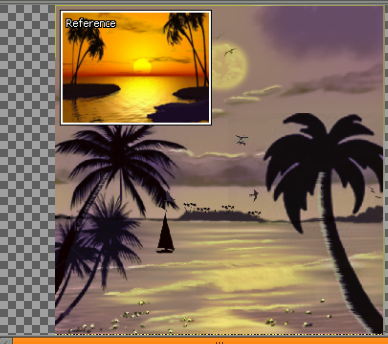
I just tried it again with my silhouette painting with a yellow source picture and it turned out quite nice.
Image

_________________
Image


Top
 Post subject: Re: Transfer colors from one image to another.
PostPosted: Fri Apr 03, 2015 5:50 pm  (#71) 
Offline
GimpChat Member
User avatar

Joined: Nov 09, 2011
Posts: 726
@Ronounours, Now it works! :bigthup

_________________
Image
Be patient, English is not my language.


Top
 Post subject: Re: Transfer colors from one image to another.
PostPosted: Sat Apr 04, 2015 2:38 am  (#72) 
Offline
GimpChat Member
User avatar

Joined: Nov 15, 2014
Posts: 875
Working perfectly (and quicker?).

david.


Top
 Post subject: Re: Transfer colors from one image to another.
PostPosted: Sat Apr 04, 2015 7:32 am  (#73) 
Offline
GimpChat Member
User avatar

Joined: Jan 31, 2015
Posts: 146
I havent updated it yet, but I've been testing it extensively combining my digital paintings and photos containing the same subject with a different colour scheme. Been getting very mixed results. Here's one that didn't work out too well.

Source photo:

Image

Target painting:

Image

Result:

Image

Will update it and try a few more.


Top
 Post subject: Re: Transfer colors from one image to another.
PostPosted: Sun Apr 05, 2015 4:39 am  (#74) 
Offline
GimpChat Member
User avatar

Joined: Nov 15, 2014
Posts: 875
Tried again this morning and getting a preview error (see attached screen-dump).
Is it "finger trouble" on my part or is there a problem?

david.


Attachments:
Screenshot.png
Screenshot.png [ 289.42 KiB | Viewed 2806 times ]
Top
 Post subject: Re: Transfer colors from one image to another.
PostPosted: Sun Apr 05, 2015 5:18 am  (#75) 
Offline
GimpChat Member
User avatar

Joined: Jan 03, 2011
Posts: 1656
@david : I've updated the filter yesterday but it now uses some new features that are able only in latest pre-release binaries.
I suggest you re-install the latest plug-in binary to make it work again.


Top
 Post subject: Re: Transfer colors from one image to another.
PostPosted: Sun Apr 05, 2015 5:45 am  (#76) 
Offline
GimpChat Member
User avatar

Joined: Nov 15, 2014
Posts: 875
@Ronounours: Updated the plug-in and it is now working OK.
Many thanks for that, but perhaps you should sleep occasionally so that the rest of us could keep up with you!

david.


Top
 Post subject: Re: Transfer colors from one image to another.
PostPosted: Sun Apr 05, 2015 5:49 am  (#77) 
Offline
GimpChat Member
User avatar

Joined: Jan 03, 2011
Posts: 1656
Well, as I've said, this is a *very* experimental filter, so it still requires I finely tune the code to make it work better.
And sometimes, I need to modify the internal G'MIC engine for that, hence the new releases :)


Top
 Post subject: Re: Transfer colors from one image to another.
PostPosted: Fri Apr 08, 2016 4:29 am  (#78) 
Offline
GimpChat Member
User avatar

Joined: Mar 28, 2016
Posts: 312
Location: Netherlands
:bump

David

Thank you very much. I didn't know this works interactive now. I didn't notice that change :oops: . This is approximately the same what I asked for in Pixl.us three months ago. How long works it this way? If it then worked like this, I wouldn't have asked you about it.

:jumpclap :tyspin


Top
Post new topic Reply to topic  [ 78 posts ]  Go to page Previous  1, 2, 3, 4

All times are UTC - 5 hours [ DST ]


* Login  


Powered by phpBB3 © phpBB Group