It is currently Tue Jul 21, 2026 11:53 am


All times are UTC - 5 hours [ DST ]


Post new topic Reply to topic  [ 44 posts ]  Go to page 1, 2, 3  Next
Author Message
 Post subject: My way to make easily a planet (short tutorial) Update
PostPosted: Wed Apr 29, 2015 4:25 am  (#1) 
Offline
GimpChat Member
User avatar

Joined: Mar 01, 2014
Posts: 14073
Location: Spain, Aragón
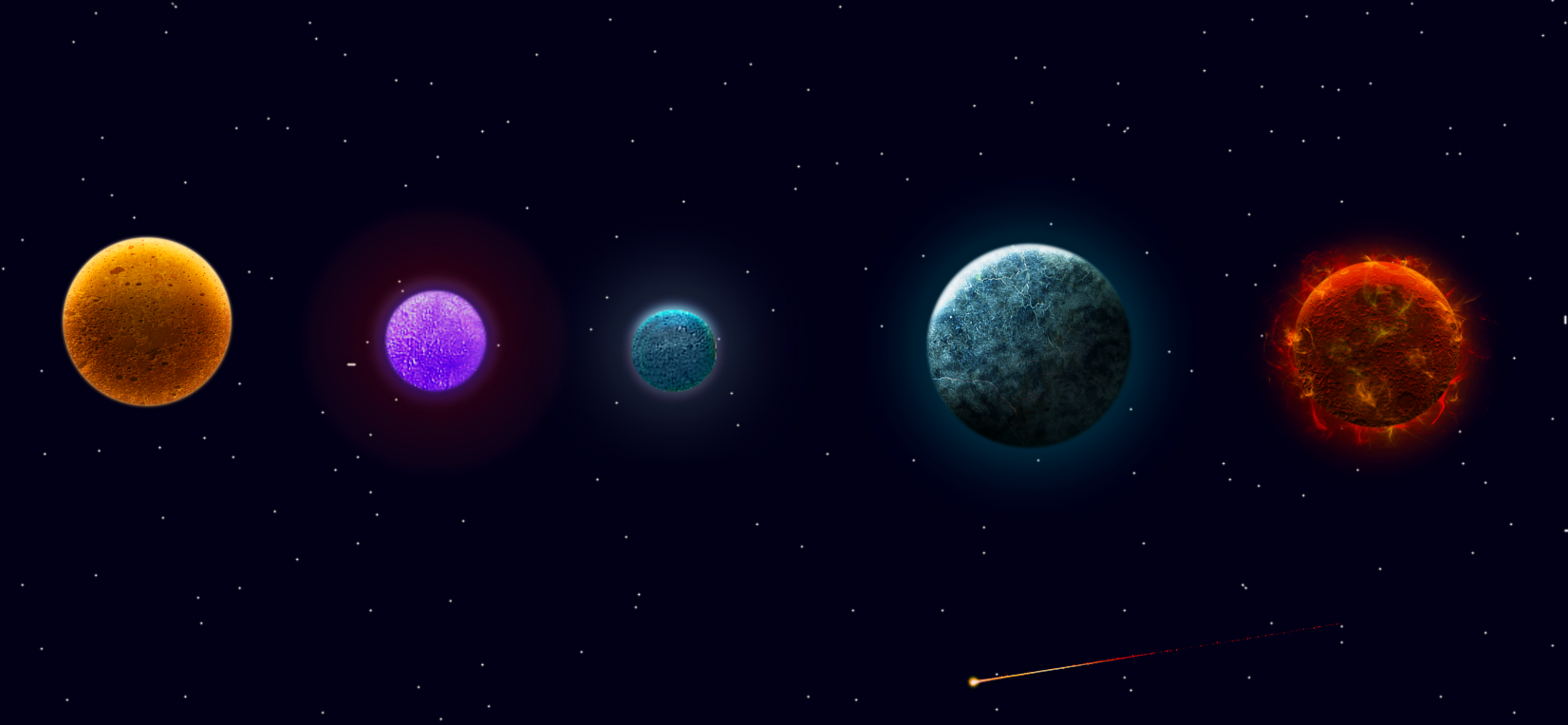
For those who like planets.
(Thanks MarFisk for reminding me the missing step)
Simple steps:
1. Search for appropriate images. (rocks, strata, minerals…)
2. Search for other images to mix with the previous ones. (specific attractive minerals)
3. Make with the two images chosen, one unique image. Use layer modes. (multiply…)
4. Now you can use Dinasset's script (Globe View of an Image), or go to Filters, Map, Map object, sphere.
5. When you have your planet created, duplicate the planet layer. Go to Filters – Blur – Gaussian Blur and apply to below layer radius 13.
6. Highlight the upper planet layer and go to Filters – Map – Bump Map and it opens a window. In Bump Map select blurred layer; Map Type Sinusoidal; Depth 8. Say OK.
7. New from Visible.
8. Play with bright and contrast to give to your planet the right atmosphere. You can add extra bright where you want to if apply any white points and apply to them Gaussian blur.
9. Create the background with stars and add your planets.
I drop my steps as a sample in .zip file
Enjoy!


Attachments:
Howtomake planets.PNG
Howtomake planets.PNG [ 93.07 KiB | Viewed 11908 times ]
UpDate-Create-a-Planet.zip [2.3 MiB]
Downloaded 537 times
Howtocreateplanets.zip [187.85 KiB]
Downloaded 424 times

_________________
Image

Gimp 2.10.30(samj) portable _ OS Windows 10 Home_ 64bits
Don’t be afraid to start over. It’s a new chance to rebuild what you want.


Last edited by Issabella on Thu Apr 30, 2015 2:30 pm, edited 4 times in total.
Share on Facebook Share on Twitter Share on Orkut Share on Digg Share on MySpace Share on Delicious Share on Technorati
Top
 Post subject: Re: My way to make easily a planet (short tutorial)
PostPosted: Wed Apr 29, 2015 4:28 am  (#2) 
Offline
GimpChat Member
User avatar

Joined: Mar 01, 2014
Posts: 14073
Location: Spain, Aragón
Other planets.


Attachments:
A166.PNG
A166.PNG [ 486.86 KiB | Viewed 11906 times ]
Mixed-images-sphere.PNG
Mixed-images-sphere.PNG [ 687.89 KiB | Viewed 11906 times ]
redish-planet.PNG
redish-planet.PNG [ 530.73 KiB | Viewed 11906 times ]

_________________
Image

Gimp 2.10.30(samj) portable _ OS Windows 10 Home_ 64bits
Don’t be afraid to start over. It’s a new chance to rebuild what you want.


Last edited by Issabella on Thu Apr 30, 2015 5:18 am, edited 1 time in total.
Top
 Post subject: Re: My way to make easily a planet (short tutorial)
PostPosted: Wed Apr 29, 2015 6:53 am  (#3) 
Offline
GimpChat Member
User avatar

Joined: Jan 20, 2013
Posts: 14831
Location: roma, italy
aha! it seems you are fed up with the life on our planet, and looking for another one more attractive!
...and inviting everybody chatting here to do the same!

let's see what comes out from the readers...

yours are BTW nice and attractive!

_________________
"Where am I ?"


Top
 Post subject: Re: My way to make easily a planet (short tutorial)
PostPosted: Wed Apr 29, 2015 7:11 am  (#4) 
Offline
GimpChat Member
User avatar

Joined: Mar 01, 2014
Posts: 14073
Location: Spain, Aragón
Thank you Dinasset. :)

_________________
Image

Gimp 2.10.30(samj) portable _ OS Windows 10 Home_ 64bits
Don’t be afraid to start over. It’s a new chance to rebuild what you want.


Top
 Post subject: Re: My way to make easily a planet (short tutorial)
PostPosted: Wed Apr 29, 2015 7:31 am  (#5) 
Offline
GimpChat Member
User avatar

Joined: Jan 20, 2013
Posts: 14831
Location: roma, italy
not to let yours alone....

Attachment:
just-one-for-fun.png
just-one-for-fun.png [ 773.58 KiB | Viewed 12042 times ]


very strange planet! hehehe....

_________________
"Where am I ?"


Top
 Post subject: Re: My way to make easily a planet (short tutorial)
PostPosted: Wed Apr 29, 2015 7:36 am  (#6) 
Offline
GimpChat Member
User avatar

Joined: Mar 01, 2014
Posts: 14073
Location: Spain, Aragón
Thank you Dinasset, I'm so happy to see yours too. :) :tyspin

_________________
Image

Gimp 2.10.30(samj) portable _ OS Windows 10 Home_ 64bits
Don’t be afraid to start over. It’s a new chance to rebuild what you want.


Top
 Post subject: Re: My way to make easily a planet (short tutorial)
PostPosted: Wed Apr 29, 2015 7:41 am  (#7) 
Offline
GimpChat Member
User avatar

Joined: Apr 07, 2010
Posts: 14182
Issabella wrote:
For those who like creating planets.

Simple steps:
1. Search for appropriate images. (rocks, strata, minerals…)
2. Search for other images to mix with the previous ones. (specific attractive minerals)
3. Make with the two images chosen, one unique image. Use layer modes. (multiply…)
4. Now you can use Dinasset's script (Globe View of an Image), or go to Filters, Map, Map object, sphere.
5. Play with bright and contrast to give to your planet the right atmosphere. You can add extra bright where
you want to if apply any white points and apply to them Gaussian blur.
6. Create the background with stars and add your planets.

I drop my steps as a sample in .zip file
Enjoy!

Very nice, thank you Issabella for the tute.

_________________
Image


Top
 Post subject: Re: My way to make easily a planet (short tutorial)
PostPosted: Wed Apr 29, 2015 8:39 am  (#8) 
Offline
GimpChat Member
User avatar

Joined: Jan 20, 2013
Posts: 14831
Location: roma, italy
second play...

Attachment:
just-another-one.png
just-another-one.png [ 831.94 KiB | Viewed 12024 times ]

_________________
"Where am I ?"


Top
 Post subject: Re: My way to make easily a planet (short tutorial)
PostPosted: Wed Apr 29, 2015 8:46 am  (#9) 
Offline
GimpChat Member
User avatar

Joined: Mar 01, 2014
Posts: 14073
Location: Spain, Aragón
Nice wooded planet, Dinasset. I like it in its starry background. :hi5

_________________
Image

Gimp 2.10.30(samj) portable _ OS Windows 10 Home_ 64bits
Don’t be afraid to start over. It’s a new chance to rebuild what you want.


Top
 Post subject: Re: My way to make easily a planet (short tutorial)
PostPosted: Wed Apr 29, 2015 4:59 pm  (#10) 
Offline
GimpChat Member
User avatar

Joined: Nov 16, 2011
Posts: 5127
Location: Metro Vancouver, BC
Nice one Issabella.

_________________
Image
Gimp 2.8.18, Linux, median user
Gimp Chat Tutorials Index
Spirit Bear (Kermode)


Top
 Post subject: Re: My way to make easily a planet (short tutorial)
PostPosted: Wed Apr 29, 2015 7:26 pm  (#11) 
Offline
Administrator
User avatar

Joined: Aug 10, 2012
Posts: 14127
Location: Native to NYC living in Arizona, Gimp 2.8 - 3.0, Win 11 PC.
I've made a few of my own planets and here are some of them.
BTW... I'm sorry that I did not use this tutorial to make any of these planets.
Image
Attachment:
Wallace Planets.zip [4.44 MiB]
Downloaded 263 times

_________________
Image
"A wise man learns more from a foolish question than a fool can learn from a wise answer"
Image


Top
 Post subject: Re: My way to make easily a planet (short tutorial)
PostPosted: Thu Apr 30, 2015 12:25 am  (#12) 
Offline
GimpChat Member

Joined: Feb 28, 2014
Posts: 137
Issabella wrote:
For those who like creating planets.

Simple steps:
1. Search for appropriate images. (rocks, strata, minerals…)
2. Search for other images to mix with the previous ones. (specific attractive minerals)
3. Make with the two images chosen, one unique image. Use layer modes. (multiply…)
4. Now you can use Dinasset's script (Globe View of an Image), or go to Filters, Map, Map object, sphere.
5. Play with bright and contrast to give to your planet the right atmosphere. You can add extra bright where
you want to if apply any white points and apply to them Gaussian blur.
6. Create the background with stars and add your planets.

I drop my steps as a sample in .zip file
Enjoy!


Thanks for this. I'll try out this method. One suggestion to play with though... When I made the planet for my cover art for Trainee, I used a bump map or bevel (sorry I can't remember :() of the original image so the planet gains texture. I created the image with nebulas and filters rather than starting with strata/rocks, but I'll bet it would have beautiful effects with those.

Here's one of them to show what I mean:
Attachment:
File comment: An example of using Map>Bump or Decor>Bevel to add texture.
textured planet.jpg
textured planet.jpg [ 392.57 KiB | Viewed 6470 times ]

_________________
Margaret McGaffey Fisk
steampunk, fantasy, science fiction, and romance author
Tales to Tide You Over


Top
 Post subject: Re: My way to make easily a planet (short tutorial) Update
PostPosted: Thu Apr 30, 2015 1:55 am  (#13) 
Offline
GimpChat Member
User avatar

Joined: Mar 01, 2014
Posts: 14073
Location: Spain, Aragón
Thank you Odin for your nice words. :)
Margaret, thank you. I had missed the step to bump the planet. I've just added that step in the tutorial. :tyspin :)

_________________
Image

Gimp 2.10.30(samj) portable _ OS Windows 10 Home_ 64bits
Don’t be afraid to start over. It’s a new chance to rebuild what you want.


Last edited by Issabella on Thu Apr 30, 2015 4:01 am, edited 1 time in total.

Top
 Post subject: Re: My way to make easily a planet (short tutorial) Update
PostPosted: Thu Apr 30, 2015 1:56 am  (#14) 
Offline
GimpChat Member
User avatar

Joined: Mar 01, 2014
Posts: 14073
Location: Spain, Aragón
Wallace, I love your planets. :tyspin

_________________
Image

Gimp 2.10.30(samj) portable _ OS Windows 10 Home_ 64bits
Don’t be afraid to start over. It’s a new chance to rebuild what you want.


Top
 Post subject: Re: My way to make easily a planet (short tutorial) Update
PostPosted: Thu Apr 30, 2015 4:43 am  (#15) 
Offline
GimpChat Member
User avatar

Joined: Jan 20, 2013
Posts: 14831
Location: roma, italy
updated my second try, thanks

Attachment:
just-another-one_bumped.png
just-another-one_bumped.png [ 1.13 MiB | Viewed 6464 times ]

_________________
"Where am I ?"


Top
 Post subject: Re: My way to make easily a planet (short tutorial) Update
PostPosted: Thu Apr 30, 2015 5:43 am  (#16) 
Offline
GimpChat Member
User avatar

Joined: Mar 01, 2014
Posts: 14073
Location: Spain, Aragón
You're welcome, Molly. :)
Thanks Dinasset for your new try in relief planet. :bigthup :tyspin

_________________
Image

Gimp 2.10.30(samj) portable _ OS Windows 10 Home_ 64bits
Don’t be afraid to start over. It’s a new chance to rebuild what you want.


Top
 Post subject: Re: My way to make easily a planet (short tutorial) Update
PostPosted: Thu Apr 30, 2015 6:03 am  (#17) 
Offline
Global Moderator
User avatar

Joined: Oct 02, 2014
Posts: 5005
Location: Sydney Australia
I could not miss this one ...

Image

Image

Strange markings , including a dog's face, visible from space in the second one.

_________________
Image

Respect should be offered freely but hard earned


Top
 Post subject: Re: My way to make easily a planet (short tutorial) Update
PostPosted: Thu Apr 30, 2015 6:58 am  (#18) 
Offline
GimpChat Member
User avatar

Joined: Mar 01, 2014
Posts: 14073
Location: Spain, Aragón
Thank you so much OMG, your outcome is fantastic! and... yes, I can see the dog's face. hehehe Great! :bigthup :tyspin

_________________
Image

Gimp 2.10.30(samj) portable _ OS Windows 10 Home_ 64bits
Don’t be afraid to start over. It’s a new chance to rebuild what you want.


Top
 Post subject: Re: My way to make easily a planet (short tutorial) Update
PostPosted: Thu Apr 30, 2015 8:55 am  (#19) 
Offline
Retired Staff
User avatar

Joined: May 22, 2008
Posts: 6946
Location: Somewhere in GIMP
Very nice Issabella. You could add holes to the shiny ones and call them bowling balls. :mrgreen:

_________________
Image
World War IV will be fought with sticks and stones. - Albert Einstein


Top
 Post subject: Re: My way to make easily a planet (short tutorial) Update
PostPosted: Thu Apr 30, 2015 12:15 pm  (#20) 
Offline
GimpChat Founder
User avatar

Joined: May 22, 2008
Posts: 5241
Location: Gimpville
Thanks for the tutorial, Issabella. I'll definitely try this one when I get a chance.

_________________
“If you reach for the stars, you just might land on a decently sized hill.” - Stuart Hill


Top
Post new topic Reply to topic  [ 44 posts ]  Go to page 1, 2, 3  Next

All times are UTC - 5 hours [ DST ]


* Login  


Powered by phpBB3 © phpBB Group