It is currently Mon Aug 31, 2026 1:22 pm


All times are UTC - 5 hours [ DST ]


Post new topic Reply to topic  [ 10 posts ] 
Author Message
 Post subject: I'm making progress with MyPaint
PostPosted: Sun Jul 26, 2015 3:54 am  (#1) 
Offline
GimpChat Member
User avatar

Joined: Mar 23, 2012
Posts: 7388
Location: Göteborg at last!
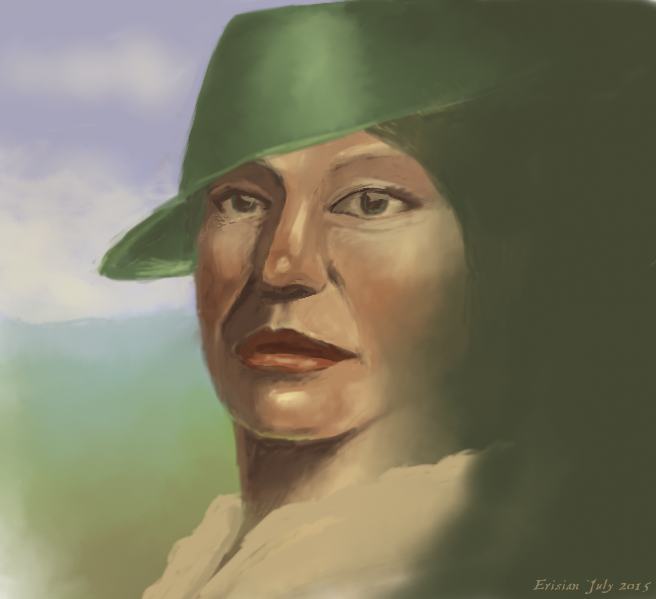
Once upon a time I didn't like MyPaint because I found it difficult to use but I thought I would try again and here are my first scribblings. I like how easy it is to sketch loosely and compose simple environments but for detailed work I think I still prefer Gimp.
Image
Image
Image


Share on Facebook Share on Twitter Share on Orkut Share on Digg Share on MySpace Share on Delicious Share on Technorati
Top
 Post subject: Re: I'm making progress with MyPaint
PostPosted: Sun Jul 26, 2015 5:07 am  (#2) 
Offline
GimpChat Member
User avatar

Joined: Apr 07, 2010
Posts: 14182
You are coming along very nicely Eris, I knew you would like it and you can go back and forth from gimp and my paint so easily. .. Nice work.

_________________
Image


Top
 Post subject: Re: I'm making progress with MyPaint
PostPosted: Sun Jul 26, 2015 7:28 am  (#3) 
Offline
GimpChat Member
User avatar

Joined: Aug 16, 2012
Posts: 4271
Location: Göteborg, Sweden
erisian: good stuff, all of it. i'm having so much fun following your progress (and providing the soundtrack for it ;) ).

i don't know if it's firefox, or my screen, or erisian's screen, or what it is, but the images look very different colourwise when i see them here on gc than when i see them on erisian's laptop as he paints them. i remember having the same experience when i borrowed erisian's laptop for a card i was making and then posted on gc. the images he posted here all look a bit too light to me and not high enough on contrast. what about the rest of you? do you see these images as dark or light? and how does the contrast look?

_________________


Top
 Post subject: Re: I'm making progress with MyPaint
PostPosted: Sun Jul 26, 2015 7:36 am  (#4) 
Offline
GimpChat Member
User avatar

Joined: Apr 07, 2010
Posts: 14182
They look fine to me but he could try some of the Color modes to darken or lighten, or maybe some brightness and contrast.

_________________
Image


Top
 Post subject: Re: I'm making progress with MyPaint
PostPosted: Sun Jul 26, 2015 7:47 am  (#5) 
Offline
GimpChat Member
User avatar

Joined: Aug 16, 2012
Posts: 4271
Location: Göteborg, Sweden
molly: when i see them on erisian's laptop as he paints them they don't look like they need any of that. the contrast is perfect and if anything they may be a bit on the darker scale. i wonder if it's my screen that needs adjusting, or erisian's? or if it's just something that happens in firefox? for example: the water in that last picture looks very well defined on erisian's original and has a nice, watery reflective surface. the way i see it here on gc it's almost hard to see it as water even. and the shadow on the hat lady's face goes almost down to black in the original, here i see it as a light shade of green, and without the shifting nuances of the original. i know erisian's screen waas colour calibrated sometime back in the middle ages when my brother owned that laptop, but it may have gone through any number of accidental changes since. and my own screen i don't have a clue about, i wouldn't even know how to check it. hopefully otheer people will see what i see, then we can just blame the browser!

_________________


Top
 Post subject: Re: I'm making progress with MyPaint
PostPosted: Sun Jul 26, 2015 7:51 am  (#6) 
Offline
GimpChat Member
User avatar

Joined: Apr 07, 2010
Posts: 14182
Can you do a screen shot of what you see and post them side by side to see the difference?

_________________
Image


Top
 Post subject: Re: I'm making progress with MyPaint
PostPosted: Mon Jul 27, 2015 6:03 pm  (#7) 
Offline
GimpChat Member
User avatar

Joined: Mar 19, 2013
Posts: 338
Location: the Netherlands
Nice work Eris, I like these :) You should give Krita a try if you haven't, it works great for painting


Top
 Post subject: Re: I'm making progress with MyPaint
PostPosted: Tue Jul 28, 2015 5:50 am  (#8) 
Offline
GimpChat Member
User avatar

Joined: Mar 23, 2012
Posts: 7388
Location: Göteborg at last!
I have looked at my original and compared it with the online copy and they look the same so the problem is a difference in screens and I think it is my screen that is at fault. I have been told before that my paintings are too dark so my screen must be too light. Maybe in future, AnMal can adjust the lighting on her computer before I post my work.

BaukjeSpirit wrote:
Nice work Eris, I like these :) You should give Krita a try if you haven't, it works great for painting

Thank you. I have tried Krita a couple of times but the Windows version took forever to load and left a mess when I uninstalled it. Maybe it is better now but I can't trust it. Maybe when I can afford a new computer and install fedora, I'll try the Linux version.


Top
 Post subject: Re: I'm making progress with MyPaint
PostPosted: Tue Jul 28, 2015 6:07 am  (#9) 
Offline
GimpChat Member
User avatar

Joined: Apr 07, 2010
Posts: 14182
Go Linux Fedora :teeth

_________________
Image


Top
 Post subject: Re: I'm making progress with MyPaint
PostPosted: Tue Jul 28, 2015 12:57 pm  (#10) 
Offline
GimpChat Member
User avatar

Joined: Aug 28, 2012
Posts: 3060
Location: Idk where I am.
Oooo, I like the painted look. MyPaint can be a pain in the neck but once you get used to it, it's lovely!

The second one makes me think of a musical from the 20s or 30s. Like a sassy rich person bragging on their wealth.

The landscape is lovely too.

_________________
Image
Reality is a lovely place...But I wouldn't wanna live there.


Top
Post new topic Reply to topic  [ 10 posts ] 

All times are UTC - 5 hours [ DST ]


* Login  


Powered by phpBB3 © phpBB Group