It is currently Wed Sep 16, 2026 11:49 pm


All times are UTC - 5 hours [ DST ]


Post new topic Reply to topic  [ 35 posts ]  Go to page 1, 2  Next
Author Message
 Post subject: Scaling script request
PostPosted: Mon Mar 07, 2011 6:20 pm  (#1) 
Offline
GimpChat Member
User avatar

Joined: Oct 07, 2010
Posts: 439
Location: home/Nixnine/.gimp-2.0/scripts/nixnine.scm
Hey guys. I am looking for a script that can do the following: Take a layer and scale it down incrementally, while retaining the scaling steps as new layers. Or more simply put, a script that can make layers that when animated seem like the image is zooming in or out. Does anyone know of a script that does that? The step resize script might be made to work if it could be modified to: 1.save each step as a new layer; 2.not resize the image-just the layer; 3.and allow more than 20 steps.

So, is this possible? Does such a script exist already?

Thanks

_________________
I refuse to be confused, but am often confused at this refusal.


Share on Facebook Share on Twitter Share on Orkut Share on Digg Share on MySpace Share on Delicious Share on Technorati
Top
 Post subject: Re: Scaling script request
PostPosted: Tue Mar 08, 2011 8:57 pm  (#2) 
Offline
GimpChat Member
User avatar

Joined: Oct 07, 2010
Posts: 439
Location: home/Nixnine/.gimp-2.0/scripts/nixnine.scm
So, can someone tell me if this is a possibility? If not I shall seek to pursue an alternate method. Just thought that someone here in the great GimpChat could give me some info on the reality of this request.

_________________
I refuse to be confused, but am often confused at this refusal.


Top
 Post subject: Re: Scaling script request
PostPosted: Tue Mar 08, 2011 10:32 pm  (#3) 
Offline
GimpChat Member
User avatar

Joined: Jul 04, 2010
Posts: 2253
Location: Retired Moderator Slowly Returning to the Living.
I think that may be do-able with mathmap. I'll see what I can do.

_________________
Artists aren't crazy! We're eccentric! ~G.M. Ross

Image

My Sigs = My Photos
Check out my work at http://www.flickr.com/photos/photomastergreg.


Top
 Post subject: Re: Scaling script request
PostPosted: Tue Mar 08, 2011 11:43 pm  (#4) 
Offline
GimpChat Member
User avatar

Joined: Jul 04, 2010
Posts: 2253
Location: Retired Moderator Slowly Returning to the Living.
Here is a working script for mathmap. Save it with the other mathmap scripts. I named mine zoom.mm

I canabalized Zoom_and_Rotate_by_nevit.mm to make this. It's not my original code.


#Simple Zoom

filter simplezoom (image in)

zoom = sin(t*pi/2);

in(xy * exp(scale(zoom, 0, 1, 4, 0)))

end


Attachments:
ZoomAni2.gif
ZoomAni2.gif [ 454.78 KiB | Viewed 5120 times ]

_________________
Artists aren't crazy! We're eccentric! ~G.M. Ross

Image

My Sigs = My Photos
Check out my work at http://www.flickr.com/photos/photomastergreg.
Top
 Post subject: Re: Scaling script request
PostPosted: Tue Mar 08, 2011 11:59 pm  (#5) 
Offline
GimpChat Member
User avatar

Joined: Jul 04, 2010
Posts: 2253
Location: Retired Moderator Slowly Returning to the Living.
I forgot to mention that the scripts does an animation one way. I duplicated it, reversed the layers and put them together, to get it to zoom both ways (in and out).

_________________
Artists aren't crazy! We're eccentric! ~G.M. Ross

Image

My Sigs = My Photos
Check out my work at http://www.flickr.com/photos/photomastergreg.


Top
 Post subject: Re: Scaling script request
PostPosted: Wed Mar 09, 2011 12:08 am  (#6) 
Offline
GimpChat Member
User avatar

Joined: Oct 06, 2010
Posts: 4050
Your script wouldn't parse on my mathmap until I added blank lines between each row. Weird.

_________________
"In order to attain the impossible, one must attempt the absurd."
~ Miguel de Cervantes


Top
 Post subject: Re: Scaling script request
PostPosted: Wed Mar 09, 2011 12:50 am  (#7) 
Offline
GimpChat Member
User avatar

Joined: Jul 04, 2010
Posts: 2253
Location: Retired Moderator Slowly Returning to the Living.
My computer adds the blank lines automatically. I just don't see them until I re-open the file. I went back and added them to the code. Good catch!

_________________
Artists aren't crazy! We're eccentric! ~G.M. Ross

Image

My Sigs = My Photos
Check out my work at http://www.flickr.com/photos/photomastergreg.


Top
 Post subject: Re: Scaling script request
PostPosted: Wed Mar 09, 2011 10:33 pm  (#8) 
Offline
GimpChat Member
User avatar

Joined: Oct 07, 2010
Posts: 439
Location: home/Nixnine/.gimp-2.0/scripts/nixnine.scm
Hey thanks! You da man!!! Works great. And the scaling looks good.

Thanks again, man.

_________________
I refuse to be confused, but am often confused at this refusal.


Top
 Post subject: Re: Scaling script request
PostPosted: Thu Mar 10, 2011 11:24 pm  (#9) 
Offline
GimpChat Member
User avatar

Joined: Jul 04, 2010
Posts: 2253
Location: Retired Moderator Slowly Returning to the Living.
You're very welcome. This is definitely the place to find ways to do things.

_________________
Artists aren't crazy! We're eccentric! ~G.M. Ross

Image

My Sigs = My Photos
Check out my work at http://www.flickr.com/photos/photomastergreg.


Top
 Post subject: Re: Scaling script request
PostPosted: Mon Mar 21, 2011 7:59 pm  (#10) 
Offline
GimpChat Member

Joined: Mar 08, 2011
Posts: 155
Hi, I was wanting to use this effect, but I'm kind of script stupid...

I installed Mathmap and confirmed its installation (Filters>Generic>Mathmap), and the rest I was guessing at:

I copied the script code, saved it in a notepad doc I titled "simple_zoom.mm" and placed it in the Geometry folder at

C:\Users\User Name\.gimp-2.6\mathmap\expressions\Geometry

I started GIMP and I don't see anything other than the original options that was in the Geometry folder. Should I have done something differently (probably, what a dumb question! I'm being too polite and passive. What should I have done to install? Please help!)?

Sorry if this was posted elsewhere, and I literally just installed it and haven't had a chance to read the instruction manual. :oops:

Thanks for any assistance!


Top
 Post subject: Re: Scaling script request
PostPosted: Mon Mar 21, 2011 9:06 pm  (#11) 
Offline
GimpChat Member

Joined: Apr 12, 2010
Posts: 5870
I believe is a weirdness of the mathmap menu:
it has a lot of entries but you should better avoid all of them except the most hidden, the very last at the button of the menu : Filters/Generic/ MathMap/ MathMap

The reason is that all the others launch mathmap with a very limited interface, again to see the real thing, and have the real list of available filter you have to forgot all other entries and go in mathmap/mathmap

i know may sound weird but try, then you may use the real thing

_________________
My 3D Gallery on Deviantart http://photocomix2.deviantart.com/
Main gallery http://www.flickriver.com/photos/photocomix-mandala/
Mandala and simmetry http://www.flickriver.com/photos/photocomix_mandala/

Image

Mrs Wilbress


Top
 Post subject: Re: Scaling script request
PostPosted: Mon Mar 21, 2011 10:19 pm  (#12) 
Offline
Global Moderator
User avatar

Joined: May 16, 2010
Posts: 16173
I wonder if there is a way to cannibalize the FU-stair-resize.scm script in FX-Foundry to keep all it's layers each step?
; FU_stair-resize.scm
; version 2.0 [gimphelp.org]
; last modified/tested by Paul Sherman
; 01/03/2011 on GIMP-2.6.11
;
; ------------------------------------------------------------------
; Original information ---------------------------------------------
;
; Stair re-size is a script for The GIMP
; Resizes the image up or down in multiple steps instead of one.
; The script is located in menu
; "<Image> / Script-Fu / Misc / Stair Interpolation..."
; Last changed: 13 August 2007
; Copyright (C) 2007 Harry Phillips <[email protected]>
;
; This program is free software; you can redistribute it and/or modify
; it under the terms of the GNU General Public License as published by
; the Free Software Foundation; either version 3 of the License, or
; (at your option) any later version. 
;
; This program is distributed in the hope that it will be useful,
; but WITHOUT ANY WARRANTY; without even the implied warranty of
; MERCHANTABILITY or FITNESS FOR A PARTICULAR PURPOSE.  See the
; GNU General Public License for more details.
;
; You should have received a copy of the GNU General Public License
; along with this program; if not, you can view the GNU General Public
; License version 3 at the web site http://www.gnu.org/licenses/gpl-3.0.html
; Alternatively you can write to the Free Software Foundation, Inc., 675 Mass
; Ave, Cambridge, MA 02139, USA.
;
; End original information ------------------------------------------
;--------------------------------------------------------------------

(define (step-size   stepNumber
         wantedSize
         currentSize)
   
   (let* (
      (stepSize (/ (- wantedSize currentSize) stepNumber))
   )
   
   ;Return stepSize
   stepSize))


(define (FU-stair-resize      theImage
               theLayer
               targetSide
               targetValue
               stepsWanted)

    (let* (
   
       ;Read the image width and height
   (imageWidth (car (gimp-image-width theImage)))
   (imageHeight (car (gimp-image-height theImage)))
   
   (sizeList)
   (targetWidth)
   (targetHeight)
   (realWidth)
   (realHeight)
   (nextWidth)
   (nextHeight)
   (stepsX)
   (stepsY)

    )

    ;Start an undo group so the process can be undone with one undo
    (gimp-image-undo-group-start theImage)

    ;Select none
    (gimp-selection-none theImage)
   
    ;Calculate the required step size
    (if (= targetSide 0)
       ;True width is the target
       (begin
          (set! stepsX (step-size stepsWanted targetValue imageWidth))
          (set! realWidth (+ (* stepsX stepsWanted) imageWidth))
          (set! realHeight (/ (* imageHeight  realWidth) imageWidth))
          (set! stepsY (step-size stepsWanted realHeight imageHeight))
       )
       
       ;False the height is the target
       (begin
          (set! stepsY (step-size stepsWanted targetValue imageHeight))
          (set! realHeight (+ (* stepsY stepsWanted) imageHeight))
          (set! realWidth (/ (* imageWidth  realHeight) imageHeight))
          (set! stepsX (step-size stepsWanted realWidth imageWidth))
       )
    )
   
   ;Set the first resize values
   (set! nextWidth (+ imageWidth stepsX))
   (set! nextHeight (+ imageHeight stepsY))

   ;Change the image size by a step at a time
   (while (> stepsWanted 0)
      (gimp-image-scale theImage nextWidth nextHeight)
      (set! stepsWanted (- stepsWanted 1))
      (set! nextWidth (+ nextWidth stepsX))
      (set! nextHeight (+ nextHeight stepsY))
   )

    ;Finish the undo group for the process
    (gimp-image-undo-group-end theImage)

    ;Ensure the updated image is displayed now
    (gimp-displays-flush)
))

(script-fu-register "FU-stair-resize"
   "<Image>/Script-Fu/Step Resize"
   "Resizes the image to desired size using small steps."
   "Harry Phillips"
   "Harry Phillips"
   "13 August 2007"
   "RGB* GRAY*"
   SF-IMAGE      "Image"            0
   SF-DRAWABLE      "Drawable"         0
   SF-OPTION      "Target side"      '("Width" "Height")
   SF-VALUE      "Target value"      "1024"
   SF-ADJUSTMENT   "Numbers of steps"   '(10 2 20 1 1 0 0)
)           


_________________
Image


Top
 Post subject: Re: Scaling script request
PostPosted: Sun Apr 03, 2011 1:56 pm  (#13) 
Offline
Global Moderator
User avatar

Joined: May 16, 2010
Posts: 16173
No?

_________________
Image


Top
 Post subject: Re: Scaling script request
PostPosted: Sun Apr 03, 2011 2:02 pm  (#14) 
Offline
GimpChat Member
User avatar

Joined: Oct 06, 2010
Posts: 4050
If you want someone like Saulgoode or RobA to see this, you'll probably need to create a new post and direct your question to them regarding this script.

It might be a simple fix.

_________________
"In order to attain the impossible, one must attempt the absurd."
~ Miguel de Cervantes


Top
 Post subject: Re: Scaling script request
PostPosted: Sun Apr 03, 2011 3:35 pm  (#15) 
Offline
Global Moderator
User avatar

Joined: May 16, 2010
Posts: 16173
Good idea mahvin, i went ahead and did just that. :)

_________________
Image


Top
 Post subject: Re: Scaling script request
PostPosted: Sun Apr 03, 2011 4:06 pm  (#16) 
Offline
Global Moderator
User avatar

Joined: May 16, 2010
Posts: 16173
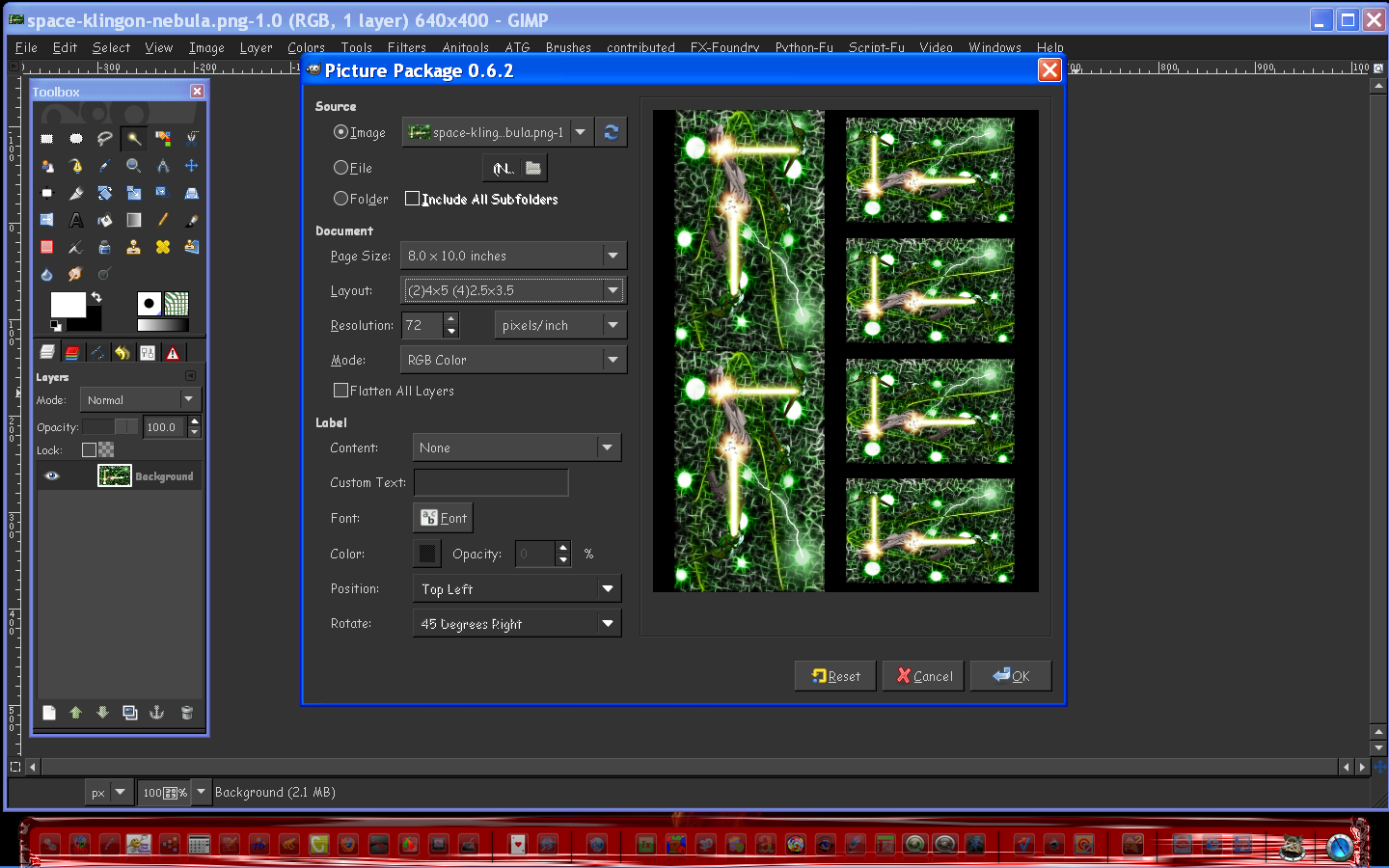
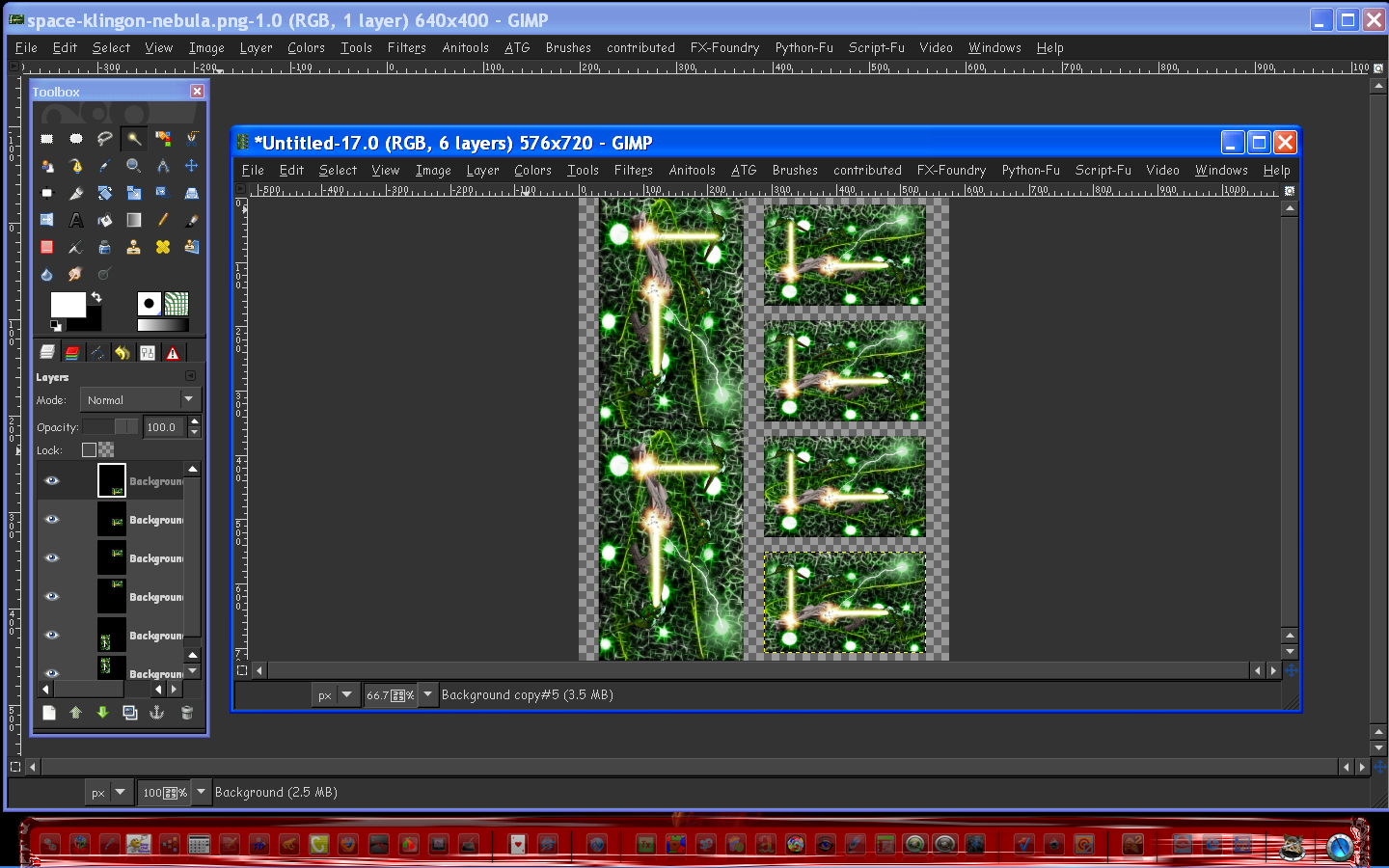
Wow i just realized Adobes Picture Package will accomplish this.
Then i remembered Gimp Sharp comes with that package, and i found it works quite well. :)

The settings
Image

The results
Image

Gimp sharp can be downloaded here (windows and src are available)
http://sourceforge.net/projects/gimp-sharp/files/

All Windows platforms - (it should work with all)
After downloading the exe file rename it from ".e_x_e" to .exe
Then rename gimp-2.6.exe in the bin folder to gimp-2.4.exe
Then install gimp sharp

Now just rename the gimp 2.4 back to gimp-2.6.exe and fire up Gimp. :)
You will find the Picture Package in Filters/Picture Package

I have no idea how to install for Linux or Mac.

_________________
Image


Top
 Post subject: Re: Scaling script request
PostPosted: Sun Apr 03, 2011 4:42 pm  (#17) 
Offline
Global Moderator
User avatar

Joined: May 16, 2010
Posts: 16173
Still the script would be nicer as it would have 1 of each size per layer.

_________________
Image


Top
 Post subject: Re: Scaling script request
PostPosted: Sun Apr 03, 2011 5:39 pm  (#18) 
Offline
GimpChat Member
User avatar

Joined: Oct 06, 2010
Posts: 4050
Wow, multiple issues with mono libraries, and certainly not worth the hassle compiling for Ubuntu. Certainly not with my Linux skill sets.

_________________
"In order to attain the impossible, one must attempt the absurd."
~ Miguel de Cervantes


Top
 Post subject: Re: Scaling script request
PostPosted: Sun Apr 03, 2011 5:50 pm  (#19) 
Offline
GimpChat Member
User avatar

Joined: Oct 29, 2010
Posts: 711
Location: Netherlands
I d/led the source tarball and decompressed it. (Linux)
I looked at the README and INSTALL files and went ahead and tried to install it.
./configure went ok but make failed because it needed "gtk-sharp".
So I installed that with 5 other pckgs as dependencies.
It installed and shows up in Gimp but nothing works.
I then checked the plugins that got installed:They're ALL Windows executables!
First time something like this happened to me.
The only thing left for me was to remove everything.
Gerard.

_________________
Gentoo Linux always up-to-date.
Kernel-3.17.4 Python-2.7.8/3.3.5
Gimp-2.8.14

I use Linux only.
And Virtualbox with Win 7


Top
 Post subject: Re: Scaling script request
PostPosted: Sun Apr 03, 2011 6:10 pm  (#20) 
Offline
GimpChat Member
User avatar

Joined: Oct 29, 2010
Posts: 711
Location: Netherlands
My bad.
It might work after all thanks to mono which will run .exe files in Linux.
I'll try again tomorrow it's 1 am here.
Gerard.

_________________
Gentoo Linux always up-to-date.
Kernel-3.17.4 Python-2.7.8/3.3.5
Gimp-2.8.14

I use Linux only.
And Virtualbox with Win 7


Top
Post new topic Reply to topic  [ 35 posts ]  Go to page 1, 2  Next

All times are UTC - 5 hours [ DST ]


* Login  


Powered by phpBB3 © phpBB Group