It is currently Thu Nov 12, 2026 6:11 am


All times are UTC - 5 hours [ DST ]


Post new topic Reply to topic  [ 10 posts ] 
Author Message
 Post subject: how do i photoshop an eye by replacing it with a different eye?
PostPosted: Tue Mar 08, 2016 8:23 pm  (#1) 
Offline
New Member

Joined: Mar 08, 2016
Posts: 1
im new to gimp but i need help. i dont know how to like replace an eye with another eye


Share on Facebook Share on Twitter Share on Orkut Share on Digg Share on MySpace Share on Delicious Share on Technorati
Top
 Post subject: Re: how do i photoshop an eye by replacing it with a different eye?
PostPosted: Tue Mar 08, 2016 8:36 pm  (#2) 
Offline
Administrator
User avatar

Joined: Aug 10, 2012
Posts: 14268
Location: Native to NYC living in Arizona, Gimp 2.8 - 3.0, Win 11 PC.
Itachi220 wrote:
im new to gimp but i need help.
i dont know how to like replace an eye with another eye

You can't "photoshop" anything using Gimp.
:hoh

_________________
Image
"A wise man learns more from a foolish question than a fool can learn from a wise answer"
Image


Top
 Post subject: Re: how do i photoshop an eye by replacing it with a different eye?
PostPosted: Tue Mar 08, 2016 11:28 pm  (#3) 
Offline
GimpChat Member
User avatar

Joined: Sep 24, 2010
Posts: 12856
lol; you beat me to it, Wallace. ;)

That said, you can copy/paste the eye and do some clone/heal brush work to clean things up as needed. Many other ways too available such as using G'MIC and seamless blending. :)

www.youtube.com Video from : www.youtube.com

_________________
Lyle

Psalm 109:8

Image


Top
 Post subject: Re: how do i photoshop an eye by replacing it with a different eye?
PostPosted: Tue Mar 08, 2016 11:43 pm  (#4) 
Offline
Global Moderator
User avatar

Joined: Apr 01, 2012
Posts: 8503
Location: On the other side of your screen
Wallace wrote:
Itachi220 wrote:
im new to gimp but i need help.
i dont know how to like replace an eye with another eye

You can't "photoshop" anything using Gimp.
:hoh

That's right. using Gimp, you gimp it. :gimp

Seamless blending is great for adding in extras.

_________________
Image
Free Fun Photo Editing & resources
Poems from the Lord
Gimp Newby
Gimp version 3.2.8 and GMIC-Qt 4.0.2 OS :- Windows 10 Home 64


Top
 Post subject: Re: how do i photoshop an eye by replacing it with a different eye?
PostPosted: Wed Mar 09, 2016 4:43 am  (#5) 
Offline
GimpChat Member
User avatar

Joined: Jan 11, 2016
Posts: 17
well, everyone makes typo's
i spelled your name wrong the last time Wallace
sorry

bad kitsune, bad kitsune
go shame your self


Top
 Post subject: Re: how do i photoshop an eye by replacing it with a different eye?
PostPosted: Wed Mar 09, 2016 6:37 am  (#6) 
Offline
Global Moderator
User avatar

Joined: Apr 01, 2012
Posts: 8503
Location: On the other side of your screen
Have you done what you wanted or do you want to put your pictures here...
Someone can do them for you and even attach the xcf if you want to see how it is done.

_________________
Image
Free Fun Photo Editing & resources
Poems from the Lord
Gimp Newby
Gimp version 3.2.8 and GMIC-Qt 4.0.2 OS :- Windows 10 Home 64


Top
 Post subject: Re: how do i photoshop an eye by replacing it with a different eye?
PostPosted: Wed Mar 09, 2016 10:38 am  (#7) 
Offline
Retired Staff
User avatar

Joined: May 22, 2008
Posts: 6946
Location: Somewhere in GIMP
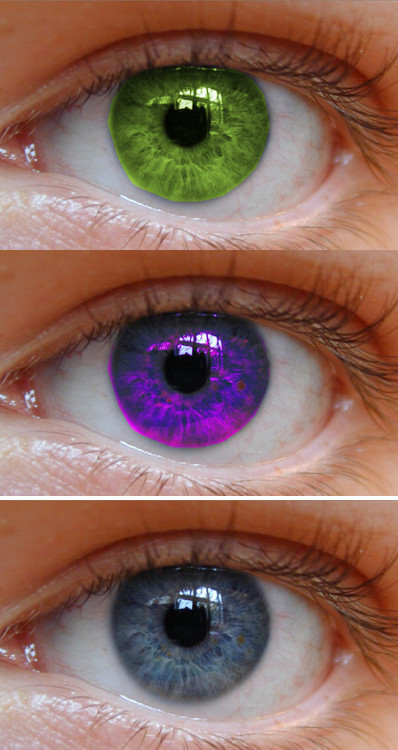
Is it the whole eye you want to replace or just change the color? Gimp has nice color tools to do that. This one was done by selecting the colored area of the eye using the paths tool :pathtool . For information about creating paths: http://docs.gimp.org/2.8/en/gimp-using-paths.html
After creating your path, go to Select/To Path to save the path. See picture below.
Image

Now would be a good time duplicate the layer two or three times so you have some pictures of the original eye.

Then Colors/Color Balance. Move the sliders to see what they do to the colors. Below are two examples of color changes. The bottom image is the original color.
Image

_________________
Image
World War IV will be fought with sticks and stones. - Albert Einstein


Top
 Post subject: Re: how do i photoshop an eye by replacing it with a different eye?
PostPosted: Wed Mar 09, 2016 4:48 pm  (#8) 
Offline
Administrator
User avatar

Joined: Aug 10, 2012
Posts: 14268
Location: Native to NYC living in Arizona, Gimp 2.8 - 3.0, Win 11 PC.
Kitsune wrote:
well, everyone makes typo's
i spelled your name wrong the last time Wallace
sorry

bad kitsune, bad kitsune
go shame your self

I didn't notice. :oops:

_________________
Image
"A wise man learns more from a foolish question than a fool can learn from a wise answer"
Image


Top
 Post subject: Re: how do i photoshop an eye by replacing it with a different eye?
PostPosted: Wed Mar 09, 2016 8:09 pm  (#9) 
Offline
GimpChat Member
User avatar

Joined: Mar 05, 2015
Posts: 41
Location: Philippines
You can shop your photos using GIMP. :)

_________________
Image

Faith that no works is not faith at all.


Top
 Post subject: Re: how do i photoshop an eye by replacing it with a different eye?
PostPosted: Thu Mar 10, 2016 11:53 am  (#10) 
Offline
Global Moderator
User avatar

Joined: May 16, 2010
Posts: 16256
A great way to get a very close color match like the skin color around the eye is to use the Colors>curves tool.

_________________
Image


Top
Post new topic Reply to topic  [ 10 posts ] 

All times are UTC - 5 hours [ DST ]


cron

* Login  


Powered by phpBB3 © phpBB Group