It is currently Sat Aug 01, 2026 6:41 pm


All times are UTC - 5 hours [ DST ]


Post new topic Reply to topic  [ 1444 posts ]  Go to page Previous  1 ... 3, 4, 5, 6, 7, 8, 9 ... 73  Next
Author Message
 Post subject: Re: For lovers of photography
PostPosted: Tue May 03, 2016 8:35 am  (#101) 
Offline
GimpChat Member
User avatar

Joined: Mar 01, 2014
Posts: 14101
Location: Spain, Aragón
Here I leave you all these photos, very different between them and I'm sure you will know how to transform them and enjoy doing it. :)


Attachments:
IMG_3292.JPG
IMG_3292.JPG [ 4.09 MiB | Viewed 2146 times ]
IMG_4589.JPG
IMG_4589.JPG [ 3.3 MiB | Viewed 2146 times ]

_________________
Image

Gimp 2.10.30(samj) portable _ OS Windows 10 Home_ 64bits
Don’t be afraid to start over. It’s a new chance to rebuild what you want.
Top
 Post subject: Re: For lovers of photography
PostPosted: Tue May 03, 2016 8:48 am  (#102) 
Offline
GimpChat Member
User avatar

Joined: Nov 15, 2014
Posts: 875
Issabella,

Two more beautiful photographs.
You posted these as I was just about to put a new photograph for everyone to play with.
Something totally different - a scan of an old photograph, probably from the 1950's, of Conway Castle in North Wales with the road bridge built by Thomas Telford in 1826. This view can no longer be seen, because in the 1960's they built a new road bridge alongside.

The picture comes complete with scratches and various marks!

david.


Attachments:
conwaybridge.jpg
conwaybridge.jpg [ 658.03 KiB | Viewed 2144 times ]
Top
 Post subject: Re: For lovers of photography
PostPosted: Tue May 03, 2016 12:29 pm  (#103) 
Offline
GimpChat Member
User avatar

Joined: Mar 01, 2014
Posts: 14101
Location: Spain, Aragón
David, What a great challenge on the pick of this beautiful bridge. I did my best, I hope you like it, but sure that experts will get much better results. :)


Attachments:
conwaybridge-mended-Issa.JPG
conwaybridge-mended-Issa.JPG [ 601.89 KiB | Viewed 2138 times ]

_________________
Image

Gimp 2.10.30(samj) portable _ OS Windows 10 Home_ 64bits
Don’t be afraid to start over. It’s a new chance to rebuild what you want.
Top
 Post subject: Re: For lovers of photography
PostPosted: Tue May 03, 2016 12:33 pm  (#104) 
Offline
GimpChat Member

Joined: May 12, 2015
Posts: 4693
You did a beautiful job on that bridge, Issabella. I was just going through all the things I do to get scratches out of photos. Looks like you did it very well.


Top
 Post subject: Re: For lovers of photography
PostPosted: Tue May 03, 2016 12:52 pm  (#105) 
Offline
GimpChat Member
User avatar

Joined: Nov 15, 2014
Posts: 875
Issabella,

You've done a great job mending the bridge! To repair small scratches and marks I use the G'MIC Inpaint (patch-based), it is easy and does a great job. To remove anything bigger, as I have done with the posts in your tree photograph, I use the Heal Selection filter. (I thought these posts were a distraction in the picture.)
The frost on the bracken is a wonderful photograph - I may have several more tries at that!

david.


Attachments:
bracken.JPG
bracken.JPG [ 2.43 MiB | Viewed 2134 times ]
tree.JPG
tree.JPG [ 1.35 MiB | Viewed 2134 times ]
conwaycolour.jpg
conwaycolour.jpg [ 756.98 KiB | Viewed 2134 times ]
Top
 Post subject: Re: For lovers of photography
PostPosted: Tue May 03, 2016 12:56 pm  (#106) 
Offline
GimpChat Member
User avatar

Joined: Nov 15, 2014
Posts: 875
Now something very different for anyone to try.
A scan of a studio portrait of an aunt of mine. I guess she was about 16 years old, so that would make the photograph from about 1904.

david.


Attachments:
alice.jpg
alice.jpg [ 217.29 KiB | Viewed 2133 times ]
Top
 Post subject: Re: For lovers of photography
PostPosted: Tue May 03, 2016 1:17 pm  (#107) 
Offline
GimpChat Member
User avatar

Joined: Mar 01, 2014
Posts: 14101
Location: Spain, Aragón
David, you applied colour and you got the right tones on it. I have never done that and it's something I'll try it. I did my try on the two before pics. I'll try this new photo yours. It reminds me a photo of my grandmother when she was 16 too. :)


Attachments:
IMG_3292-enhanced-Issa.JPG
IMG_3292-enhanced-Issa.JPG [ 3.44 MiB | Viewed 2131 times ]
IMG_4589-enhanced-Issa.JPG
IMG_4589-enhanced-Issa.JPG [ 3.1 MiB | Viewed 2131 times ]

_________________
Image

Gimp 2.10.30(samj) portable _ OS Windows 10 Home_ 64bits
Don’t be afraid to start over. It’s a new chance to rebuild what you want.
Top
 Post subject: Re: For lovers of photography
PostPosted: Tue May 03, 2016 1:49 pm  (#108) 
Offline
GimpChat Member
User avatar

Joined: Apr 09, 2016
Posts: 580
Location: Sheffield UK
Probably not what you were looking for Issabella, however I couldn't resist....Image

_________________
Image


Top
 Post subject: Re: For lovers of photography
PostPosted: Tue May 03, 2016 2:09 pm  (#109) 
Offline
GimpChat Member
User avatar

Joined: Mar 01, 2014
Posts: 14101
Location: Spain, Aragón
RJKD, You have been very innovative really. :hehe Please, how did you do it? :) This thread is for you all and all your results are welcome. :)

_________________
Image

Gimp 2.10.30(samj) portable _ OS Windows 10 Home_ 64bits
Don’t be afraid to start over. It’s a new chance to rebuild what you want.


Top
 Post subject: Re: For lovers of photography
PostPosted: Tue May 03, 2016 2:19 pm  (#110) 
Offline
GimpChat Member
User avatar

Joined: Mar 01, 2014
Posts: 14101
Location: Spain, Aragón
David, before I start to try to apply colour on a pic. Please, Could you give me advice and some of guide to get an acceptable result? :) Thanks in advance.

_________________
Image

Gimp 2.10.30(samj) portable _ OS Windows 10 Home_ 64bits
Don’t be afraid to start over. It’s a new chance to rebuild what you want.


Top
 Post subject: Re: For lovers of photography
PostPosted: Tue May 03, 2016 2:49 pm  (#111) 
Offline
GimpChat Member
User avatar

Joined: Mar 28, 2016
Posts: 312
Location: Netherlands
Could not resist. A little bit curves, almost everything done with G'MIC filters.

Image


Top
 Post subject: Re: For lovers of photography
PostPosted: Tue May 03, 2016 3:06 pm  (#112) 
Offline
GimpChat Member
User avatar

Joined: Nov 15, 2014
Posts: 875
@Iarga,
Fantastic colours!!!

@Issabella,
For painting colours on a picture I make a new, transparent layer, very often one for each colour I am going to add. I change the blending mode to Overlay and then paint on the layer.
If you are not sure about the colour you require, you can open an image with the colour you want, select the colour and then change back to your original image and the colour will remain selected. For instance, to colour the walls of the castle, I opened the picture of the church, Ayia Paraskevi, and clicked on a suitable part of the wall.
Also, by having each colour on a separate layer you can always adjust that one colour with brightness and saturation, as well as changing its opacity.

My version of Aunt Alice - I hope she would approve of it were she alive today!

david.


Attachments:
alice.jpg
alice.jpg [ 99.75 KiB | Viewed 2189 times ]
Top
 Post subject: Re: For lovers of photography
PostPosted: Tue May 03, 2016 3:51 pm  (#113) 
Offline
GimpChat Member
User avatar

Joined: Mar 01, 2014
Posts: 14101
Location: Spain, Aragón
Iarga, What colour you got! Really surprising! :) Thanks for your contribution at this thread.
David, thank so much for your help. It seems to be a patient work but I'll try it as your result is very good and I like it a lot. Your result on Aunty Alice I'm sure she would approve it. I did my tries, too. One of them in B&W and other in Vintage Effect. By the way, She was a very pretty lady. :)


Attachments:
alice-B&W-Enhancement-Issa.jpg
alice-B&W-Enhancement-Issa.jpg [ 126.59 KiB | Viewed 2184 times ]
alice-Enhancement-VintageEffect-Issa.jpg
alice-Enhancement-VintageEffect-Issa.jpg [ 205.6 KiB | Viewed 2184 times ]

_________________
Image

Gimp 2.10.30(samj) portable _ OS Windows 10 Home_ 64bits
Don’t be afraid to start over. It’s a new chance to rebuild what you want.
Top
 Post subject: Re: For lovers of photography
PostPosted: Tue May 03, 2016 4:40 pm  (#114) 
Offline
GimpChat Member
User avatar

Joined: Apr 09, 2016
Posts: 580
Location: Sheffield UK
In my GIMP, it's; Map-Fractal Trace, it's an amazing filter, but I reckon an untameable beast - in Peace.

_________________
Image


Top
 Post subject: Re: For lovers of photography
PostPosted: Tue May 03, 2016 8:09 pm  (#115) 
Offline
Global Moderator
User avatar

Joined: Oct 02, 2014
Posts: 5009
Location: Sydney Australia
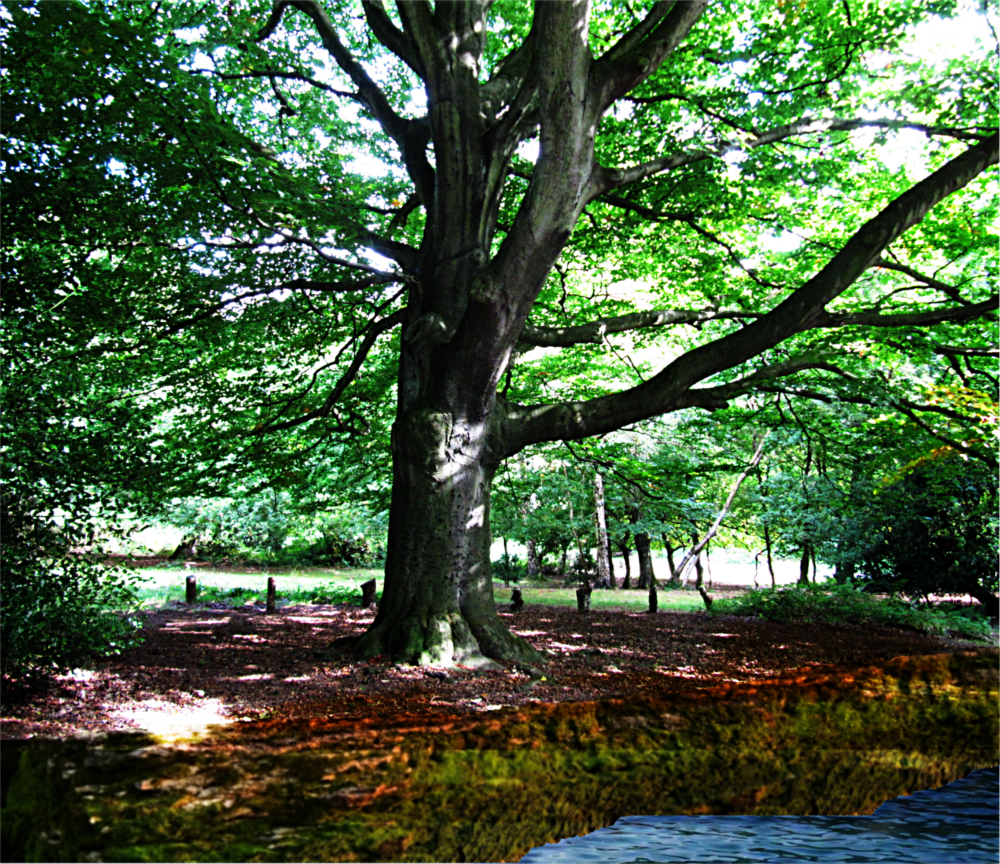
Well this thread moves on so quickly!

My attempt with the tree just shows there is so much still to learn in GIMP/GMIC, as my available repertoire fell short of what I needed for this manipulation of adding an embankment and lake edge. Still onwards and upwards!

Image

_________________
Image

Respect should be offered freely but hard earned


Top
 Post subject: Re: For lovers of photography
PostPosted: Wed May 04, 2016 12:57 am  (#116) 
Offline
GimpChat Member
User avatar

Joined: Nov 15, 2014
Posts: 875
@OMG,
I wish my repertoire was as great as yours! I have tried to create water with reflections where the borderline is not horizontal and failed miserably.

@Issabella,
I like both your versions of aunt Alice.
On my try, I used the healing tool on all the little spots, then I applied anisotropic smoothing. This is something I have only used for the first time in the last week. It seems to produce very good results. I haven't dared alter any of its settings yet!
Next I increased the brightness and contrast on the iris of the eyes. This always seems to add life to the picture. If it was in colour, I would probably increase the saturation a little.
I did the same, very slightly, on the mouth. I have also widened the mouth a small amount. I added the vignette because there was deterioration at the bottom of the picture.
Finally, wavelet sharpening.

I will try to find a similar portrait I have of another aunt. It has proved a useful learning exercise for me and I hope for others.

david.


Top
 Post subject: Re: For lovers of photography
PostPosted: Wed May 04, 2016 1:44 am  (#117) 
Offline
GimpChat Member
User avatar

Joined: Mar 01, 2014
Posts: 14101
Location: Spain, Aragón
RJKD, Thank you very much. I have to try that too. :bigthup
OMG, your outcome seems so real with water. As David says it isn't easy to get that on an not even level. Well done!
David, Thank you so much for all your great help for me to understand more about photography technics. I have to practise your advice and I'll repeat my try on the pic applying what you say. I think that this thread is a wonderful resource to learn more about this photography world. :)

_________________
Image

Gimp 2.10.30(samj) portable _ OS Windows 10 Home_ 64bits
Don’t be afraid to start over. It’s a new chance to rebuild what you want.


Top
 Post subject: Re: For lovers of photography
PostPosted: Wed May 04, 2016 4:27 am  (#118) 
Offline
Global Moderator
User avatar

Joined: Apr 01, 2012
Posts: 8446
Location: On the other side of your screen
Late entry
Image

_________________
Image
Free Fun Photo Editing & resources
Poems from the Lord
Gimp Newby
Gimp version 3.2.4 and GMIC-Qt 4.2.0 OS :- Windows 10 Home 64


Top
 Post subject: Re: For lovers of photography
PostPosted: Wed May 04, 2016 6:48 am  (#119) 
Offline
Global Moderator
User avatar

Joined: Apr 01, 2012
Posts: 8446
Location: On the other side of your screen
Not much different from the original. Didn't need to be.
I just added a little contrast, added a little saturation. Equalized shadow, unsharp mask.
Image

_________________
Image
Free Fun Photo Editing & resources
Poems from the Lord
Gimp Newby
Gimp version 3.2.4 and GMIC-Qt 4.2.0 OS :- Windows 10 Home 64


Top
 Post subject: Re: For lovers of photography
PostPosted: Wed May 04, 2016 7:30 am  (#120) 
Offline
GimpChat Member
User avatar

Joined: Mar 01, 2014
Posts: 14101
Location: Spain, Aragón
Sallyanne, thanks for your contributions in this thread. You are an expert in this filed, too. :bigthup

_________________
Image

Gimp 2.10.30(samj) portable _ OS Windows 10 Home_ 64bits
Don’t be afraid to start over. It’s a new chance to rebuild what you want.


Top
Post new topic Reply to topic  [ 1444 posts ]  Go to page Previous  1 ... 3, 4, 5, 6, 7, 8, 9 ... 73  Next

All times are UTC - 5 hours [ DST ]


* Login  


Powered by phpBB3 © phpBB Group