It is currently Sun Jun 07, 2026 6:12 pm


All times are UTC - 5 hours [ DST ]


Post new topic Reply to topic  [ 13 posts ] 
Author Message
 Post subject: 'script-fu-copy-rotate'
PostPosted: Tue Jul 31, 2012 6:42 pm  (#1) 
Offline
GimpChat Member
User avatar

Joined: Jul 17, 2012
Posts: 2769
so i downloaded the 'script-fu-copy-rotate' and it took me really long to figure out, where it is actually located in the menu
was expecting this to be under Script-Fu or maybe Rotate, but it is in the Selection menu.....

next i tried to rotate a line but it makes really weird things out of it, and i cant see what the logic is behind these actions
so what do you actually enter in the center x/y coordinates field ?
lets say my canvas is 600x400, that would make the center at 300x200, right
but apparently that is not the point this script uses as the center of rotation

btw: dont these scripts come with some sort of manual ???

EDIT:
you can find the script here:
http://registry.gimp.org/node/22254
Quote:
Define the center of rotation, angle and count it will then copy and rotate based on the original distance from center. I have included images to show usage. This was based in part on Radial Copy by pkotronis but as i couldn't figure out how to use his i made a simpler one

Image

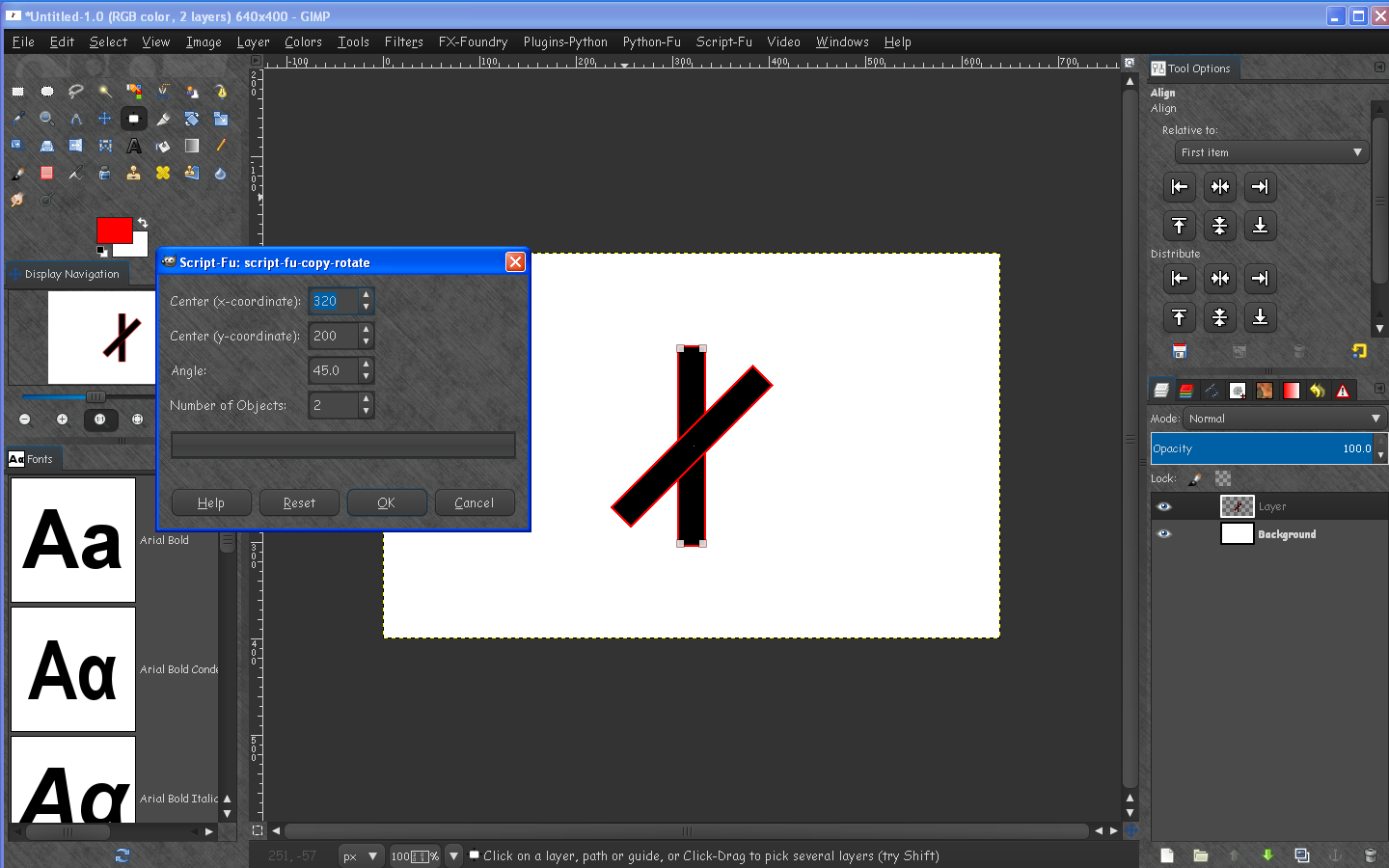
this is what happens when i enter x:300; y:200; 90 degrees; number of Objects: 2

Attachment:
wat.png
wat.png [ 10.23 KiB | Viewed 7006 times ]


Last edited by Esper on Tue Jul 31, 2012 7:17 pm, edited 1 time in total.

Share on Facebook Share on Twitter Share on Orkut Share on Digg Share on MySpace Share on Delicious Share on Technorati
Top
 Post subject: Re: 'script-fu-copy-rotate'
PostPosted: Tue Jul 31, 2012 6:47 pm  (#2) 
Offline
GimpChat Member
User avatar

Joined: Mar 23, 2012
Posts: 7388
Location: Göteborg at last!
The problem in full.

Image


Top
 Post subject: Re: 'script-fu-copy-rotate'
PostPosted: Tue Jul 31, 2012 7:03 pm  (#3) 
Offline
GimpChat Member
User avatar

Joined: Jul 17, 2012
Posts: 2769
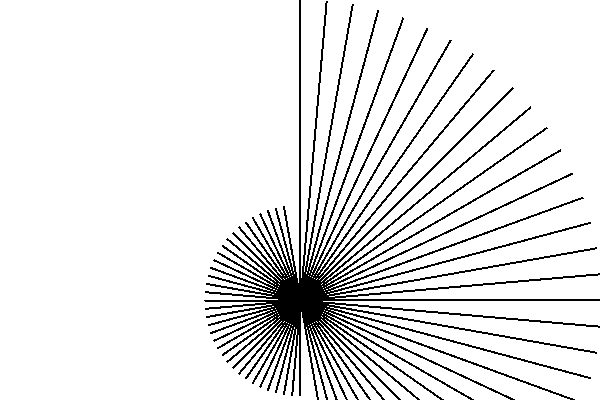
yeah, you get a nice "sun" when you enter the following numbers

x:300; y:200; d:15°; NoO:24

for some reason the script uses 300/300 as the centre of rotation, instead of 300/200

Attachment:
sun.png
sun.png [ 26.33 KiB | Viewed 6985 times ]


Top
 Post subject: Re: 'script-fu-copy-rotate'
PostPosted: Tue Jul 31, 2012 7:09 pm  (#4) 
Offline
GimpChat Member

Joined: Jul 14, 2012
Posts: 162
That seems like a cryptical response frome Erisian. How does it work with square images?

Also, if you open the script file with a text editor, the last few lines will tell you where it should show up.


Top
 Post subject: Re: 'script-fu-copy-rotate'
PostPosted: Tue Jul 31, 2012 7:20 pm  (#5) 
Offline
GimpChat Member
User avatar

Joined: Jul 17, 2012
Posts: 2769
Bug Sampson wrote:
How does it work with square images?

it works as its supposed to....maybe this script needs a square canvas

Quote:
Also, if you open the script file with a text editor, the last few lines will tell you where it should show up.

thanks for the info Bug, didnt know that


Top
 Post subject: Re: 'script-fu-copy-rotate'
PostPosted: Tue Jul 31, 2012 7:40 pm  (#6) 
Offline
GimpChat Member
User avatar

Joined: Apr 07, 2010
Posts: 14182
And another way if you are already in Gimp, go to help--> Plug in browser, in the search box type in the script or plug-in you are looking for, It will come up with the exact location where to find it, who the author is and most times what it does.

Image

_________________
Image


Top
 Post subject: Re: 'script-fu-copy-rotate'
PostPosted: Tue Jul 31, 2012 7:47 pm  (#7) 
Offline
Global Moderator
User avatar

Joined: May 16, 2010
Posts: 16018
I edited the script-fu-copy-rotate script so it will undo all steps at once.
new scm file
;;; Plugin  : copy-rotate
;;; Author  : tekhertz
;;; Date    : jan 13, 2010
;;; Revision: None
;;;                
;;; Version : 1.0
;;; Latest version at: http://registry.gimp.org
;;; Required : Gimp 2.6 or later
;;;
;;; Description:
;;; copy active selection rotate and anchor it based on count and angle
;;; -----------------------------------------------------------------------------
;;;
;;; License:
;;; This program is free software; you can redistribute it and/or modify
;;; it under the terms of the GNU General Public License as published by
;;; the Free Software Foundation; either version 2 of the License, or
;;; (at your option) any later version.
;;;
;;; This program is distributed in the hope that it will be useful,
;;; but WITHOUT ANY WARRANTY; without even the implied warranty of
;;; MERCHANTABILITY or FITNESS FOR A PARTICULAR PURPOSE.  See the
;;; GNU General Public License for more details.
;;;
;;; You should have received a copy of the GNU General Public License
;;; along with this program; if not, write to the Free Software
;;; Foundation, Inc., 675 Mass Ave, Cambridge, MA 02139, USA.

(define (script-fu-copy-rotate inImage inLayer xCenter yCenter StartAngle Objects)
   (let* (   (drawable 0)
      (rAngle 0)
      (BoxWidth 0) (BoxHeight 0)
      (xoffset 0) (yoffset 0)
      (countdown 0)
      (sel-float 0)
      (degree 0)
      (imageWidth  (car (gimp-image-width inImage)))
         )
   (set! BoxWidth (cadr (gimp-selection-bounds inImage)))
   (set! BoxHeight (caddr (gimp-selection-bounds inImage)))
   (set! countdown 0)
   (set! xoffset BoxWidth)
   (set! yoffset BoxHeight)
   (set! drawable inLayer)
   (set! rAngle (* StartAngle (/ 3.14159 180)))
   (gimp-image-undo-group-start inImage)
   (gimp-layer-resize-to-image-size inLayer)
     (gimp-edit-copy drawable);copy
   (gimp-edit-clear drawable);clear selection to handle partial transparency
   
  (while (< countdown Objects)
    (begin
   (set! degree (* rAngle countdown))
   (set! sel-float (car (gimp-edit-paste drawable FALSE)));paste
   (gimp-layer-set-offsets sel-float xoffset yoffset);move
   (gimp-drawable-transform-rotate-default sel-float degree FALSE xCenter xCenter FALSE FALSE);rotate
;   (gimp-floating-sel-to-layer sel-float);make each transform a new layer
   (gimp-floating-sel-anchor sel-float);anchor each transform to start layer
   (set! countdown (+ countdown 1))
   );begin
);while
   (gimp-displays-flush)
   (gimp-image-undo-group-end inImage)
      );let
) ;;def


(script-fu-register
"script-fu-copy-rotate"
_"<Image>/_Select/_script-fu-copy-rotate"
"copy active selection rotate and anchor it "
"*"
"*"
"01/13/2010"
"RGB* GRAY* INDEXED*"
SF-IMAGE "The Image" 0
SF-DRAWABLE "The Layer" 0
SF-ADJUSTMENT "Center (x-coordinate)" '(640 0 9999 1 10 0 1)
SF-ADJUSTMENT "Center (y-coordinate)" '(640 0 9999 1 10 0 1)
SF-ADJUSTMENT "Angle" '(120 0 360 0.1 1 1 1)
SF-ADJUSTMENT "Number of Objects" '(3 -9999 9999 1 10 0 1)
)


Just save as any name you want in the script folder.The same name is preferred.Be sure and give it a scm extension though.

Gives me a chance to play with schema. :)

_________________
Image


Top
 Post subject: Re: 'script-fu-copy-rotate'
PostPosted: Tue Jul 31, 2012 8:11 pm  (#8) 
Offline
GimpChat Member
User avatar

Joined: Jul 17, 2012
Posts: 2769
molly wrote:
And another way if you are already in Gimp, go to help--> Plug in browser, in the search box type in the script or plug-in you are looking for, It will come up with the exact location where to find it, who the author is and most times what it does.

thanks molly !

Rod wrote:
I edited the script-fu-copy-rotate script so it will undo all steps at once.
new scm file
thats very useful, Rod, undoing 36 steps is one hell of hard work :gaah


Top
 Post subject: Re: 'script-fu-copy-rotate'
PostPosted: Tue Jul 31, 2012 8:20 pm  (#9) 
Offline
Global Moderator
User avatar

Joined: May 16, 2010
Posts: 16018
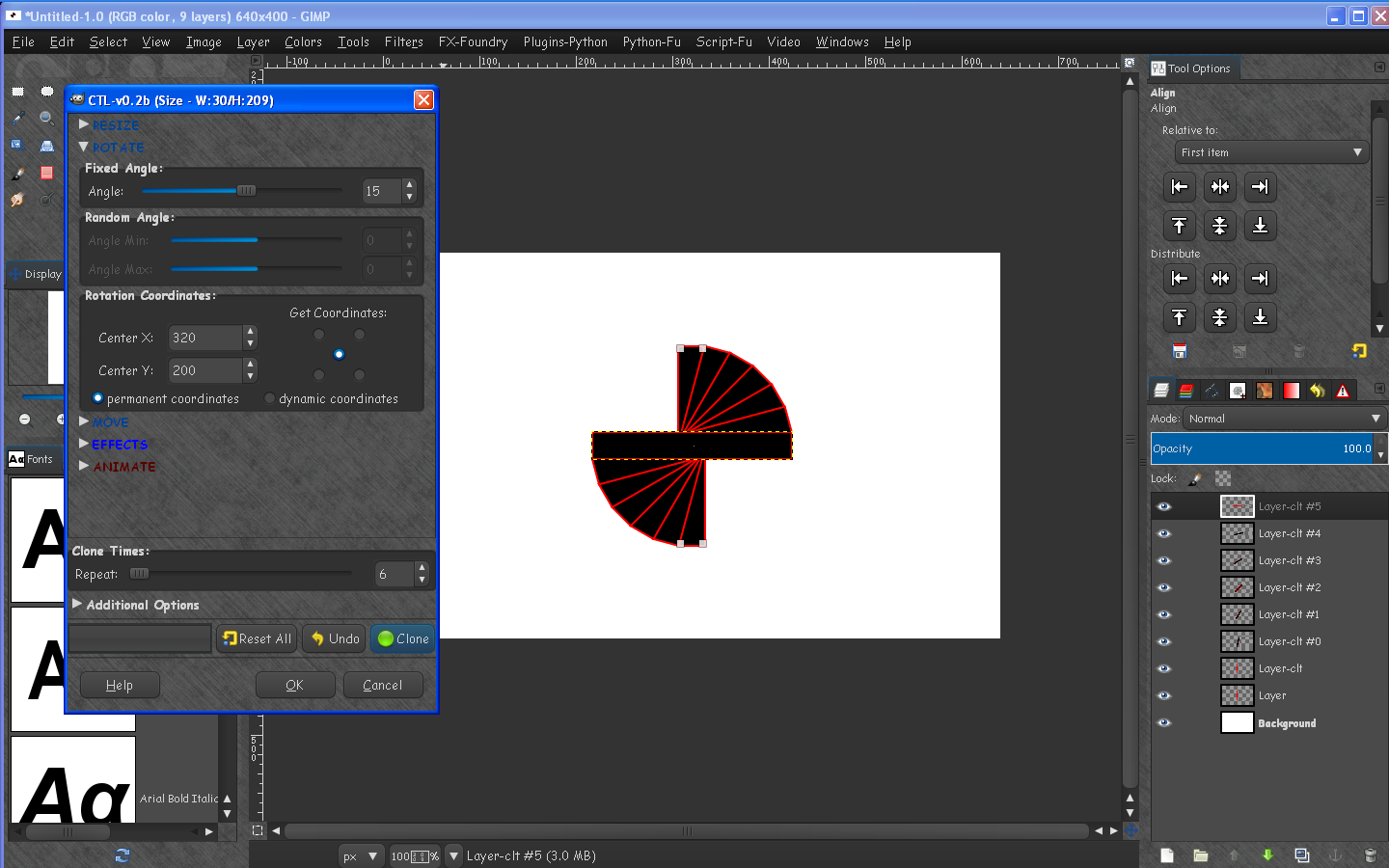
A much better tool is the clone-layer-tool
http://registry.gimp.org/node/25422

Image

_________________
Image


Top
 Post subject: Re: 'script-fu-copy-rotate'
PostPosted: Tue Jul 31, 2012 8:27 pm  (#10) 
Offline
Global Moderator
User avatar

Joined: May 16, 2010
Posts: 16018
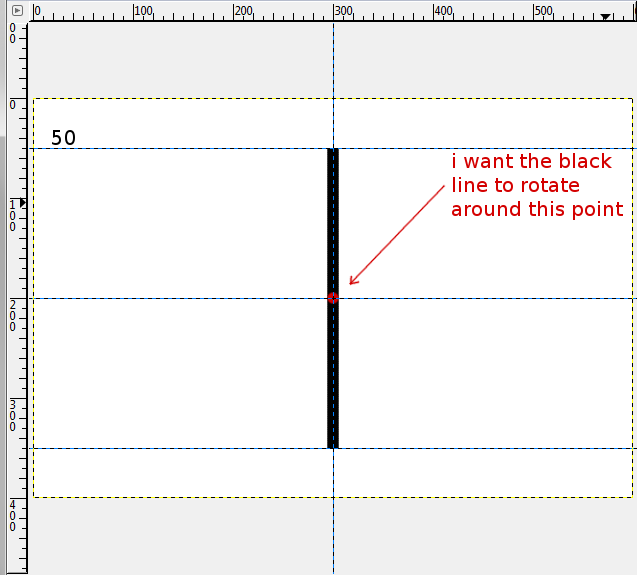
I fixed the script so it rotates exactly in center now.
Image
;;; Plugin  : copy-rotate
;;; Author  : tekhertz
;;; Date    : jan 13, 2010
;;; Revision: None
;;;                
;;; Version : 1.0
;;; Latest version at: http://registry.gimp.org
;;; Required : Gimp 2.6 or later
;;;
;;; Description:
;;; copy active selection rotate and anchor it based on count and angle
;;; -----------------------------------------------------------------------------
;;;
;;; License:
;;; This program is free software; you can redistribute it and/or modify
;;; it under the terms of the GNU General Public License as published by
;;; the Free Software Foundation; either version 2 of the License, or
;;; (at your option) any later version.
;;;
;;; This program is distributed in the hope that it will be useful,
;;; but WITHOUT ANY WARRANTY; without even the implied warranty of
;;; MERCHANTABILITY or FITNESS FOR A PARTICULAR PURPOSE.  See the
;;; GNU General Public License for more details.
;;;
;;; You should have received a copy of the GNU General Public License
;;; along with this program; if not, write to the Free Software
;;; Foundation, Inc., 675 Mass Ave, Cambridge, MA 02139, USA.

(define (script-fu-copy-rotate inImage inLayer xCenter yCenter StartAngle Objects)
   (let* (   (drawable 0)
      (rAngle 0)
      (BoxWidth 0) (BoxHeight 0)
      (xoffset 0) (yoffset 0)
      (countdown 0)
      (sel-float 0)
      (degree 0)
      (imageWidth  (car (gimp-image-width inImage)))
         )
   (set! BoxWidth (cadr (gimp-selection-bounds inImage)))
   (set! BoxHeight (caddr (gimp-selection-bounds inImage)))
   (set! countdown 0)
   (set! xoffset BoxWidth)
   (set! yoffset BoxHeight)
   (set! drawable inLayer)
   (set! rAngle (* StartAngle (/ 3.14159 180)))
   (gimp-image-undo-group-start inImage)
   (gimp-layer-resize-to-image-size inLayer)
     (gimp-edit-copy drawable);copy
   (gimp-edit-clear drawable);clear selection to handle partial transparency
   
  (while (< countdown Objects)
    (begin
   (set! degree (* rAngle countdown))
   (set! sel-float (car (gimp-edit-paste drawable FALSE)));paste
   (gimp-layer-set-offsets sel-float xoffset yoffset);move
   (gimp-drawable-transform-rotate-default sel-float degree FALSE xCenter yCenter FALSE FALSE);rotate
;   (gimp-floating-sel-to-layer sel-float);make each transform a new layer
   (gimp-floating-sel-anchor sel-float);anchor each transform to start layer
   (set! countdown (+ countdown 1))
   );begin
);while
   (gimp-displays-flush)
   (gimp-image-undo-group-end inImage)
      );let
) ;;def


(script-fu-register
"script-fu-copy-rotate"
_"<Image>/_Select/_script-fu-copy-rotate"
"copy active selection rotate and anchor it "
"*"
"*"
"01/13/2010"
"RGB* GRAY* INDEXED*"
SF-IMAGE "The Image" 0
SF-DRAWABLE "The Layer" 0
SF-ADJUSTMENT "Center (x-coordinate)" '(640 0 9999 1 10 0 1)
SF-ADJUSTMENT "Center (y-coordinate)" '(640 0 9999 1 10 0 1)
SF-ADJUSTMENT "Angle" '(120 0 360 0.1 1 1 1)
SF-ADJUSTMENT "Number of Objects" '(3 -9999 9999 1 10 0 1)
)


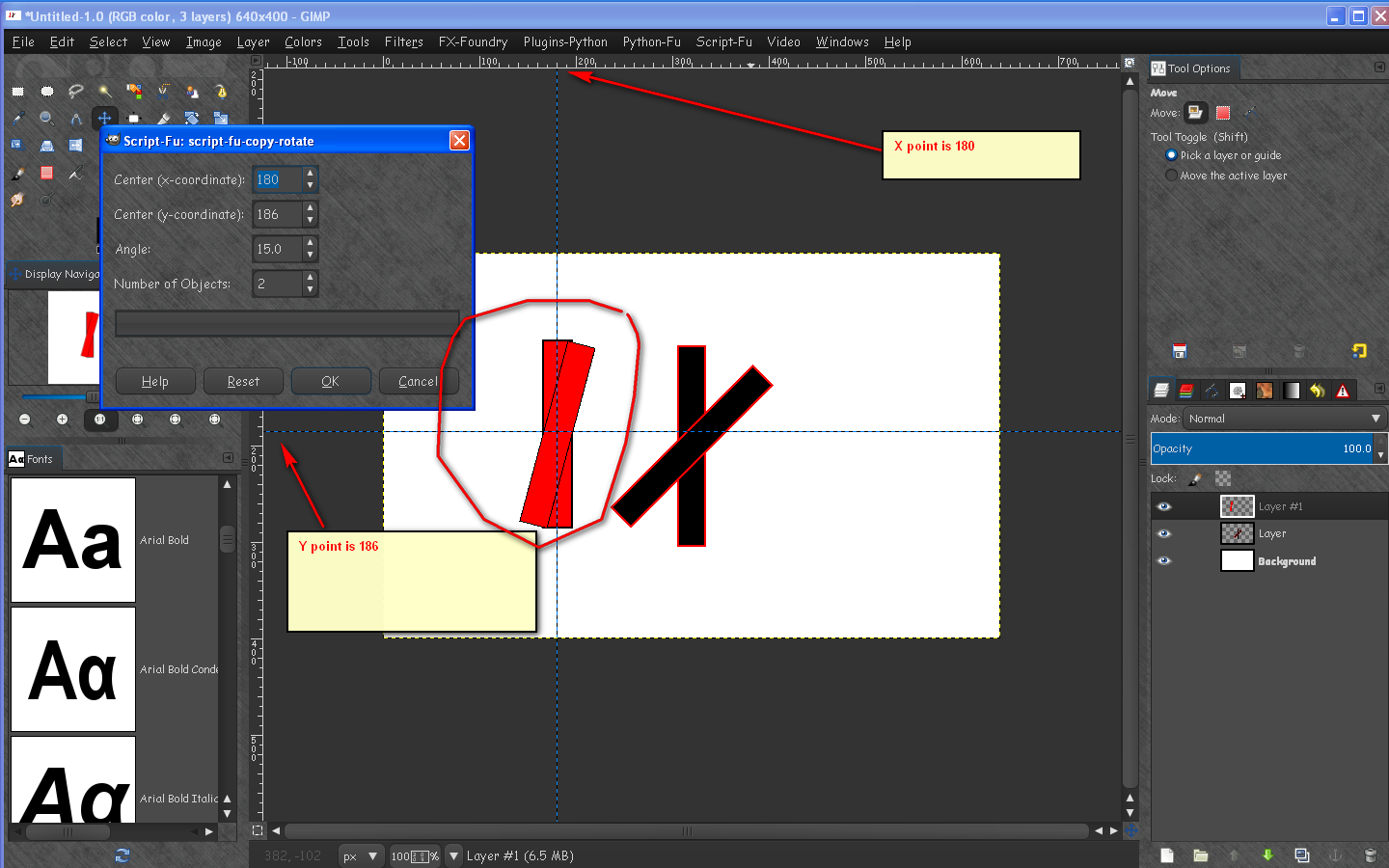
But you will have to determine the exact center of your selection with guides.
For example
Image

_________________
Image


Top
 Post subject: Re: 'script-fu-copy-rotate'
PostPosted: Wed Aug 01, 2012 12:33 pm  (#11) 
Offline
GimpChat Member
User avatar

Joined: Mar 23, 2012
Posts: 7388
Location: Göteborg at last!
Bug Sampson wrote:
That seems like a cryptical response frome Erisian.


Apologies. I didn't explain myself well. It was just taking Esper's demonstration further in case it helped to understand what was going on.


Top
 Post subject: Re: 'script-fu-copy-rotate'
PostPosted: Wed May 25, 2016 3:38 pm  (#12) 
Offline
GimpChat Member
User avatar

Joined: Jul 06, 2013
Posts: 2661
Location: California
Where is the updated version of this script?


Top
 Post subject: Re: 'script-fu-copy-rotate'
PostPosted: Thu May 26, 2016 3:58 am  (#13) 
Offline
Administrator
User avatar

Joined: Aug 10, 2012
Posts: 14014
Location: Native to NYC living in Arizona, Gimp 2.8 - 3.0, Win 11 PC.
mackenzieh wrote:
Where is the updated version of this script?

The attached .scm file,
is the most up to date version of script-fu-copy-rotate.

Attachment:
script-fu-copy-rotate.scm [2.97 KiB]
Downloaded 199 times


Also you may want to have a look at this linked thread below.

Script/Plugin That Emulates Mura Meister Copies

This is a new script (Mura_Meister_Copies.scm),
created by Gimp Chat member trandoductin.
Offers better options then the original,
or most recent version of script-fu copy-rotate.

_________________
Image
"A wise man learns more from a foolish question than a fool can learn from a wise answer"
Image


Top
Post new topic Reply to topic  [ 13 posts ] 

All times are UTC - 5 hours [ DST ]


* Login  


Powered by phpBB3 © phpBB Group