It is currently Thu Jul 30, 2026 12:22 am


All times are UTC - 5 hours [ DST ]


Post new topic Reply to topic  [ 1444 posts ]  Go to page Previous  1 ... 32, 33, 34, 35, 36, 37, 38 ... 73  Next
Author Message
 Post subject: Re: For lovers of photography
PostPosted: Fri Jul 01, 2016 12:44 pm  (#681) 
Offline
GimpChat Member
User avatar

Joined: Mar 01, 2014
Posts: 14088
Location: Spain, Aragón
Thank you Dinasset. I don't know how to smooth the sky, tried something but I don't know if it is enough or if it isn't correct. :roll:


Attachments:
fishing_boat-white%20balance-blue%20correction-contrast-wavelet%20sharpening-tonemap+smooth sky.jpg
fishing_boat-white%20balance-blue%20correction-contrast-wavelet%20sharpening-tonemap+smooth sky.jpg [ 1.37 MiB | Viewed 1502 times ]

_________________
Image

Gimp 2.10.30(samj) portable _ OS Windows 10 Home_ 64bits
Don’t be afraid to start over. It’s a new chance to rebuild what you want.
Top
 Post subject: Re: For lovers of photography
PostPosted: Fri Jul 01, 2016 12:56 pm  (#682) 
Offline
GimpChat Member
User avatar

Joined: Mar 28, 2016
Posts: 312
Location: Netherlands
the road:


Attachments:
road_edited.jpg
road_edited.jpg [ 917.22 KiB | Viewed 1500 times ]
Top
 Post subject: Re: For lovers of photography
PostPosted: Fri Jul 01, 2016 1:07 pm  (#683) 
Offline
GimpChat Member
User avatar

Joined: Jan 20, 2013
Posts: 14831
Location: roma, italy
Issabella wrote:
Thank you Dinasset. I don't know how to smooth the sky, tried something but I don't know if it is enough or if it isn't correct. :roll:

- taken this your image as input
- select (repeatedly) by contiguous colour the sky
- grow the selection by 1
- applied G'mic Iain's noise reduction (default)
here the outcome

Attachment:
fishing_boat_Issa+dn-smooth-sky.jpg
fishing_boat_Issa+dn-smooth-sky.jpg [ 1.15 MiB | Viewed 1496 times ]

_________________
"Where am I ?"


Top
 Post subject: Re: For lovers of photography
PostPosted: Fri Jul 01, 2016 1:55 pm  (#684) 
Offline
GimpChat Member
User avatar

Joined: Mar 01, 2014
Posts: 14088
Location: Spain, Aragón
That is very clever Dinasset. I have to do it, too. :bigthup :tyspin
iarga, I like your result. I see it very well balanced. :)

_________________
Image

Gimp 2.10.30(samj) portable _ OS Windows 10 Home_ 64bits
Don’t be afraid to start over. It’s a new chance to rebuild what you want.


Last edited by Issabella on Sat Jul 02, 2016 2:08 am, edited 1 time in total.

Top
 Post subject: Re: For lovers of photography
PostPosted: Fri Jul 01, 2016 3:33 pm  (#685) 
Offline
GimpChat Member
User avatar

Joined: Mar 28, 2016
Posts: 312
Location: Netherlands
Tone mapping, details, G'MIC "Smooth nlmeans", "Customize CLUT" and curves:


Attachments:
fishing_boat_edited.jpg
fishing_boat_edited.jpg [ 1.07 MiB | Viewed 1485 times ]
Top
 Post subject: Re: For lovers of photography
PostPosted: Sat Jul 02, 2016 2:12 am  (#686) 
Offline
GimpChat Member
User avatar

Joined: Mar 01, 2014
Posts: 14088
Location: Spain, Aragón
iarga, a very nice enhancing result on the fishing boat picture. Excuse my ignorance, could you tell me what "Customize CLUT" is? Thank you so much. :)

_________________
Image

Gimp 2.10.30(samj) portable _ OS Windows 10 Home_ 64bits
Don’t be afraid to start over. It’s a new chance to rebuild what you want.


Top
 Post subject: Re: For lovers of photography
PostPosted: Sat Jul 02, 2016 2:48 am  (#687) 
Offline
GimpChat Member
User avatar

Joined: Mar 28, 2016
Posts: 312
Location: Netherlands
Issabella, "Customize CLUT" is a new filter in G'MIC. Colors>Customize CLUT.

More about it here:
https://discuss.pixls.us/t/gimp-how-to- ... ut/1567/27
https://discuss.pixls.us/t/sharing-galore/1660/2


If you can login in PIXLS.US then also here:
https://discuss.pixls.us/t/article-idea ... -clut/1681

Start with at least 8 keypoints in "Lock uniform sampling", otherwise your image will be black and white.
Below there are actions. With the actions you can replace a color or lock a color. So replace the color(s) you want to change and lock all the colors you don't want to change. You have to experiment to learn how it works.

With the spatial regularization, you can "soften" color artifacts.

In the picture above I used the filter to change the blue of the sky, I locked the blue of the boat and all other colors I didn't want to change.

After tone mapping and details, the blue of the boat was not equal, so I used the filter a second time to make darker blue parts of the ship more like the lighter parts. Here I locked the colors of the sky, the water and everything else that was not the blue of the boat.


Top
 Post subject: Re: For lovers of photography
PostPosted: Sat Jul 02, 2016 5:22 am  (#688) 
Offline
GimpChat Member
User avatar

Joined: Mar 01, 2014
Posts: 14088
Location: Spain, Aragón
Thank you so much iarga. I think this filter has a lot of potential. :) :tyspin

_________________
Image

Gimp 2.10.30(samj) portable _ OS Windows 10 Home_ 64bits
Don’t be afraid to start over. It’s a new chance to rebuild what you want.


Top
 Post subject: Re: For lovers of photography
PostPosted: Sun Jul 03, 2016 8:17 am  (#689) 
Offline
GimpChat Member
User avatar

Joined: Mar 01, 2014
Posts: 14088
Location: Spain, Aragón
I took these photos in Barcelona. You can play your magic on them. :)


Attachments:
IMG_8994.JPG
IMG_8994.JPG [ 380.02 KiB | Viewed 1408 times ]
IMG_8942.JPG
IMG_8942.JPG [ 312.93 KiB | Viewed 1408 times ]
IMG_8939.JPG
IMG_8939.JPG [ 441.03 KiB | Viewed 1408 times ]

_________________
Image

Gimp 2.10.30(samj) portable _ OS Windows 10 Home_ 64bits
Don’t be afraid to start over. It’s a new chance to rebuild what you want.
Top
 Post subject: Re: For lovers of photography
PostPosted: Mon Jul 04, 2016 3:40 am  (#690) 
Offline
GimpChat Member
User avatar

Joined: Jan 20, 2013
Posts: 14831
Location: roma, italy
my tries

- perspective
- saturation
- curve to reduce whites
- unsharp mask

Attachment:
IMG_8994-dn1.JPG
IMG_8994-dn1.JPG [ 762.99 KiB | Viewed 1387 times ]

-------------------------------------------------------
- perspective
- increased red/green
- added a radial gradient to focus on the animal

Attachment:
IMG_8942-dn1.JPG
IMG_8942-dn1.JPG [ 409.69 KiB | Viewed 1387 times ]

-------------------------------------------------------
- crop
- patched a bit
- unsharp mask
- more contrast

Attachment:
IMG_8939-dn1.JPG
IMG_8939-dn1.JPG [ 824.58 KiB | Viewed 1387 times ]

_________________
"Where am I ?"


Top
 Post subject: Re: For lovers of photography
PostPosted: Mon Jul 04, 2016 4:45 am  (#691) 
Offline
GimpChat Member
User avatar

Joined: Mar 01, 2014
Posts: 14088
Location: Spain, Aragón
What good results on them, Dinasset. :bigthup
I did my tries.


Attachments:
IMG_8994-luminosity Mask-white balance-tonemap-contrast-Issa.JPG
IMG_8994-luminosity Mask-white balance-tonemap-contrast-Issa.JPG [ 984.68 KiB | Viewed 1448 times ]
IMG_8942-Perspective-contrast-unsharp mask-Issa.JPG
IMG_8942-Perspective-contrast-unsharp mask-Issa.JPG [ 778.73 KiB | Viewed 1448 times ]
IMG_8939-wavelet sharpening.JPG
IMG_8939-wavelet sharpening.JPG [ 1.14 MiB | Viewed 1448 times ]

_________________
Image

Gimp 2.10.30(samj) portable _ OS Windows 10 Home_ 64bits
Don’t be afraid to start over. It’s a new chance to rebuild what you want.
Top
 Post subject: Re: For lovers of photography
PostPosted: Mon Jul 04, 2016 6:01 am  (#692) 
Offline
GimpChat Member
User avatar

Joined: Jan 20, 2013
Posts: 14831
Location: roma, italy
Yours are good too.
Those images are a bit difficult to interpret.
I tried to add "something" to them

Attachment:
IMG_8994-dn2.JPG
IMG_8994-dn2.JPG [ 1 MiB | Viewed 1444 times ]


Attachment:
IMG_8942-dn2.JPG
IMG_8942-dn2.JPG [ 333.08 KiB | Viewed 1444 times ]


Attachment:
IMG_8939-dn2.JPG
IMG_8939-dn2.JPG [ 830.9 KiB | Viewed 1444 times ]

_________________
"Where am I ?"


Top
 Post subject: Re: For lovers of photography
PostPosted: Mon Jul 04, 2016 7:26 am  (#693) 
Offline
GimpChat Member
User avatar

Joined: Nov 15, 2014
Posts: 875
I have been busy for the last few days, so I am late with my homework!
The road: Cleared the rubbish! Slight adjustments to colour and saturation.
Fishing boat: I tried to bring out the scene as I remember it when I took the photograph.
The sea and sky were very deep blue that morning and faded into each other - so no change there.
Subdued the brightest white areas of the boat slightly, and because I use them rarely, decided to use Burn and Dodge to darken the foreground and emphasise the reflections in the water.

david.


Attachments:
road.jpg
road.jpg [ 1.14 MiB | Viewed 1438 times ]
fishing_boat.jpg
fishing_boat.jpg [ 763.06 KiB | Viewed 1438 times ]
Top
 Post subject: Re: For lovers of photography
PostPosted: Mon Jul 04, 2016 7:37 am  (#694) 
Offline
GimpChat Member
User avatar

Joined: Nov 15, 2014
Posts: 875
The next three.
Fairground: I decided not to apply perspective correction as this is the natural perspective of looking upward into the "galloper".
I just made the colours more brilliant, as loved by travelling fairgrounds. High frequency sharpening.

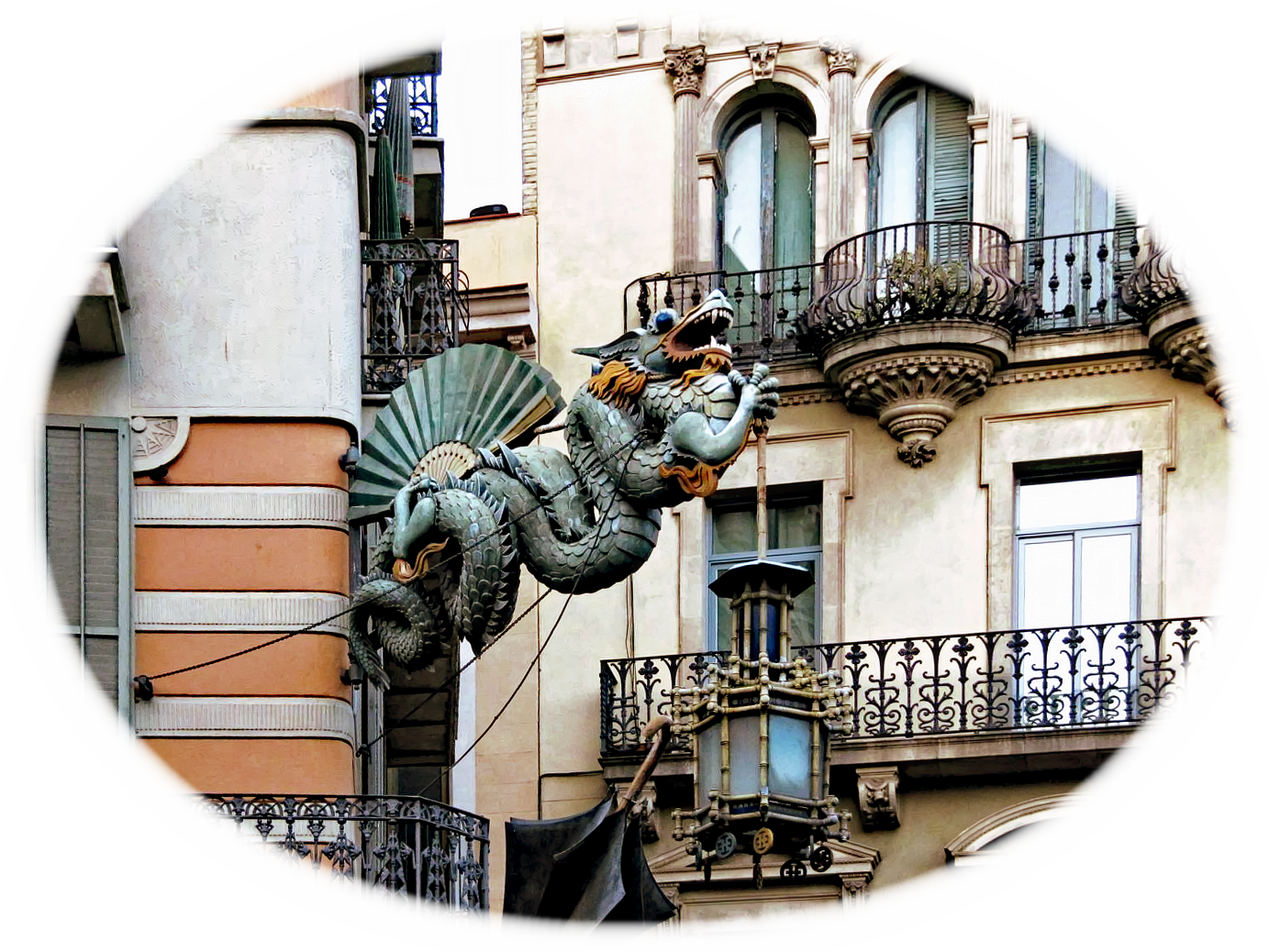
Dragon: I decided it deserved a photograph of its own! I think the changes need no explanation!

Fruit: I selected the area around the fruit pyramid, darkened it and reduced contrast. The area to the right of the fruit I added a slight blur.
I used a layer mask with a gradient to even up the brightness between the top and bottom of the fruit.

david.


Attachments:
fairground.JPG
fairground.JPG [ 710.57 KiB | Viewed 1438 times ]
dragon.JPG
dragon.JPG [ 95.8 KiB | Viewed 1438 times ]
fruit.JPG
fruit.JPG [ 856.29 KiB | Viewed 1438 times ]
Top
 Post subject: Re: For lovers of photography
PostPosted: Mon Jul 04, 2016 8:12 am  (#695) 
Offline
GimpChat Member
User avatar

Joined: Jan 20, 2013
Posts: 14831
Location: roma, italy
david wrote:
I have been busy for the last few days, so I am late with my homework!
The road: Cleared the rubbish! Slight adjustments to colour and saturation.
Fishing boat: I tried to bring out the scene as I remember it when I took the photograph.
The sea and sky were very deep blue that morning and faded into each other - so no change there.
Subdued the brightest white areas of the boat slightly, and because I use them rarely, decided to use Burn and Dodge to darken the foreground and emphasise the reflections in the water.

david.

Nice outcome for the road.
About the fishing boat IMO the colours are not enough "brilliant"; just taken your image and run "autolevel"
Attachment:
fishing_boat_david-autolevel.jpg
fishing_boat_david-autolevel.jpg [ 789.04 KiB | Viewed 1436 times ]

_________________
"Where am I ?"


Top
 Post subject: Re: For lovers of photography
PostPosted: Mon Jul 04, 2016 8:30 am  (#696) 
Offline
GimpChat Member
User avatar

Joined: Mar 28, 2016
Posts: 312
Location: Netherlands
David, I like your dragon. I understand that you removed the waste, next to the road. That's the reason I made "my" road a bit gloomy, because of litter.

My dragon, (a bit boring, I have to admit :) )

Image


Top
 Post subject: Re: For lovers of photography
PostPosted: Mon Jul 04, 2016 11:03 am  (#697) 
Offline
GimpChat Member
User avatar

Joined: Mar 28, 2016
Posts: 312
Location: Netherlands
Tone mapping, curves and details:


Attachments:
IMG_8994_edited.JPG
IMG_8994_edited.JPG [ 923.02 KiB | Viewed 1425 times ]
Top
 Post subject: Re: For lovers of photography
PostPosted: Mon Jul 04, 2016 11:48 am  (#698) 
Offline
GimpChat Member
User avatar

Joined: Mar 28, 2016
Posts: 312
Location: Netherlands
Dinasset, I like your first merry-go-round. The nice thing here is to spot the differences. Did you only use the unsharp mask for details? Which unsharp mask did you use? from GIMP or G'MIC? Your edges are much cleaner. Did you use also a kind of noise reduction here, with this picture? So I want to learn something here:

left: dinasset, right: me.
Image


Top
 Post subject: Re: For lovers of photography
PostPosted: Mon Jul 04, 2016 5:37 pm  (#699) 
Offline
GimpChat Member
User avatar

Joined: Mar 12, 2016
Posts: 198
Location: Illinois, USA
Nice results everyone !
My attempts.


Attachments:
IMG_8994.JPG
IMG_8994.JPG [ 1.01 MiB | Viewed 1407 times ]
IMG_8939.JPG
IMG_8939.JPG [ 1.12 MiB | Viewed 1407 times ]

_________________
Image
Top
 Post subject: Re: For lovers of photography
PostPosted: Tue Jul 05, 2016 4:29 am  (#700) 
Offline
GimpChat Member
User avatar

Joined: Mar 01, 2014
Posts: 14088
Location: Spain, Aragón
Thank you all for your nice contributions. I enjoy each result with different version according to your art. I'm learning so much from you all, so enormous THANKS. :tyspin
iarga, sure that Dinasset will answer you about your request. :)
I leave these others. What will you do on them? :)


Attachments:
IMG_4358.JPG
IMG_4358.JPG [ 295.31 KiB | Viewed 1397 times ]
IMG_4108.JPG
IMG_4108.JPG [ 355.98 KiB | Viewed 1397 times ]

_________________
Image

Gimp 2.10.30(samj) portable _ OS Windows 10 Home_ 64bits
Don’t be afraid to start over. It’s a new chance to rebuild what you want.
Top
Post new topic Reply to topic  [ 1444 posts ]  Go to page Previous  1 ... 32, 33, 34, 35, 36, 37, 38 ... 73  Next

All times are UTC - 5 hours [ DST ]


* Login  


Powered by phpBB3 © phpBB Group