It is currently Sun Jun 07, 2026 10:02 am


All times are UTC - 5 hours [ DST ]


Post new topic Reply to topic  [ 126 posts ]  Go to page Previous  1, 2, 3, 4, 5, 6, 7  Next
Author Message
 Post subject: Re: Announcing ArrowsCreator-0.3
PostPosted: Mon Aug 29, 2016 10:27 pm  (#81) 
Offline
Administrator
User avatar

Joined: Aug 10, 2012
Posts: 14014
Location: Native to NYC living in Arizona, Gimp 2.8 - 3.0, Win 11 PC.
mackenzieh wrote:
Kind of but my gimp lists the script under Script Fu>Arrow.. not Arrows Creator and it's a py file but I guess I have it in the wrong place. I have it here: Program Files>GIMP 2>lib>gimp>2.0>plug-ins

You should be putting any scripts and plug-ins into your Gimp User folders not in the Program folders.

_________________
Image
"A wise man learns more from a foolish question than a fool can learn from a wise answer"
Image


Top
 Post subject: Re: Announcing ArrowsCreator-0.3
PostPosted: Mon Aug 29, 2016 10:34 pm  (#82) 
Offline
GimpChat Member
User avatar

Joined: Jul 06, 2013
Posts: 2661
Location: California
Wallace wrote:
mackenzieh wrote:
Kind of but my gimp lists the script under Script Fu>Arrow.. not Arrows Creator and it's a py file but I guess I have it in the wrong place. I have it here: Program Files>GIMP 2>lib>gimp>2.0>plug-ins

You should be putting any scripts and plug-ins into your Gimp User folders not in the Program folders.

That's where most of my py files are in the program folder, otherwise they won't show up in gimp.


Top
 Post subject: Re: Announcing ArrowsCreator-0.3
PostPosted: Mon Aug 29, 2016 10:39 pm  (#83) 
Offline
Administrator
User avatar

Joined: Aug 10, 2012
Posts: 14014
Location: Native to NYC living in Arizona, Gimp 2.8 - 3.0, Win 11 PC.
mackenzieh wrote:
That's where most of my py files are in the program folder, otherwise they won't show up in gimp.

That isn't true.
I've been using Gimp a very long time and have never heard of that.
I never place scripts or plug-ins into the program folder.
That is why there is a Gimp User folder,
so you the user can add stuff to Gimp.

_________________
Image
"A wise man learns more from a foolish question than a fool can learn from a wise answer"
Image


Top
 Post subject: Re: Announcing ArrowsCreator-0.3
PostPosted: Mon Aug 29, 2016 10:47 pm  (#84) 
Offline
GimpChat Member
User avatar

Joined: Oct 06, 2010
Posts: 4050
By placing your scripts in Plugins and/or scripts in the Program Files GIMP folders, you risk losing them all when you have to re-install GIMP. Like Wallace said, placing them into your User folders for GIMP, there is no danger to you losing them should you ever need to re-install GIMP.

_________________
"In order to attain the impossible, one must attempt the absurd."
~ Miguel de Cervantes


Top
 Post subject: Re: Announcing ArrowsCreator-0.3
PostPosted: Mon Aug 29, 2016 11:02 pm  (#85) 
Offline
GimpChat Member
User avatar

Joined: Jul 06, 2013
Posts: 2661
Location: California
Wallace wrote:
mackenzieh wrote:
That's where most of my py files are in the program folder, otherwise they won't show up in gimp.

That isn't true.
I've been using Gimp a very long time and have never heard of that.
I never place scripts or plug-ins into the program folder.
That is why there is a Gimp User folder,
so you the user can add stuff to Gimp.


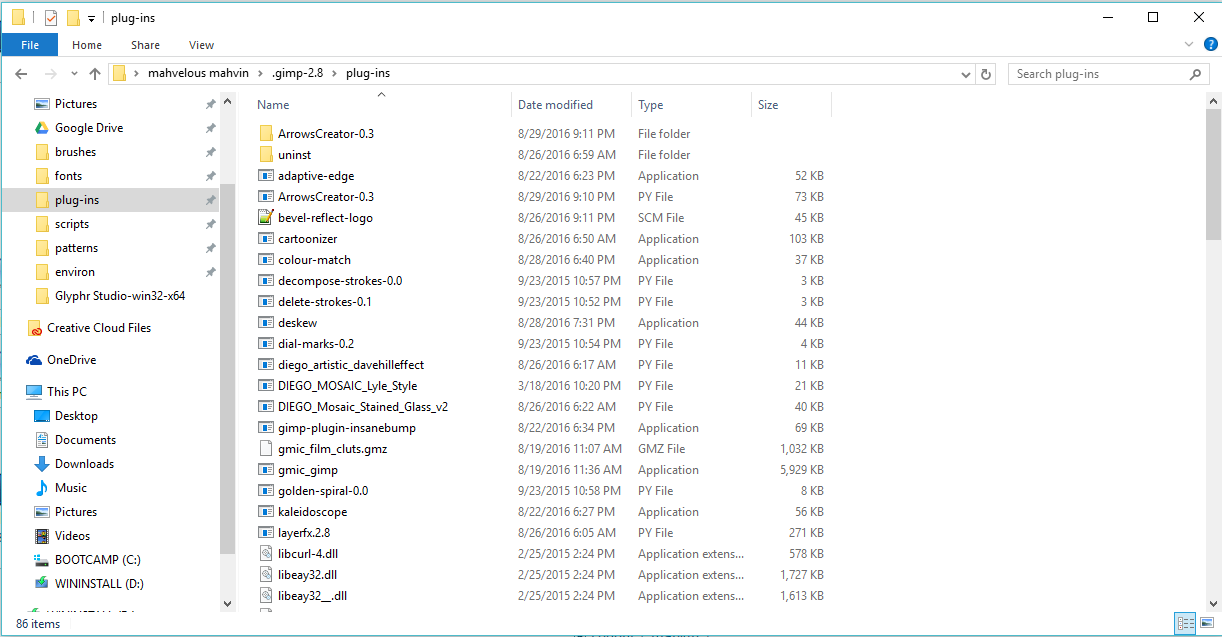
Here's what I have:
Plugins:
Image

Py Files:
Image

I use windows 7 64 bit. How ever, that still doesn't expain why I can't access ArrowsCreator 0.3. When I open Gimp.


Top
 Post subject: Re: Announcing ArrowsCreator-0.3
PostPosted: Mon Aug 29, 2016 11:16 pm  (#86) 
Offline
GimpChat Member
User avatar

Joined: Oct 06, 2010
Posts: 4050
Image

I personally prefer sticking with using the User folders for GIMP, it's just faster and easier for me to deal with.

_________________
"In order to attain the impossible, one must attempt the absurd."
~ Miguel de Cervantes


Top
 Post subject: Re: Announcing ArrowsCreator-0.3
PostPosted: Mon Aug 29, 2016 11:33 pm  (#87) 
Offline
GimpChat Member
User avatar

Joined: Jul 06, 2013
Posts: 2661
Location: California
I did as Wallace's image had done but before gimp could run smoothly, I got a message saying that gimp is running sluggish when I first opened it up. I restarted it a second time and I now see a new tab called Extensions. It's there.


Top
 Post subject: Re: Announcing ArrowsCreator-0.3
PostPosted: Tue Aug 30, 2016 12:52 am  (#88) 
Offline
GimpChat Member
User avatar

Joined: Oct 06, 2010
Posts: 4050
You have to check Edit - Preferences - Folders - Plugins to make sure GIMP is pointed to the user folders.

Image

_________________
"In order to attain the impossible, one must attempt the absurd."
~ Miguel de Cervantes


Top
 Post subject: Re: Announcing ArrowsCreator-0.3
PostPosted: Tue Aug 30, 2016 1:36 am  (#89) 
Offline
GimpChat Member
User avatar

Joined: Jul 06, 2013
Posts: 2661
Location: California
mahvin wrote:
You have to check Edit - Preferences - Folders - Plugins to make sure GIMP is pointed to the user folders.

[ Image ]


I checked it and it's there. :)


Top
 Post subject: Re: Announcing ArrowsCreator-0.3
PostPosted: Tue Aug 30, 2016 1:41 am  (#90) 
Offline
GimpChat Member
User avatar

Joined: Oct 06, 2010
Posts: 4050
Weird. You might have a bad download of GIMP, no idea..

_________________
"In order to attain the impossible, one must attempt the absurd."
~ Miguel de Cervantes


Top
 Post subject: Re: Announcing ArrowsCreator-0.3
PostPosted: Tue Aug 30, 2016 4:15 am  (#91) 
Offline
GimpChat Member
User avatar

Joined: Apr 07, 2010
Posts: 14182
Graechan wrote:
Hi Molly is that really you? without you,Tux and Saulgoode around I've lost my 'Spark'

Awe, yes it is me graechan and 2-ton, I missed y'all too.

_________________
Image


Top
 Post subject: Re: Announcing ArrowsCreator-0.3
PostPosted: Tue Aug 30, 2016 4:45 am  (#92) 
Offline
Global Moderator
User avatar

Joined: Apr 01, 2012
Posts: 8361
Location: On the other side of your screen
molly wrote:
Graechan wrote:
Hi Molly is that really you? without you,Tux and Saulgoode around I've lost my 'Spark'

Awe, yes it is me graechan and 2-ton, I missed y'all too.

Good to see your little penguins :) Missed them

_________________
Image
Free Fun Photo Editing & resources
Poems from the Lord
Gimp Newby
Gimp version 3.2.0 and GMIC-Qt 3.7.5 OS :- Windows 10 Home 64


Top
 Post subject: Re: Announcing ArrowsCreator-0.3
PostPosted: Tue Aug 30, 2016 4:52 am  (#93) 
Offline
GimpChat Member
User avatar

Joined: Apr 07, 2010
Posts: 14182
Thank you sallyanne

_________________
Image


Top
 Post subject: Re: Announcing ArrowsCreator-0.3
PostPosted: Tue Aug 30, 2016 5:36 am  (#94) 
Offline
Global Moderator
User avatar

Joined: May 16, 2010
Posts: 16015
mackenzieh maybe you need the arrows creator 0.3 folder in the plug-in directory also?

_________________
Image


Top
 Post subject: Re: Announcing ArrowsCreator-0.3
PostPosted: Tue Aug 30, 2016 10:57 am  (#95) 
Offline
GimpChat Member

Joined: Jul 13, 2014
Posts: 109
@mackenzieh,
To answer your comment: 'Where to find it?'
It should be on the menu-bar where you put it; since version 0.2 it's a feature of the plug-in.
This placement happens when you start GIMP after installing the plug-in in a folder pointed to in 'Preferences'.
You should see this during that GIMP start <attachment>. The underline file-name is for your programs plug-in folder
(I don't use that, like Wallace etc. , but it work there also for me) and 'ArrowsCreator-0.3.4' on Windows 7 for GIMP-2.8.18 . The values seen in the image are the default.
After, a press the 'configuration OK' or 'quit X' button, this folder with that file will appear in the same plug-in folder where you install 'ArrowsCreator-0.3.py'.

I don't really know what is happening in your case. See if a lowering of the Windows execution right make it appears.


Attachments:
Capture_AC_config.PNG
Capture_AC_config.PNG [ 415.99 KiB | Viewed 1844 times ]
Top
 Post subject: Re: Announcing ArrowsCreator-0.3
PostPosted: Tue Aug 30, 2016 12:10 pm  (#96) 
Offline
GimpChat Member
User avatar

Joined: Jan 13, 2011
Posts: 2638
Location: Poland
Hi Robert.
Are You planning a version for Gimp 2.9 ?

_________________
Image


Top
 Post subject: Re: Announcing ArrowsCreator-0.3
PostPosted: Tue Aug 30, 2016 12:26 pm  (#97) 
Offline
GimpChat Member
User avatar

Joined: Jul 06, 2013
Posts: 2661
Location: California
rob_brz1 wrote:
@mackenzieh,
To answer your comment: 'Where to find it?'
It should be on the menu-bar where you put it; since version 0.2 it's a feature of the plug-in.
This placement happens when you start GIMP after installing the plug-in in a folder pointed to in 'Preferences'.
You should see this during that GIMP start <attachment>. The underline file-name is for your programs plug-in folder
(I don't use that, like Wallace etc. , but it work there also for me) and 'ArrowsCreator-0.3.4' on Windows 7 for GIMP-2.8.18 . The values seen in the image are the default.
After, a press the 'configuration OK' or 'quit X' button, this folder with that file will appear in the same plug-in folder where you install 'ArrowsCreator-0.3.py'.

I don't really know what is happening in your case. See if a lowering of the Windows execution right make it appears.


Hi Rob,
I got it to work. :)


Top
 Post subject: Re: Announcing ArrowsCreator-0.3
PostPosted: Tue Aug 30, 2016 2:19 pm  (#98) 
Offline
GimpChat Member

Joined: Jul 13, 2014
Posts: 109
@MareroQ,
No there will be no support for GIMP-2.9 . Even not sure for GIMP-2.10, the plug-in getting too complex for me and GIMP.
But it was working for GIMP-2.9.3 on Windows, can I conclude from your question that it is not for the last 2.9.x ?

@makenzieh,
Good! Have notice also that you can change the last 3 values of the config file in an text editor without re-configuration.


Top
 Post subject: Re: Announcing ArrowsCreator-0.3
PostPosted: Tue Aug 30, 2016 2:49 pm  (#99) 
Offline
GimpChat Member
User avatar

Joined: Jan 13, 2011
Posts: 2638
Location: Poland
For Gimp 2.9.5 Win32bit you can start the plugin - but he does nothing.

Message:
called deprecated procedure 'gimp_image_add_vectors'.
It should call 'gimp_image_insert_vectors' instead!


A simple conversion line 1485 has not helped.
Too bad - because I use most often 2.9.5 (of the new filters Gegl).

_________________
Image


Top
 Post subject: Re: Announcing ArrowsCreator-0.3
PostPosted: Sun Sep 18, 2016 7:17 pm  (#100) 
Offline
GimpChat Member

Joined: Jul 13, 2014
Posts: 109
Hi,
Try improving now 'Labelling arrow' in version 0.3.5 available at the beginning of this thread.

Next time, Robert.


Top
Post new topic Reply to topic  [ 126 posts ]  Go to page Previous  1, 2, 3, 4, 5, 6, 7  Next

All times are UTC - 5 hours [ DST ]


* Login  


Powered by phpBB3 © phpBB Group