It is currently Fri Jun 12, 2026 5:19 pm


All times are UTC - 5 hours [ DST ]


Post new topic Reply to topic  [ 624 posts ]  Go to page Previous  1 ... 10, 11, 12, 13, 14, 15, 16 ... 32  Next
Author Message
 Post subject: Re: Custom-Font-XCF-Files
PostPosted: Wed Nov 30, 2016 10:30 am  (#241) 
Offline
GimpChat Member

Joined: Jun 16, 2016
Posts: 137
Hello,
Soon is Christmas and I thought I'd
make a font for Christmas. Containing
are large letters, numbers and characters.

Font Name: CHRISTMAS-SANTA-CLAUS-G-N-01.xcf

Attachment:
CHRISTMAS-SANTA-CLAUS-G-N-01.jpg
CHRISTMAS-SANTA-CLAUS-G-N-01.jpg [ 1.04 MiB | Viewed 1817 times ]


Attachment:
CHRISTMAS-SANTA-CLAUS-G-N-21.jpg
CHRISTMAS-SANTA-CLAUS-G-N-21.jpg [ 1.94 MiB | Viewed 1817 times ]


Attachment:
weihnachten-jahr-2017.jpg
weihnachten-jahr-2017.jpg [ 1.49 MiB | Viewed 1817 times ]


Download: http://www.kanzler-brd.de/dateien/CHRIS ... G-N-01.zip

Greetings from Germany Hardy111


Top
 Post subject: Re: Custom-Font-XCF-Files
PostPosted: Wed Nov 30, 2016 10:35 am  (#242) 
Offline
GimpChat Member

Joined: Jun 16, 2016
Posts: 137
Hello Issa
I like your new font (Balcony_Issa.xcf)
very well. Many thanks to all of you.

Greetings Hardy111


Top
 Post subject: Re: Custom-Font-XCF-Files
PostPosted: Wed Nov 30, 2016 11:18 am  (#243) 
Offline
GimpChat Member

Joined: Jun 16, 2016
Posts: 137
Hello,
I like to drink some beer, because I
have created a font and would like
to share it with you.

Font: PROST-BIER-FONT-G-N-01.xcf

Attachment:
PROST-BIER-FONT-G-N-21.jpg
PROST-BIER-FONT-G-N-21.jpg [ 2.56 MiB | Viewed 1814 times ]


Attachment:
PROST-BIER-FONT-G-N-01.jpg
PROST-BIER-FONT-G-N-01.jpg [ 1.43 MiB | Viewed 1814 times ]


Attachment:
PROST-BIER-FONT-G-N-11.jpg
PROST-BIER-FONT-G-N-11.jpg [ 918.62 KiB | Viewed 1814 times ]


Download: http://www.kanzler-brd.de/dateien/PROST ... G-N-01.zip

Many greetings Hardy111


Top
 Post subject: Re: Custom-Font-XCF-Files
PostPosted: Wed Nov 30, 2016 1:23 pm  (#244) 
Offline
GimpChat Member
User avatar

Joined: Mar 01, 2014
Posts: 14020
Location: Spain, Aragón
Thank you so much Hardy, I like your fonts, too. I'm sure all of us are going to enjoy and use your fonts. Good job Hardy :bigthup

_________________
Image

Gimp 2.10.30(samj) portable _ OS Windows 10 Home_ 64bits
Don’t be afraid to start over. It’s a new chance to rebuild what you want.


Top
 Post subject: Re: Custom-Font-XCF-Files
PostPosted: Wed Nov 30, 2016 3:25 pm  (#245) 
Offline
GimpChat Member

Joined: May 12, 2015
Posts: 4693
All of you that have made fonts have done such a wonderful job. I am envious. RJKD, another use for your flags! Issabella, your fonts are precious. You have added a feminine touch to this endeavor.

I would love to join you in font making, but I have been unable to figure out how you do it so quickly.


Top
 Post subject: Re: Custom-Font-XCF-Files
PostPosted: Wed Nov 30, 2016 3:35 pm  (#246) 
Offline
GimpChat Member
User avatar

Joined: Mar 01, 2014
Posts: 14020
Location: Spain, Aragón
Thank you Pat. I'll try to write a short guide for you as soon as possible so that you can enjoy creating your own fonts. :)
This one, I used a square font as a base and on transparent layer I put little pine branches until the letter was done, it taken me quite a lot time. :)


Attachments:
ChristmasPineBranches-Font Issa.JPG
ChristmasPineBranches-Font Issa.JPG [ 576.22 KiB | Viewed 1799 times ]
Christmas Font-PineBranches-Issa.xcf [2.71 MiB]
Downloaded 86 times

_________________
Image

Gimp 2.10.30(samj) portable _ OS Windows 10 Home_ 64bits
Don’t be afraid to start over. It’s a new chance to rebuild what you want.
Top
 Post subject: Re: Custom-Font-XCF-Files
PostPosted: Wed Nov 30, 2016 5:58 pm  (#247) 
Offline
GimpChat Member

Joined: May 12, 2015
Posts: 4693
Love that pine font, Issabella! You have such artistic ideas. I appreciate your help. I figure there are some steps I am missing or shortcuts that I don't know.


Top
 Post subject: Re: Custom-Font-XCF-Files
PostPosted: Wed Nov 30, 2016 6:28 pm  (#248) 
Offline
GimpChat Member
User avatar

Joined: Sep 24, 2010
Posts: 12775
Indeed Awesome, Issabella. :)


Attachments:
ia.jpg
ia.jpg [ 546.06 KiB | Viewed 1790 times ]

_________________
Lyle

Psalm 109:8

Image
Top
 Post subject: Re: Custom-Font-XCF-Files
PostPosted: Wed Nov 30, 2016 6:50 pm  (#249) 
Offline
Global Moderator
User avatar

Joined: May 16, 2010
Posts: 16023
Pat try this.
1) Create a new document
2) Using the text tool, create the entire alphabet caps only A-Z. Be sure to space the letters a bit.
3) Right click the text and create a path from the layer.
4) In the brush dialog select your favorite brush (can be animated). Size , color will be up to your liking.
4.5 ) Create a new layer (transparent) and select it.
5) Now select the path layer (right click stroke path) stroke the path with the brush (no dynamics)
6) Now you should have a whole alphabet with a brush outline on your new transparent layer.
7) Now right click the text layer and select alpha to selection. Shrink the selection by a few pixels.
8) Edit>stroke selection with the same brush again.
9) Repeat shrinking selection and stroking with brush until you get the results you desire.

The goal here is to fill your text with the brush object you select. So you can see how many different fonts you can create quickly this way. This is only one way to do it.

10) ONCE you have the font look you desire, use G'MIC Extract Objects to extract each letter to its own layer.
11) Now create a new layer at the bottom of the layer stack and name it "space.png" .
12) Now you need to select the move tool and from the top to the bottom select a layer and rename it (double click the layer) rename it to its corresponding character. For instance the period would be "..png" the question mark would be "?.png" WITHOUT THE QUOTES A.png B.png C.png and so forth until all layers are named.
13) Next with the move tool still selected grab each character and move it to the far left of the canvas (make sure View>Snap to canvas edges) is selected. I normally start with the cap A and make sure its moved all the way to the left to snap against the canvas edge.
14) Once ALL the characters are snapped to the left of the canvas, CROP the entire IMAGE around the characters. This will greatly reduce your file size.
15) Go to Layer>Autocrop all layers (if you don't have that script use Layer>Autocrop Layer) however you will have to crop each one separately. Its easier to do them all at once with the script. Tran also wrote a script that auto crops all layers and fixes the layer border height all at the same time. This is what i use.
16) Time to test your XCF font file. Run the xcf with Trans Custom Font script and check alignment.
Most of the time you will only need to select the space.png layer and set the Layer>Layer Boundaries width smaller and to the left of the canvas. You can move the space.png layer by selecting the move tool and moving the empty layer way to the edge of the left side of the canvas.
17) Test the XCF font file again and check for faults. If none your ready to release it to the public.

That's it really. But remember its only ONE way to do this. There are many. This way is pretty quick and clean.
Remember also that you can use any of your fonts for the outline so you have lots of capabilities there also.

MY ADVICE?
Start with just caps and get good at those. Then move on to small characters, punctuation and so on.

_________________
Image


Top
 Post subject: Re: Custom-Font-XCF-Files
PostPosted: Wed Nov 30, 2016 6:56 pm  (#250) 
Offline
GimpChat Member

Joined: May 12, 2015
Posts: 4693
Thank you, Rod. I'll give that a try.


Top
 Post subject: Re: Custom-Font-XCF-Files
PostPosted: Thu Dec 01, 2016 6:20 am  (#251) 
Offline
GimpChat Member
User avatar

Joined: Mar 01, 2014
Posts: 14020
Location: Spain, Aragón
Thank you so much Pat and Lyle. :)
Pat, I see that Rod did for you a very complete guide to create a new font. So mine maybe a bit simple. Anyway, I have put both explanations for it in a PDF file, just in case it can be useful for you.


Attachments:
Guide to create a custom font by Rod and Issa.pdf [217.37 KiB]
Downloaded 127 times

_________________
Image

Gimp 2.10.30(samj) portable _ OS Windows 10 Home_ 64bits
Don’t be afraid to start over. It’s a new chance to rebuild what you want.
Top
 Post subject: Re: Custom-Font-XCF-Files
PostPosted: Thu Dec 01, 2016 10:45 am  (#252) 
Offline
GimpChat Member

Joined: May 12, 2015
Posts: 4693
Thank you very much, Issabella. I appreciate all your help and Rod's.I'm sure it will help others, also.


Top
 Post subject: Re: Custom-Font-XCF-Files
PostPosted: Thu Dec 01, 2016 11:44 am  (#253) 
Offline
GimpChat Member
User avatar

Joined: Apr 09, 2016
Posts: 580
Location: Sheffield UK
Thank you Rod and Issabella, much appreciated. :tyspin

_________________
Image


Top
 Post subject: Re: Custom-Font-XCF-Files
PostPosted: Thu Dec 01, 2016 12:09 pm  (#254) 
Offline
GimpChat Member
User avatar

Joined: Jan 20, 2013
Posts: 14831
Location: roma, italy
a divertissement

Attachment:
HAPPY-NEW-YEAR-2.png
HAPPY-NEW-YEAR-2.png [ 2.66 MiB | Viewed 1789 times ]

_________________
"Where am I ?"


Top
 Post subject: Re: Custom-Font-XCF-Files
PostPosted: Thu Dec 01, 2016 1:05 pm  (#255) 
Offline
GimpChat Member
User avatar

Joined: Mar 01, 2014
Posts: 14020
Location: Spain, Aragón
Thanks a lot to you. I appreciate your nice comments :) I like to see the use in cards. :) :bigthup
I finished one I started yesterday for explanation. Here the result. :)
I hope you like this, too.


Attachments:
Midnight_Font_Issa.xcf [1.93 MiB]
Downloaded 95 times
Midnight Font-Issa.JPG
Midnight Font-Issa.JPG [ 496.63 KiB | Viewed 1783 times ]

_________________
Image

Gimp 2.10.30(samj) portable _ OS Windows 10 Home_ 64bits
Don’t be afraid to start over. It’s a new chance to rebuild what you want.
Top
 Post subject: Re: Custom-Font-XCF-Files
PostPosted: Thu Dec 01, 2016 5:27 pm  (#256) 
Offline
Script Coder
User avatar

Joined: Feb 18, 2011
Posts: 4826
Location: Bendigo Vic. Australia
Issabella your capital A was incorrect, it was A.PNG instead of A.png, Z also needs looking at otherwise I loved your Midnight_Font

_________________
Image
No matter how much you push the envelope, it'll still be stationery.


Top
 Post subject: Re: Custom-Font-XCF-Files
PostPosted: Fri Dec 02, 2016 3:06 am  (#257) 
Offline
GimpChat Member
User avatar

Joined: Mar 01, 2014
Posts: 14020
Location: Spain, Aragón
Graechan, Thank you so much for telling me. I'm so sorry for my mistake. Please, if someone needs it corrected, here it is. A and Z corrected.


Attachments:
Midnight_Font_Issa.xcf [1.93 MiB]
Downloaded 79 times

_________________
Image

Gimp 2.10.30(samj) portable _ OS Windows 10 Home_ 64bits
Don’t be afraid to start over. It’s a new chance to rebuild what you want.
Top
 Post subject: Re: Custom-Font-XCF-Files
PostPosted: Fri Dec 02, 2016 5:16 am  (#258) 
Offline
GimpChat Member

Joined: Jun 16, 2016
Posts: 137
Hello,
I still have a font, but for the coming summer.

Font Name:EISTUETEN-FONT-G-N-01.xcf

Attachment:
EISTUETEN-FONT-G-N-01.jpg
EISTUETEN-FONT-G-N-01.jpg [ 2.91 MiB | Viewed 1744 times ]


Attachment:
EISTUETEN-FONT-G-N-11.jpg
EISTUETEN-FONT-G-N-11.jpg [ 1.83 MiB | Viewed 1744 times ]


Attachment:
EISTUETEN-FONT-G-N-21.jpg
EISTUETEN-FONT-G-N-21.jpg [ 927.21 KiB | Viewed 1744 times ]


Download: http://www.kanzler-brd.de/dateien/EISTU ... G-N-01.zip

Have fun with it and many greetings
Hardy111


Top
 Post subject: Re: Custom-Font-XCF-Files
PostPosted: Sat Dec 03, 2016 3:12 am  (#259) 
Offline
Script Coder
User avatar

Joined: Feb 18, 2011
Posts: 4826
Location: Bendigo Vic. Australia
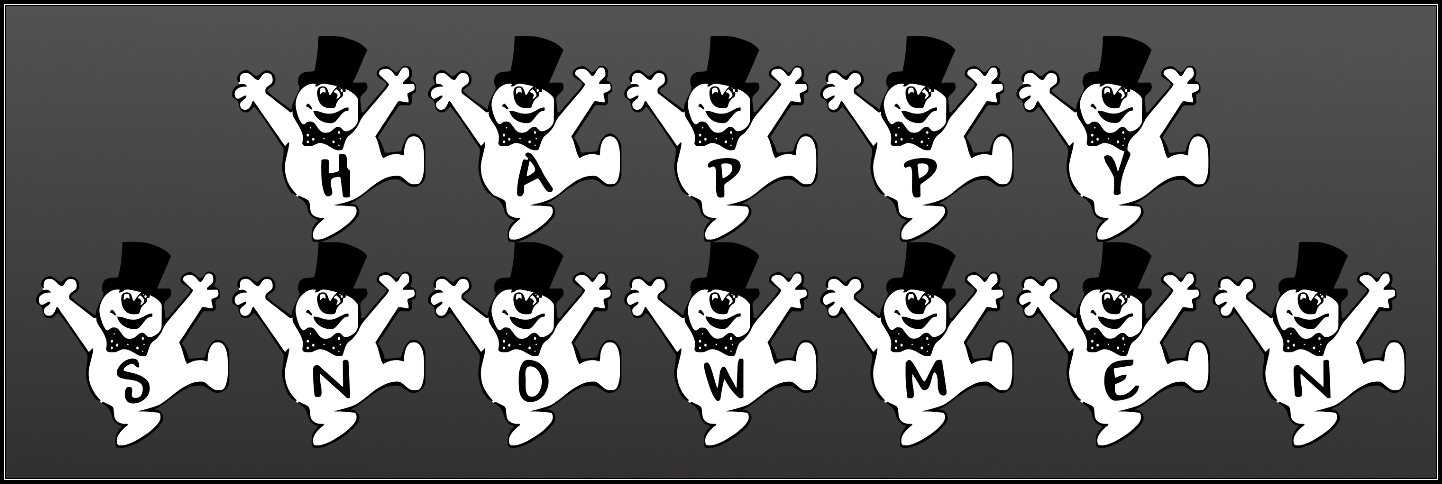
Image


Attachment:
File comment: Caps Nums
Happy_Snowmen.xcf [2.6 MiB]
Downloaded 89 times

_________________
Image
No matter how much you push the envelope, it'll still be stationery.


Top
 Post subject: Re: Custom-Font-XCF-Files
PostPosted: Sat Dec 03, 2016 4:39 pm  (#260) 
Offline
GimpChat Member

Joined: May 12, 2015
Posts: 4693
Your snowmen are really cute, Graechan.


Top
Post new topic Reply to topic  [ 624 posts ]  Go to page Previous  1 ... 10, 11, 12, 13, 14, 15, 16 ... 32  Next

All times are UTC - 5 hours [ DST ]


* Login  


Powered by phpBB3 © phpBB Group