It is currently Mon Jun 15, 2026 4:36 am


All times are UTC - 5 hours [ DST ]


Post new topic Reply to topic  [ 166 posts ]  Go to page Previous  1 ... 4, 5, 6, 7, 8, 9  Next
Author Message
 Post subject: Re: new script glass-frame-effect.scm
PostPosted: Tue Oct 07, 2014 1:25 am  (#121) 
Offline
Global Moderator
User avatar

Joined: Oct 02, 2014
Posts: 4962
Location: Sydney Australia
OK I admit it ... I am hooked on both this powerful, fabulous script & GIMP. Given the last few pages of posts in this thread and the Aussie connections, I just could not resist this one but as I am rather new here, I promise to stop overloading the thread now!

@Dinasset & @Graechan - what can I say but thankyou for the great tool!


Attachments:
File comment: Tongue in cheek!
touraussie2.png
touraussie2.png [ 542.08 KiB | Viewed 2000 times ]

_________________
Image

Respect should be offered freely but hard earned
Top
 Post subject: Re: new script glass-frame-effect.scm
PostPosted: Tue Oct 07, 2014 4:02 am  (#122) 
Offline
GimpChat Member
User avatar

Joined: Jan 20, 2013
Posts: 14831
Location: roma, italy
very nice!
I'm sure Sally, Graechan and other Australians will appreciate it...

_________________
"Where am I ?"


Top
 Post subject: Re: new script glass-frame-effect.scm
PostPosted: Tue Oct 07, 2014 4:07 am  (#123) 
Offline
GimpChat Member

Joined: Oct 29, 2012
Posts: 33
Location: Brisbane, Australia
Hi Graechan,

Just for the record I'm Brissie born and raised. Have lived in the same area for all my 58 years. Retired a couple of years ago and now starting to look around this great country of ours. I've lurked around this forum for a long time but don't post too often. I just admire all the guys like you who come up with these great scripts and tutorials to make life easier and enjoyable for lazy fellas like me. I enjoy mucking around with images and this script of dinasset's is a beauty. I wouldn't know where to start to come up with the results this script produces if I had to do it from scratch. Keep up the good work.

Cheers,

Bob


Top
 Post subject: Re: new script glass-frame-effect.scm
PostPosted: Tue Nov 18, 2014 8:37 pm  (#124) 
Offline
Global Moderator
User avatar

Joined: Apr 01, 2012
Posts: 8364
Location: On the other side of your screen
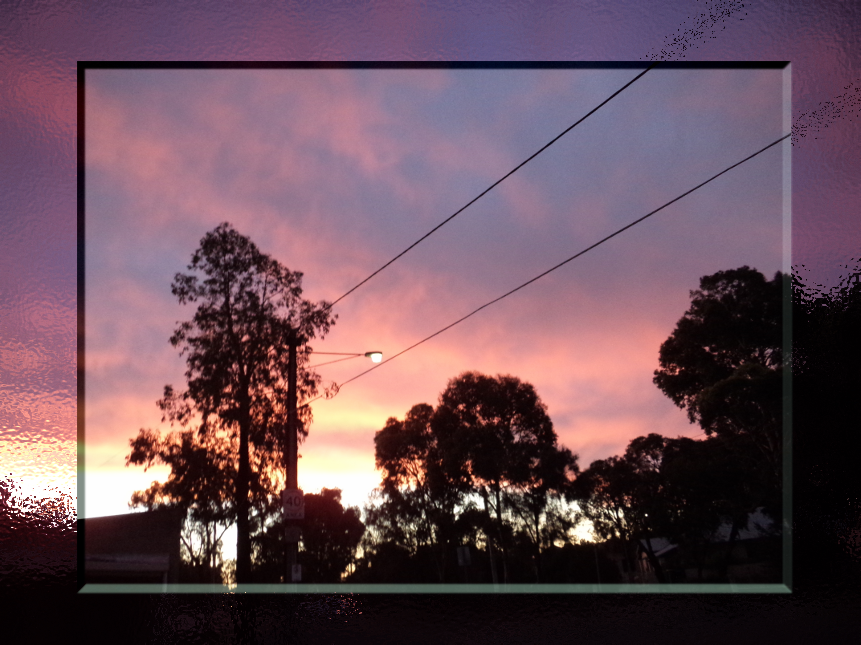
Another photo from my city.
Yesterday evening I noticed the colour of the sunset coming through my kitchen window and thought I must get a photo but it was much better than this. I decided to put a glass fame around it. Photo is rescaled to 20%
Image

_________________
Image
Free Fun Photo Editing & resources
Poems from the Lord
Gimp Newby
Gimp version 3.2.0 and GMIC-Qt 3.7.5 OS :- Windows 10 Home 64


Top
 Post subject: Re: new script glass-frame-effect.scm
PostPosted: Tue Nov 18, 2014 8:41 pm  (#125) 
Offline
GimpChat Member
User avatar

Joined: Apr 07, 2010
Posts: 14182
That's very beautiful Sallyanne, you are lucky you are having great weather. Right now in Buffalo NY, they had 150 cm of snow in the past 24 hrs. All the roads in upper New York State are shut down... it is 0 visibility.
We don't have any yet where I live but it is supposed to start tonight if the weatherman is correct.

_________________
Image


Top
 Post subject: Re: new script glass-frame-effect.scm
PostPosted: Tue Nov 18, 2014 9:28 pm  (#126) 
Offline
Script Coder
User avatar

Joined: Feb 18, 2011
Posts: 4826
Location: Bendigo Vic. Australia
Hi wirra I'm from Runcorn 'Brissy' Myself but when I retired I moved to Bendigo in Vic
(so many Victorians moving to 'Qld' to retire I decided to go in the opposite direction)
But it's good to have another Aussie around

_________________
Image
No matter how much you push the envelope, it'll still be stationery.


Last edited by Graechan on Tue Nov 18, 2014 9:49 pm, edited 1 time in total.

Top
 Post subject: Re: new script glass-frame-effect.scm
PostPosted: Tue Nov 18, 2014 9:38 pm  (#127) 
Offline
GimpChat Member
User avatar

Joined: Apr 08, 2010
Posts: 5420
Location: Northwest Ohio
How small the world is, I have internet friends in Brisbane and in Bendigo, from being on Queen sites.


Top
 Post subject: Re: new script glass-frame-effect.scm
PostPosted: Tue Dec 06, 2016 4:38 am  (#128) 
Offline
GimpChat Member

Joined: Dec 29, 2015
Posts: 223
I don't know why I am not getting any effect from the script. Scirpt doesn't return any error and on some effects produces different masked layers. Can any body throw some light on it.


Top
 Post subject: Re: new script glass-frame-effect.scm
PostPosted: Tue Dec 06, 2016 5:16 am  (#129) 
Offline
GimpChat Member
User avatar

Joined: Jan 20, 2013
Posts: 14831
Location: roma, italy
Double-checked all the options.
Got expected results in any of them.
Check:
- to have the version 1.1.0 as available at http://gimpscripts.com/2014/10/diego_gl ... me_effect/
- to have a valid G'MIC running (for some frames)
Otherwise do the following:
- post here your version
- post an image and the outcome you get (use defaults and choose any effect you want)
I will double check your test.

_________________
"Where am I ?"


Top
 Post subject: Re: new script glass-frame-effect.scm
PostPosted: Tue Dec 06, 2016 5:28 am  (#130) 
Offline
GimpChat Member
User avatar

Joined: Mar 01, 2014
Posts: 14025
Location: Spain, Aragón
I checked your script, Dinasset on an image I did yesterday and it works great. :bigthup


Attachments:
Fun_Sphere_Frame around an image-DN_Issa.jpg
Fun_Sphere_Frame around an image-DN_Issa.jpg [ 361.8 KiB | Viewed 1364 times ]

_________________
Image

Gimp 2.10.30(samj) portable _ OS Windows 10 Home_ 64bits
Don’t be afraid to start over. It’s a new chance to rebuild what you want.
Top
 Post subject: Re: new script glass-frame-effect.scm
PostPosted: Tue Dec 06, 2016 7:01 am  (#131) 
Offline
GimpChat Member

Joined: Dec 29, 2015
Posts: 223
I downloaded the script and installed it. Some scripts are 2.6kb (from 7zip file) and some are 2.5 from Script registry. I used both but the results are from the 2.5 Script Registry script.

Good thing is that it worked on most and produced great results except the
Fractalize
Polygonize
Textured Glass

Photos are attached. It is not essential for me to have them working but I was testing the performance of the Script on the whole. If you have time go ahead or don't waste time on this particular instance.


Attachments:
-Madina Internation Airport.xcf-1.0 (RGB color, 2 layers) 1536x2048 – GIMP_030.jpg
-Madina Internation Airport.xcf-1.0 (RGB color, 2 layers) 1536x2048 – GIMP_030.jpg [ 100.69 KiB | Viewed 1256 times ]
-Madina Internation Airport.xcf-1.0 (RGB color, 2 layers) 1536x2048 – GIMP_027.jpg
-Madina Internation Airport.xcf-1.0 (RGB color, 2 layers) 1536x2048 – GIMP_027.jpg [ 275.35 KiB | Viewed 1256 times ]
-Madina Internation Airport.xcf-1.0 (RGB color, 1 layer) 1536x2048 – GIMP_029.jpg
-Madina Internation Airport.xcf-1.0 (RGB color, 1 layer) 1536x2048 – GIMP_029.jpg [ 135.95 KiB | Viewed 1256 times ]
Top
 Post subject: Re: new script glass-frame-effect.scm
PostPosted: Tue Dec 06, 2016 7:40 am  (#132) 
Offline
GimpChat Member
User avatar

Joined: Jan 20, 2013
Posts: 14831
Location: roma, italy
They use all 3 G'MIC.
Hence it seems a G'MIC compatibility issue.
Strange you do not get any error message.
Which G'MIC version do you have?

_________________
"Where am I ?"


Top
 Post subject: Re: new script glass-frame-effect.scm
PostPosted: Tue Dec 06, 2016 7:45 am  (#133) 
Offline
GimpChat Member

Joined: Dec 29, 2015
Posts: 223
It is GMIC 1.5.7.1
I am Ubuntu 14.04 user and I downloaded from Ubuntu Software Center so it must be older version as Software Center is always behind from the latest release.


Top
 Post subject: Re: new script glass-frame-effect.scm
PostPosted: Tue Dec 06, 2016 7:47 am  (#134) 
Offline
GimpChat Member
User avatar

Joined: Jan 20, 2013
Posts: 14831
Location: roma, italy
maybe a stupid question:
did you check your "error console"?

_________________
"Where am I ?"


Top
 Post subject: Re: new script glass-frame-effect.scm
PostPosted: Tue Dec 06, 2016 7:57 am  (#135) 
Offline
GimpChat Member

Joined: Dec 29, 2015
Posts: 223
It didn't display any error message (which is usual on Plugin and Script Failure). I again ran the script and the report from error window is as under:

" Creates a glass frame around an image-v.1.1 Warning
Error while executing script-fu-glass-frame-effect:

Error: ( : 1) Procedure execution of plug-in-gmic failed on invalid input arguments: Procedure 'plug-in-gmic' returned no return values


GIMP Warning
Plug-In 'Creates a glass frame around an image-v.1.1' left image undo in inconsistent state, closing open undo groups".


Top
 Post subject: Re: new script glass-frame-effect.scm
PostPosted: Tue Dec 06, 2016 8:11 am  (#136) 
Offline
GimpChat Member
User avatar

Joined: Jan 20, 2013
Posts: 14831
Location: roma, italy
definitely a G'mic interface incompatibility.
Maybe solved when you install a new O.S. release with the relevant version of G'mic.

_________________
"Where am I ?"


Top
 Post subject: Re: new script glass-frame-effect.scm
PostPosted: Tue Dec 06, 2016 8:13 am  (#137) 
Offline
GimpChat Member
User avatar

Joined: Jan 20, 2013
Posts: 14831
Location: roma, italy
Maybe in the future I will create a version capable of running independently, but it's not a quick solution.

_________________
"Where am I ?"


Top
 Post subject: Re: new script glass-frame-effect.scm
PostPosted: Tue Dec 06, 2016 8:13 am  (#138) 
Offline
GimpChat Member

Joined: Dec 29, 2015
Posts: 223
Thanks.


Top
 Post subject: Re: new script glass-frame-effect.scm
PostPosted: Tue Dec 06, 2016 2:34 pm  (#139) 
Offline
Global Moderator
User avatar

Joined: Apr 01, 2012
Posts: 8364
Location: On the other side of your screen
Image
To get this selection I just did an ellipse select, shrunk it and run distort on the selection before the glass frame.

_________________
Image
Free Fun Photo Editing & resources
Poems from the Lord
Gimp Newby
Gimp version 3.2.0 and GMIC-Qt 3.7.5 OS :- Windows 10 Home 64


Top
 Post subject: Re: new script glass-frame-effect.scm
PostPosted: Tue Dec 06, 2016 2:50 pm  (#140) 
Offline
GimpChat Member
User avatar

Joined: Jan 20, 2013
Posts: 14831
Location: roma, italy
very creative, sallyanne!
thanks for the suggestion, other users may take advantage of this mini-tut.

_________________
"Where am I ?"


Top
Post new topic Reply to topic  [ 166 posts ]  Go to page Previous  1 ... 4, 5, 6, 7, 8, 9  Next

All times are UTC - 5 hours [ DST ]


* Login  


Powered by phpBB3 © phpBB Group