It is currently Mon Jun 15, 2026 5:12 am


All times are UTC - 5 hours [ DST ]


Post new topic Reply to topic  [ 166 posts ]  Go to page Previous  1 ... 5, 6, 7, 8, 9  Next
Author Message
 Post subject: Re: new script glass-frame-effect.scm
PostPosted: Tue Dec 06, 2016 2:54 pm  (#141) 
Offline
GimpChat Member
User avatar

Joined: Apr 09, 2016
Posts: 580
Location: Sheffield UK
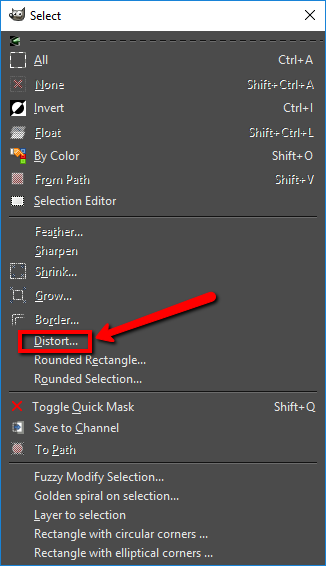
This is one of my favorite filters. Sallyanne, pardon me for my typical dumbness, just how did you get the distort on the selection please, I can't figure it out?

_________________
Image


Top
 Post subject: Re: new script glass-frame-effect.scm
PostPosted: Tue Dec 06, 2016 6:09 pm  (#142) 
Offline
Script Coder
User avatar

Joined: Feb 18, 2011
Posts: 4826
Location: Bendigo Vic. Australia
Select/Distort
Image

_________________
Image
No matter how much you push the envelope, it'll still be stationery.


Top
 Post subject: Re: new script glass-frame-effect.scm
PostPosted: Tue Dec 06, 2016 7:38 pm  (#143) 
Offline
Global Moderator
User avatar

Joined: Oct 02, 2014
Posts: 4962
Location: Sydney Australia
RJKD - I saw your post earlier this morning and was going to post a response when I got back from the dentist. But my Aussie mate Graechan has beaten me to it; so I decided to post something using this excellent filter anyway. There are, of course, many ways of distorting/reshaping ellipse selections so here is a 'scalloped' selection using this filter -

Image

_________________
Image

Respect should be offered freely but hard earned


Top
 Post subject: Re: new script glass-frame-effect.scm
PostPosted: Tue Dec 06, 2016 11:07 pm  (#144) 
Offline
GimpChat Member

Joined: Dec 29, 2015
Posts: 223
Oval hole edges are very realistic, It appears as if the glass has been nibbled/rasped with grozier-pliers. Well done.


Top
 Post subject: Re: new script glass-frame-effect.scm
PostPosted: Wed Dec 07, 2016 12:39 am  (#145) 
Offline
Global Moderator
User avatar

Joined: Apr 01, 2012
Posts: 8364
Location: On the other side of your screen
Graechan wrote:
Select/Distort
[ Image ]


Thanks :bigthup :bigthup

_________________
Image
Free Fun Photo Editing & resources
Poems from the Lord
Gimp Newby
Gimp version 3.2.0 and GMIC-Qt 3.7.5 OS :- Windows 10 Home 64


Top
 Post subject: Re: new script glass-frame-effect.scm
PostPosted: Wed Dec 07, 2016 3:07 am  (#146) 
Offline
Global Moderator
User avatar

Joined: Apr 01, 2012
Posts: 8364
Location: On the other side of your screen
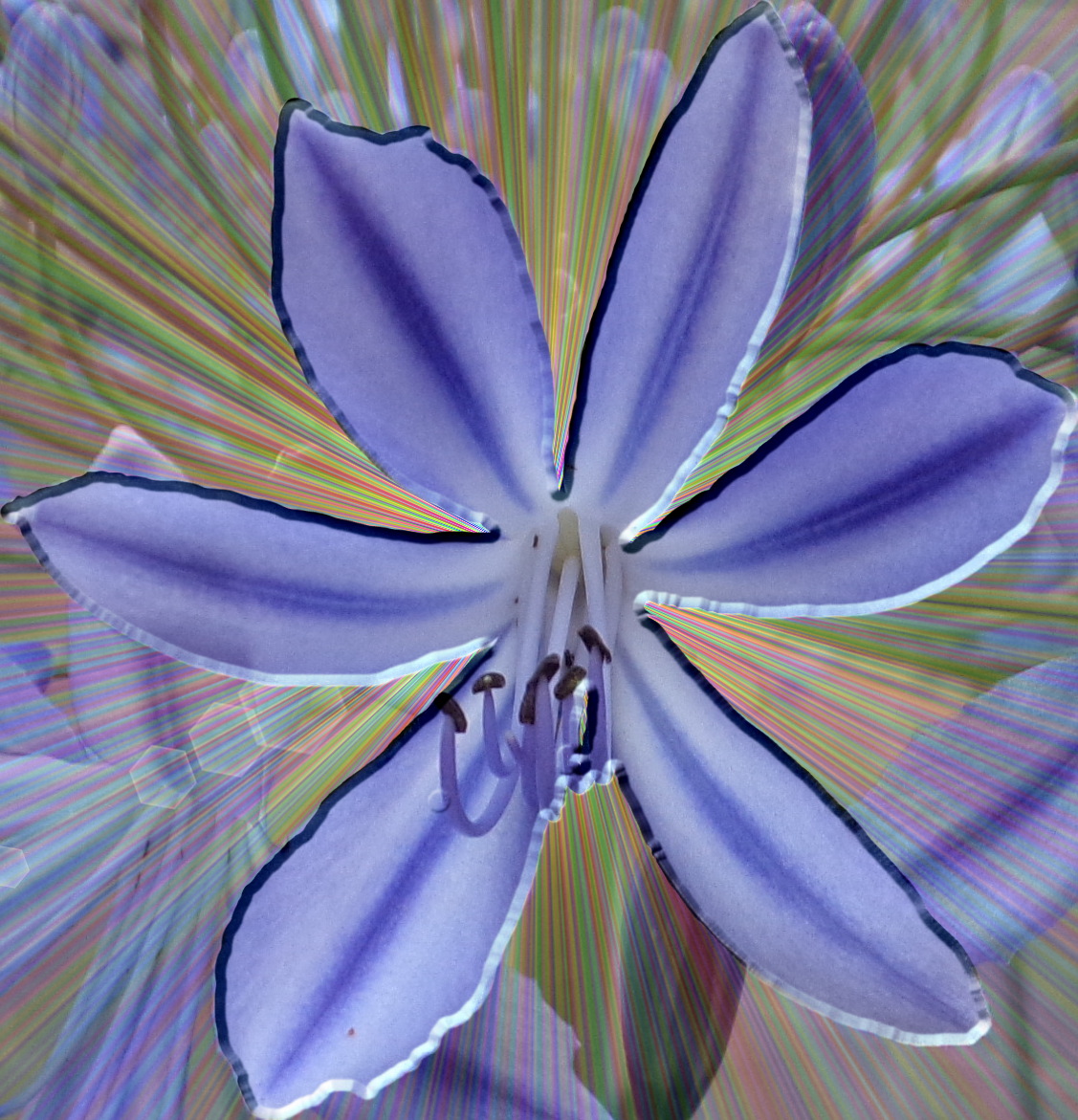
tried it on a flower I took a photo of this afternoon
Image

_________________
Image
Free Fun Photo Editing & resources
Poems from the Lord
Gimp Newby
Gimp version 3.2.0 and GMIC-Qt 3.7.5 OS :- Windows 10 Home 64


Top
 Post subject: Re: new script glass-frame-effect.scm
PostPosted: Wed Dec 07, 2016 3:33 am  (#147) 
Offline
GimpChat Member

Joined: Dec 29, 2015
Posts: 223
I like this blunt-edge effect on flower petals and would try it someday. I cannot say anything about the effects which I miss due to GMIC version problem but 'Gradient Flare' and 'Glass Tiles Blur effec't have produced wonderful photo effects to this single photo. Within serveral thousand miles of my imagination there was no such photo manipulation.


Attachments:
Madina Intl_ Apt_GlassTilesBlurEffect_GIMPCHAT.png
Madina Intl_ Apt_GlassTilesBlurEffect_GIMPCHAT.png [ 445.24 KiB | Viewed 1506 times ]
Top
 Post subject: Re: new script glass-frame-effect.scm
PostPosted: Wed Dec 07, 2016 5:45 am  (#148) 
Offline
GimpChat Member
User avatar

Joined: Apr 09, 2016
Posts: 580
Location: Sheffield UK
Ah ah, thank you Graechan and OMG.
Rashid, the image you are working with is really beautiful, so clean and pure looking, I'd love to see some more of this structure.

_________________
Image


Top
 Post subject: Re: new script glass-frame-effect.scm
PostPosted: Wed Dec 07, 2016 6:46 am  (#149) 
Offline
GimpChat Member

Joined: Dec 29, 2015
Posts: 223
Alas! My camera was in the baggage while I was moving out of the airport. I had only my 3 megapixel mobile and I used that to capture only a fraction of the whole massive and beautiful structure.

ONE very interesting thing is that both the image and the script are about the glass. If you see behind the metal frame work you would see green reflecting partition/wall which is made up of trasparent greenish glass.

I came across this script about a year ago and I used it and didn't get any result. I am using gimp for making painted glass through a tutorial and again came across this script and this image became the object of experimenting for this script.


Top
 Post subject: Re: new script glass-frame-effect.scm
PostPosted: Wed Dec 07, 2016 11:51 am  (#150) 
Offline
GimpChat Member

Joined: Dec 10, 2012
Posts: 32
Have tried everything I can think of, and the script won't run at all.
Tried running it from Script-Fu console and got the following error:
> (script-fu-glass-frame-effect run-mode image drawable option toggle toggle)
Error: ( : 1) eval: unbound variable: run-mode

I'm using G'MIC 1.7.9
DIEGO_glass-frame-effect-v1.1(Graechan).scm

Do I have to rename anything?

Also, I removed layerfx.py and started G'MIC before running the script.

Anyone have an idea of what I'm doing wrong?

Thanks in advance.
adam933


Top
 Post subject: Re: new script glass-frame-effect.scm
PostPosted: Wed Dec 07, 2016 2:36 pm  (#151) 
Offline
GimpChat Member
User avatar

Joined: Jan 20, 2013
Posts: 14831
Location: roma, italy
Adam,
once installed into your scripts, does it show up?
if yes, what do you get on the error console using the defaults?
(to use the console you have to: identify the image, identify the layer, use those numbers, omit the run-mode...just make your experiments as an installed script and tell what you get)

_________________
"Where am I ?"


Top
 Post subject: Re: new script glass-frame-effect.scm
PostPosted: Wed Dec 07, 2016 4:45 pm  (#152) 
Offline
GimpChat Member

Joined: Dec 10, 2012
Posts: 32
Thank you Dinasset.
Yes the script shows up under Script-Fu/Frames/"Creates a glass frame around an image-v.1.1"
The error console is completely blank.
If I try to run the script again, the error console gives me:

"Creates a glass frame around an image-v.1.1 Warning
Script-Fu cannot process two scripts at the same time.
You are already running the "Creates a glass frame around an image-v.1.1" script."


Top
 Post subject: Re: new script glass-frame-effect.scm
PostPosted: Thu Dec 08, 2016 1:38 am  (#153) 
Offline
GimpChat Member
User avatar

Joined: Jan 20, 2013
Posts: 14831
Location: roma, italy
Which means it goes into a loop.
Does this happen with default parameters or did you choose a different option?
Many options (but not the default one) are using G'MIC and other people have problems because of release incompatibilities.
Let me know if this happens also with default parameters

_________________
"Where am I ?"


Top
 Post subject: Re: new script glass-frame-effect.scm
PostPosted: Thu Dec 08, 2016 2:21 am  (#154) 
Offline
GimpChat Member

Joined: Dec 10, 2012
Posts: 32
There is no selection, default or otherwise.
Nothing happens - the picture I have chosen is unchanged and no menu or parameter selection is shown.
I have waited a couple of hours just in case the process is very slow, but nothing happens.
This is true whether I have made an area selection (rectangular or ellipse) on the photo or not.


Top
 Post subject: Re: new script glass-frame-effect.scm
PostPosted: Thu Dec 08, 2016 4:35 am  (#155) 
Offline
GimpChat Member
User avatar

Joined: Jan 20, 2013
Posts: 14831
Location: roma, italy
Could you post here your picture?
and...
could you double-check you do not have duplicate scm filters?
is it possible for you to run it in a clean environment, without any scm script active except this one?
It should show the parameter window, at least...

_________________
"Where am I ?"


Top
 Post subject: Re: new script glass-frame-effect.scm
PostPosted: Thu Dec 08, 2016 12:31 pm  (#156) 
Offline
GimpChat Member

Joined: Dec 10, 2012
Posts: 32
Attachment:
20140109_155201.jpg
20140109_155201.jpg [ 3.2 MiB | Viewed 1451 times ]

Hi Dinasset,

I just checked and there is not a duplicate, nor is another script running.

I'm wondering if GMIC 1.7.9 name changes is the problem.

adam933


Top
 Post subject: Re: new script glass-frame-effect.scm
PostPosted: Thu Dec 08, 2016 12:40 pm  (#157) 
Offline
GimpChat Member
User avatar

Joined: Jan 20, 2013
Posts: 14831
Location: roma, italy
adam, I just release a special edition without G'mic
you may download it and try (it's in python, no conflict with the previous one in scheme)
viewtopic.php?f=9&t=14962&start=0

_________________
"Where am I ?"


Top
 Post subject: Re: new script glass-frame-effect.scm
PostPosted: Thu Dec 08, 2016 12:44 pm  (#158) 
Offline
GimpChat Member
User avatar

Joined: Jan 20, 2013
Posts: 14831
Location: roma, italy
dinasset wrote:
Maybe in the future I will create a version capable of running independently, but it's not a quick solution.

Rashid,
I just released the version in python without the use of G'MIC, you may try it
viewtopic.php?f=9&t=14962&start=0

_________________
"Where am I ?"


Top
 Post subject: Re: new script glass-frame-effect.scm
PostPosted: Thu Dec 08, 2016 12:54 pm  (#159) 
Offline
GimpChat Member
User avatar

Joined: Jan 20, 2013
Posts: 14831
Location: roma, italy
adam933 wrote:
Attachment:
The attachment 20140109_155201.jpg is no longer available

Hi Dinasset,

I just checked and there is not a duplicate, nor is another script running.

I'm wondering if GMIC 1.7.9 name changes is the problem.

adam933

Run both the old version in Scheme and the new version in Python with your image as source.
Here the results:
Attachment:
20140109_155201_UsingOldSchemeVersion .jpg
20140109_155201_UsingOldSchemeVersion .jpg [ 3 MiB | Viewed 1450 times ]

Attachment:
20140109_155201_UsingNewPythonVersion .jpg
20140109_155201_UsingNewPythonVersion .jpg [ 3.14 MiB | Viewed 1450 times ]

Hence, your image is not a problem.
Let me know whether you succeed in using the new version in Python without G'mic

_________________
"Where am I ?"


Top
 Post subject: Re: new script glass-frame-effect.scm
PostPosted: Thu Dec 08, 2016 1:30 pm  (#160) 
Offline
GimpChat Member

Joined: Dec 10, 2012
Posts: 32
Hi Dinasset,

The gmic_less python version starts off fine but I get the following error:

Bevel and Emboss Warning
Error: Argument 16 not found in pattern list.

I copied all of the patterns in the pattern download file.
Any idea what pattern could be missing? (or something else).

Thanks,
adam933


Top
Post new topic Reply to topic  [ 166 posts ]  Go to page Previous  1 ... 5, 6, 7, 8, 9  Next

All times are UTC - 5 hours [ DST ]


* Login  


Powered by phpBB3 © phpBB Group