It is currently Tue Nov 03, 2026 5:35 pm


All times are UTC - 5 hours [ DST ]


Post new topic Reply to topic  [ 135 posts ]  Go to page Previous  1 ... 3, 4, 5, 6, 7
Author Message
 Post subject: Re: Let's carve some wood
PostPosted: Fri Dec 30, 2016 12:16 pm  (#121) 
Offline
GimpChat Member
User avatar

Joined: Mar 01, 2014
Posts: 14221
Location: Spain, Aragón
I like yours results a lot! :coolthup :bigthup
Thank you so much Gimper, I understand the method just now with your help. :tyspin :)

_________________
Image

Gimp 2.10.36 (samj) portable _ OS Windows 10 Home_ 64bits
Don’t be afraid to start over. It’s a new chance to rebuild what you want.


Top
 Post subject: Re: Let's carve some wood
PostPosted: Sat Dec 31, 2016 7:23 am  (#122) 
Offline
GimpChat Member
User avatar

Joined: Apr 26, 2014
Posts: 3837
Location: belgium
Image


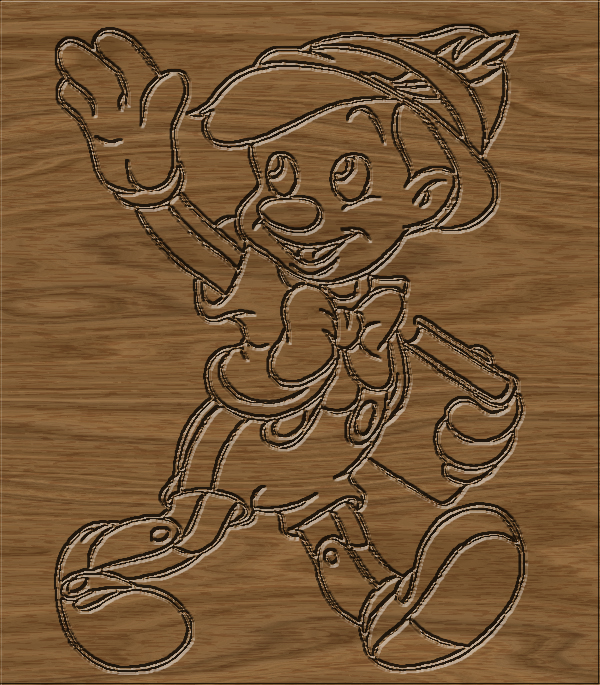
in the attachments a zipped folder explains how I made this picture
as well as the Pinocchio figure in the other folder


in the tutorial on page 3 there was a small error This has now changed,there should be

First right click the wooden copy layer and add a alpha channel


Attachments:
pinocio figuur.zip [177.86 KiB]
Downloaded 79 times
pinocchio-02.zip [4.03 MiB]
Downloaded 90 times


Last edited by gimper66 on Sat Dec 31, 2016 3:42 pm, edited 3 times in total.
Top
 Post subject: Re: Let's carve some wood
PostPosted: Sat Dec 31, 2016 9:44 am  (#123) 
Offline
GimpChat Member
User avatar

Joined: Mar 01, 2014
Posts: 14221
Location: Spain, Aragón
Thank you so much Gimper for your tutorial. I love it and for sure I'll do it. :) :bigthup :tyspin

_________________
Image

Gimp 2.10.36 (samj) portable _ OS Windows 10 Home_ 64bits
Don’t be afraid to start over. It’s a new chance to rebuild what you want.


Top
 Post subject: Re: Let's carve some wood
PostPosted: Sat Dec 31, 2016 12:22 pm  (#124) 
Offline
GimpChat Member
User avatar

Joined: Mar 01, 2014
Posts: 14221
Location: Spain, Aragón
Well, I had to do it before than 2016 was gone. :hehe
Gimper, Nice tutorial and only to add that the wooden copy must be added alpha channel so that the cut is out. :) :coolthup
My Angel result, it is a floral decoration I transformed into an angel. :)


Attachments:
Tutorial Gimper_ Issa.jpg
Tutorial Gimper_ Issa.jpg [ 582.91 KiB | Viewed 1416 times ]
Decoration_Angel.jpg
Decoration_Angel.jpg [ 602.21 KiB | Viewed 1416 times ]

_________________
Image

Gimp 2.10.36 (samj) portable _ OS Windows 10 Home_ 64bits
Don’t be afraid to start over. It’s a new chance to rebuild what you want.
Top
 Post subject: Re: Let's carve some wood
PostPosted: Sat Dec 31, 2016 3:52 pm  (#125) 
Offline
GimpChat Member
User avatar

Joined: Apr 26, 2014
Posts: 3837
Location: belgium
Issabella wrote:
Well, I had to do it before than 2016 was gone. :hehe
Gimper, Nice tutorial and only to add that the wooden copy must be added alpha channel so that the cut is out. :) :coolthup
My Angel result, it is a floral decoration I transformed into an angel. :)


thanks isabella, I have updated the error and also attached the tranparant Pinocchio in a second map


Top
 Post subject: Re: Let's carve some wood
PostPosted: Sat Dec 31, 2016 4:41 pm  (#126) 
Offline
GimpChat Member

Joined: May 12, 2015
Posts: 4693
Gimper & Issabella, beautiful images.


Top
 Post subject: Re: Let's carve some wood
PostPosted: Sun Jan 01, 2017 6:00 am  (#127) 
Offline
GimpChat Member
User avatar

Joined: Mar 01, 2014
Posts: 14221
Location: Spain, Aragón
Happy 2017 to you all!
Here my result following your tutorial, Gimper. I've enjoyed doing it a lot and I love this effect. Thank you so much. :tyspin


Attachments:
Pinocchio_wood_Gimper tut.JPG
Pinocchio_wood_Gimper tut.JPG [ 878.22 KiB | Viewed 1386 times ]

_________________
Image

Gimp 2.10.36 (samj) portable _ OS Windows 10 Home_ 64bits
Don’t be afraid to start over. It’s a new chance to rebuild what you want.
Top
 Post subject: Re: Let's carve some wood
PostPosted: Sun Jan 01, 2017 6:16 am  (#128) 
Offline
GimpChat Member
User avatar

Joined: Apr 26, 2014
Posts: 3837
Location: belgium
Image


Top
 Post subject: Re: Let's carve some wood
PostPosted: Sun Jan 01, 2017 12:34 pm  (#129) 
Offline
GimpChat Member

Joined: May 12, 2015
Posts: 4693
Thanks for the tut, Gimper66. I know it will be useful for many. I had previously only used Chisel and Carve, so now I have learned an additional method to use. Thank you.
Attachment:
Pinocchio.Gimper66 Tutorial.Bevel & Emboss.jpg
Pinocchio.Gimper66 Tutorial.Bevel & Emboss.jpg [ 2.07 MiB | Viewed 1380 times ]


Top
 Post subject: Re: Let's carve some wood
PostPosted: Sun Jan 01, 2017 11:38 pm  (#130) 
Offline
GimpChat Member

Joined: May 12, 2015
Posts: 4693
This was not on wood but I used Bevel and Emboss.
Attachment:
Floral Scroll.Bevel & Emboss2.jpg
Floral Scroll.Bevel & Emboss2.jpg [ 2.2 MiB | Viewed 1358 times ]


Top
 Post subject: Re: Let's carve some wood
PostPosted: Tue Jan 03, 2017 12:04 am  (#131) 
Offline
GimpChat Member

Joined: May 12, 2015
Posts: 4693
This was done with Chisel & Carve with a bit of coloring.
Attachment:
Small World.Chisel & Carve.jpg
Small World.Chisel & Carve.jpg [ 1.41 MiB | Viewed 1339 times ]


Top
 Post subject: Re: Let's carve some wood
PostPosted: Thu Jan 05, 2017 1:11 am  (#132) 
Offline
GimpChat Member

Joined: May 12, 2015
Posts: 4693
Attachment:
Scroll Bevel emboss Carve.jpg
Scroll Bevel emboss Carve.jpg [ 1.37 MiB | Viewed 1317 times ]


Top
 Post subject: Re: Let's carve some wood
PostPosted: Thu Jan 05, 2017 4:02 am  (#133) 
Offline
GimpChat Member
User avatar

Joined: Mar 01, 2014
Posts: 14221
Location: Spain, Aragón
Pat, you have created very beautiful outputs. Well done Pat. :bigthup
Since Gimper's tutorial, I have practised this style in wood. Thanks again, Gimper. :) :tyspin


Attachments:
wood_celtic_knot.jpg
wood_celtic_knot.jpg [ 367.6 KiB | Viewed 1315 times ]

_________________
Image

Gimp 2.10.36 (samj) portable _ OS Windows 10 Home_ 64bits
Don’t be afraid to start over. It’s a new chance to rebuild what you want.
Top
 Post subject: Re: Let's carve some wood
PostPosted: Thu Jan 05, 2017 4:43 am  (#134) 
Offline
GimpChat Member
User avatar

Joined: Apr 26, 2014
Posts: 3837
Location: belgium
Issabella wrote:
Pat, you have created very beautiful outputs. Well done Pat. :bigthup
Since Gimper's tutorial, I have practised this style in wood. Thanks again, Gimper. :) :tyspin


thanks issabella you're welcome
it is a pleasure to see the beautiful results
:coolthup :jumpclap


Top
 Post subject: Re: Let's carve some wood
PostPosted: Thu Jan 05, 2017 3:04 pm  (#135) 
Offline
GimpChat Member

Joined: May 12, 2015
Posts: 4693
Thank you, Issabella. You also have beautiful results. Gimper taught us a nice Bevel and Emboss technique. I had never used it before. Now I use it along with Chisel & Carve depending on the image.


Top
Post new topic Reply to topic  [ 135 posts ]  Go to page Previous  1 ... 3, 4, 5, 6, 7

All times are UTC - 5 hours [ DST ]


* Login  


Powered by phpBB3 © phpBB Group