It is currently Tue Nov 17, 2026 1:18 am


All times are UTC - 5 hours [ DST ]


Post new topic Reply to topic  [ 11 posts ] 
Author Message
 Post subject: Need help with Dodge/Burn tool
PostPosted: Tue May 03, 2011 9:52 am  (#1) 
Offline
GimpChat Member
User avatar

Joined: Mar 18, 2011
Posts: 283
Location: Lusaka, Zambia
GIMP Version: 2.7.3
Operating System: Windows
OS Version: Vista
GIMP Experience: Beginner Level


Hi,

I was once advised to darken my image areas using the dodge/burn tool, but I do not know how to use the tool achieve the 300 movie sort of effect.

I need to be taught, please.


Share on Facebook Share on Twitter Share on Orkut Share on Digg Share on MySpace Share on Delicious Share on Technorati
Top
 Post subject: Re: Need help with Dodge/Burn tool
PostPosted: Tue May 03, 2011 9:54 am  (#2) 
Offline
Retired Staff
User avatar

Joined: May 22, 2008
Posts: 6946
Location: Somewhere in GIMP
I don't know much about the tool, but here's the GIMP manual's take on it.

http://docs.gimp.org/2.6/en/gimp-tool-dodge-burn.html

_________________
Image
World War IV will be fought with sticks and stones. - Albert Einstein


Top
 Post subject: Re: Need help with Dodge/Burn tool
PostPosted: Tue May 03, 2011 9:59 am  (#3) 
Offline
GimpChat Member
User avatar

Joined: Mar 18, 2011
Posts: 283
Location: Lusaka, Zambia
Hi,

Thanks Oregonian. That should be helpful.


Top
 Post subject: Re: Need help with Dodge/Burn tool
PostPosted: Tue May 03, 2011 10:03 am  (#4) 
Offline
Global Moderator
User avatar

Joined: May 16, 2010
Posts: 16274
The Dodge or Burn tool uses the current brush to lighten or darken the colors in your image. The mode will determine which type of pixels are affected.

Type
The dodge effect lightens colors.
The burn effect darkens colors.
Range
There are three modes:
 Shadows restricts the effect to darkest pixels.
 Midtones restricts the effect to pixels of average tone.
 Highlights restricts the effect to lightest pixels.
Exposure
Exposure defines how much the tool effect will be strong, as a more or less exposed photograph. Default slider is 50 but can vary from 0 to 100.

_________________
Image


Top
 Post subject: Re: Need help with Dodge/Burn tool
PostPosted: Tue May 03, 2011 12:51 pm  (#5) 
Offline
GimpChat Member
User avatar

Joined: Apr 18, 2011
Posts: 620
Location: New York
there is a script to help get you that "300 film" effect

http://gimp-registry.fargonauten.de/node/24203

by the way.

_________________
Ubuntu 24.04.1, Kernel i686, 6.8.0-52-generic
python3 v3.12.3 ----- GIMP - ver 2.10.38


Top
 Post subject: Re: Need help with Dodge/Burn tool
PostPosted: Tue May 03, 2011 1:19 pm  (#6) 
Offline
Retired Staff
User avatar

Joined: May 22, 2008
Posts: 6946
Location: Somewhere in GIMP
Nice filter! Thanks cecelia! Good find.

_________________
Image
World War IV will be fought with sticks and stones. - Albert Einstein


Top
 Post subject: Re: Need help with Dodge/Burn tool
PostPosted: Tue May 03, 2011 2:11 pm  (#7) 
Offline
Retired Staff
User avatar

Joined: May 22, 2008
Posts: 6946
Location: Somewhere in GIMP
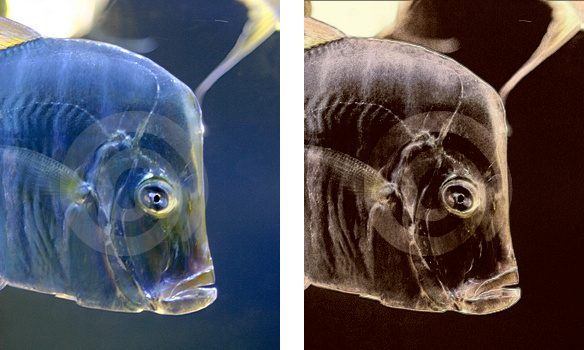
Here's a before and after image using the default settings in the script. Original image on the left.

Image

_________________
Image
World War IV will be fought with sticks and stones. - Albert Einstein


Top
 Post subject: Re: Need help with Dodge/Burn tool
PostPosted: Tue May 03, 2011 3:15 pm  (#8) 
Offline
GimpChat Member
User avatar

Joined: Oct 06, 2010
Posts: 4050
National Geographic does something similar, as well.

_________________
"In order to attain the impossible, one must attempt the absurd."
~ Miguel de Cervantes


Top
 Post subject: Re: Need help with Dodge/Burn tool
PostPosted: Tue May 03, 2011 3:17 pm  (#9) 
Offline
GimpChat Member

Joined: Mar 08, 2011
Posts: 155
If you're lightening or darkening an entire image, you might just make a new layer, color it how you want (lighter here, darker there), and change the layer mode.


Top
 Post subject: Re: Need help with Dodge/Burn tool
PostPosted: Tue May 03, 2011 3:37 pm  (#10) 
Offline
GimpChat Member
User avatar

Joined: Apr 09, 2011
Posts: 1764
I have the elsamuko package installed which includes that one.


Top
 Post subject: Re: Need help with Dodge/Burn tool
PostPosted: Tue May 03, 2011 5:56 pm  (#11) 
Offline
GimpChat Member
User avatar

Joined: Apr 18, 2011
Posts: 620
Location: New York
akky wrote:
I have the elsamuko package installed which includes that one.

that's where I got it from originally as well....
http://sites.google.com/site/elsamuko/gimp

quite interesting scripts in there

_________________
Ubuntu 24.04.1, Kernel i686, 6.8.0-52-generic
python3 v3.12.3 ----- GIMP - ver 2.10.38


Top
Post new topic Reply to topic  [ 11 posts ] 

All times are UTC - 5 hours [ DST ]


* Login  


Powered by phpBB3 © phpBB Group