It is currently Sun Aug 23, 2026 6:58 am


All times are UTC - 5 hours [ DST ]


Post new topic Reply to topic  [ 18 posts ] 
Author Message
 Post subject: Blue Color cast.
PostPosted: Mon Feb 26, 2018 1:32 am  (#1) 
Online
Global Moderator
User avatar

Joined: Apr 01, 2012
Posts: 8461
Location: On the other side of your screen
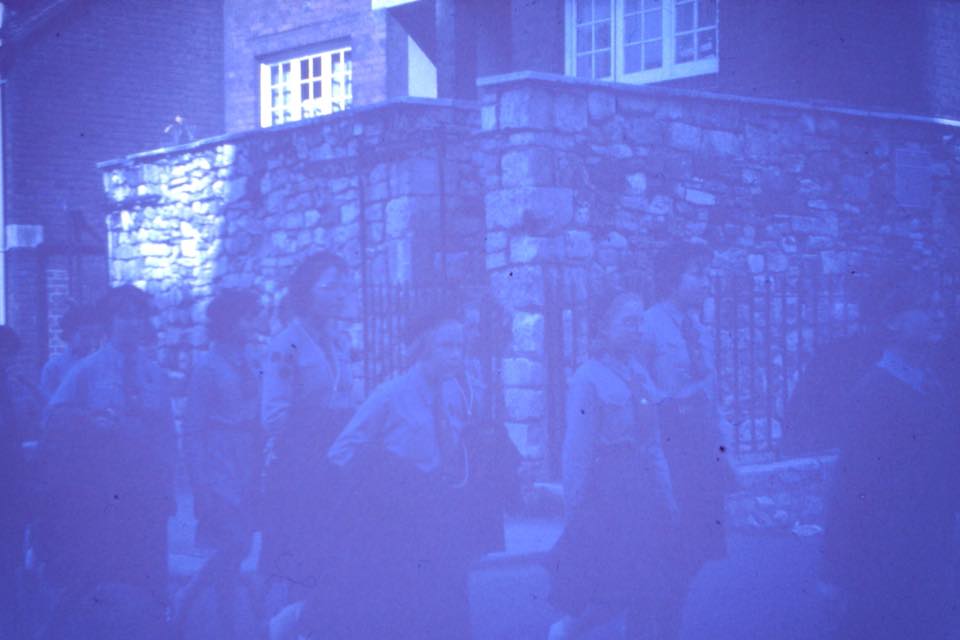
I have found an old photo with a red color cast, manual white balance usually helps fix it but I am stuck with a blue cast on a old colour photo.
ps. Looking at the channels I noticed nothing was in the blue channel?
example
Image

_________________
Image
Free Fun Photo Editing & resources
Poems from the Lord
Gimp Newby
Gimp version 3.2.4 and GMIC-Qt 4.0.2 OS :- Windows 10 Home 64


Share on Facebook Share on Twitter Share on Orkut Share on Digg Share on MySpace Share on Delicious Share on Technorati
Top
 Post subject: Re: Blue Color cast.
PostPosted: Mon Feb 26, 2018 3:59 am  (#2) 
Offline
Administrator
User avatar

Joined: Aug 10, 2012
Posts: 14166
Location: Native to NYC living in Arizona, Gimp 2.8 - 3.0, Win 11 PC.
sallyanne wrote:
I have found an old photo with a red color cast,
manual white balance usually helps fix it but I am stuck with a blue cast on a old colour photo.
ps. Looking at the channels I noticed nothing was in the blue channel?
example
[ Image ]

I'm not a photo restoration expert.
However,
I've heard that some older photos can sometimes turn blue over time.
The blue tint can be lessened,
but the other colors that were present.
Have probably been damages or lost beyond repair,
due to age.
Restoring this photo to it's former colorful glory.
May be difficult or nearly impossible at best.
One could desaturate a photo like this and then try and recolor what was lost/damaged.
I don't believe a full color restoration on this photo would be possible.
Unless it was done as previously mentioned.

I could be wrong about this,
but I feel it's more likely that I'm not.

_________________
Image
"A wise man learns more from a foolish question than a fool can learn from a wise answer"
Image


Top
 Post subject: Re: Blue Color cast.
PostPosted: Mon Feb 26, 2018 4:08 am  (#3) 
Offline
GimpChat Member
User avatar

Joined: Jan 08, 2018
Posts: 101
Location: The Netherlands
I am afraid Wallace is right. It has become a mono color image over time. Restoring it would mean coloring by hand. But it is always good to see what color information is left on it.

_________________
Image


Top
 Post subject: Re: Blue Color cast.
PostPosted: Mon Feb 26, 2018 4:43 am  (#4) 
Online
Global Moderator
User avatar

Joined: Apr 01, 2012
Posts: 8461
Location: On the other side of your screen
Thanks for looking guys. This was a photo from one of the retouching forums I visit.
In my group not too many restorers there yet so I want to know how it can be done if indeed it can, so I wanted to know how to tackle it if I ever came across the same.

_________________
Image
Free Fun Photo Editing & resources
Poems from the Lord
Gimp Newby
Gimp version 3.2.4 and GMIC-Qt 4.0.2 OS :- Windows 10 Home 64


Top
 Post subject: Re: Blue Color cast.
PostPosted: Mon Feb 26, 2018 5:10 am  (#5) 
Offline
GimpChat Member
User avatar

Joined: Jan 08, 2018
Posts: 101
Location: The Netherlands
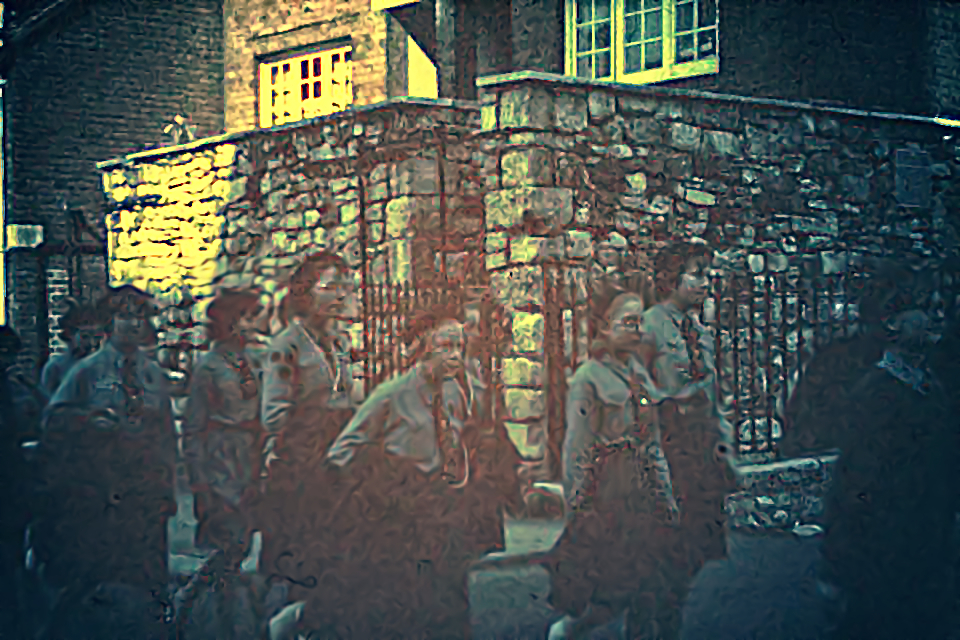
This is what I could get out of it:


Attachments:
1831_28059107_10156081415624462_4803962561090463202_nVIN.jpg
1831_28059107_10156081415624462_4803962561090463202_nVIN.jpg [ 538.4 KiB | Viewed 12266 times ]

_________________
Image
Top
 Post subject: Re: Blue Color cast.
PostPosted: Mon Feb 26, 2018 5:58 am  (#6) 
Offline
Script Coder
User avatar

Joined: Oct 25, 2010
Posts: 4812
Always worth looking at the histogram. There is definitely something in the blue channel. This looks like some form of JPEG mis-encoding. The blue channel seems to have been shifted by some amount (about 100), and all the value above 255-100=155 are clamped to 255. To fix, you would have to subtract that amount (Levels), and replace the blue above 155 by the average or the max of the red/green channels (so light tones would be grey, but this is better than blue) (make a grey copy of the image, put it under the color image, and make the color image transparent where the blue is 255). See XCF in attached ZIP (slow link...). Now of course this image also has a severe contrast problem.


Attachments:
SallyAnne-Blue.zip [1.75 MiB]
Downloaded 343 times

_________________
Image
Top
 Post subject: Re: Blue Color cast.
PostPosted: Mon Feb 26, 2018 7:55 am  (#7) 
Online
Global Moderator
User avatar

Joined: Apr 01, 2012
Posts: 8461
Location: On the other side of your screen
Thanks ofnuts (I know I've seen the histogram before but for the life of me I cannot find it now)for the xcf and Thank you vincent for trying.
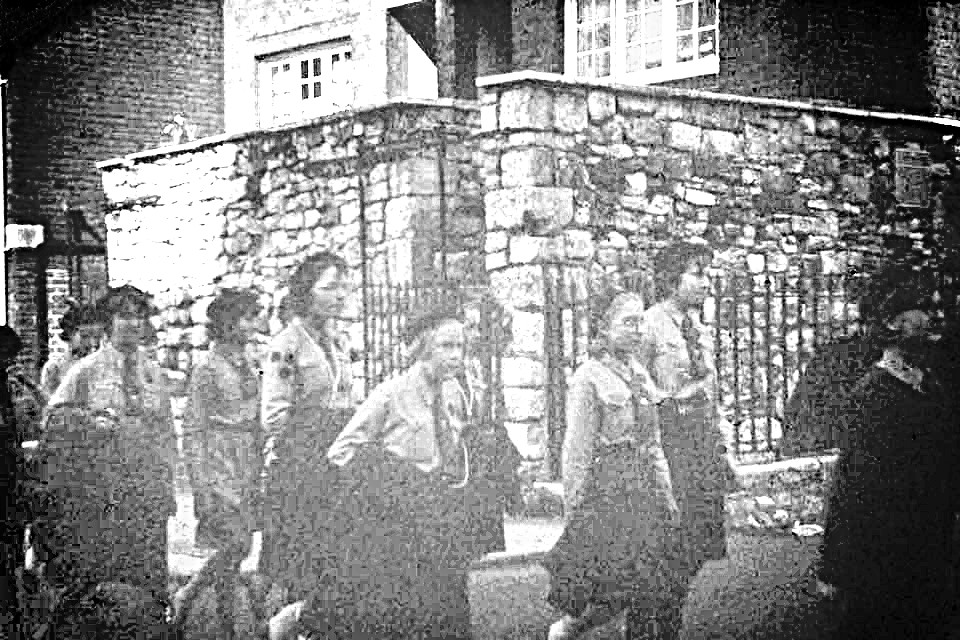
I got a black and white picture using temperature and levels. I know a lot more work needs doing on it to make it look acceptable.
Image

Here is one I did tonight that was nearly as bad
Image

_________________
Image
Free Fun Photo Editing & resources
Poems from the Lord
Gimp Newby
Gimp version 3.2.4 and GMIC-Qt 4.0.2 OS :- Windows 10 Home 64


Top
 Post subject: Re: Blue Color cast.
PostPosted: Mon Feb 26, 2018 8:49 am  (#8) 
Offline
Script Coder
User avatar

Joined: Oct 25, 2010
Posts: 4812
Windows>Dockable dialogs>Histogram. If you do photo restoration you should have it open all the time. There are also histograms in the Levels/Curves tools.

_________________
Image


Top
 Post subject: Re: Blue Color cast.
PostPosted: Mon Feb 26, 2018 8:51 am  (#9) 
Online
Global Moderator
User avatar

Joined: Apr 01, 2012
Posts: 8461
Location: On the other side of your screen
ofnuts wrote:
Windows>Dockable dialogs>Histogram. If you do photo restoration you should have it open all the time. There are also histograms in the Levels/Curves tools.

Thank you, Thank you, I'll open the window right now.

_________________
Image
Free Fun Photo Editing & resources
Poems from the Lord
Gimp Newby
Gimp version 3.2.4 and GMIC-Qt 4.0.2 OS :- Windows 10 Home 64


Top
 Post subject: Re: Blue Color cast.
PostPosted: Tue Feb 27, 2018 7:32 am  (#10) 
Offline
GimpChat Member
User avatar

Joined: Aug 16, 2012
Posts: 4271
Location: Göteborg, Sweden
Sallyanne: Great job on those images! I would probably have taken one look and turned around :). I know you say you used temperature and levels, but how did you make the temperature manipulations? Gimp tools or a g'mic restoration tool or something?
Vincent: That's very good! What did you do to it?

_________________


Top
 Post subject: Re: Blue Color cast.
PostPosted: Tue Feb 27, 2018 7:38 am  (#11) 
Offline
GimpChat Member
User avatar

Joined: Jan 08, 2018
Posts: 101
Location: The Netherlands
Vincent: That's very good! What did you do to it?[/quote]

All done in GIMP. First used the Channel mixer (Menu: Colors - Components) on a new layer and tweaked the greens and reds, than let GIMP do some auto correct (Menu: Colors - Auto - Normalize/White Balance) on a third layer and used the curves tool as well. Lastly I did some corrections with the blend tool set to radial because of the heavy vignetting.

_________________
Image


Top
 Post subject: Re: Blue Color cast.
PostPosted: Tue Feb 27, 2018 7:48 am  (#12) 
Offline
GimpChat Member
User avatar

Joined: Aug 16, 2012
Posts: 4271
Location: Göteborg, Sweden
Vincent wrote:
Lastly I did some corrections with the blend tool set to radial because of the heavy vignetting.
That's something I wondered about! Thanks for sharing, I think I often overcomplicate things when I try to correct photos and tend to overlook things like the gradient tool because they seem too "simple". Silly of me.

_________________


Top
 Post subject: Re: Blue Color cast.
PostPosted: Tue Feb 27, 2018 8:14 am  (#13) 
Online
Global Moderator
User avatar

Joined: Apr 01, 2012
Posts: 8461
Location: On the other side of your screen
Hi Anmal. Thank you :) Good to see your still around and tell Erisian he will be missed if he stays away ;)

With the first picture that was really blue, just turning it to black and white still kept it very dark.. So, I made it very yellow using the color temperature in G'mic then using levels and contrast etc after desaturating.
I found by making it a lighter color it helped make the desturated picture lighter.
With the second one there was some colour showing so I didn't have to turn it into a Black and white. Manual white balance plus a radial blend for the sky as it was blown out. I forget what else I did.

_________________
Image
Free Fun Photo Editing & resources
Poems from the Lord
Gimp Newby
Gimp version 3.2.4 and GMIC-Qt 4.0.2 OS :- Windows 10 Home 64


Top
 Post subject: Re: Blue Color cast.
PostPosted: Tue Feb 27, 2018 3:15 pm  (#14) 
Offline
GimpChat Member
User avatar

Joined: Aug 16, 2012
Posts: 4271
Location: Göteborg, Sweden
Sallyanne:A-ha! G'mic:s colour temperature filter is another thing I don't use enough. I haven't thought of trying that before desaturating an image.

_________________


Top
 Post subject: Re: Blue Color cast.
PostPosted: Fri Mar 02, 2018 10:04 am  (#15) 
Offline
GimpChat Member
User avatar

Joined: Mar 28, 2016
Posts: 312
Location: Netherlands
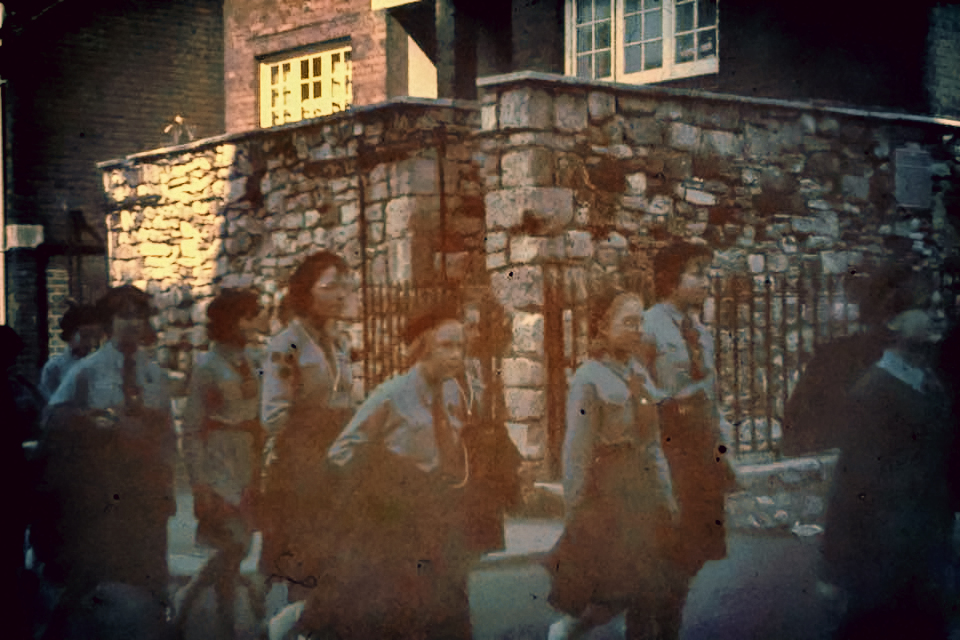
My try:
Attachment:
1831_28059107_10156081415624462_4803962561090463202_n_edit.jpg
1831_28059107_10156081415624462_4803962561090463202_n_edit.jpg [ 445.19 KiB | Viewed 8590 times ]

edit:

Sallyanne, this color cast is hard to correct.

Here I used first the channel mixer (GIMP>Colours>Components>'Channel Mixer' .. No Preserve Luminosity)

In G'MIC you can use G'MIC>Colors>'RGB tone' and 'CMYK tone'. On my system 'CMYK tone' is not very stable in G'MIC Qt. For this blue cast the 'CMYK tone' filter is the best. I think these filters do something like the Channel Mixer in GIMP, but expanded. Unfortunately they crash in Qt, so I used G'MIC 1.79 here. So the 'magic' here is "Channel Mixing". This method is also very useful for underwater image color correction.

Also an interesting filter for this color cast is G'MIC>Colors>Mixer [CMYK].

After using the filters I described here above, I used G'MIC>Colors>Curves,
G'MIC>Colors>Boost chromaticity (YCbCr distinct) and
G'MIC>Colors>Specific saturation.

In this process I create layer after layer. Everytime I blend those layers with the last layer with an opacity I like. Sometimes I copy an 'old' lower layer to correct for Value, (or/and) Color, (or/and) Saturation or/and Tint on top of the newer layers.

I also warmly recommend a brand new G'MIC filter .....G'MIC>Details>'Local Processing'
with Action: Equalize
with 'Process channels individualy' On.
with Channels: RGB [all]


Last edited by iarga on Fri Mar 02, 2018 2:08 pm, edited 3 times in total.

Top
 Post subject: Re: Blue Color cast.
PostPosted: Fri Mar 02, 2018 10:12 am  (#16) 
Offline
GimpChat Member
User avatar

Joined: Jan 08, 2018
Posts: 101
Location: The Netherlands
iarga wrote:
My try:


Well done! :clap

_________________
Image


Top
 Post subject: Re: Blue Color cast.
PostPosted: Tue Jun 05, 2018 12:01 pm  (#17) 
Offline
GimpChat Member

Joined: May 15, 2018
Posts: 28
Sallyanne,
I tried to follow the tips given by the iarga but even the result was not satisfactory. I believe that if you could follow the tips ofnuts could have a better result, but as Wallace said, this photograph is in difficult conditions to be restored.

My fast attempt.Image


Top
 Post subject: Re: Blue Color cast.
PostPosted: Tue Jun 05, 2018 6:46 pm  (#18) 
Offline
GimpChat Member

Joined: May 12, 2015
Posts: 4693
Iarga, what you have done with this photo is spectacular! I would be proud if I could do half that good!

TicTac, you also have a lot of talent with these photos.


Top
Post new topic Reply to topic  [ 18 posts ] 

All times are UTC - 5 hours [ DST ]


* Login  


Powered by phpBB3 © phpBB Group