Not able to reproduce a fault.
This is the dialogue again.
Does that come up in your Gimp? If it does what happens when you 'ok' it?
From your file it looks like it has been applied but nothing happened.
screenshot
https://i.imgur.com/4I4xvli.jpgThe text layer loses its text 'status' flattened to include the drop shadow.
screenshot
https://i.imgur.com/c10R8KE.jpgYour drop shadow legacy layers are a bit strange. The drop shadow has a bit of an outline, looks like a composite of coloured text / white text / shadow.
-------------
Edit: Noticed this before but just got round to looking at the problem text.
The flattened text is GIMP DROP SHADOW ie. all upper case.
From the layer the text should be Gimp Drop Shadow ie. lower case, capitalised.
screenshot:
https://i.imgur.com/vR4kEzQ.jpgDo not know how you managed that, suggest trying the GEGL filter on an un-modified layer until you get the hang of it.
----------------
Unrelated but just a note. Gimp 2.9/10 has two layer types 'default' and 'legacy' If you need to save an xcf file that will open with Gimp 2.8 then
all layers need to be legacy.
 Login
 Register
 Tweets
 FAQ
 Advanced Search







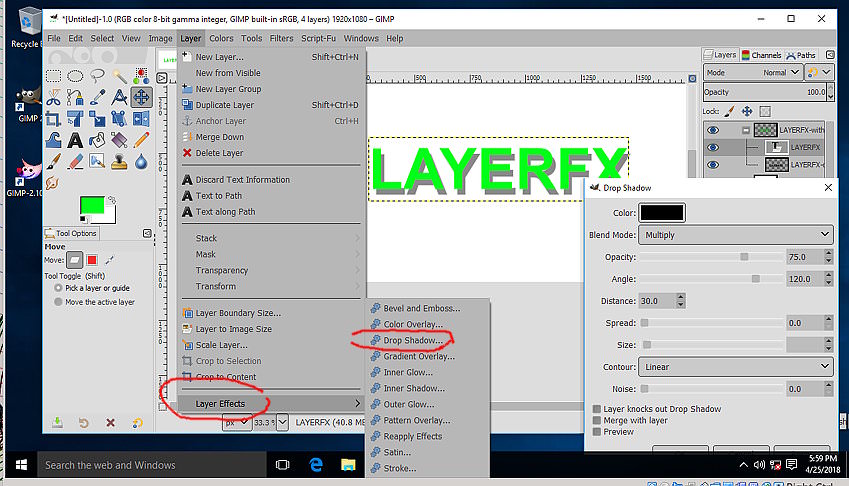
 Even the older layerfx.scm script-fu works, sort of.