It is currently Fri Jun 12, 2026 8:25 am


All times are UTC - 5 hours [ DST ]


Post new topic Reply to topic  [ 22 posts ]  Go to page 1, 2  Next
Author Message
 Post subject: Can't get GMIC to work. Resolved.
PostPosted: Fri Jun 29, 2018 1:55 am  (#1) 
Offline
GimpChat Member
User avatar

Joined: May 13, 2018
Posts: 270
Location: Oregon, USA
GIMP Version: 2.8.14
Operating System: Windows
GIMP Experience: Experienced User


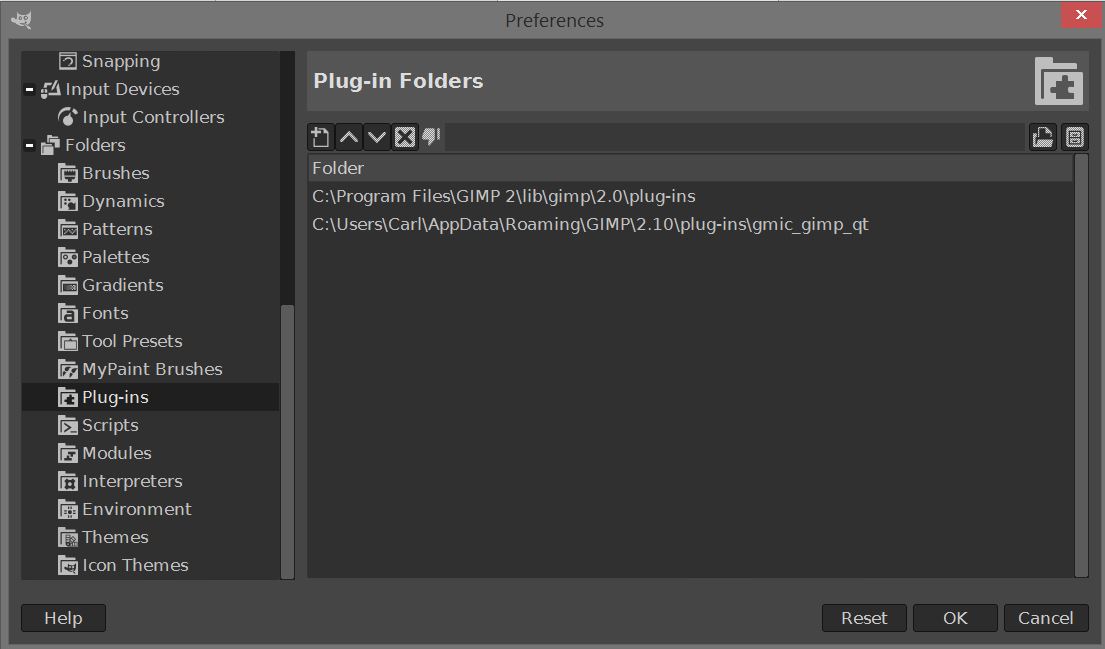
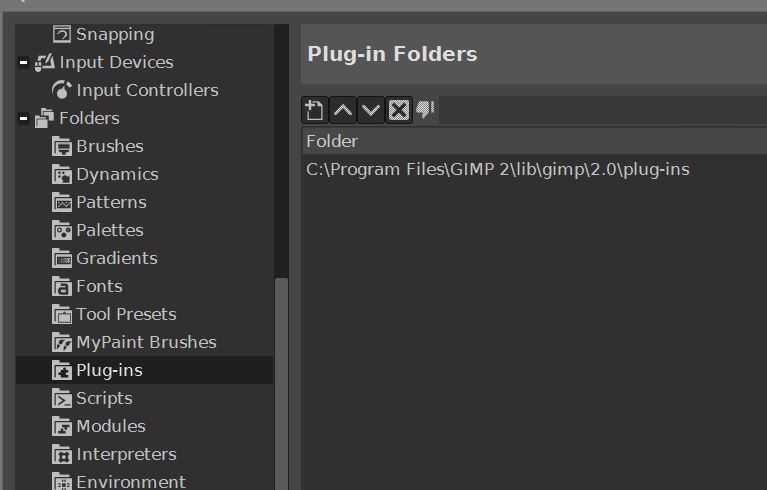
I just installed v:2.10 and I'm having the same problem. I've read everything here but can't get 2.10 to read in the g'mic filter.
Here's a shot of my GIMP plug-in folders.
I'm stumped.
Image

_________________
Image


Last edited by Peter on Sat Jul 07, 2018 6:39 pm, edited 1 time in total.

Share on Facebook Share on Twitter Share on Orkut Share on Digg Share on MySpace Share on Delicious Share on Technorati
Top
 Post subject: Re: Can't get GMIC to work.
PostPosted: Fri Jun 29, 2018 2:36 am  (#2) 
Offline
GimpChat Member
User avatar

Joined: Jan 20, 2013
Posts: 14831
Location: roma, italy
You may try to use the portable samj's package of 2.10.2.
https://samjcreations.blogspot.com/2018 ... ndows.html
Gmic is included.

_________________
"Where am I ?"


Top
 Post subject: Re: Can't get GMIC to work.
PostPosted: Fri Jun 29, 2018 2:55 am  (#3) 
Offline
GimpChat Member

Joined: Mar 04, 2011
Posts: 2603
My guess is an old version of gmic that has been migrated from Gimp 2.8 profile when Gimp 2.10 was installed.

G'mic has a separate version for Gimp 2.10 which installs in the correct place and does not require adding to the plug-ins paths. Right at the top of the page https://gmic.eu/download.shtml

My advice, remove any old version folder that might cause a conflict. Install the latest for Gimp 2.10


Top
 Post subject: Re: Can't get GMIC to work.
PostPosted: Fri Jun 29, 2018 3:07 am  (#4) 
Offline
GimpChat Member

Joined: Sep 23, 2016
Posts: 317
Did G'MIC actually install to the correct location? When I installed G'MIC on 2.10 the G'MIC installer wanted to install to 2.8 location. I corrected the install location and G'MIC installed and worked without problems.


Top
 Post subject: Re: Can't get GMIC to work.
PostPosted: Fri Jun 29, 2018 4:03 am  (#5) 
Offline
GimpChat Member
User avatar

Joined: May 10, 2013
Posts: 1430
Location: FInland
Maybe you have wrong plugin entry?
IF you dropped the G'mic plugin into plug-ins folder, which in your case would be
C:\Users\Carl\AppData\Roaming\GIMP\2.10\plug-ins
You have to remove the \gmic_gimp_qt from the end.

Now it's searching the plugin from "gmic_gimp_qt" folder, inside your plug-ins folder.


Top
 Post subject: Re: Can't get GMIC to work.
PostPosted: Fri Jun 29, 2018 4:31 am  (#6) 
Offline
GimpChat Member

Joined: Mar 04, 2011
Posts: 2603
Blighty has a good point about the installer. If gmic was installed into Gimp 2.8 there are Windows registry entries pointing there. Gmic will look on the install as an update if gmic was never un-installed. You would need to enter the correct path for Gimp 2.10

For a clean installation gmic goes straight to the correct place:

Image

Do you need to add to the plugins paths? No. Gimp 2.10 will use the folder name providing it is the same name as the plugin. Default paths are satisfactory.

Image

Does it work out-of-the-box? Yes.

Image


Top
 Post subject: Re: Can't get GMIC to work.
PostPosted: Fri Jun 29, 2018 11:42 am  (#7) 
Offline
GimpChat Member
User avatar

Joined: May 13, 2018
Posts: 270
Location: Oregon, USA
rich2005 wrote:
Blighty has a good point about the installer. If gmic was installed into Gimp 2.8 there are Windows registry entries pointing there. Gmic will look on the install as an update if gmic was never un-installed. You would need to enter the correct path for Gimp 2.10

For a clean installation gmic goes straight to the correct place:

[ Image ]

Do you need to add to the plugins paths? No. Gimp 2.10 will use the folder name providing it is the same name as the plugin. Default paths are satisfactory.

[ Image ]

Does it work out-of-the-box? Yes.

[ Image ]

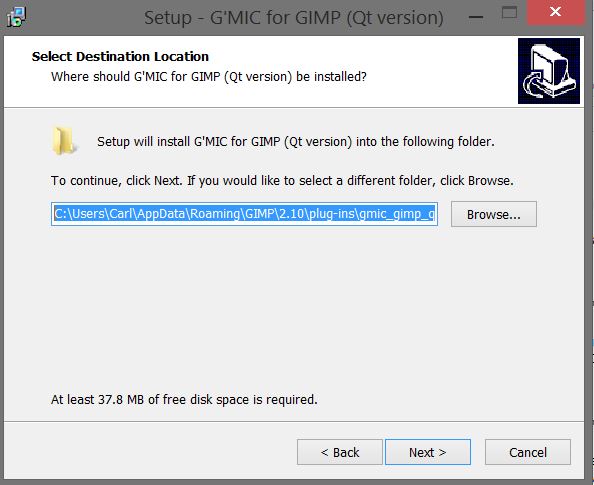
Here's where the gmic installer put the gmic program...
Image

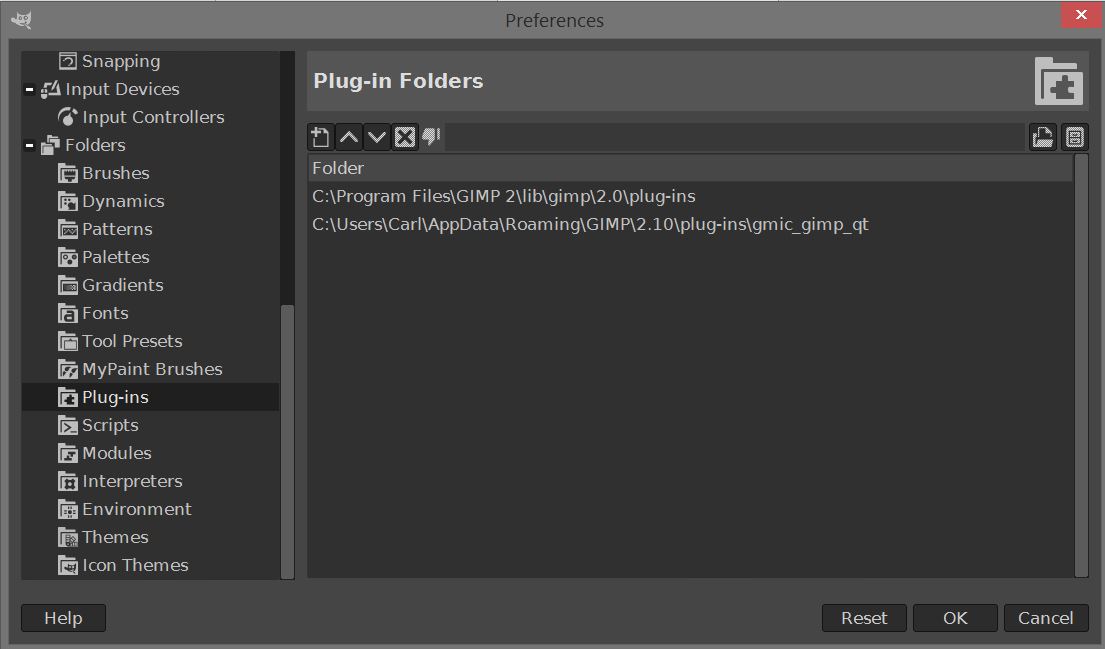
Here's where GIMP is looking for gmic...
Image

Based on this, shouldn't gmic work???
Seems to me, GIMP is looking at the right place. Yes? No?

_________________
Image


Top
 Post subject: Re: Can't get GMIC to work.
PostPosted: Fri Jun 29, 2018 3:16 pm  (#8) 
Offline
GimpChat Member

Joined: Mar 04, 2011
Posts: 2603
Quote:
....Based on this, shouldn't gmic work???
Seems to me, GIMP is looking at the right place. Yes? No?...


Not the best way to do it, but of course it does work. But not in your installation. Just do not expect any other plugin you install in plug-ins to work. You have to start looking for other reasons.

Image

Start with

Was gmic installed in Gimp 2.8 and where was it installed? Are any legacy files remaining? Especially in "Program Files\GIMP 2\..." folder structure.

Have you tried creating a clean Gimp 2.10 profile? Disable the gimp 2.8 profile (rename it) Delete the Gimp 2.10 profile. Run Gimp 2.10 to create a new empty profile. Install gmic (using the 2.10 version).

Is your Windows 32 bit?


Top
 Post subject: Re: Can't get GMIC to work.
PostPosted: Fri Jun 29, 2018 5:55 pm  (#9) 
Offline
GimpChat Member
User avatar

Joined: May 13, 2018
Posts: 270
Location: Oregon, USA
rich2005 wrote:
Quote:
....Based on this, shouldn't gmic work???
Seems to me, GIMP is looking at the right place. Yes? No?...


Not the best way to do it, but of course it does work. But not in your installation. Just do not expect any other plugin you install in plug-ins to work. You have to start looking for other reasons.

[ Image ]

Start with

Was gmic installed in Gimp 2.8 and where was it installed? Are any legacy files remaining? Especially in "Program Files\GIMP 2\..." folder structure.

Have you tried creating a clean Gimp 2.10 profile? Disable the gimp 2.8 profile (rename it) Delete the Gimp 2.10 profile. Run Gimp 2.10 to create a new empty profile. Install gmic (using the 2.10 version).

Is your Windows 32 bit?

It is 64 bit.
Your comment here made sense. Out of pure frustration I had to completely uninstall GIMP and start over.
I now have GIMP reinstalled. I now can get gmic to show up in my "filters" menu without using the "appdata" path.
Now gmic comes up "HALLELUJAH." But.... "there is no Dream Smoother." I was told that gmic 2.2.3 has Dream Smoother. Where do I get that? Been hunting for it all morning. Gee whiz..... soooo frustrating.

_________________
Image


Top
 Post subject: Re: Can't get GMIC to work.
PostPosted: Sat Jun 30, 2018 2:08 am  (#10) 
Offline
GimpChat Member

Joined: Mar 04, 2011
Posts: 2603
Peter wrote:
But.... "there is no Dream Smoother." I was told that gmic 2.2.3 has Dream Smoother. Where do I get that? Been hunting for it all morning. Gee whiz..... soooo frustrating.


Did you refresh the filters? From memory, initially 300 something, after a refresh 501


Top
 Post subject: Re: Can't get GMIC to work.
PostPosted: Sat Jun 30, 2018 10:37 am  (#11) 
Offline
GimpChat Member
User avatar

Joined: May 13, 2018
Posts: 270
Location: Oregon, USA
Did not do that. How do you do that?

_________________
Image


Top
 Post subject: Re: Can't get GMIC to work.
PostPosted: Sat Jun 30, 2018 10:45 am  (#12) 
Offline
GimpChat Member
User avatar

Joined: May 13, 2018
Posts: 270
Location: Oregon, USA
dinasset wrote:
You may try to use the portable samj's package of 2.10.2.
https://samjcreations.blogspot.com/2018 ... ndows.html
Gmic is included.

I tried to get that package. When I clicked on your link I got a page that was not English. I cannot identify which one to download. I desperately need this version. Can you help me identify which one you downloaded?
Any light you can shed on this would be greatly appreciated.
Thank you.

_________________
Image


Top
 Post subject: Re: Can't get GMIC to work.
PostPosted: Sat Jun 30, 2018 10:50 am  (#13) 
Offline
GimpChat Member

Joined: Mar 04, 2011
Posts: 2603
Peter wrote:
Did not do that. How do you do that?


Enable the internet button bottom of the gmic window. Click on the double arrow to update.

No need to trawl through all the menus, use the search bar with some search term.

Image


Top
 Post subject: Re: Can't get GMIC to work.
PostPosted: Sat Jun 30, 2018 12:43 pm  (#14) 
Offline
GimpChat Member
User avatar

Joined: May 13, 2018
Posts: 270
Location: Oregon, USA
rich2005 wrote:
Peter wrote:
Did not do that. How do you do that?


Enable the internet button bottom of the gmic window. Click on the double arrow to update.

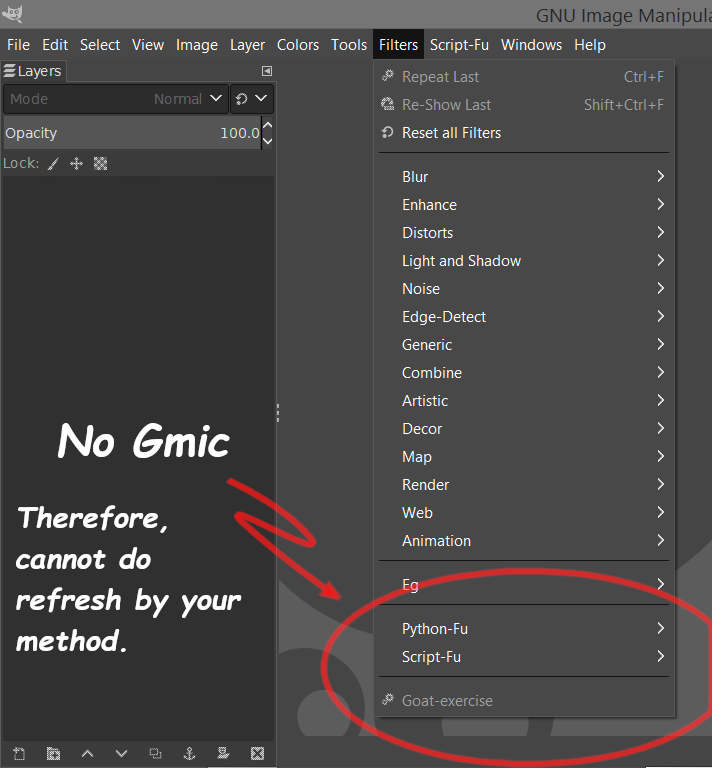
No need to trawl through all the menus, use the search bar with some search term.

[ Image ]

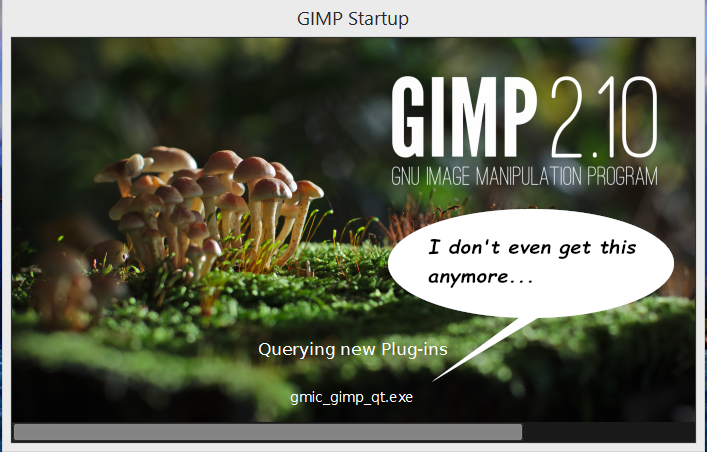
Here's the problem...
Image

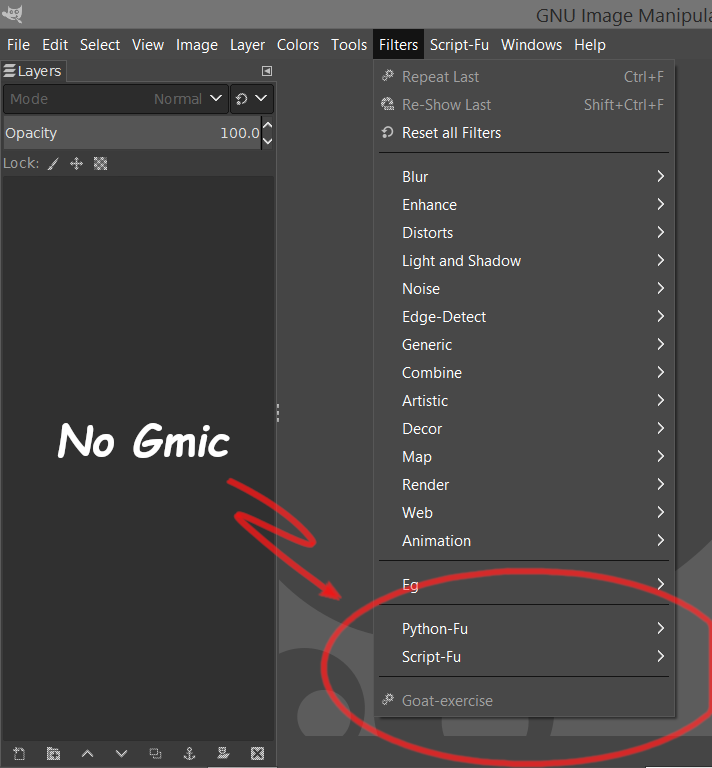
Here's the result...
Image
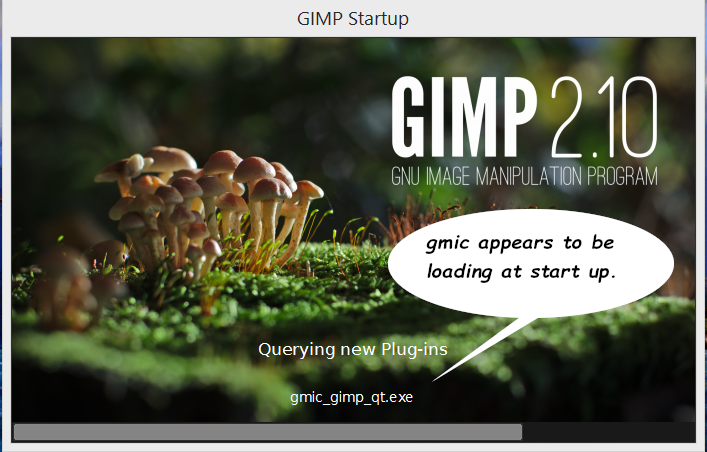
I'm totally stumped as to why I'm not even seeing gmic after start up.
I have tripled checked that GIMP is looking at the right folder to get gmic but gmic is never there.

_________________
Image


Top
 Post subject: Re: Can't get GMIC to work.
PostPosted: Sat Jun 30, 2018 1:10 pm  (#15) 
Offline
GimpChat Member

Joined: Mar 04, 2011
Posts: 2603
Can not help any more.

What happened after this post: viewtopic.php?f=8&t=16609#p229079 edit: fixed it

You must have seen gmic then.

Why do you have that eg menu entry? (presumably egger..something scripts from some old Gimp installation )

Just do not know what you are doing.


Last edited by rich2005 on Sat Jun 30, 2018 1:28 pm, edited 1 time in total.

Top
 Post subject: Re: Can't get GMIC to work.
PostPosted: Sat Jun 30, 2018 1:18 pm  (#16) 
Offline
GimpChat Member
User avatar

Joined: May 13, 2018
Posts: 270
Location: Oregon, USA
Clicking your link got me a blank page.
Anyway.....
At one point I "did" see gmic. Then someone else suggested I move it to a different location because the file path that involved "App Data" was not an optimum location. After that, gmic disappeared. Sorry I tried that. I think what I'm going to do is to completely uninstall and re-install 2.10 and start all over. Now that I think about it, I think I tried that already. But I've got no other choice. If I get 2.10 with gmic working again, then I'll certainly try your method to get "dream smooth." I understood your instruction and it makes sense to me.
I'll let you know how I make out.
Again, I appreciate your help. Thanks so much.

_________________
Image


Top
 Post subject: Re: Can't get GMIC to work.
PostPosted: Sat Jun 30, 2018 1:21 pm  (#17) 
Offline
GimpChat Member

Joined: Jan 03, 2014
Posts: 97
Don't know if this works on that Redmond system, but you could try and copy the command to start gimp from its shortcut under the start menu (or where ever you put it), paste that into a cmd window (or use PowerShell if you have it).
To invoke the cmd window, press and release the left Windows key, type cmd and that old time DOS box' icon should appear somewhere at the top right on the screen (works with win versions from 7 and above), or go through the normal start button mania to find it. (I hate windows, but have to work with it.)
Paste the command you copied by right-clicking in that black (unless it's PowerShell, which defaults to blue, I think) window and select Paste. Then hit enter to start gimp. You might get wiser that way, if gimp is smart enough to spit back some error messages for you, that might tell you where to look for the problem.
Good luck!


Top
 Post subject: Re: Can't get GMIC to work.
PostPosted: Sat Jun 30, 2018 1:25 pm  (#18) 
Offline
GimpChat Member
User avatar

Joined: May 13, 2018
Posts: 270
Location: Oregon, USA
Hmmmm...... thanks for that. I never would've thought of that.... and I do have PowerShell. I have to be gone this afternoon for a little while but I'll get back to all of this a little later.
I'm thankful for all the tips I'm getting here.

_________________
Image


Top
 Post subject: Re: Can't get GMIC to work.
PostPosted: Sat Jun 30, 2018 3:01 pm  (#19) 
Offline
GimpChat Member

Joined: Mar 04, 2011
Posts: 2603
Gimp comes with several command line switches, one of them --verbose will open a terminal for messages.
Not always so useful with gmic because of all the QT dependency dll's gimp looks on each as a possible plugin and reports on it.

However you might find a real error. I renamed a dll here to disable it and you might see the difference in the message.

Image

I am sure you will get gmic running just remember the installation criteria for Gimp 2.10 from gimp.org.

1. If there is an existing Gimp 2.8 with a 'uninstall' registry entry, Gimp 2.10 will uninstall Gimp 2.8 and install Gimp 2.10 to the same location. Usually C:\Program Files\GIMP 2\..

2. If there were any 'extras' there, these will remain and probably interfere with Gimp 2.10 operation. Example: A favourite at the moment is an old tiff import dll which stops Gimp 2.10 importing 16 bit files.

3. If there is no Gimp 2.8 'uninstall' registry entries, well you can install Gimp 2.10 anywhere you like, but most stick with C:\Program Files\GIMP 2\.. and if that exists with 'extra' files these can interfere with Gimp 2.10 operation, as before.

*** bottom line*** To make sure. Uninstall Gimp 2.8 - If C:\Program Files\GIMP 2\ is still there delete it. Now install Gimp 2.10

4. Once Gimp is installed the first time it runs it creates a Gimp profile in ...\AppData\Roaming\GIMP\2.10\

5. If there is a Gimp 2.8 user profile C:\Users\"yourname"\.gimp-2.8\ Gimp will copy various resources and settings files across to ...\AppData\Roaming\GIMP\2.10\ Including brushes / fonts/ and of course plug-ins which might or might-not work.

*** bottom line *** Want a clean install. Backup/Rename C:\Users\"yourname"\.gimp-2.8\ (say to \.ggimp-2.8) before the first run of Gimp 2.10.

To Late -- then delete \AppData\Roaming\GIMP\2.10\ and pretend you have just installed Gimp 2.10

Sorry for being so verbose about this, I honestly wish the devs had:
a) specified a different install folder for Gimp 2.10
b) omitted the migrate profile procedure (not just Windows, it is the same in Linux)
It would save a lot of problems.


Top
 Post subject: Re: Can't get GMIC to work.
PostPosted: Sat Jun 30, 2018 7:07 pm  (#20) 
Offline
GimpChat Member
User avatar

Joined: May 13, 2018
Posts: 270
Location: Oregon, USA
rich2005 wrote:
Gimp comes with several command line switches, one of them --verbose will open a terminal for messages.
Not always so useful with gmic because of all the QT dependency dll's gimp looks on each as a possible plugin and reports on it.

However you might find a real error. I renamed a dll here to disable it and you might see the difference in the message.

[ Image ]

I am sure you will get gmic running just remember the installation criteria for Gimp 2.10 from gimp.org.

I GIVE UP.
I've been at this for three days now and all afternoon today.
I've completely uninstalled re-installed everything and I can't get GIMP to load gmic at all... I've tried gmic in three different locations to no avail.
[ Image ]

1. If there is an existing Gimp 2.8 with a 'uninstall' registry entry, Gimp 2.10 will uninstall Gimp 2.8 and install Gimp 2.10 to the same location. Usually C:\Program Files\GIMP 2\..

2. If there were any 'extras' there, these will remain and probably interfere with Gimp 2.10 operation. Example: A favourite at the moment is an old tiff import dll which stops Gimp 2.10 importing 16 bit files.

3. If there is no Gimp 2.8 'uninstall' registry entries, well you can install Gimp 2.10 anywhere you like, but most stick with C:\Program Files\GIMP 2\.. and if that exists with 'extra' files these can interfere with Gimp 2.10 operation, as before.

*** bottom line*** To make sure. Uninstall Gimp 2.8 - If C:\Program Files\GIMP 2\ is still there delete it. Now install Gimp 2.10

4. Once Gimp is installed the first time it runs it creates a Gimp profile in ...\AppData\Roaming\GIMP\2.10\

5. If there is a Gimp 2.8 user profile C:\Users\"yourname"\.gimp-2.8\ Gimp will copy various resources and settings files across to ...\AppData\Roaming\GIMP\2.10\ Including brushes / fonts/ and of course plug-ins which might or might-not work.

*** bottom line *** Want a clean install. Backup/Rename C:\Users\"yourname"\.gimp-2.8\ (say to \.ggimp-2.8) before the first run of Gimp 2.10.

To Late -- then delete \AppData\Roaming\GIMP\2.10\ and pretend you have just installed Gimp 2.10

Sorry for being so verbose about this, I honestly wish the devs had:
a) specified a different install folder for Gimp 2.10
b) omitted the migrate profile procedure (not just Windows, it is the same in Linux)
It would save a lot of problems.


I GIVE UP...
I've been at this for three days now and all afternoon today.
I've completely uninstalled and re-installed everything to no avail.
I've tried three different locations for gmic and GIMP won't load it.
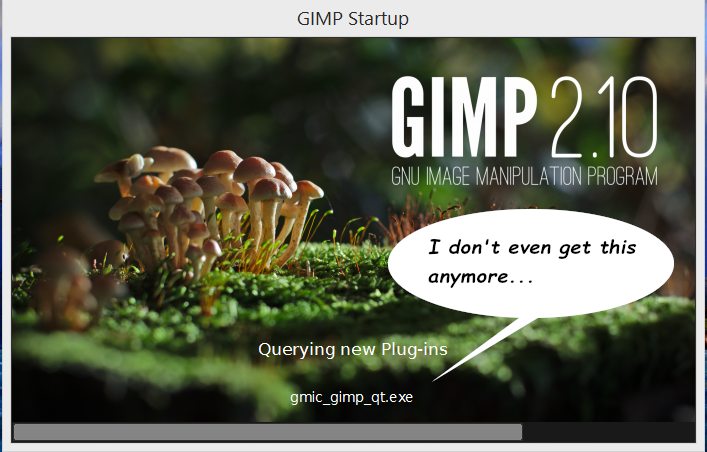
Image

This is the result... no gmic...
Image

This was the last location I tried...
Image

If I want to use gmic I guess I'll just have to give up 2.10 and go back to 2.8.
Tired of messing with it anymore.
I'd still be glad to hear from somebody that might have an idea I haven't tried yet.

_________________
Image


Top
Post new topic Reply to topic  [ 22 posts ]  Go to page 1, 2  Next

All times are UTC - 5 hours [ DST ]


* Login  


Powered by phpBB3 © phpBB Group