It is currently Sun Nov 08, 2026 4:49 am


All times are UTC - 5 hours [ DST ]


Post new topic Reply to topic  [ 11 posts ] 
Author Message
 Post subject: No tools working, pretty much.
PostPosted: Wed Sep 26, 2018 10:43 pm  (#1) 
Offline
GimpChat Member

Joined: Sep 26, 2018
Posts: 5
GIMP Version: 2.10.6
Operating System: Windows
OS Version: Windows 10 Anniversary Update (1607)
GIMP Experience: Basic Level

List any relevant plug-ins or scripts:
Just installed the most recent version of GimP, so, no plugins whatsoever.

List any ERROR messages you received:
No error messages at all.


Hello! I am a new user on this page, but I have been using GimP for a long time. Completely amazed with the newest version! But, I have a problem. The brushes are not working. Like, none of them. I have made sure I wasn't selecting the clipboard one. All opacities are set to 100%. The brush either refuses to go into the canvas, or stays in a single spot, and doesn't follow my pointer. I have tried using the bucket tool, still not working. No selections made, no other layers other than the background. I open the program and just stare, because I cannot use it lol. This happened before, with the 2.8 version. I use a Genius EasyPen i405x graphic tablet and the mouse. I have tried resetting the preferences, still nothing. So. . . Help? Please?
:hehe :hehe :hehe


Share on Facebook Share on Twitter Share on Orkut Share on Digg Share on MySpace Share on Delicious Share on Technorati
Top
 Post subject: Re: No tools working, pretty much.
PostPosted: Thu Sep 27, 2018 12:18 am  (#2) 
Offline
Administrator
User avatar

Joined: Aug 10, 2012
Posts: 14265
Location: Native to NYC living in Arizona, Gimp 2.8 - 3.0, Win 11 PC.
Allech wrote:
GIMP Version: 2.10.6
Operating System: Windows
OS Version: Windows 10 Anniversary Update (1607)
GIMP Experience: Basic Level

List any relevant plug-ins or scripts:
Just installed the most recent version of GimP, so, no plugins whatsoever.

List any ERROR messages you received:
No error messages at all.


Hello! I am a new user on this page, but I have been using GimP for a long time. Completely amazed with the newest version! But, I have a problem. The brushes are not working. Like, none of them. I have made sure I wasn't selecting the clipboard one. All opacities are set to 100%. The brush either refuses to go into the canvas, or stays in a single spot, and doesn't follow my pointer. I have tried using the bucket tool, still not working. No selections made, no other layers other than the background. I open the program and just stare, because I cannot use it lol. This happened before, with the 2.8 version. I use a Genius EasyPen i405x graphic tablet and the mouse. I have tried resetting the preferences, still nothing. So. . . Help? Please?:hehe :hehe :hehe


Does this also occur when you're only using a mouse?

_________________
Image
"A wise man learns more from a foolish question than a fool can learn from a wise answer"
Image


Top
 Post subject: Re: No tools working, pretty much.
PostPosted: Thu Sep 27, 2018 12:19 am  (#3) 
Offline
Script Coder
User avatar

Joined: May 07, 2014
Posts: 4561
Location: Canada
Try the start a new profile trick.

_________________
Image
Visualize your and others dreams coming true.


Top
 Post subject: Re: No tools working, pretty much.
PostPosted: Thu Sep 27, 2018 12:50 am  (#4) 
Offline
GimpChat Member

Joined: Sep 26, 2018
Posts: 5
Yes, it does. It acted up with the tablet and the mouse, the difference being that whenever I used the tablet's pen, the brush would follow, but not paint at all. Again, all opacities on 100%. Anyhow, maybe the installation of Photoshop made GimP jealous. It's working now, and I didn't touch anything. :huh
The previous version did exactly the same. Not work for a few days, then magically fix itself.

Sorry for the inconveniences I guess, and thanks for answering quickly. :thanku


Top
 Post subject: Re: No tools working, pretty much.
PostPosted: Thu Sep 27, 2018 1:07 am  (#5) 
Offline
Administrator
User avatar

Joined: Aug 10, 2012
Posts: 14265
Location: Native to NYC living in Arizona, Gimp 2.8 - 3.0, Win 11 PC.
Allech wrote:
Yes, it does. It acted up with the tablet and the mouse, the difference being that whenever I used the tablet's pen, the brush would follow, but not paint at all. Again, all opacities on 100%. Anyhow, maybe the installation of Photoshop made GimP jealous. It's working now, and I didn't touch anything. :huh
The previous version did exactly the same. Not work for a few days, then magically fix itself.

Sorry for the inconveniences I guess, and thanks for answering quickly. :thanku

That's odd,
:puzzled
but glad it's now working for you.

By the by,
welcome to the forum.

_________________
Image
"A wise man learns more from a foolish question than a fool can learn from a wise answer"
Image


Top
 Post subject: Re: No tools working, pretty much.
PostPosted: Thu Sep 27, 2018 10:52 am  (#6) 
Offline
Script Coder
User avatar

Joined: May 07, 2014
Posts: 4561
Location: Canada
There a ghost in the machine :D

_________________
Image
Visualize your and others dreams coming true.


Top
 Post subject: Re: No tools working, pretty much.
PostPosted: Thu Sep 27, 2018 6:44 pm  (#7) 
Offline
GimpChat Member

Joined: Sep 26, 2018
Posts: 5
Thanks! And, hello again, lmao. yes, guess what, GimP died again. I have been reading around, trying to know what could cause this. My mouse is set to "Screen" in Edit>Input Devices. I tried changing it, but it doesn't let me. The graphics tablet is not connected. It was working just fine yesterday.

I'll upload an image of what is going on, if it helps.


Attachments:
File comment: As you can see, it's just stuck outside the canvas, refusing to go in, and not painting at all. No tools work, again.
yee.png
yee.png [ 141.27 KiB | Viewed 3564 times ]
Top
 Post subject: Re: No tools working, pretty much.
PostPosted: Thu Sep 27, 2018 7:32 pm  (#8) 
Offline
Administrator
User avatar

Joined: Aug 10, 2012
Posts: 14265
Location: Native to NYC living in Arizona, Gimp 2.8 - 3.0, Win 11 PC.
Allech wrote:
Thanks! And, hello again, lmao. yes, guess what, GimP died again. I have been reading around, trying to know what could cause this. My mouse is set to "Screen" in Edit>Input Devices. I tried changing it, but it doesn't let me. The graphics tablet is not connected. It was working just fine yesterday.

I'll upload an image of what is going on, if it helps.

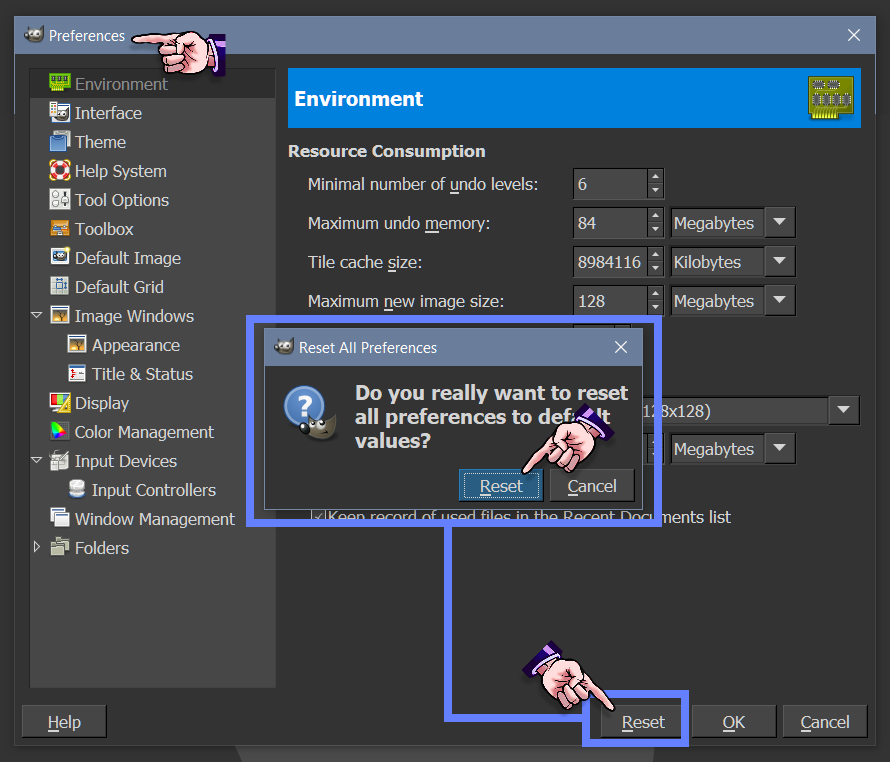
Have you tried resetting all preferences to their default vales?

Image

_________________
Image
"A wise man learns more from a foolish question than a fool can learn from a wise answer"
Image


Top
 Post subject: Re: No tools working, pretty much.
PostPosted: Fri Sep 28, 2018 1:00 am  (#9) 
Offline
GimpChat Member

Joined: Sep 26, 2018
Posts: 5
Yes, I just did. Didn't work. And, I don't really know how to start a new profile on GimP?
:')


Top
 Post subject: Re: No tools working, pretty much.
PostPosted: Fri Sep 28, 2018 7:42 am  (#10) 
Offline
GimpChat Member

Joined: Mar 04, 2011
Posts: 2629
Allech wrote:
Yes, I just did. Didn't work. And, I don't really know how to start a new profile on GimP?


Quote ..Just installed the most recent version of GimP, so, no plugins whatsoever.

Then it does not matter if you save your existing Gimp profile or not ;)

Go to C:\Users\your-name\AppData\Roaming\GIMP\2.10 and delete the folder 2.10 - that is your Gimp profile

Start up Gimp and a new default profile is created.

However. That is probably not the basic problem.
Gimp 2.10 will copy resources and settings from any existing Gimp 2.8 profile. To prevent that rename your old Gimp 2.8 profile from C:\Users\"yourname"\.gimp-2.8 to maybe C:\Users\"yourname"\.ggimp-2.8 Just enough so it is not recognised.

If you are still having problems with the graphics tablet then the settings are held in the file

C:\Users\your-name\AppData\Roaming\GIMP\2.10\devicerc Deleting that will let Gimp create a new default on next restart.


Top
 Post subject: Re: No tools working, pretty much.
PostPosted: Fri Sep 28, 2018 11:12 pm  (#11) 
Offline
GimpChat Member

Joined: Sep 26, 2018
Posts: 5
YAS It worked! Thank you all for answering, really. ♥♥♥ :yr


Attachments:
File comment: GimP got it, good.
Y E ET.png
Y E ET.png [ 1.66 KiB | Viewed 1248 times ]
Top
Post new topic Reply to topic  [ 11 posts ] 

All times are UTC - 5 hours [ DST ]


* Login  


Powered by phpBB3 © phpBB Group