It is currently Wed Jul 29, 2026 6:23 am


All times are UTC - 5 hours [ DST ]


Post new topic Reply to topic  [ 97 posts ]  Go to page Previous  1, 2, 3, 4, 5
Author Message
 Post subject: Re: Multiple Layer Actions Script Rel5.1 [Added 'Center All Layers']
PostPosted: Mon May 09, 2016 12:52 am  (#81) 
Offline
Administrator
User avatar

Joined: Aug 10, 2012
Posts: 14136
Location: Native to NYC living in Arizona, Gimp 2.8 - 3.0, Win 11 PC.
trandoductin wrote:
Is this related to creating custom fonts?

because i thought about this when i had to create fonts i had to manually autocrop each layer...which would be good if you only had letters of same height..but once you reach things like commas, period or single quotes and other symbols it would make the symbols center-ish looking when we run the custom font script.

Yes it is, but I've always want to have this functionality added to this script.
I understand what you're saying. The symbols and other various marks would need to be adjusted accordingly.
I don't think any form of automation could position all things perfectly.

_________________
Image
"A wise man learns more from a foolish question than a fool can learn from a wise answer"
Image


Top
 Post subject: Re: Multiple Layer Actions Script Rel5.1 [Added 'Center All Layers']
PostPosted: Mon May 09, 2016 12:59 am  (#82) 
Offline
Script Coder
User avatar

Joined: May 07, 2014
Posts: 4524
Location: Canada
makes sense if this script lets you apply to only linked layers maybe you unlink the special symbols..it would fit nicely in this script.

_________________
TinT


Top
 Post subject: Re: Multiple Layer Actions Script Rel5.1 [Added 'Center All Layers']
PostPosted: Mon May 09, 2016 1:06 am  (#83) 
Offline
Administrator
User avatar

Joined: Aug 10, 2012
Posts: 14136
Location: Native to NYC living in Arizona, Gimp 2.8 - 3.0, Win 11 PC.
trandoductin wrote:
makes sense if this script lets you apply to only linked layers maybe you unlink the special symbols..it would fit nicely in this script.

Yes, this script has a apply to linked layer function.

_________________
Image
"A wise man learns more from a foolish question than a fool can learn from a wise answer"
Image


Top
 Post subject: Re: Multiple Layer Actions Script Rel5.1 [Added 'Center All Layers']
PostPosted: Tue Dec 20, 2016 10:20 am  (#84) 
Offline
Global Moderator
User avatar

Joined: May 16, 2010
Posts: 16136
Ofnuts does have a script available that does autocrop all linked layers.
https://sourceforge.net/projects/gimp-t ... s/scripts/

autocrop-linked-layers-0.2.py

_________________
Image


Top
 Post subject: Re: Multiple Layer Actions Script Rel5.1 [Added 'Center All Layers']
PostPosted: Sat Apr 06, 2019 2:15 am  (#85) 
Offline
New Member

Joined: Apr 06, 2019
Posts: 1
Hey,
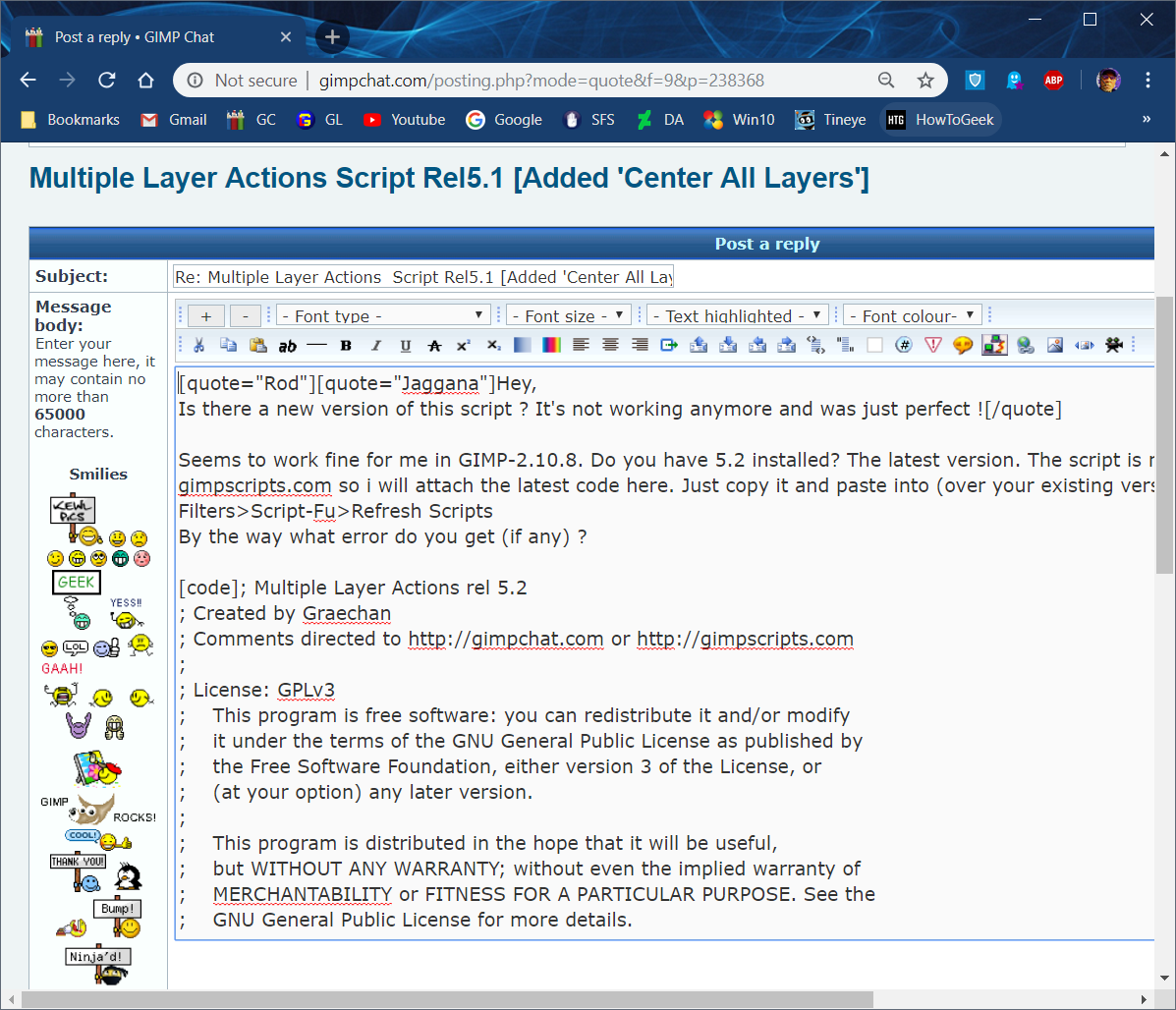
Is there a new version of this script ? It's not working anymore and was just perfect !


Top
 Post subject: Re: Multiple Layer Actions Script Rel5.1 [Added 'Center All Layers']
PostPosted: Sun Apr 07, 2019 12:25 pm  (#86) 
Offline
Global Moderator
User avatar

Joined: May 16, 2010
Posts: 16136
Jaggana wrote:
Hey,
Is there a new version of this script ? It's not working anymore and was just perfect !


Seems to work fine for me in GIMP-2.10.8. Do you have 5.2 installed? The latest version. The script is no longer available at gimpscripts.com so i will attach the latest code here. Just copy it and paste into (over your existing version. Then refresh your scripts Filters>Script-Fu>Refresh Scripts
By the way what error do you get (if any) ?

; Multiple Layer Actions rel 5.2
; Created by Graechan
; Comments directed to http://gimpchat.com or http://gimpscripts.com
;
; License: GPLv3
;    This program is free software: you can redistribute it and/or modify
;    it under the terms of the GNU General Public License as published by
;    the Free Software Foundation, either version 3 of the License, or
;    (at your option) any later version.
;
;    This program is distributed in the hope that it will be useful,
;    but WITHOUT ANY WARRANTY; without even the implied warranty of
;    MERCHANTABILITY or FITNESS FOR A PARTICULAR PURPOSE. See the
;    GNU General Public License for more details.
;
;    To view a copy of the GNU General Public License
;    visit: http://www.gnu.org/licenses/gpl.html
;
;
; ------------
;| Change Log |
; ------------
; Rel 0.01 - Initial Release
; Rel 0.02 - Bugfix for Layers with Locked Pixels, Added additional actions 'Clear Selection' and 'Layer to Image Size'
; Rel 0.03 - Enabled layer group functionality
; Rel 0.04 - Added Additional Actions
; Rel 0.05 - Added Actions for Color: Desaturate, Colorify and Color Balance
; Rel 05.1 - Added Additional Actions
;
(define (get-all-real-layers image)
    (define (get-children group)
      (let loop ((children (vector->list (cadr (gimp-item-get-children group))))
                 (sub-layers '()) )
        (if (null? children)
          (reverse sub-layers)
          (loop (cdr children)
                (if (zero? (car (gimp-item-is-group (car children))))
                  (cons (car children) sub-layers)
                  (append sub-layers (get-children (car children))) )))))
    (let loop ((top-layers (vector->list (cadr (gimp-image-get-layers image))))
               (all-layers '()) )
      (if (null? top-layers)
        all-layers
        (loop (cdr top-layers)
              (if (zero? (car (gimp-item-is-group (car top-layers))))
                (append all-layers (list (car top-layers)))
                (append all-layers (get-children (car top-layers)))) ))))
;
(define lists-menu
                  '("All layers"
                    "Linked Layers"
               "Non-Linked Layers"
               ))
;
(define actions-menu
                  '("Set Invisible"
                    "Set Visible"
               "Invert"
               "Clear Selection"
               "Layer to Image Size"
               "Semi-Flatten"
               "Flatten"
               "Add Alpha"
               "Remove Layers from Image"
               "Desaturate"
               "Colorify"
               "Color Balance(settings below)"
               "AutoCrop Layers"
               "Center All Layers"
               ))
;               
(define (script-fu-multiple-layer-actions image drawable
                                               listType
                                        exclude
                                        sf-color
                                    actionType
                                    range
                                    cyan-red
                                    magenta-green
                                    yellow-blue
                                    preserve-lum
                                        )   
            
   (gimp-image-undo-group-start image)                   

(let* (
       
      (layerList 0)
      (lockList 0)
      (layerId 0)
        )


;;-------------------------------
;;set the pre-conditions
    (set! lockList (let loop ((layers (vector->list (cadr (gimp-image-get-layers image))))
                           (layerList '()) )
                  (if (null? layers)
                    (reverse layerList)
                    (loop (cdr layers)
                          (if (zero? (car (gimp-item-get-lock-content (car layers))))
                            layerList
                            (cons (car layers) lockList) )))))
                     
   (map (lambda (x) (gimp-item-set-lock-content x FALSE)) lockList)

    (if (or (= actionType 5) (= actionType 6)) (gimp-context-set-background sf-color))
   (if (and (= actionType 8) (= listType 0)) (set! exclude TRUE))   
;;-----------------------------------------------------------------------
;;set the List Types   
   (cond
   ((= listType 0) ;All Layers
   (set! layerList (get-all-real-layers image))
   (if (= exclude TRUE) (set! layerList (delq drawable layerList)))    ;remove the drawable from the 'layerList'
   ) ;end All Layers
   
   ((= listType 1) ;Linked Layers
   (set! layerList (let loop ((layers (get-all-real-layers image))
                           (layerList '()) )
                  (if (null? layers)
                    (reverse layerList)
                    (loop (cdr layers)
                          (if (zero? (car (gimp-drawable-get-linked (car layers))))
                            layerList
                            (cons (car layers) layerList) )))))
   (if (= exclude TRUE) (set! layerList (delq drawable layerList)))    ;remove the drawable from the 'layerList'
   ) ;end Linked Layers
   
   ((= listType 2) ;Non Linked Layers
   (set! layerList (let loop ((layers (get-all-real-layers image))
                           (layerList '()) )
                  (if (null? layers)
                    (reverse layerList)
                    (loop (cdr layers)
                          (if (not(zero? (car (gimp-drawable-get-linked (car layers)))))
                            layerList
                            (cons (car layers) layerList) )))))
   (if (= exclude TRUE) (set! layerList (delq drawable layerList)))    ;remove the drawable from the 'layerList'
   ) ;end Non Linked Layers
   ) ;endcond

;;--------------------------------------------------------------------------------------------------------------------
            
;;------------------------------------------------------------------------------------------------------------------------   
;;Actions to perform   
   (cond
    ((= actionType 0 ) (map (lambda (x) (gimp-drawable-set-visible x FALSE)) layerList))         
   ((= actionType 1 ) (map (lambda (x) (gimp-drawable-set-visible x TRUE)) layerList))
   ((= actionType 2 ) (map (lambda (x) (gimp-invert x)) layerList))
   ((= actionType 3 ) (map (lambda (x) (gimp-edit-clear x)) layerList))
   ((= actionType 4 ) (map (lambda (x) (gimp-layer-resize-to-image-size x)) layerList))
   ((= actionType 5 ) (map (lambda (x) (plug-in-semiflatten 1 image x)) layerList))
   ((= actionType 6 ) (map (lambda (x) (gimp-layer-flatten x)) layerList))
   ((= actionType 7 ) (map (lambda (x) (gimp-layer-add-alpha x)) layerList))
   ((= actionType 8 )
   (map (lambda (x) (gimp-image-remove-layer image x)) layerList)
   (set! layerList (vector->list (cadr (gimp-image-get-layers image))))
   (if (= exclude TRUE) (set! layerList (delq drawable layerList)))
   (cond
   ((= listType 0)
   (map (lambda (x) (gimp-image-remove-layer image x)) layerList))
   ((> listType 0)
   (while (not (null? layerList))
          (set! layerId (car layerList))
        (cond ((= (car (gimp-item-is-group layerId)) TRUE)
        (if (= (car (gimp-item-get-children layerId)) 0) (gimp-image-remove-layer image layerId))))
        (set! layerList (cdr layerList))))))
   ((= actionType 9) (map (lambda (x) (gimp-desaturate x)) layerList))   
   ((= actionType 10) (map (lambda (x) (plug-in-colorify 1 image x sf-color)) layerList))
   ((= actionType 11) (map (lambda (x) (gimp-color-balance x range preserve-lum cyan-red magenta-green yellow-blue)) layerList))
   ((= actionType 12)
   (let* (
   (activeList layerList)
   (layerId 0)
   (visible 0)
   )
   (while (not (null? activeList))
          (set! layerId (car activeList))
        (gimp-image-set-active-layer image layerId)
        (set! visible (car (gimp-item-get-visible layerId)))        
        (gimp-drawable-set-visible layerId TRUE)
        (plug-in-autocrop-layer 1 image layerId)
        (if (= visible FALSE) (begin
        (gimp-drawable-set-visible layerId FALSE)))
        (set! activeList (cdr activeList))
        ) ;enwhile
        ) ;end actionVariables       
        ) ;end actionType 12
   ((= actionType 13)
   (let* (
   (activeList layerList)
   (img-width (car (gimp-image-width image)))
   (img-height (car (gimp-image-height image)))
   (width 0)
   (height 0)
   (layerId 0)
   (offx 0)
    (offy 0)
   )
         (while (not (null? activeList))
          (set! layerId (car activeList))
        (set! width (car (gimp-drawable-width layerId)))
        (set! height (car (gimp-drawable-height layerId)))
        (set! offx (/ (- img-width width) 2))
          (set! offy (/ (- img-height height) 2))   
          (gimp-layer-set-offsets layerId offx offy)
        (set! activeList (cdr activeList))
        ) ;enwhile
        ) ;end actionVariables       
        ) ;end actionType 13
   ) ;end actions cond
      
;;------------------------------------------------------------------------------------------------------   
;;reset pre-conditions
    (map (lambda (x) (gimp-item-set-lock-content x TRUE)) lockList)
;;---------------------------------------------------------------------------------------------------
   (gimp-displays-flush)
   (gimp-image-undo-group-end image);preserve-lum cyan-red magenta-green yellow-blue
   
)
)

(script-fu-register "script-fu-multiple-layer-actions"                 
  "Muliple Layer Actions..."
  "Set the type of Layers to Effect and wether to exclude the active Layer then the action you want done"
  "Graechan"
  "Graechan - http://gimpchat.com"
  "Feb 2015"
  "RGB*"
  SF-IMAGE      "image"      0
  SF-DRAWABLE   "drawable"   0
  SF-OPTION "Layers to Affect" lists-menu
  SF-TOGGLE     "Exclude Active Layer"    FALSE
  SF-COLOR "Effect Color
  (Only used if Actions Semi-Flatten, Flatten or Colorify Chosen)" '(255 255 255)
  SF-OPTION "Actions" actions-menu
  SF-ENUM _"Select Range to Adjust" '("TransferMode" "midtones")
  SF-ADJUSTMENT _"cyan-red" '(0 -100 100 1 10 0 0)
  SF-ADJUSTMENT _"magenta-green" '(0 -100 100 1 10 0 0)
  SF-ADJUSTMENT _"yellow-blue" '(0 -100 100 1 10 0 0)
  SF-TOGGLE     _"Preserve luminosity "    TRUE
)

(script-fu-menu-register "script-fu-multiple-layer-actions" "<Image>/Layer/")


Has anyone noticed the full editor for reply's is looking goofy? No images. Including smilies. :)

_________________
Image


Top
 Post subject: Re: Multiple Layer Actions Script Rel5.1 [Added 'Center All Layers']
PostPosted: Sun Apr 07, 2019 12:57 pm  (#87) 
Offline
Administrator
User avatar

Joined: Aug 10, 2012
Posts: 14136
Location: Native to NYC living in Arizona, Gimp 2.8 - 3.0, Win 11 PC.
Rod wrote:
Jaggana wrote:
Hey,
Is there a new version of this script ? It's not working anymore and was just perfect !


Seems to work fine for me in GIMP-2.10.8. Do you have 5.2 installed? The latest version. The script is no longer available at gimpscripts.com so i will attach the latest code here. Just copy it and paste into (over your existing version. Then refresh your scripts Filters>Script-Fu>Refresh Scripts
By the way what error do you get (if any) ?

; Multiple Layer Actions rel 5.2
; Created by Graechan
; Comments directed to http://gimpchat.com or http://gimpscripts.com
;
; License: GPLv3
;    This program is free software: you can redistribute it and/or modify
;    it under the terms of the GNU General Public License as published by
;    the Free Software Foundation, either version 3 of the License, or
;    (at your option) any later version.
;
;    This program is distributed in the hope that it will be useful,
;    but WITHOUT ANY WARRANTY; without even the implied warranty of
;    MERCHANTABILITY or FITNESS FOR A PARTICULAR PURPOSE. See the
;    GNU General Public License for more details.
;
;    To view a copy of the GNU General Public License
;    visit: http://www.gnu.org/licenses/gpl.html
;
;
; ------------
;| Change Log |
; ------------
; Rel 0.01 - Initial Release
; Rel 0.02 - Bugfix for Layers with Locked Pixels, Added additional actions 'Clear Selection' and 'Layer to Image Size'
; Rel 0.03 - Enabled layer group functionality
; Rel 0.04 - Added Additional Actions
; Rel 0.05 - Added Actions for Color: Desaturate, Colorify and Color Balance
; Rel 05.1 - Added Additional Actions
;
(define (get-all-real-layers image)
    (define (get-children group)
      (let loop ((children (vector->list (cadr (gimp-item-get-children group))))
                 (sub-layers '()) )
        (if (null? children)
          (reverse sub-layers)
          (loop (cdr children)
                (if (zero? (car (gimp-item-is-group (car children))))
                  (cons (car children) sub-layers)
                  (append sub-layers (get-children (car children))) )))))
    (let loop ((top-layers (vector->list (cadr (gimp-image-get-layers image))))
               (all-layers '()) )
      (if (null? top-layers)
        all-layers
        (loop (cdr top-layers)
              (if (zero? (car (gimp-item-is-group (car top-layers))))
                (append all-layers (list (car top-layers)))
                (append all-layers (get-children (car top-layers)))) ))))
;
(define lists-menu
                  '("All layers"
                    "Linked Layers"
               "Non-Linked Layers"
               ))
;
(define actions-menu
                  '("Set Invisible"
                    "Set Visible"
               "Invert"
               "Clear Selection"
               "Layer to Image Size"
               "Semi-Flatten"
               "Flatten"
               "Add Alpha"
               "Remove Layers from Image"
               "Desaturate"
               "Colorify"
               "Color Balance(settings below)"
               "AutoCrop Layers"
               "Center All Layers"
               ))
;               
(define (script-fu-multiple-layer-actions image drawable
                                               listType
                                        exclude
                                        sf-color
                                    actionType
                                    range
                                    cyan-red
                                    magenta-green
                                    yellow-blue
                                    preserve-lum
                                        )   
            
   (gimp-image-undo-group-start image)                   

(let* (
       
      (layerList 0)
      (lockList 0)
      (layerId 0)
        )


;;-------------------------------
;;set the pre-conditions
    (set! lockList (let loop ((layers (vector->list (cadr (gimp-image-get-layers image))))
                           (layerList '()) )
                  (if (null? layers)
                    (reverse layerList)
                    (loop (cdr layers)
                          (if (zero? (car (gimp-item-get-lock-content (car layers))))
                            layerList
                            (cons (car layers) lockList) )))))
                     
   (map (lambda (x) (gimp-item-set-lock-content x FALSE)) lockList)

    (if (or (= actionType 5) (= actionType 6)) (gimp-context-set-background sf-color))
   (if (and (= actionType 8) (= listType 0)) (set! exclude TRUE))   
;;-----------------------------------------------------------------------
;;set the List Types   
   (cond
   ((= listType 0) ;All Layers
   (set! layerList (get-all-real-layers image))
   (if (= exclude TRUE) (set! layerList (delq drawable layerList)))    ;remove the drawable from the 'layerList'
   ) ;end All Layers
   
   ((= listType 1) ;Linked Layers
   (set! layerList (let loop ((layers (get-all-real-layers image))
                           (layerList '()) )
                  (if (null? layers)
                    (reverse layerList)
                    (loop (cdr layers)
                          (if (zero? (car (gimp-drawable-get-linked (car layers))))
                            layerList
                            (cons (car layers) layerList) )))))
   (if (= exclude TRUE) (set! layerList (delq drawable layerList)))    ;remove the drawable from the 'layerList'
   ) ;end Linked Layers
   
   ((= listType 2) ;Non Linked Layers
   (set! layerList (let loop ((layers (get-all-real-layers image))
                           (layerList '()) )
                  (if (null? layers)
                    (reverse layerList)
                    (loop (cdr layers)
                          (if (not(zero? (car (gimp-drawable-get-linked (car layers)))))
                            layerList
                            (cons (car layers) layerList) )))))
   (if (= exclude TRUE) (set! layerList (delq drawable layerList)))    ;remove the drawable from the 'layerList'
   ) ;end Non Linked Layers
   ) ;endcond

;;--------------------------------------------------------------------------------------------------------------------
            
;;------------------------------------------------------------------------------------------------------------------------   
;;Actions to perform   
   (cond
    ((= actionType 0 ) (map (lambda (x) (gimp-drawable-set-visible x FALSE)) layerList))         
   ((= actionType 1 ) (map (lambda (x) (gimp-drawable-set-visible x TRUE)) layerList))
   ((= actionType 2 ) (map (lambda (x) (gimp-invert x)) layerList))
   ((= actionType 3 ) (map (lambda (x) (gimp-edit-clear x)) layerList))
   ((= actionType 4 ) (map (lambda (x) (gimp-layer-resize-to-image-size x)) layerList))
   ((= actionType 5 ) (map (lambda (x) (plug-in-semiflatten 1 image x)) layerList))
   ((= actionType 6 ) (map (lambda (x) (gimp-layer-flatten x)) layerList))
   ((= actionType 7 ) (map (lambda (x) (gimp-layer-add-alpha x)) layerList))
   ((= actionType 8 )
   (map (lambda (x) (gimp-image-remove-layer image x)) layerList)
   (set! layerList (vector->list (cadr (gimp-image-get-layers image))))
   (if (= exclude TRUE) (set! layerList (delq drawable layerList)))
   (cond
   ((= listType 0)
   (map (lambda (x) (gimp-image-remove-layer image x)) layerList))
   ((> listType 0)
   (while (not (null? layerList))
          (set! layerId (car layerList))
        (cond ((= (car (gimp-item-is-group layerId)) TRUE)
        (if (= (car (gimp-item-get-children layerId)) 0) (gimp-image-remove-layer image layerId))))
        (set! layerList (cdr layerList))))))
   ((= actionType 9) (map (lambda (x) (gimp-desaturate x)) layerList))   
   ((= actionType 10) (map (lambda (x) (plug-in-colorify 1 image x sf-color)) layerList))
   ((= actionType 11) (map (lambda (x) (gimp-color-balance x range preserve-lum cyan-red magenta-green yellow-blue)) layerList))
   ((= actionType 12)
   (let* (
   (activeList layerList)
   (layerId 0)
   (visible 0)
   )
   (while (not (null? activeList))
          (set! layerId (car activeList))
        (gimp-image-set-active-layer image layerId)
        (set! visible (car (gimp-item-get-visible layerId)))        
        (gimp-drawable-set-visible layerId TRUE)
        (plug-in-autocrop-layer 1 image layerId)
        (if (= visible FALSE) (begin
        (gimp-drawable-set-visible layerId FALSE)))
        (set! activeList (cdr activeList))
        ) ;enwhile
        ) ;end actionVariables       
        ) ;end actionType 12
   ((= actionType 13)
   (let* (
   (activeList layerList)
   (img-width (car (gimp-image-width image)))
   (img-height (car (gimp-image-height image)))
   (width 0)
   (height 0)
   (layerId 0)
   (offx 0)
    (offy 0)
   )
         (while (not (null? activeList))
          (set! layerId (car activeList))
        (set! width (car (gimp-drawable-width layerId)))
        (set! height (car (gimp-drawable-height layerId)))
        (set! offx (/ (- img-width width) 2))
          (set! offy (/ (- img-height height) 2))   
          (gimp-layer-set-offsets layerId offx offy)
        (set! activeList (cdr activeList))
        ) ;enwhile
        ) ;end actionVariables       
        ) ;end actionType 13
   ) ;end actions cond
      
;;------------------------------------------------------------------------------------------------------   
;;reset pre-conditions
    (map (lambda (x) (gimp-item-set-lock-content x TRUE)) lockList)
;;---------------------------------------------------------------------------------------------------
   (gimp-displays-flush)
   (gimp-image-undo-group-end image);preserve-lum cyan-red magenta-green yellow-blue
   
)
)

(script-fu-register "script-fu-multiple-layer-actions"                 
  "Muliple Layer Actions..."
  "Set the type of Layers to Effect and wether to exclude the active Layer then the action you want done"
  "Graechan"
  "Graechan - http://gimpchat.com"
  "Feb 2015"
  "RGB*"
  SF-IMAGE      "image"      0
  SF-DRAWABLE   "drawable"   0
  SF-OPTION "Layers to Affect" lists-menu
  SF-TOGGLE     "Exclude Active Layer"    FALSE
  SF-COLOR "Effect Color
  (Only used if Actions Semi-Flatten, Flatten or Colorify Chosen)" '(255 255 255)
  SF-OPTION "Actions" actions-menu
  SF-ENUM _"Select Range to Adjust" '("TransferMode" "midtones")
  SF-ADJUSTMENT _"cyan-red" '(0 -100 100 1 10 0 0)
  SF-ADJUSTMENT _"magenta-green" '(0 -100 100 1 10 0 0)
  SF-ADJUSTMENT _"yellow-blue" '(0 -100 100 1 10 0 0)
  SF-TOGGLE     _"Preserve luminosity "    TRUE
)

(script-fu-menu-register "script-fu-multiple-layer-actions" "<Image>/Layer/")


Has anyone noticed the full editor for reply's is looking goofy? No images. Including smilies. :)

Things look as expected in my browser.
Image

_________________
Image
"A wise man learns more from a foolish question than a fool can learn from a wise answer"
Image


Top
 Post subject: Re: Multiple Layer Actions Script Rel5.1 [Added 'Center All Layers']
PostPosted: Sun Apr 07, 2019 1:46 pm  (#88) 
Offline
Global Moderator
User avatar

Joined: May 16, 2010
Posts: 16136
Wallace wrote:
Rod wrote:
Jaggana wrote:
Hey,
Is there a new version of this script ? It's not working anymore and was just perfect !


Seems to work fine for me in GIMP-2.10.8. Do you have 5.2 installed? The latest version. The script is no longer available at gimpscripts.com so i will attach the latest code here. Just copy it and paste into (over your existing version. Then refresh your scripts Filters>Script-Fu>Refresh Scripts
By the way what error do you get (if any) ?

; Multiple Layer Actions rel 5.2
; Created by Graechan
; Comments directed to http://gimpchat.com or http://gimpscripts.com
;
; License: GPLv3
;    This program is free software: you can redistribute it and/or modify
;    it under the terms of the GNU General Public License as published by
;    the Free Software Foundation, either version 3 of the License, or
;    (at your option) any later version.
;
;    This program is distributed in the hope that it will be useful,
;    but WITHOUT ANY WARRANTY; without even the implied warranty of
;    MERCHANTABILITY or FITNESS FOR A PARTICULAR PURPOSE. See the
;    GNU General Public License for more details.
;
;    To view a copy of the GNU General Public License
;    visit: http://www.gnu.org/licenses/gpl.html
;
;
; ------------
;| Change Log |
; ------------
; Rel 0.01 - Initial Release
; Rel 0.02 - Bugfix for Layers with Locked Pixels, Added additional actions 'Clear Selection' and 'Layer to Image Size'
; Rel 0.03 - Enabled layer group functionality
; Rel 0.04 - Added Additional Actions
; Rel 0.05 - Added Actions for Color: Desaturate, Colorify and Color Balance
; Rel 05.1 - Added Additional Actions
;
(define (get-all-real-layers image)
    (define (get-children group)
      (let loop ((children (vector->list (cadr (gimp-item-get-children group))))
                 (sub-layers '()) )
        (if (null? children)
          (reverse sub-layers)
          (loop (cdr children)
                (if (zero? (car (gimp-item-is-group (car children))))
                  (cons (car children) sub-layers)
                  (append sub-layers (get-children (car children))) )))))
    (let loop ((top-layers (vector->list (cadr (gimp-image-get-layers image))))
               (all-layers '()) )
      (if (null? top-layers)
        all-layers
        (loop (cdr top-layers)
              (if (zero? (car (gimp-item-is-group (car top-layers))))
                (append all-layers (list (car top-layers)))
                (append all-layers (get-children (car top-layers)))) ))))
;
(define lists-menu
                  '("All layers"
                    "Linked Layers"
               "Non-Linked Layers"
               ))
;
(define actions-menu
                  '("Set Invisible"
                    "Set Visible"
               "Invert"
               "Clear Selection"
               "Layer to Image Size"
               "Semi-Flatten"
               "Flatten"
               "Add Alpha"
               "Remove Layers from Image"
               "Desaturate"
               "Colorify"
               "Color Balance(settings below)"
               "AutoCrop Layers"
               "Center All Layers"
               ))
;               
(define (script-fu-multiple-layer-actions image drawable
                                               listType
                                        exclude
                                        sf-color
                                    actionType
                                    range
                                    cyan-red
                                    magenta-green
                                    yellow-blue
                                    preserve-lum
                                        )   
            
   (gimp-image-undo-group-start image)                   

(let* (
       
      (layerList 0)
      (lockList 0)
      (layerId 0)
        )


;;-------------------------------
;;set the pre-conditions
    (set! lockList (let loop ((layers (vector->list (cadr (gimp-image-get-layers image))))
                           (layerList '()) )
                  (if (null? layers)
                    (reverse layerList)
                    (loop (cdr layers)
                          (if (zero? (car (gimp-item-get-lock-content (car layers))))
                            layerList
                            (cons (car layers) lockList) )))))
                     
   (map (lambda (x) (gimp-item-set-lock-content x FALSE)) lockList)

    (if (or (= actionType 5) (= actionType 6)) (gimp-context-set-background sf-color))
   (if (and (= actionType 8) (= listType 0)) (set! exclude TRUE))   
;;-----------------------------------------------------------------------
;;set the List Types   
   (cond
   ((= listType 0) ;All Layers
   (set! layerList (get-all-real-layers image))
   (if (= exclude TRUE) (set! layerList (delq drawable layerList)))    ;remove the drawable from the 'layerList'
   ) ;end All Layers
   
   ((= listType 1) ;Linked Layers
   (set! layerList (let loop ((layers (get-all-real-layers image))
                           (layerList '()) )
                  (if (null? layers)
                    (reverse layerList)
                    (loop (cdr layers)
                          (if (zero? (car (gimp-drawable-get-linked (car layers))))
                            layerList
                            (cons (car layers) layerList) )))))
   (if (= exclude TRUE) (set! layerList (delq drawable layerList)))    ;remove the drawable from the 'layerList'
   ) ;end Linked Layers
   
   ((= listType 2) ;Non Linked Layers
   (set! layerList (let loop ((layers (get-all-real-layers image))
                           (layerList '()) )
                  (if (null? layers)
                    (reverse layerList)
                    (loop (cdr layers)
                          (if (not(zero? (car (gimp-drawable-get-linked (car layers)))))
                            layerList
                            (cons (car layers) layerList) )))))
   (if (= exclude TRUE) (set! layerList (delq drawable layerList)))    ;remove the drawable from the 'layerList'
   ) ;end Non Linked Layers
   ) ;endcond

;;--------------------------------------------------------------------------------------------------------------------
            
;;------------------------------------------------------------------------------------------------------------------------   
;;Actions to perform   
   (cond
    ((= actionType 0 ) (map (lambda (x) (gimp-drawable-set-visible x FALSE)) layerList))         
   ((= actionType 1 ) (map (lambda (x) (gimp-drawable-set-visible x TRUE)) layerList))
   ((= actionType 2 ) (map (lambda (x) (gimp-invert x)) layerList))
   ((= actionType 3 ) (map (lambda (x) (gimp-edit-clear x)) layerList))
   ((= actionType 4 ) (map (lambda (x) (gimp-layer-resize-to-image-size x)) layerList))
   ((= actionType 5 ) (map (lambda (x) (plug-in-semiflatten 1 image x)) layerList))
   ((= actionType 6 ) (map (lambda (x) (gimp-layer-flatten x)) layerList))
   ((= actionType 7 ) (map (lambda (x) (gimp-layer-add-alpha x)) layerList))
   ((= actionType 8 )
   (map (lambda (x) (gimp-image-remove-layer image x)) layerList)
   (set! layerList (vector->list (cadr (gimp-image-get-layers image))))
   (if (= exclude TRUE) (set! layerList (delq drawable layerList)))
   (cond
   ((= listType 0)
   (map (lambda (x) (gimp-image-remove-layer image x)) layerList))
   ((> listType 0)
   (while (not (null? layerList))
          (set! layerId (car layerList))
        (cond ((= (car (gimp-item-is-group layerId)) TRUE)
        (if (= (car (gimp-item-get-children layerId)) 0) (gimp-image-remove-layer image layerId))))
        (set! layerList (cdr layerList))))))
   ((= actionType 9) (map (lambda (x) (gimp-desaturate x)) layerList))   
   ((= actionType 10) (map (lambda (x) (plug-in-colorify 1 image x sf-color)) layerList))
   ((= actionType 11) (map (lambda (x) (gimp-color-balance x range preserve-lum cyan-red magenta-green yellow-blue)) layerList))
   ((= actionType 12)
   (let* (
   (activeList layerList)
   (layerId 0)
   (visible 0)
   )
   (while (not (null? activeList))
          (set! layerId (car activeList))
        (gimp-image-set-active-layer image layerId)
        (set! visible (car (gimp-item-get-visible layerId)))        
        (gimp-drawable-set-visible layerId TRUE)
        (plug-in-autocrop-layer 1 image layerId)
        (if (= visible FALSE) (begin
        (gimp-drawable-set-visible layerId FALSE)))
        (set! activeList (cdr activeList))
        ) ;enwhile
        ) ;end actionVariables       
        ) ;end actionType 12
   ((= actionType 13)
   (let* (
   (activeList layerList)
   (img-width (car (gimp-image-width image)))
   (img-height (car (gimp-image-height image)))
   (width 0)
   (height 0)
   (layerId 0)
   (offx 0)
    (offy 0)
   )
         (while (not (null? activeList))
          (set! layerId (car activeList))
        (set! width (car (gimp-drawable-width layerId)))
        (set! height (car (gimp-drawable-height layerId)))
        (set! offx (/ (- img-width width) 2))
          (set! offy (/ (- img-height height) 2))   
          (gimp-layer-set-offsets layerId offx offy)
        (set! activeList (cdr activeList))
        ) ;enwhile
        ) ;end actionVariables       
        ) ;end actionType 13
   ) ;end actions cond
      
;;------------------------------------------------------------------------------------------------------   
;;reset pre-conditions
    (map (lambda (x) (gimp-item-set-lock-content x TRUE)) lockList)
;;---------------------------------------------------------------------------------------------------
   (gimp-displays-flush)
   (gimp-image-undo-group-end image);preserve-lum cyan-red magenta-green yellow-blue
   
)
)

(script-fu-register "script-fu-multiple-layer-actions"                 
  "Muliple Layer Actions..."
  "Set the type of Layers to Effect and wether to exclude the active Layer then the action you want done"
  "Graechan"
  "Graechan - http://gimpchat.com"
  "Feb 2015"
  "RGB*"
  SF-IMAGE      "image"      0
  SF-DRAWABLE   "drawable"   0
  SF-OPTION "Layers to Affect" lists-menu
  SF-TOGGLE     "Exclude Active Layer"    FALSE
  SF-COLOR "Effect Color
  (Only used if Actions Semi-Flatten, Flatten or Colorify Chosen)" '(255 255 255)
  SF-OPTION "Actions" actions-menu
  SF-ENUM _"Select Range to Adjust" '("TransferMode" "midtones")
  SF-ADJUSTMENT _"cyan-red" '(0 -100 100 1 10 0 0)
  SF-ADJUSTMENT _"magenta-green" '(0 -100 100 1 10 0 0)
  SF-ADJUSTMENT _"yellow-blue" '(0 -100 100 1 10 0 0)
  SF-TOGGLE     _"Preserve luminosity "    TRUE
)

(script-fu-menu-register "script-fu-multiple-layer-actions" "<Image>/Layer/")


Has anyone noticed the full editor for reply's is looking goofy? No images. Including smilies. :)

Things look as expected in my browser.
[ Image ]

Yeah must have been a fluke. Looks great now! :bigthup

_________________
Image


Top
 Post subject: Re: Multiple Layer Actions Script Rel5.1 [Added 'Center All Layers']
PostPosted: Sun Apr 07, 2019 1:52 pm  (#89) 
Offline
Administrator
User avatar

Joined: Aug 10, 2012
Posts: 14136
Location: Native to NYC living in Arizona, Gimp 2.8 - 3.0, Win 11 PC.
Rod wrote:
Yeah must have been a fluke. Looks great now! :bigthup

This happens to me sometimes,
when I follow GC links,
that have been sent to my email.

Not sure why this happens,
but often refreshing the page and or my DSN,
resolves the issue.

_________________
Image
"A wise man learns more from a foolish question than a fool can learn from a wise answer"
Image


Top
 Post subject: Re: Multiple Layer Actions Script Rel5.1 [Added 'Center All Layers']
PostPosted: Mon Apr 08, 2019 7:34 am  (#90) 
Offline
Global Moderator
User avatar

Joined: May 16, 2010
Posts: 16136
Wallace wrote:
Rod wrote:
Yeah must have been a fluke. Looks great now! :bigthup

This happens to me sometimes,
when I follow GC links,
that have been sent to my email.

Not sure why this happens,
but often refreshing the page and or my DSN,
resolves the issue.


Yeah i tried refreshing the page but it still looked weird. :)
I am thinking maybe i was having a connection issue for a few seconds.

_________________
Image


Top
 Post subject: Re: Multiple Layer Actions Script Rel5.1 [Added 'Center All Layers']
PostPosted: Mon Apr 08, 2019 11:13 am  (#91) 
Offline
Administrator
User avatar

Joined: Aug 10, 2012
Posts: 14136
Location: Native to NYC living in Arizona, Gimp 2.8 - 3.0, Win 11 PC.
Rod wrote:

Yeah i tried refreshing the page but it still looked weird. :)
I am thinking maybe i was having a connection issue for a few seconds.

Right, who knows?
I'm glad that it's not stuck that way.
Still, it's annoying to have to deal with.

_________________
Image
"A wise man learns more from a foolish question than a fool can learn from a wise answer"
Image


Top
 Post subject: Re: Multiple Layer Actions Script Rel5.1 [Added 'Center All Layers']
PostPosted: Sat Aug 14, 2021 12:09 pm  (#92) 
Offline
GimpChat Member

Joined: Jul 30, 2021
Posts: 12
Hello everyone in the chat!
Please, would anyone know where I can get this script, in order to use it in Gimp 2.10?
From now on, I thank you for your esteemed attention!


Top
 Post subject: Re: Multiple Layer Actions Script Rel5.1 [Added 'Center All Layers']
PostPosted: Sat Aug 14, 2021 3:04 pm  (#93) 
Offline
GimpChat Member

Joined: Mar 04, 2011
Posts: 2610
You can get it from the old Gimpscripts site via the Internet archive.

https://web.archive.org/web/20171113075 ... r-actions/

As it happens ;) It is one I use from time-to-time so I will attach it.

This is always worth a check when looking for old stuff:
Gimpscript.com archive https://www.gimpscripts.net/2020/09/gimpscript.html that multiple-layer-actions is in pack number 7


Attachments:
Multiple-Layer-Actions.scm [9.62 KiB]
Downloaded 154 times
Top
 Post subject: Re: Multiple Layer Actions Script Rel5.1 [Added 'Center All Layers']
PostPosted: Sat Aug 14, 2021 4:51 pm  (#94) 
Offline
GimpChat Member
User avatar

Joined: Jul 06, 2013
Posts: 2662
Location: California
Has anyone tested all of the scripts in the 11 packs to see if they still work?

EDIT: Currently testing all of the plugins & scripts from the gimpscripts.com packs. I'll put a list of which ones don't work here.

I use Windows 10 64 Bit.

Here are the Plugins/Scripts that don't work:

Bumpy (.scm)
Chisel (.scm)
DIEGO Mosaic Stained Glass Ver 2
DIEGO Mosaic Stained Glass Ver 3
DIEGO Lyle Style Mosaic
Electricity Logo
Gradient Extrapolate
G'MIC LOGOS
JamackSketch
Jaz_Diego_Wireframe_GC_II
Jaz_Wireframe_gc_ii_ac
Liquid Water
Mythical
Photo_Mosaic
DIEGO Enhance Lyle Style Details
DIEGO Enhance Rod Style Details
DIEGO Remove All But Gray
DIEGO Reflect On Ponds
DIEGO PsuedoHDREffect
Soap Bubbles 2.6
SG Warp Text
Stepped Chisel
Shiny_Painting
Space Text
Transfer Colours
Texturize Area By Colour
Warhol
WhiteBalanceStretch
WhiteBalanceStretch 2


Top
 Post subject: Re: Multiple Layer Actions Script Rel5.1 [Added 'Center All Layers']
PostPosted: Sat Aug 27, 2022 12:34 pm  (#95) 
Offline
GimpChat Member
User avatar

Joined: Oct 31, 2020
Posts: 2013
Does this work and if so can it run GEGL:GEGL from script fu? So i can run gegl operations on multiple layers?


Top
 Post subject: Re: Multiple Layer Actions Script Rel5.1 [Added 'Center All Layers']
PostPosted: Sat Aug 27, 2022 2:22 pm  (#96) 
Yes, It works for GIMP 2.10.


Top
 Post subject: Re: Multiple Layer Actions Script Rel5.1 [Added 'Center All Layers']
PostPosted: Sat Aug 27, 2022 10:12 pm  (#97) 
Offline
Global Moderator
User avatar

Joined: May 16, 2010
Posts: 16136
SG Warptext also works. You have to create the path nodes in a certain order top left,top right,bottom right, then bottom left then back to top left.
Although in this case i do not believe the script likes circular text. :rofl

Attachment:
SaulGoodes-Warp-Text_RD-2022-08-27_230529.jpg
SaulGoodes-Warp-Text_RD-2022-08-27_230529.jpg [ 97.52 KiB | Viewed 1360 times ]


Thank you Saulgoode wherever you are. :bigthup

_________________
Image


Top
Post new topic Reply to topic  [ 97 posts ]  Go to page Previous  1, 2, 3, 4, 5

All times are UTC - 5 hours [ DST ]


* Login  


Powered by phpBB3 © phpBB Group