It is currently Fri Jun 05, 2026 10:03 pm


All times are UTC - 5 hours [ DST ]


Post new topic Reply to topic  [ 44 posts ]  Go to page Previous  1, 2, 3
Author Message
 Post subject: Re: Playing with SWF Export
PostPosted: Sun May 29, 2011 6:18 am  (#41) 
Offline
Global Moderator
User avatar

Joined: May 16, 2010
Posts: 16011
Graechan wrote:


Rod this is the best I can think of and 'Dog' can't help anymore he passed away yesterday,

Rajah 14 years Golden Retreiver (sadly missed by all who new him)


Very cool animation. :)

Thanks Tux

_________________
Image


Top
 Post subject: Re: Playing with SWF Export
PostPosted: Sun May 29, 2011 6:46 pm  (#42) 
Offline
GimpChat Member
User avatar

Joined: Apr 18, 2011
Posts: 620
Location: New York
Rod wrote:
Graechan wrote:
That was 'brilliant' Rod is there a tutorial or could you create one showing how to make a flash animation with sound from a GIF or multi frame image, as I am failing in my attempts to do so.


You should be able to add the sound through the dialog for SWFExport plug-in.
You need a couple things before you start -
1 - the python fu setup in Gimp
2 - the swfexport.py plug-in
3 - flash player
You will need all your layers saved as a GIF
Next -
Go to Image/Mode/Select RGB mode (because usually GIF are Indexed), or SWF Export will not be usable (it will be grayed out in the menu list)
Now go to File/Export SWF File
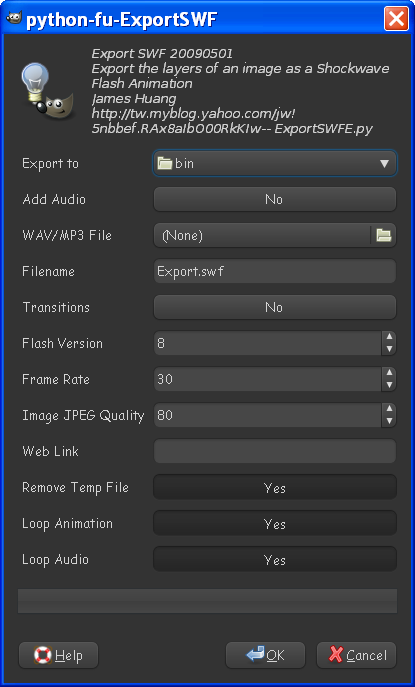
This dialog will pop up
Image

Export to - save your swf executable where you want it saved (can be anywhere)
Add audio - yes -
Wav-MP3 file - browse to the file for the sound you want (many are down-loadable on the net for free)
File name - name your output swf file
Transitions can stay at no for now
Flash version - select the 8 (most people have 8 or higher)
Frame rate - number ms you want each frame to stay opened in the movie. (25-30 is usually fine)
JPG quality can be set to 100 here if the image is small this will give you a bigger file if you have large animations (80-85 for quality is norm)
Link - link the swf to a website (useful for clickable buttons)
Remove temp file - yes
Loop animation - yes if small file
Loop audio - yes if not a problem like if the sound will contiue on one page and could get annoying.
I looped mine because i know folks will be going to the next page and wont be constantly listening to annoying sound on one page :lol
You can choose whichever you wish.
That's it select ok and double click your saved swf to view it in the flash player.
You can attach swf files here at Gimp Chat via the up-loader.
It's not real hard - you probably didn't change the image mode which took me a few moments to figure out. :)

Have fun!

Wow Lyle you opened a browser just for me? :lol
Thankyou

I have used the version from here:
http://registry.gimp.org/node/14983

but that one doesn't save with an audio file.

I found the version that looks like your screen grab and while it does pop up it obviously was written for windows because it complains that I need swftools (which I most certainly have installed).

is there a linux version that saves audio with the flash file??
thank you :tyspin

_________________
Ubuntu 24.04.1, Kernel i686, 6.8.0-52-generic
python3 v3.12.3 ----- GIMP - ver 2.10.38


Top
 Post subject: Re: Playing with SWF Export
PostPosted: Tue May 31, 2011 8:18 pm  (#43) 
Offline
GimpChat Member
User avatar

Joined: Apr 25, 2011
Posts: 121
Location: Taiwan
cecilia wrote:
Rod wrote:
Graechan wrote:
That was 'brilliant' Rod is there a tutorial or could you create one showing how to make a flash animation with sound from a GIF or multi frame image, as I am failing in my attempts to do so.

...

I have used the version from here:
http://registry.gimp.org/node/14983

but that one doesn't save with an audio file.

I found the version that looks like your screen grab and while it does pop up it obviously was written for windows because it complains that I need swftools (which I most certainly have installed).

is there a linux version that saves audio with the flash file??
thank you :tyspin


try this
ExportSWFE(Linux).zip

_________________
Sorry for my poor English, I use Google Translate.
There may be something wrong, Please understand.

GIMP 2.10.38 rev1 portable+GAP+G'MIC+nufraw+Beautify+MathMap+...


Top
 Post subject: Re: Playing with SWF Export
PostPosted: Tue May 31, 2011 10:22 pm  (#44) 
Offline
GimpChat Member
User avatar

Joined: Apr 18, 2011
Posts: 620
Location: New York
ok, the window comes up with the audio file but it doesn't like my mp3's
I even made sure there were no spaces in the file name.

anyway, I can play with this later. thanks

_________________
Ubuntu 24.04.1, Kernel i686, 6.8.0-52-generic
python3 v3.12.3 ----- GIMP - ver 2.10.38


Top
Post new topic Reply to topic  [ 44 posts ]  Go to page Previous  1, 2, 3

All times are UTC - 5 hours [ DST ]


* Login  


Powered by phpBB3 © phpBB Group