It is currently Sat Nov 07, 2026 9:55 pm


All times are UTC - 5 hours [ DST ]


Post new topic Reply to topic  [ 6 posts ] 
Author Message
 Post subject: [solved] help to finalize
PostPosted: Sun Oct 20, 2019 12:14 pm  (#1) 
Offline
GimpChat Member

Joined: Apr 09, 2018
Posts: 1888
Location: France
GIMP Version: 2.10.13
Operating System: Windows
GIMP Experience: New User


:wvy
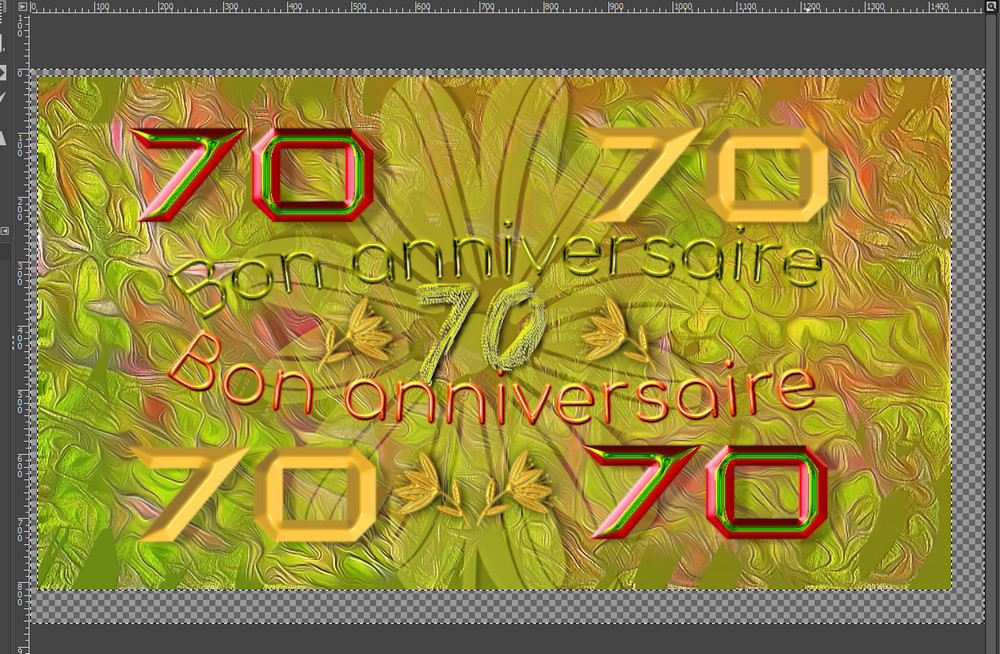
For the birthday of a friend,tomorrow, I started this a few days ago and I can not finish.To bring out the text, I tried a gradient on the bottom (there is one light), I tried a drop shadow on the texts by trying several colors with filters Gimp and G'Mic but I have not found a outcome that suits me. :(
I am at this result:
Image

What would you advise me?

_________________
Les parfums, les couleurs et les sons se répondent.Baudelaire (Les fleurs du mal)
2.10.36/(Samj) Gimp 2.10.38 OS Windows 10 Home 64 bits


Last edited by level_0 on Mon Oct 21, 2019 1:48 am, edited 1 time in total.

Share on Facebook Share on Twitter Share on Orkut Share on Digg Share on MySpace Share on Delicious Share on Technorati
Top
 Post subject: Re: help to finalize
PostPosted: Sun Oct 20, 2019 3:13 pm  (#2) 
Offline
GimpChat Member
User avatar

Joined: Aug 16, 2012
Posts: 4271
Location: Göteborg, Sweden
Level_0: That's a really beautiful card. If you are concerned that the text doesn't stand out enough and you are in a hurry, I'd suggest just stroking a thin outline of the text on a separate layer and put it to difference mode. Usually the effect is a bit too strong with full opacity, but it looks good if you pull opacity down a bit.

_________________


Top
 Post subject: Re: help to finalize
PostPosted: Sun Oct 20, 2019 3:29 pm  (#3) 
Offline
GimpChat Member

Joined: Apr 09, 2018
Posts: 1888
Location: France
AnMal wrote:
Level_0: That's a really beautiful card. If you are concerned that the text doesn't stand out enough and you are in a hurry, I'd suggest just stroking a thin outline of the text on a separate layer and put it to difference mode. Usually the effect is a bit too strong with full opacity, but it looks good if you pull opacity down a bit.


Thank you AnMalImage for these valuable tips, I will try this.

_________________
Les parfums, les couleurs et les sons se répondent.Baudelaire (Les fleurs du mal)
2.10.36/(Samj) Gimp 2.10.38 OS Windows 10 Home 64 bits


Top
 Post subject: Re: help to finalize
PostPosted: Sun Oct 20, 2019 3:53 pm  (#4) 
Offline
Administrator
User avatar

Joined: Aug 10, 2012
Posts: 14265
Location: Native to NYC living in Arizona, Gimp 2.8 - 3.0, Win 11 PC.
You could try doing a 3D Extrusion, or a Outer Glow on the text.

_________________
Image
"A wise man learns more from a foolish question than a fool can learn from a wise answer"
Image


Top
 Post subject: Re: help to finalize
PostPosted: Sun Oct 20, 2019 4:07 pm  (#5) 
Offline
GimpChat Member

Joined: Apr 09, 2018
Posts: 1888
Location: France
Wallace wrote:
You could try doing a 3D Extrusion, or a Outer Glow on the text.

:tyspin Wallace,I'll see that tomorrow morning because now Image

_________________
Les parfums, les couleurs et les sons se répondent.Baudelaire (Les fleurs du mal)
2.10.36/(Samj) Gimp 2.10.38 OS Windows 10 Home 64 bits


Top
 Post subject: Re: help to finalize
PostPosted: Mon Oct 21, 2019 1:48 am  (#6) 
Offline
GimpChat Member

Joined: Apr 09, 2018
Posts: 1888
Location: France
With the advice of AnMal, :tyspin I made a contour in difference mode and I decreased the opacity. It is a subtle contrast (I'll have to note and try to remember ;) ).
the 70 green and red are made with the Erisian Emap (christmas) and the lower text with the Warrior Emap (lava1). (thanks) :)

Wallace,thanks, I tried but very quickly, too quickly 3D extrusion and layerFx / outer glow and I will have to study this.

_________________
Les parfums, les couleurs et les sons se répondent.Baudelaire (Les fleurs du mal)
2.10.36/(Samj) Gimp 2.10.38 OS Windows 10 Home 64 bits


Top
Post new topic Reply to topic  [ 6 posts ] 

All times are UTC - 5 hours [ DST ]


* Login  


Powered by phpBB3 © phpBB Group