It is currently Mon Jun 29, 2026 12:19 am


All times are UTC - 5 hours [ DST ]


Post new topic Reply to topic  [ 122 posts ]  Go to page Previous  1, 2, 3, 4, 5, 6, 7  Next
Author Message
 Post subject: Re: Falling snow animated Scheme Script for Gimp
PostPosted: Sat Apr 11, 2020 5:13 am  (#41) 
Offline
GimpChat Member
User avatar

Joined: Apr 15, 2017
Posts: 1837
I love that beer teapot. Excellent idea reversing the layer order. I was also thinking of doing that, but hadn't come up with an interesting effect yet. Maybe a lava lamp or something...

Here's my quick beer test from one of my images.


Attachments:
beer.gif
beer.gif [ 304.63 KiB | Viewed 3754 times ]
Top
 Post subject: Re: Falling snow animated Scheme Script for Gimp
PostPosted: Sat Apr 11, 2020 1:14 pm  (#42) 
Offline
GimpChat Member
User avatar

Joined: Apr 05, 2020
Posts: 41
Hello, :)

Cheers... i like the bubbles effect.. :bigthup

The new option "Reverse the animation" is now in the updated script.

I have tried a lot of combinations before obtaining the Lava Lamp effect :

Attachment:
LavaLamp02.gif
LavaLamp02.gif [ 601.85 KiB | Viewed 3730 times ]


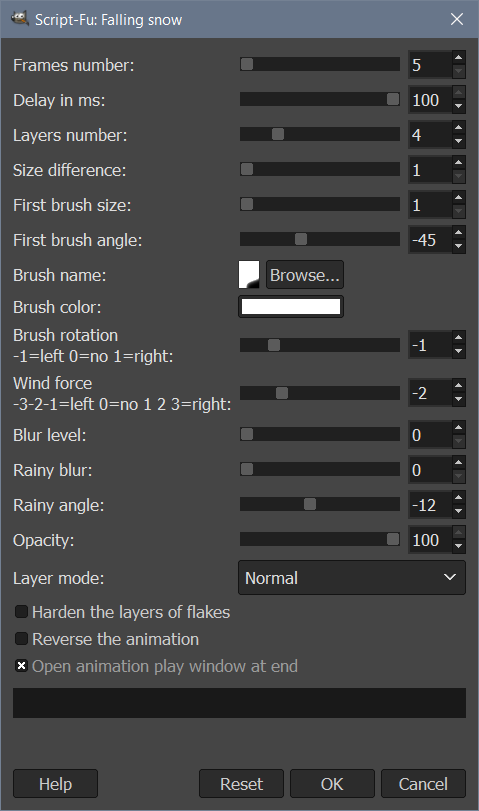
Settings using simple Brush 2. Hardness 025, on a 600 x 840 picture, resized after cool effect :

Attachment:
LavaLampSettings.jpg
LavaLampSettings.jpg [ 73.19 KiB | Viewed 3730 times ]


Have fun. :)
@+++


Attachments:
falling-snow-anim.scm [11.78 KiB]
Downloaded 148 times

_________________
Top
 Post subject: Re: Falling snow animated Scheme Script for Gimp
PostPosted: Sat Apr 11, 2020 4:35 pm  (#43) 
Offline
GimpChat Member
User avatar

Joined: Apr 15, 2017
Posts: 1837
Yeah, it works well, thanks.

Attachment:
beer2.gif
beer2.gif [ 136.19 KiB | Viewed 3721 times ]


Top
 Post subject: Re: Falling snow animated Scheme Script for Gimp
PostPosted: Sat Apr 11, 2020 5:15 pm  (#44) 
Offline
GimpChat Member
User avatar

Joined: Apr 15, 2017
Posts: 1837
And here is my attempt at a lava lamp.

Attachment:
lava.gif
lava.gif [ 1.39 MiB | Viewed 3714 times ]


Top
 Post subject: Re: Falling snow animated Scheme Script for Gimp
PostPosted: Sat Apr 11, 2020 5:44 pm  (#45) 
Offline
GimpChat Member
User avatar

Joined: Dec 09, 2018
Posts: 734
Wow, great lava lamps and beer JimmyMarco and racer-x :clap

Thank you for the updated script JimmyMarco :bigthup


Top
 Post subject: Re: Falling snow animated Scheme Script for Gimp
PostPosted: Sat Apr 11, 2020 10:35 pm  (#46) 
Offline
Administrator
User avatar

Joined: Aug 10, 2012
Posts: 14097
Location: Native to NYC living in Arizona, Gimp 2.8 - 3.0, Win 11 PC.
This took over 4 minutes to complete this 5 layer gif,
without having use of the brushes dynamics.


Image

Image

_________________
Image
"A wise man learns more from a foolish question than a fool can learn from a wise answer"
Image


Top
 Post subject: Re: Falling snow animated Scheme Script for Gimp
PostPosted: Sun Apr 12, 2020 4:37 am  (#47) 
Offline
GimpChat Member
User avatar

Joined: May 10, 2013
Posts: 1430
Location: FInland
Great looking gifs, the Harley pint is awesome. I'm just waiting when the foam will settle down...
Thanks for the update and lava lamp settings JimmyMarco.


Top
 Post subject: Re: Falling snow animated Scheme Script for Gimp
PostPosted: Sun Apr 12, 2020 9:58 am  (#48) 
Offline
GimpChat Member
User avatar

Joined: Apr 15, 2017
Posts: 1837
JimmyMarco, you did a great job on this script. I will definitely use it on occasion. Release the balloons..

Attachment:
balloons.gif
balloons.gif [ 1.43 MiB | Viewed 3654 times ]


Top
 Post subject: Re: Falling snow animated Scheme Script for Gimp
PostPosted: Sun Apr 12, 2020 10:16 am  (#49) 
Offline
GimpChat Member

Joined: May 12, 2015
Posts: 4693
Wallace, please tell me what it is?


Top
 Post subject: Re: Falling snow animated Scheme Script for Gimp
PostPosted: Sun Apr 12, 2020 10:58 am  (#50) 
Offline
Administrator
User avatar

Joined: Aug 10, 2012
Posts: 14097
Location: Native to NYC living in Arizona, Gimp 2.8 - 3.0, Win 11 PC.
Pat625 wrote:
Wallace, please tell me what it is?

I'm not quite sure what it is Pat.
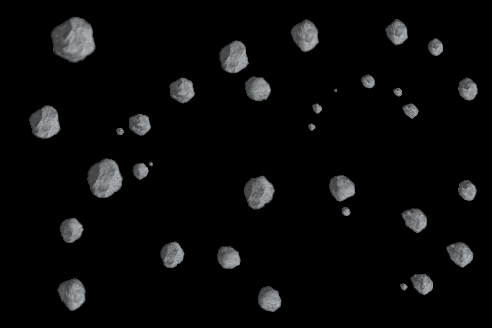
I used an asteroid brush that I made.
The spacing was set to 200 and the brush dynamics set to basic simple.
The settings for the script gave me the gif I posted.
Which took over 4 minutes to complete with only 5 layers.
Some setting of the script, seem to send it running out of control.


Image

Attachment:
gimp_asteroid_animated_brush.zip [636.08 KiB]
Downloaded 154 times


Image

_________________
Image
"A wise man learns more from a foolish question than a fool can learn from a wise answer"
Image


Top
 Post subject: Re: Falling snow animated Scheme Script for Gimp
PostPosted: Sun Apr 12, 2020 11:20 am  (#51) 
Offline
GimpChat Member
User avatar

Joined: Apr 15, 2017
Posts: 1837
Probably best to use just one layer in this case..

Attachment:
asteroid.gif
asteroid.gif [ 814.98 KiB | Viewed 4002 times ]


Top
 Post subject: Re: Falling snow animated Scheme Script for Gimp
PostPosted: Sun Apr 12, 2020 11:54 am  (#52) 
Offline
Administrator
User avatar

Joined: Aug 10, 2012
Posts: 14097
Location: Native to NYC living in Arizona, Gimp 2.8 - 3.0, Win 11 PC.
racer-x wrote:
Probably best to use just one layer in this case..

Right, ok.
:bigthup
I think I'm suffering,
form the effects of "staring into space" for too long.
:hehe

Image
Still out of control.

Here are the results using the default settings.
:hehe
Image

_________________
Image
"A wise man learns more from a foolish question than a fool can learn from a wise answer"
Image


Top
 Post subject: Re: Falling snow animated Scheme Script for Gimp
PostPosted: Sun Apr 12, 2020 12:37 pm  (#53) 
Offline
GimpChat Member
User avatar

Joined: Apr 05, 2020
Posts: 41
Hello, :)

@racer-x... wow... i like lava effect and balloons... great... :jumpclap

@Wallace : Don't forget the original script is designed to use "Bristels 03"... a brush having little spaced dots .

When you use a "block" like the asteroid, brushes are too side by side... not enough space between them.

Tips : create you own brush : on another transparent image, paint some asteroids, select few of them and copy... use copy-board as brush :

Attachment:
JupiterMeteoroids.gif
JupiterMeteoroids.gif [ 1.89 MiB | Viewed 3989 times ]


Never use 5 frames... it's too small 5 x 5 pixels : here the smallest brush is 30 (frames) x 3 (1st brush size) = 90 pixels
Size difference = 2 x 30 = 60 pixels
So : First layer : 90 x 90 ... Second : 150 x 150 ... Third : 210 x 210

Attachment:
FallingSnowWindow02.jpg
FallingSnowWindow02.jpg [ 143.31 KiB | Viewed 3989 times ]


Have fun. :)
@+++

_________________


Last edited by JimmyMarco on Mon Apr 13, 2020 10:47 am, edited 2 times in total.

Top
 Post subject: Re: Falling snow animated Scheme Script for Gimp
PostPosted: Sun Apr 12, 2020 1:23 pm  (#54) 
Offline
GimpChat Member
User avatar

Joined: Dec 09, 2018
Posts: 734
Nice asteroids everyone :jumpclap

Thanks for the explanations JimmyMarco :bigthup

Wallace, I was confused by brush sizes originally but got it from JimmyMarco's explanation in post #24. Made this note to remember it:

Smallest brush size = Frames Number * First brush size
Brush size increase = Frames number * Size difference
Smallest scroll = First brush size
Next scroll = Smallest scroll + Size difference


Top
 Post subject: Re: Falling snow animated Scheme Script for Gimp
PostPosted: Sun Apr 12, 2020 2:28 pm  (#55) 
Offline
Administrator
User avatar

Joined: Aug 10, 2012
Posts: 14097
Location: Native to NYC living in Arizona, Gimp 2.8 - 3.0, Win 11 PC.
Here is my results using the suggested setting.

Image

I'm obviously doing something wrong.

:oops:
Image

_________________
Image
"A wise man learns more from a foolish question than a fool can learn from a wise answer"
Image


Top
 Post subject: Re: Falling snow animated Scheme Script for Gimp
PostPosted: Sun Apr 12, 2020 4:11 pm  (#56) 
Offline
GimpChat Member
User avatar

Joined: Apr 15, 2017
Posts: 1837
What I did with your brush was to make a new layer and add asteroids in various sizes. I then copied that layer to clipboard and used the clipboard image for the brush and used just one layer in the script. It's often a hit or miss and you need to experiment.

Relax and have a beer on me...

Attachment:
beer1.gif
beer1.gif [ 190.02 KiB | Viewed 3954 times ]


Top
 Post subject: Re: Falling snow animated Scheme Script for Gimp
PostPosted: Sun Apr 12, 2020 5:34 pm  (#57) 
Offline
Administrator
User avatar

Joined: Aug 10, 2012
Posts: 14097
Location: Native to NYC living in Arizona, Gimp 2.8 - 3.0, Win 11 PC.
racer-x wrote:
What I did with your brush was to make a new layer and add asteroids in various sizes. I then copied that layer to clipboard and used the clipboard image for the brush and used just one layer in the script. It's often a hit or miss and you need to experiment.

Relax and have a beer on me...

Attachment:
beer1.gif

Thanks racer-x.
:bigthup

_________________
Image
"A wise man learns more from a foolish question than a fool can learn from a wise answer"
Image


Top
 Post subject: Re: Falling snow animated Scheme Script for Gimp
PostPosted: Mon Apr 13, 2020 3:17 am  (#58) 
Offline
GimpChat Member
User avatar

Joined: Jan 13, 2011
Posts: 2643
Location: Poland
It is because of the Teapot and Racer-X animations (great idea and great workmanship) that I will always have such an association:
falling snow = drink beer
So since the script can do a lot more than its name says it can change the name (even if only in menu): Falling snow ... to: Falling snow ETC ... or better Falling brush ...
In any case, everyone can name whatever they want (just use a text editor)...

"etc" = Latin phrase: et cetera

_________________
Image


Top
 Post subject: Re: Falling snow animated Scheme Script for Gimp
PostPosted: Mon Apr 13, 2020 8:44 am  (#59) 
Offline
GimpChat Member
User avatar

Joined: Apr 05, 2020
Posts: 41
Hello, :)

MareroQ... you are right... in the description, "(or other brush)" is already written in the 4 or 5 last versions.

It's time to change the script title in "Falling snow or other brush..."

As i like the fishes made by teapot, i have tried my own version using self built brush :

Attachment:
ExoticFishes.gif
ExoticFishes.gif [ 4.72 MiB | Viewed 3909 times ]


Settings used :

Attachment:
ExoticFishesSettings.jpg
ExoticFishesSettings.jpg [ 74.46 KiB | Viewed 3909 times ]


...


Attachments:
falling-snow-or-other-brush-anim.scm [11.87 KiB]
Downloaded 158 times

_________________


Last edited by JimmyMarco on Mon Apr 13, 2020 8:51 am, edited 3 times in total.
Top
 Post subject: Re: Falling snow animated Scheme Script for Gimp
PostPosted: Mon Apr 13, 2020 8:46 am  (#60) 
Offline
GimpChat Member
User avatar

Joined: Apr 05, 2020
Posts: 41
And the picture used to add by select and copy to Clip-board brush :

Attachment:
poissons-exotiques01.png
poissons-exotiques01.png [ 512.38 KiB | Viewed 3908 times ]


And the deep sea picture found on the web.

Attachment:
chaayaIslandDhonveli.jpg
chaayaIslandDhonveli.jpg [ 51.13 KiB | Viewed 3904 times ]


Have fun. :)
@+++

_________________


Top
Post new topic Reply to topic  [ 122 posts ]  Go to page Previous  1, 2, 3, 4, 5, 6, 7  Next

All times are UTC - 5 hours [ DST ]


cron

* Login  


Powered by phpBB3 © phpBB Group