It is currently Sat Sep 19, 2026 4:38 pm


All times are UTC - 5 hours [ DST ]


Post new topic Reply to topic  [ 40 posts ]  Go to page 1, 2  Next
Author Message
 Post subject: Bending Lines
PostPosted: Mon Jun 13, 2011 2:58 am  (#1) 
Offline
GimpChat Member
User avatar

Joined: Apr 09, 2011
Posts: 1764
GIMP Version: 2.6.11
Operating System: Mac OS
OS Version: OS X 10.6.7
GIMP Experience: Basic Level


I want to bend the lines on this so that on one side there will be a kind of large, curved wave or bubble coming about half way up the actual background.
Any ideas...I just cant seem to get the warp feature to do what I want.


Attachments:
pink.xcf [811.22 KiB]
Downloaded 181 times
Share on Facebook Share on Twitter Share on Orkut Share on Digg Share on MySpace Share on Delicious Share on Technorati
Top
 Post subject: Re: Bending Lines
PostPosted: Mon Jun 13, 2011 4:01 am  (#2) 
Offline
GimpChat Member
User avatar

Joined: Oct 06, 2010
Posts: 4050
Can you offer a simple line sketch to show the effect you want?

Curve Bend in File - Distort did the following:


Attachments:
pink2.xcf [853.49 KiB]
Downloaded 148 times

_________________
"In order to attain the impossible, one must attempt the absurd."
~ Miguel de Cervantes
Top
 Post subject: Re: Bending Lines
PostPosted: Mon Jun 13, 2011 5:04 am  (#3) 
Offline
GimpChat Member
User avatar

Joined: Apr 09, 2011
Posts: 1764
very rugged idea but its more or less how I want those three lines to go


Attachments:
bendline.xcf [15.4 KiB]
Downloaded 126 times
Top
 Post subject: Re: Bending Lines
PostPosted: Mon Jun 13, 2011 5:13 am  (#4) 
Offline
GimpChat Member
User avatar

Joined: Oct 06, 2010
Posts: 4050
Again, using Curve Bend in File - Distorts (the idea is to shape the upper and lower paths to reflect your desired flow - it may require some tinkering and you may have to move the lines layer up or down depending on the height of your curve paths.:


Attachments:
bendline2.xcf [858.55 KiB]
Downloaded 147 times

_________________
"In order to attain the impossible, one must attempt the absurd."
~ Miguel de Cervantes
Top
 Post subject: Re: Bending Lines
PostPosted: Mon Jun 13, 2011 5:40 am  (#5) 
Offline
GimpChat Member
User avatar

Joined: Oct 06, 2010
Posts: 4050
There is another way to accomplish the same thing.

Create a path in the desired shape you want.

Seeing you have 5 equally sized stripes, stroke your path accordingly:

Widest stroke = 5 times the single stripe width (example, each stripe is 20 pixels wide) First stroke is 100 pixels. Using white for color foreground

The middle stroke is 3 times the stripe width = 60 pixels using black for color foreground.

Last stroke is 20 px wide using black for color foreground. There won't be any pinch or convex/concave application to the ribbon/line. They will be equally distanced across the image.


Attachments:
bendline3.xcf [848.23 KiB]
Downloaded 138 times

_________________
"In order to attain the impossible, one must attempt the absurd."
~ Miguel de Cervantes
Top
 Post subject: Re: Bending Lines
PostPosted: Mon Jun 13, 2011 6:07 am  (#6) 
Offline
GimpChat Member
User avatar

Joined: Apr 09, 2011
Posts: 1764
that is actually a psp mask that I want to distort...not 5 individual lines


Top
 Post subject: Re: Bending Lines
PostPosted: Mon Jun 13, 2011 6:10 am  (#7) 
Offline
GimpChat Member
User avatar

Joined: Apr 09, 2011
Posts: 1764
well I am going to try it but I'm not that confident


Top
 Post subject: Re: Bending Lines
PostPosted: Mon Jun 13, 2011 6:40 am  (#8) 
Offline
GimpChat Member
User avatar

Joined: Apr 09, 2011
Posts: 1764
the second one is the way I want it almost to a t but I just cant get it happening right


Top
 Post subject: Re: Bending Lines
PostPosted: Mon Jun 13, 2011 8:04 am  (#9) 
Offline
GimpChat Member

Joined: Dec 20, 2010
Posts: 174
Location: Wherever the voices in my head tell me I am.
akky wrote:
the second one is the way I want it almost to a t but I just cant get it happening right


akky,

I'm posting a ZIP file of a Curve Bend curve file similar to the one you like by mahvin. After downloading it, please unzip it into a folder of your choice. Then with your "psp mask" layer selected in Gimp, run the Curve Bend distort filter and in the dialog box that opens, click on the Open button and then open the folder containing the unzipped file I added to load my Curve Bend curve file. You can then see the curve that was made and make adjustments to it if you wish. Otherwise, perhaps mahvin can also make a zipped archive file of the curve he used and add it as an attachment for you to try out.

Hoping this can help some.

:)

Attachment:
curve_bend_points.zip [1.12 KiB]
Downloaded 151 times


Top
 Post subject: Re: Bending Lines
PostPosted: Mon Jun 13, 2011 9:30 am  (#10) 
Offline
Retired Staff
User avatar

Joined: May 22, 2008
Posts: 6946
Location: Somewhere in GIMP
ccbarr wrote:
click on the Open button and then open the folder containing the unzipped file I added to load my Curve Bend curve file.
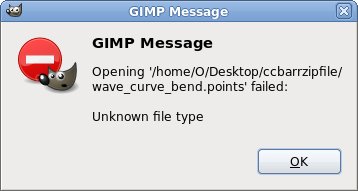
Your file has no extension it, ccbarr, and GIMP does not recognize it.

Image

_________________
Image
World War IV will be fought with sticks and stones. - Albert Einstein


Top
 Post subject: Re: Bending Lines
PostPosted: Mon Jun 13, 2011 12:34 pm  (#11) 
Offline
Global Moderator
User avatar

Joined: May 16, 2010
Posts: 16173
Thanks ccbarr i will be editing and re-using that points file ;)
It seemed to run fine for me showed the curve and everything

Image

Finished image -

Image
I attached the finished curve XCF Akky.


Attachments:
pink-curved.xcf [869.5 KiB]
Downloaded 87 times

_________________
Image
Top
 Post subject: Re: Bending Lines
PostPosted: Mon Jun 13, 2011 1:52 pm  (#12) 
Offline
GimpChat Member
User avatar

Joined: Oct 06, 2010
Posts: 4050
Just use the move tool to move the curved mask layer upwards, if you get the same result as Rod.

_________________
"In order to attain the impossible, one must attempt the absurd."
~ Miguel de Cervantes


Top
 Post subject: Re: Bending Lines
PostPosted: Mon Jun 13, 2011 2:22 pm  (#13) 
Offline
Script Coder
User avatar

Joined: Jul 14, 2010
Posts: 697
I'd use the displace filter for this. You just need to create the proper displace map.

1. Create a new layer
2. Use the blend tool, default colours, FG-BG, Linear, trangular wave, and click at around 100px x, then ctrl-drag to the right to around the 600px x. The ctrl key keeps the gradient at the 0 angle.
3. Displacing with this would cause a zigzag rather than a nice curve, so to improve thing duplicate this gradient layer, and set its mode to overlay, then rightclick->merge down. Turn off visibility of this layer with the eye.
4. Select the "Clipboard" layer and rightclick->Layer to image size (needed to displace)
5. Filter->Map->Displace. I used no Y, X displacement of 80, selecting the new gradient layer we created, Cartesian mode and wrap mode.
6. Offset the layer to the desired place with Layer->Transform->Offset. I used y of -80.

-Rob A>

_________________
Image
Fantasy Cartography and Mapping by RobA


Last edited by RobA on Thu Jun 16, 2011 1:25 pm, edited 1 time in total.

Top
 Post subject: Re: Bending Lines
PostPosted: Mon Jun 13, 2011 2:29 pm  (#14) 
Offline
GimpChat Member
User avatar

Joined: Oct 06, 2010
Posts: 4050
Rob: You should rename the file to something different, otherwise it will conflict or overwrite existing files with the same name.

I didn't get to see your result. Deleted old file first, then retried.

Still nothing: it looks like the same original bendline.xcf Akky submitted.

_________________
"In order to attain the impossible, one must attempt the absurd."
~ Miguel de Cervantes


Top
 Post subject: Re: Bending Lines
PostPosted: Mon Jun 13, 2011 2:36 pm  (#15) 
Offline
GimpChat Member
User avatar

Joined: Apr 07, 2010
Posts: 14182
Can you open it with power point being a pps file?

_________________
Image


Top
 Post subject: Re: Bending Lines
PostPosted: Mon Jun 13, 2011 2:38 pm  (#16) 
Offline
GimpChat Member
User avatar

Joined: Apr 07, 2010
Posts: 14182
I was going to write the same thing mahvin. It is the exact file that akky submitted...... I thought I was seeing things so I went back to look. :oops:

_________________
Image


Top
 Post subject: Re: Bending Lines
PostPosted: Mon Jun 13, 2011 2:52 pm  (#17) 
Offline
GimpChat Member
User avatar

Joined: Oct 06, 2010
Posts: 4050
I tried your technique, Rob, and it left the lines looking really jagged and rough. Is there a work-around for this?

Actually, pretty much any distortion adds jaggedness to the mask (after observing the other methods more closely). With the exception of laying out a stroked path, which had the cleanest edges.

_________________
"In order to attain the impossible, one must attempt the absurd."
~ Miguel de Cervantes


Top
 Post subject: Re: Bending Lines
PostPosted: Mon Jun 13, 2011 5:27 pm  (#18) 
Offline
GimpChat Member
User avatar

Joined: Apr 09, 2011
Posts: 1764
I'll get back to this when I get home from work today...thanks for all the input friends!


Top
 Post subject: Re: Bending Lines
PostPosted: Mon Jun 13, 2011 5:40 pm  (#19) 
Offline
GimpChat Member
User avatar

Joined: Oct 06, 2010
Posts: 4050
What I couldn't achieve using Ripples in GIMP's Distorts, I found an equivalent in Mathmap called Waves (found in the Distorts folder in Mathmap). And this method does not leave behind the jagged edges.

A couple of issues though:

It leaves the original mask cut off and shortened in its original location, so moving the mask toward the middle of the image resolves one part, but you'll need to use the scale tool to stretch the width of the mask back out to the edges of the image.

UPDATE:

I also had to flip the vertical orientation of the mask after rendering with Mathmap, in order to get the same flow as you wanted.


Attachments:
bendline_new1.xcf [881.53 KiB]
Downloaded 97 times

_________________
"In order to attain the impossible, one must attempt the absurd."
~ Miguel de Cervantes
Top
 Post subject: Re: Bending Lines
PostPosted: Mon Jun 13, 2011 6:27 pm  (#20) 
Offline
Global Moderator
User avatar

Joined: May 16, 2010
Posts: 16173
molly wrote:
Can you open it with power point being a pps file?


Molly all i did was download the file and unzip it to the same directory.Then i opened Gimp and the pink.xcf.
I then clicked on the mask layer and went to Filters/Distort/Curve Bend
When the curve bend dialog opens - select open - browse to the points file and it will show you the curve and bend it for you.

_________________
Image


Top
Post new topic Reply to topic  [ 40 posts ]  Go to page 1, 2  Next

All times are UTC - 5 hours [ DST ]


* Login  


Powered by phpBB3 © phpBB Group