It is currently Wed Sep 23, 2026 12:12 pm


All times are UTC - 5 hours [ DST ]


Post new topic Reply to topic  [ 8 posts ] 
Author Message
 Post subject: best way to get outlines from photos
PostPosted: Fri Jun 24, 2011 7:42 am  (#1) 
Offline
GimpChat Member
User avatar

Joined: Apr 08, 2010
Posts: 5420
Location: Northwest Ohio
GIMP Version: 2.6.11
Operating System: Mac OS
OS Version: XP - SP3
GIMP Experience: Basic Level


I was trying to do a tutorial on making a photo into a cartoon. It turned out ok, but I was wondering what is the best way to make the black outlines look better. Also, is there any script/plug-in that works better than the old posterize? for some reason, that filter always seems to make everything mostly yellow and red like when you turn the contrast way up. I only have Gimp to use, I haven't the talent to draw with a mouse or the ambition to get into inkscape yet.


Share on Facebook Share on Twitter Share on Orkut Share on Digg Share on MySpace Share on Delicious Share on Technorati
Top
 Post subject: Re: best way to get outlines from photos
PostPosted: Fri Jun 24, 2011 7:59 am  (#2) 
Offline
Script Coder
User avatar

Joined: Jun 22, 2010
Posts: 1171
Location: Here and there
For a better version of posterize, try saulgoode's script in this thread:
viewtopic.php?f=9&t=1729&hilit=posterize

What method are you using to create the black outlines? and what do you think is wrong with the ones you are getting?


Top
 Post subject: Re: best way to get outlines from photos
PostPosted: Fri Jun 24, 2011 8:03 am  (#3) 
Offline
GimpChat Member
User avatar

Joined: Apr 08, 2010
Posts: 5420
Location: Northwest Ohio
I was using a method I saw on flicker gimp users by Shelley and Roy. I don't remember exactly the tut, but it did use threshold a couple of times. Thanks for the link to the quantize script.


Top
 Post subject: Re: best way to get outlines from photos
PostPosted: Fri Jun 24, 2011 8:16 am  (#4) 
Offline
Script Coder
User avatar

Joined: Jun 22, 2010
Posts: 1171
Location: Here and there
Ah yes, this one:
http://www.flickr.com/groups/gimpusers/ ... 4952794977


Top
 Post subject: Re: best way to get outlines from photos
PostPosted: Fri Jun 24, 2011 12:02 pm  (#5) 
Offline
GimpChat Member
User avatar

Joined: Sep 24, 2010
Posts: 12845
I really like the Cartoonize Script-fu we all had fun with a while back. The originator added so many more features to it since the beginning of the thread below, but to appreciate this Script-fu, I recommend viewing the thread. :)

viewtopic.php?f=9&t=850&hilit=cartoonize#p8873

_________________
Lyle

Psalm 109:8

Image


Top
 Post subject: Re: best way to get outlines from photos
PostPosted: Fri Jun 24, 2011 12:29 pm  (#6) 
Offline
GimpChat Member
User avatar

Joined: Apr 08, 2010
Posts: 5420
Location: Northwest Ohio
How did I ever miss that thread? Going to get that script now and see if I like the lines. What I would love is a script that takes all the black lines and redraws them all the same width as if you traced them with the paths tool. I am very bad with the paths tool, or I'd do it by hand.


Top
 Post subject: Re: best way to get outlines from photos
PostPosted: Fri Jun 24, 2011 1:06 pm  (#7) 
Offline
GimpChat Member
User avatar

Joined: Sep 24, 2010
Posts: 12845
As a side note, I recently used Cartoonize for the rendering at this thread (after I used G'MIC for the fake smudge). :)

http://www.innographx.com/forum/viewtop ... 89#p129650

_________________
Lyle

Psalm 109:8

Image


Top
 Post subject: Re: best way to get outlines from photos
PostPosted: Fri Jun 24, 2011 1:29 pm  (#8) 
Offline
GimpChat Member
User avatar

Joined: Apr 08, 2010
Posts: 5420
Location: Northwest Ohio
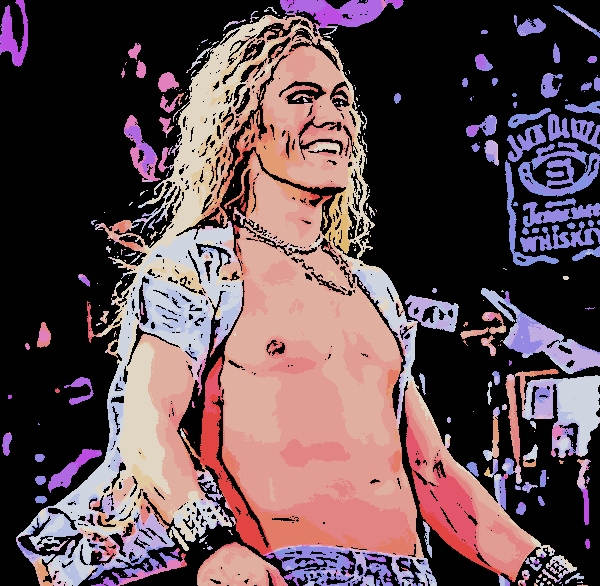
Here is a quick try of cartoonize...very good results, just need to play with the sliders a bit. I'd like fewer colors in the skin and clothing, but want to keep the yellow in the hair...guess I can paint by hand but I'm not very good with coloring and shading. Time to do some practicing!
Image


Top
Post new topic Reply to topic  [ 8 posts ] 

All times are UTC - 5 hours [ DST ]


* Login  


Powered by phpBB3 © phpBB Group