It is currently Sun Jun 21, 2026 5:01 am


All times are UTC - 5 hours [ DST ]


Post new topic Reply to topic  [ 63 posts ]  Go to page Previous  1, 2, 3, 4  Next
Author Message
 Post subject: Re: HN: Draw arrow - Arrows, block and flow diagrams and dimensioning
PostPosted: Wed Sep 29, 2021 1:26 pm  (#41) 
Offline
GimpChat Member
User avatar

Joined: Aug 22, 2017
Posts: 73
Often the standard installations of Debian and Manjaro Linux lack the software package for running plug-ins written in Python.

For this reason I have expanded the descriptions for installing plug-ins and associated library modules.
These can be found in the base directory of my plug-ins.

Since these descriptions represent the first version, I would be very grateful for improvements or for feedback on errors.


Top
 Post subject: Re: HN: Draw arrow - Arrows, block and flow diagrams and dimensioning
PostPosted: Mon Oct 18, 2021 2:35 am  (#42) 
Offline
New Member

Joined: Oct 14, 2021
Posts: 1
I'm sorry - the link seems not longer working. Where can I download the plugin?


Top
 Post subject: Re: HN: Draw arrow - Arrows, block and flow diagrams and dimensioning
PostPosted: Wed Oct 27, 2021 7:37 am  (#43) 
Offline
GimpChat Member
User avatar

Joined: Aug 22, 2017
Posts: 73
Sorry, I just discovered that my DOWNLOAD links have expired. I corrected that immediately.

My apologies again!


Top
 Post subject: Re: HN: Draw arrow - Arrows, block and flow diagrams and dimensioning
PostPosted: Mon Nov 01, 2021 1:34 pm  (#44) 
Offline
GimpChat Member
User avatar

Joined: Aug 22, 2017
Posts: 73
The configuration file "Plugin-Start.txt" has been extended by the setting "showHints". The default setting is "True". If it is set to "False", the "Current Hints" box will not be displayed.
This reduces the size of the user interface.


Top
 Post subject: Re: HN: Draw arrow - Arrows, block and flow diagrams and dimensioning
PostPosted: Thu Mar 31, 2022 1:03 pm  (#45) 
Offline
GimpChat Member
User avatar

Joined: Aug 22, 2017
Posts: 73
In order to better relate the shape and layer name, the layer name is chosen according to the shape style.
Attachment:
File comment: Layer name is chosen according to the shape style
Layer name is chosen according to the shape style.png
Layer name is chosen according to the shape style.png [ 28 KiB | Viewed 1715 times ]


Last edited by Herbie on Thu Apr 07, 2022 9:17 am, edited 1 time in total.

Top
 Post subject: Re: HN: Draw arrow - Arrows, block and flow diagrams and dimensioning
PostPosted: Thu Apr 07, 2022 9:10 am  (#46) 
Offline
GimpChat Member
User avatar

Joined: Aug 22, 2017
Posts: 73
In the new version from 2022-04-07 the definition of the start defaults of user interface, depending on the path length was changed.
Additionaly a new arrow style "Hunting arrow (path segment, medieval, shaft, hunting head)" was added.
Attachment:
File comment: Example fo a hunting arrow
Hunting arrow.png
Hunting arrow.png [ 38.26 KiB | Viewed 1715 times ]


Top
 Post subject: Re: HN: Draw arrow - Arrows, block and flow diagrams and dimensioning
PostPosted: Wed Apr 20, 2022 12:28 pm  (#47) 
Offline
GimpChat Member
User avatar

Joined: Aug 22, 2017
Posts: 73
In the current version 2022-04-20, in addition to an adjustment in the library, the possibility of providing the arrows with an outline has been added.
Attachment:
File comment: Jointed arrow with outlines
Jointed arrow with outlines.png
Jointed arrow with outlines.png [ 100.38 KiB | Viewed 1681 times ]


Top
 Post subject: Re: HN: Draw arrow - Arrows, block and flow diagrams and dimensioning
PostPosted: Sat May 07, 2022 8:02 am  (#48) 
Offline
GimpChat Member
User avatar

Joined: Aug 22, 2017
Posts: 73
In version 2022-05-07 the incorrect handling of the plugin of value changes by the user via the GIMP interface has been fixed. Secondly, the option to define a gradient for the contour was added.
Attachment:
Trace contour with gradient.png
Trace contour with gradient.png [ 906.29 KiB | Viewed 1626 times ]


Top
 Post subject: Re: HN: Draw arrow - Arrows, block and flow diagrams and dimensioning
PostPosted: Tue Oct 18, 2022 10:51 am  (#49) 
Offline
New Member

Joined: Oct 18, 2022
Posts: 1
Hi Herbie,
I like your two PlugIns very much - thank you a lot!
But now I have a problem (with both):
If I work with your plugins and would like to end the working, I click the button "Beenden" (finish). This button gets dark-grey (inactive) but nothing else happens.
If I close the window by clicking the X and would like to restart the plugin, a message appears: "another instance of this plugin is just working". So I have to finish and restart gimp to work with your plugin again.
Could you imagine what's going wrong?


Top
 Post subject: Re: HN: Draw arrow - Arrows, block and flow diagrams and dimensioning
PostPosted: Wed Oct 19, 2022 2:05 am  (#50) 
Offline
Global Moderator
User avatar

Joined: May 16, 2010
Posts: 16038
This is an error i get when Gimp loads.

Attachment:
2022-10-19_025402.jpg
2022-10-19_025402.jpg [ 41.35 KiB | Viewed 1444 times ]


Other than that both draw arrows and draw shapes are working fine in Gimp-2.10.32-V1

_________________
Image


Top
 Post subject: Sorry! My download link hadn't worked.
PostPosted: Wed Dec 14, 2022 7:08 am  (#51) 
Offline
GimpChat Member
User avatar

Joined: Aug 22, 2017
Posts: 73
I've just been made aware that my download link isn't working. Unfortunately, this happens from time to time, probably when my provider Telekom updates the MagentaCLOUD software.
Of course, I corrected the link immediately and apologize for the unnecessary trouble :oops:.


Top
 Post subject: Re: HN: Draw arrow - Arrows, block and flow diagrams and dimensioning
PostPosted: Wed Mar 29, 2023 10:57 am  (#52) 
Offline
New Member

Joined: Jan 02, 2015
Posts: 4
Hello Herbie,
I have installed the arrow plugin + module (on my linux Kubuntu 22.04) but it does not show in the Gimp filter menu. I have restarted the PC twice, to no avail.
Should I have installed it as admin instead of current user ?
[Edit] I have installed it as superuser on my home laptop (same linux version) without any better result. Any clue anyone ?


Top
 Post subject: Bug at "Dimensioning with auxiliary lines" arrow type
PostPosted: Fri Aug 18, 2023 11:08 am  (#53) 
Offline
GimpChat Member
User avatar

Joined: Aug 22, 2017
Posts: 73
At the "Dimensioning with auxiliary lines" arrow type, the "Filling type of arrowhead" setting was only applied to the first arrowhead, but not to the second arrowhead.
I fixed this bug!

In addition: Some code fixes for later migration from Python 2 to Python 3. Attention: The new library is necessary!


Last edited by Herbie on Sun Aug 27, 2023 12:32 pm, edited 1 time in total.

Top
 Post subject: Re: HN: Draw arrow - Arrows, block and flow diagrams and dimensioning
PostPosted: Sat Aug 19, 2023 8:44 am  (#54) 
Offline
GimpChat Member
User avatar

Joined: Aug 22, 2017
Posts: 73
pierpiotr wrote:
Hello Herbie,
I have installed the arrow plugin + module (on my linux Kubuntu 22.04) but it does not show in the Gimp filter menu. I have restarted the PC twice, to no avail.
Should I have installed it as admin instead of current user ?
[Edit] I have installed it as superuser on my home laptop (same linux version) without any better result. Any clue anyone ?

Hello pierpiotr,
sorry for replying so late.
Under "https://magentacloud.de/s/d3Waz3JZX6Wi9wC" I have provided the description "Install plug-ins and modules.pdf" which explains how to install my plug-ins under Windows, Debian Linux and Manjaro Linux. Have you read them and then tried the installation afterwards?


Top
 Post subject: Re: HN: Draw arrow - Arrows, block and flow diagrams and dimensioning
PostPosted: Mon Aug 21, 2023 9:16 am  (#55) 
Offline
GimpChat Member
User avatar

Joined: Aug 22, 2017
Posts: 73
Herbie wrote:
pierpiotr wrote:
Hello Herbie,
I have installed the arrow plugin + module (on my linux Kubuntu 22.04) but it does not show in the Gimp filter menu. I have restarted the PC twice, to no avail.
Should I have installed it as admin instead of current user ?
[Edit] I have installed it as superuser on my home laptop (same linux version) without any better result. Any clue anyone ?

Hello pierpiotr,
sorry for replying so late.
Under "https://magentacloud.de/s/d3Waz3JZX6Wi9wC" I have provided the description "Install plug-ins and modules.pdf" which explains how to install my plug-ins under Windows, Debian Linux and Manjaro Linux. Have you read them and then tried the installation afterwards?

In the meantime I installed Kubundu 23.04 on VMware and did a test. My plugins won't build into GIMP because Python-2.7.9 is missing. Unfortunately I haven't figured out how to install the Python interpeter!


Top
 Post subject: Re: HN: Draw arrow - Arrows, block and flow diagrams and dimensioning
PostPosted: Mon Aug 21, 2023 9:37 am  (#56) 
Offline
GimpChat Member
User avatar

Joined: May 24, 2021
Posts: 859
Location: SEA - South East Asia
Herbie wrote:
Herbie wrote:
pierpiotr wrote:
Hello Herbie,
I have installed the arrow plugin + module (on my linux Kubuntu 22.04) but it does not show in the Gimp filter menu. I have restarted the PC twice, to no avail.
Should I have installed it as admin instead of current user ?
[Edit] I have installed it as superuser on my home laptop (same linux version) without any better result. Any clue anyone ?

Hello pierpiotr,
sorry for replying so late.
Under "https://magentacloud.de/s/d3Waz3JZX6Wi9wC" I have provided the description "Install plug-ins and modules.pdf" which explains how to install my plug-ins under Windows, Debian Linux and Manjaro Linux. Have you read them and then tried the installation afterwards?

In the meantime I installed Kubundu 23.04 on VMware and did a test. My plugins won't build into GIMP because Python-2.7.9 is missing. Unfortunately I haven't figured out how to install the Python interpeter!


Python 2.8/9 is deprecated and lots of Linux distro don't have it anymore in their "store", they have Python 3, Tas_mania has an appimage ( :tyspin ) which serve as a GIMP launcher to have GIMP using python2
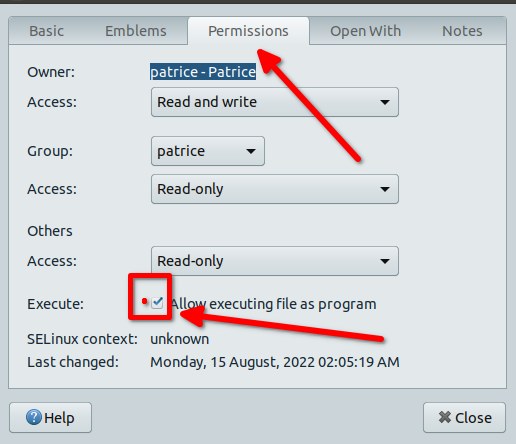
It's there > https://github.com/TasMania17/Gimp-Appi ... s/releases In your case (Kubuntu) download the one for Ubuntu, once downloaded right click on it > Properties > a window opens, go to the tab "Permission" and check the box "Allow executing as program", click OK/Close and just double click on the appimage, it will launch GIMP with Python2 usable
Image

_________________
Patrice


Top
 Post subject: Re: HN: Draw arrow - Arrows, block and flow diagrams and dimensioning
PostPosted: Sun Aug 27, 2023 4:19 am  (#57) 
Offline
GimpChat Member
User avatar

Joined: Jan 13, 2011
Posts: 2639
Location: Poland
Hi Herbie.

A little thing:
HN-Pfeil-zeichnen_HN_ Labeling knobs - Preset 1.txt
Calling error for procedure 'gimp-context-set-pattern':
Pattern '01.png #9' not found


A little suggestion to add.
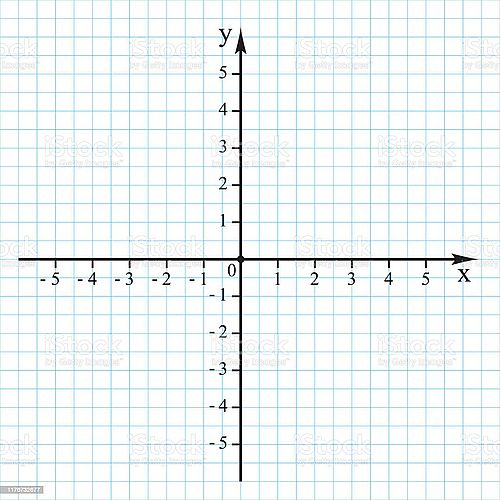
In certain periods of learning, it is the most frequently drawn 2 arrows:

Image

Manual execution coordinate system seems simple - but contrary to appearances, it takes a lot of time (especially the division and description of the axes)

_________________
Image


Top
 Post subject: Re: HN: Draw arrow - Arrows, block and flow diagrams and dimensioning
PostPosted: Mon Aug 28, 2023 6:36 am  (#58) 
Offline
GimpChat Member
User avatar

Joined: Aug 22, 2017
Posts: 73
MareroQ wrote:
Hi Herbie.

A little thing:
HN-Pfeil-zeichnen_HN_ Labeling knobs - Preset 1.txt
Calling error for procedure 'gimp-context-set-pattern':
Pattern '01.png #9' not found

Thanks for reporting the bug!
This error occurs, for example, if you use English presets with a German interface or vice versa.
I have therefore differentiated between English and German presets in the download. The two directories "tool-presets/EN" and "tool-presets/DE" can now be found there. Please use the language-specific presets.
Herbie


Last edited by Herbie on Mon Aug 28, 2023 6:46 am, edited 1 time in total.

Top
 Post subject: Re: HN: Draw arrow - Arrows, block and flow diagrams and dimensioning
PostPosted: Mon Aug 28, 2023 6:45 am  (#59) 
Offline
GimpChat Member
User avatar

Joined: Aug 22, 2017
Posts: 73
MareroQ wrote:
Hi Herbie.
...

A little suggestion to add.
In certain periods of learning, it is the most frequently drawn 2 arrows:
http://gimpchat.com/files/431_coordinate%20system.jpg
Manual execution coordinate system seems simple - but contrary to appearances, it takes a lot of time (especially the division and description of the axes)
Thank you for that suggestion. I will try a "coordinate arrow" in the plugin.
By the way, I have created a second plugin "HN: Draw shape (http://gimpchat.com/viewtopic.php?f=9&t=19081)" in which there is a shape group "Rulers". I will also add "Coordinate axis" to this shape group.
Herbie


Top
 Post subject: Re: HN: Draw arrow - Arrows, block and flow diagrams and dimensioning
PostPosted: Sat Oct 07, 2023 9:51 am  (#60) 
Offline
GimpChat Member
User avatar

Joined: Aug 22, 2017
Posts: 73
In the new version "2023-10-07" the following was added/changed:
- Added new arrow style "Coordinate axis (path segment, with markers, triangle head)".
- Storage of presets has been completely reworked so that the path can also be stored.
Attention: Tool presets created before this version, cannot longer be used!


Attachments:
Screenshot 2023-10-07 173130.png
Screenshot 2023-10-07 173130.png [ 105.99 KiB | Viewed 1156 times ]


Last edited by Herbie on Sat Oct 07, 2023 10:36 am, edited 1 time in total.
Top
Post new topic Reply to topic  [ 63 posts ]  Go to page Previous  1, 2, 3, 4  Next

All times are UTC - 5 hours [ DST ]


* Login  


Powered by phpBB3 © phpBB Group