It is currently Mon Aug 24, 2026 8:57 am


All times are UTC - 5 hours [ DST ]


Post new topic Reply to topic  [ 94 posts ]  Go to page Previous  1, 2, 3, 4, 5  Next
Author Message
 Post subject: Re: Gimp 2.99.19 to RC1 Development (live coverage thread)
PostPosted: Tue Jul 23, 2024 7:37 am  (#21) 
Offline
Global Moderator
User avatar

Joined: May 16, 2010
Posts: 16167
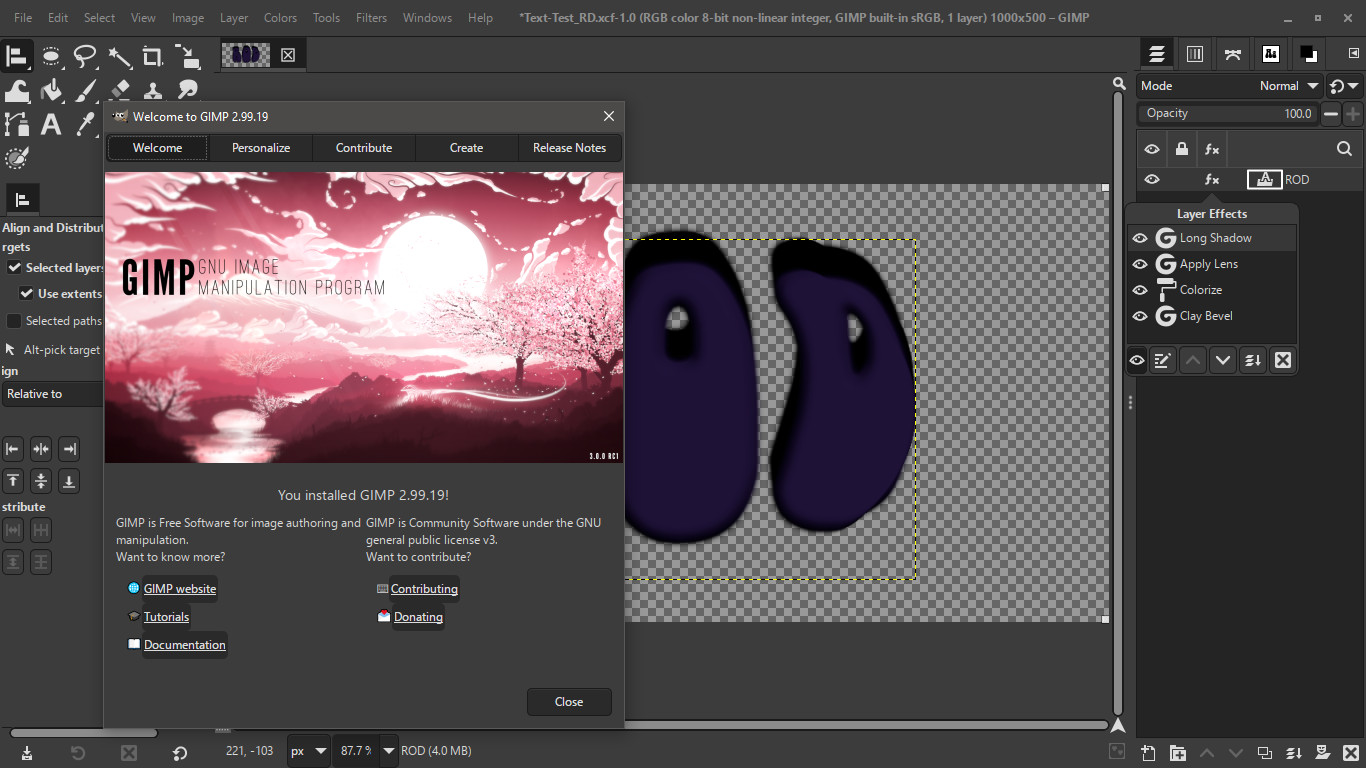
I am loving Gimps new non destructive layers. :) :hi5

Even text layers can be changed and all effects stay with the new type. That is a game changer. :hehe :clap

Image

I only had one error on startup File-heif.exe wouldn't load. Not sure what that is though. Gimp-2.99.19 seems to run fine so far. I will keep testing. :coolthup

_________________
Image


Top
 Post subject: Re: Gimp 2.99.19 to RC1 Development (live coverage thread)
PostPosted: Fri Aug 02, 2024 1:51 pm  (#22) 
Offline
GimpChat Member
User avatar

Joined: Oct 31, 2020
Posts: 2013
The color picker for GEGL filters is now officially back in GIMP 2.99.19 master branch. I hope the crash with my plugins is gone


Top
 Post subject: Re: Gimp 2.99.19 to RC1 Development (live coverage thread)
PostPosted: Fri Aug 02, 2024 5:06 pm  (#23) 
Offline
GimpChat Member
User avatar

Joined: Oct 31, 2020
Posts: 2013
It appears so far that the crash with my plugins is GONE

:jumpclap :jumpclap :jumpclap :jumpclap :jumpclap :jumpclap :jumpclap :jumpclap :jumpclap :jumpclap :jumpclap :jumpclap :jumpclap :jumpclap

I think this means GIMP 3/2.99.19 users can use the same normal repos; but still be cautious. I need to investigate further

Attachment:
all_working.png
all_working.png [ 780.73 KiB | Viewed 9171 times ]


Top
 Post subject: Re: Gimp 2.99.19 to RC1 Development (live coverage thread)
PostPosted: Sat Aug 03, 2024 3:40 am  (#24) 
Offline
Global Moderator
User avatar

Joined: May 16, 2010
Posts: 16167
Awesome news!
Unfortunately it looks like i will have to wait a couple days for the newest Windows Installer to test.

_________________
Image


Top
 Post subject: Re: Gimp 2.99.19 to RC1 Development (live coverage thread)
PostPosted: Sat Aug 03, 2024 10:05 am  (#25) 
Offline
GimpChat Member
User avatar

Joined: Oct 31, 2020
Posts: 2013
The best way to test if my plugins are full proof on the new GIMP 3 is to take a bunch of binaries of mine from mid 2023 back when they had tons of syntax errors, invalid parameters ect... and test them in GIMP 2.99.19 latest. If they don't crash GIMP its in the fool proof and the bunker repo will be removed and GIMP 3 users will be instructed to use normal repos like everyone else.


Top
 Post subject: Re: Gimp 2.99.19 to RC1 Development (live coverage thread)
PostPosted: Sat Aug 03, 2024 4:58 pm  (#26) 
Offline
GimpChat Member
User avatar

Joined: Oct 31, 2020
Posts: 2013
Sanctioned = GIMP 3 approved
lb: = LinuxBeaver
sg: = SaintGEGL
---

The crash still happens with my plugins and definitely old plugins from 2023 with invalid GEGL parameters/syntax - but it happens FAR LESS now that color param is fixed. I think I can solve this with at least 50 something sanctioned plugins. Unless a miracle happens the GIMP 3 bunker will remain - In the near future all sactioned plugins will have the namespace sg: instead of lb:

For now just go with this if you use GIMP 3
https://github.com/LinuxBeaver/GIMP_3_G ... gin_bunker


Top
 Post subject: Re: Gimp 2.99.19 to RC1 Development (live coverage thread)
PostPosted: Sat Aug 10, 2024 6:26 pm  (#27) 
Offline
GimpChat Member
User avatar

Joined: Oct 31, 2020
Posts: 2013
GIMP 2.99.19 just got the ability to apply filters destructively just like 2.10 does with this new "merge filter" checkbox. Now my resource intensive plugins will not add to memory to GIMP's cache. Also, GIMP 3 RC1 is right around the corner.

Attachment:
merge_filter.png
merge_filter.png [ 120.48 KiB | Viewed 9033 times ]


Top
 Post subject: Re: Gimp 2.99.19 to RC1 Development (live coverage thread)
PostPosted: Sun Aug 11, 2024 3:53 am  (#28) 
Offline
Global Moderator
User avatar

Joined: May 16, 2010
Posts: 16167
contrast_ wrote:
GIMP 2.99.19 just got the ability to apply filters destructively just like 2.10 does with this new "merge filter" checkbox. Now my resource intensive plugins will not add to memory to GIMP's cache. Also, GIMP 3 RC1 is right around the corner.

Attachment:
merge_filter.png

I like it! Going to save on memory big time! :bigthup
Nice to have both options Non destructive and merge filters.

_________________
Image


Top
 Post subject: Re: Gimp 2.99.19 to RC1 Development (live coverage thread)
PostPosted: Mon Aug 12, 2024 2:54 pm  (#29) 
Offline
GimpChat Member
User avatar

Joined: Oct 31, 2020
Posts: 2013
GIMP 2.99.19 is very close to its next goal. "The string freeze". For those who don't know strings are all the text boxes and text dialogues in the entire software program; in this case GIMP. All the strings written in GIMP are in English and translators who are part of GNOME's community and elsewhere translate strings to other languages. Translators now will not have to worry about new translation strings appearing unless of course there is an emergency due to the fact that string updates are frozen until after GIMP 3's release.


Top
 Post subject: Re: Gimp 2.99.19 to RC1 Development (live coverage thread)
PostPosted: Tue Aug 13, 2024 8:43 pm  (#30) 
Offline
GimpChat Member
User avatar

Joined: Oct 31, 2020
Posts: 2013
GIMP 2.99.19 had an update that removed non-destructive editing from four filters. The following four filters

Variable Blur
Oilify
Lens Blur
Bump Map


may only be applied destructive in GIMP 2.99.19 because their aux image select feature does not work in GIMP 2.99.19.


Top
 Post subject: Re: Gimp 2.99.19 to RC1 Development (live coverage thread)
PostPosted: Tue Aug 13, 2024 8:58 pm  (#31) 
Offline
GimpChat Member
User avatar

Joined: Oct 31, 2020
Posts: 2013
The GEGL crop resizing bug(seen here) has a fix pending

Description and pics of me and others encountering the gegl crop resizing bug
https://gitlab.gnome.org/GNOME/gimp/-/issues/11502
https://gitlab.gnome.org/GNOME/gimp/-/issues/11252
viewtopic.php?f=9&t=20691&start=60#p287890
viewtopic.php?f=9&t=20691&start=20#p286549
viewtopic.php?f=9&t=20691&start=20#p286551

Merge request to fix the gegl crop resizing bug

https://gitlab.gnome.org/GNOME/gimp/-/m ... uests/1730

It should be accepted soon !


Top
 Post subject: Re: Gimp 2.99.19 to RC1 Development (live coverage thread)
PostPosted: Wed Aug 14, 2024 2:17 am  (#32) 
Offline
New Member

Joined: Aug 14, 2024
Posts: 2
I'm sorry if it might out of topic, but I want to ask a question. Recently I download GIMP Devel 2.99.19 (I'm sorry forgot the commit number) but I download from gitlab /GNOME/gimp/-/jobs/4181494/artifacts/browse/build/windows/installer/_Output/

I'm not sure it's a bug or maybe it need different method, I cannot copy layer. I can copy layer using 2.99.18, just by select layer or multiple layer, then Ctrl + C, then Ctrl + V in another project.

But in latest 2.99.19, I can't do that. I think it said "unable to cut or copy because the selected region is empty" I can't remember very well because already uninstall it and back to 2.99.18.

So my question, anyone had this issues? Is it a bug, or maybe need a different method to copy layer.

Thanks in advance.


Top
 Post subject: Re: Gimp 2.99.19 to RC1 Development (live coverage thread)
PostPosted: Wed Aug 14, 2024 2:47 am  (#33) 
Offline
Global Moderator
User avatar

Joined: May 16, 2010
Posts: 16167
redybasuki i believe your problem resides within effects for your layers. Try merging effects for that layer then edit>copy visible> Paste as new layer or image. That worked for me in the newest Windows x64 commit.

Image

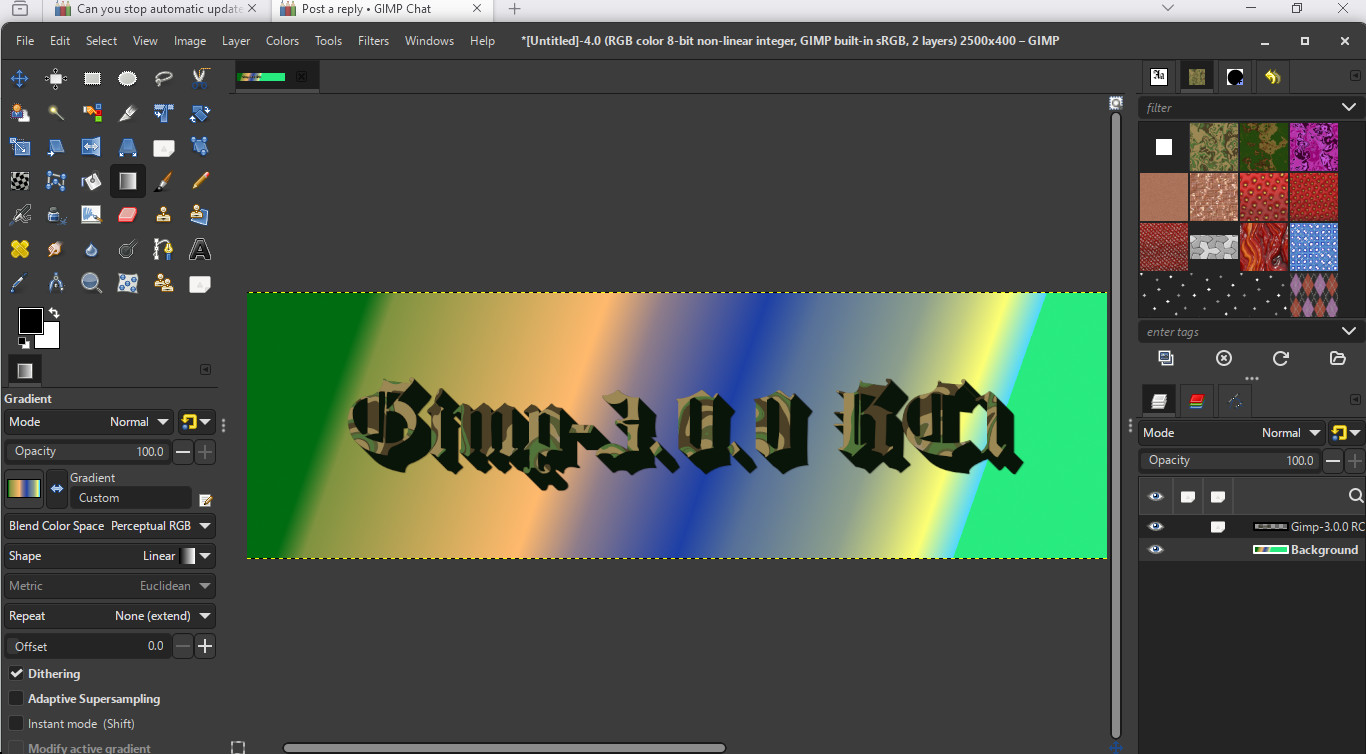
Just downloaded the latest build 3.0.0 RC1 for Windows x64. I sure hope user plug-ins .py and .scm scripting will still be available. Seems like the Gimp-2.99.19 PDB , (Procedural Database) isn't correct. I've tried authoring scm scripts for Gimp-2.99.19 and nothing works. Is the Script-Fu.exe the same?

A screenshot of Gimp-3.0.0 - RC1 :bigthup

Image

_________________
Image


Top
 Post subject: Re: Gimp 2.99.19 to RC1 Development (live coverage thread)
PostPosted: Wed Aug 14, 2024 3:25 am  (#34) 
Offline
GimpChat Member

Joined: Mar 04, 2011
Posts: 2613
@redybasuki
As Rod, it might be a problem with filters or Gimp 2.99 can select multiple layers.

This using a linux appimage. On a basic level, if you make a selection, copy it, and nothing shows as a clipboard brush, then you have selected nothing. This is 2.99.19 working much the same as Gimp 2.10 using ctrl-A (select all) ctrl-C (copy), ctrl-V (paste) This a 20 second animation. https://i.imgur.com/sVVnLwC.mp4

@Rod. It is possible to use old script-fu with Gimp 2.99 Attached a couple that work for me.
It looks like script-fu might eventually be a little easier (living in hope) see: https://developer.gimp.org/resource/scr ... ter-plugin
When it comes to python 3, from the examples I have seen, more complicated, more verbose.


Attachments:
scm-for-gimp3.zip [2.65 KiB]
Downloaded 111 times
Top
 Post subject: Re: Gimp 2.99.19 to RC1 Development (live coverage thread)
PostPosted: Wed Aug 14, 2024 5:48 am  (#35) 
Offline
GimpChat Member

Joined: Dec 28, 2023
Posts: 67
redybasuki, Rod, rich2005: The selection issue is due to a bug, likely introduced in a commit yesterday. You shouldn't need to merge layer effects down to copy a layer. I'm trying to track down the exact cause, but it'll be fixed for 3.0.

Rod: The PDB should be correct, although there's currently a bug where deprecated procedures don't have a "deprecated" label. Do you have an example of a script you were trying to run?

rich2005: Which examples of Python 3 were you looking at? It shouldn't be any more verbose or complicated.


Top
 Post subject: Re: Gimp 2.99.19 to RC1 Development (live coverage thread)
PostPosted: Wed Aug 14, 2024 6:07 am  (#36) 
Offline
GimpChat Member

Joined: Mar 04, 2011
Posts: 2613
CmykStudent wrote:
rich2005: Which examples of Python 3 were you looking at? It shouldn't be any more verbose or complicated.


I was thinking something like this, where the equivalent python3 code is 100 lines more than the old plugin.

https://github.com/akkana/gimp-plugins/ ... r/saver.py
https://github.com/akkana/gimp-plugins/ ... 3/saver.py


Top
 Post subject: Re: Gimp 2.99.19 to RC1 Development (live coverage thread)
PostPosted: Wed Aug 14, 2024 6:21 am  (#37) 
Offline
GimpChat Member

Joined: Dec 28, 2023
Posts: 67
rich2005: Ah, I see. I'd have to review the code more in-depth, but at least some of that is due to commented out code and not using the newer syntax. For instance, there's a whole helper function created (run_pdb), when they could instead just write:

Gimp.file_save(run_mode, image, 1, layer, file)

We're (almost done with) finalizing the API. Once that's done, we can write better tutorials to explain the new syntax.


Top
 Post subject: Re: Gimp 2.99.19 to RC1 Development (live coverage thread)
PostPosted: Wed Aug 14, 2024 11:33 am  (#38) 
Offline
Global Moderator
User avatar

Joined: May 16, 2010
Posts: 16167
CmykStudent wrote:
redybasuki, Rod, rich2005: The selection issue is due to a bug, likely introduced in a commit yesterday. You shouldn't need to merge layer effects down to copy a layer. I'm trying to track down the exact cause, but it'll be fixed for 3.0.

Rod: The PDB should be correct, although there's currently a bug where deprecated procedures don't have a "deprecated" label. Do you have an example of a script you were trying to run?


Well this is the code that works for Gimp-2.10.38 . I did add the patterns correctly.

;;; Description: chewed-text_RD.scm
;;; Creates a chewed effect on a user created alpha or text layer.
;;; -----------------------------------------------------------------------------
;;; Change Log:
;;; Version 1.1
;;; added slider for offset of mask pattern (chewyness)

;;; Version 1.2 - bug fix

;;; Version 1.3 - bug fix

;;; Version-1.4
;;; added ability to have user select pattern mask for cutout of text or other on alpha layer

; Information can be found at GimpChat.com
;
; License: GPLv3
; This program is free software: you can redistribute it and/or modify
; it under the terms of the GNU General Public License as published by
; the Free Software Foundation, either version 3 of the License, or
; (at your option) any later version.
;
; This program is distributed in the hope that it will be useful,
; but WITHOUT ANY WARRANTY; without even the implied warranty of
; MERCHANTABILITY or FITNESS FOR A PARTICULAR PURPOSE. See the
; GNU General Public License for more details.
;
; To view a copy of the GNU General Public License
; visit: http://www.gnu.org/licenses/gpl.html


(define (script-fu-chewed-text_RD image drawable mycolor myshadowcolor mypattern maskpattern bevel chewyness)
(gimp-image-undo-group-start image)

  ; save user settings
  (gimp-context-push)

  ; begin

  (let*
    (
   (width (car (gimp-image-width image)))
    (height (car (gimp-image-height image)))
    (original (car (gimp-layer-new-from-visible image image "Text-Copy")))
    (original-copy (car (gimp-layer-new-from-visible image image "Shadow")))   
    (pattern-fill (car (gimp-layer-new image width height RGBA-IMAGE "Pattern-Fill" 100 0)))   
    (bg-fill (car (gimp-layer-new image width height RGBA-IMAGE "Background Layer" 100 0)))   
    )


    ; add the layers   
  (gimp-selection-layer-alpha drawable)   
  (gimp-context-set-pattern mypattern)
  (gimp-edit-fill drawable FILL-PATTERN)

  (gimp-selection-none image) 
 
  (gimp-image-add-layer image original 2)
  (gimp-selection-layer-alpha original)   
  (gimp-context-set-pattern mypattern)
  (gimp-edit-fill original FILL-PATTERN)

    (script-fu-add-bevel image original bevel FALSE FALSE)
    (script-fu-add-bevel image original bevel FALSE FALSE)
    (script-fu-add-bevel image original bevel FALSE FALSE)    
 
  (gimp-image-add-layer image original-copy 1)
  (gimp-selection-layer-alpha original-copy) 
  (gimp-context-set-foreground myshadowcolor)
  (gimp-edit-fill original-copy FILL-FOREGROUND)   


  (gimp-image-add-layer image pattern-fill 0)
  (gimp-context-set-pattern maskpattern)
  (gimp-drawable-fill pattern-fill FILL-PATTERN)
  (gimp-selection-layer-alpha pattern-fill)

  (gimp-image-remove-layer image pattern-fill)
  (gimp-edit-cut original)
  (gimp-selection-layer-alpha original) 
  ;(gimp-image-add-layer image chewed-fill 0)
  (gimp-edit-clear drawable)
  (gimp-layer-resize-to-image-size drawable)

  (gimp-selection-layer-alpha original-copy)
  (gimp-selection-invert image)
  (gimp-edit-clear drawable)
  (gimp-image-raise-item-to-top image drawable)
 
     ; Offset our pattern filled text layer
  (gimp-drawable-offset drawable 1 1 chewyness 0)
 
  (gimp-drawable-set-visible original-copy FALSE)
  (gimp-selection-none image)
 
   ; add bevel to both chewed layers
    ;(script-fu-add-bevel image original bevel FALSE FALSE)
   (script-fu-add-bevel image drawable bevel FALSE FALSE)   
    ;(script-fu-add-bevel image original bevel FALSE FALSE)
    (script-fu-add-bevel image drawable bevel FALSE FALSE)   
    ;(script-fu-add-bevel image original bevel FALSE FALSE)   
    (script-fu-add-bevel image drawable bevel FALSE FALSE)


  (gimp-image-add-layer image bg-fill 0)
  (gimp-image-lower-item-to-bottom image bg-fill) 
  (gimp-context-set-foreground mycolor)
  (gimp-drawable-fill bg-fill FILL-FOREGROUND)
 
  (gimp-image-raise-item image original)   
  (gimp-drawable-set-visible original-copy TRUE)   
  (plug-in-gauss RUN-NONINTERACTIVE image original-copy 4 4 1)

  ; (plug-in-lighting RUN-NONINTERACTIVE
                    ; image            ; input image id
                    ; drawable          ; input layer id
                    ; original      ; load bumpmap? 0 = DISABLED name = enabled                     
                    ; 0                ; load env map? 0 = DISABLED name = enabled
                    ; TRUE             ; enable bumpmaping (TRUE/FALSE)
                    ; FALSE            ; enable env maping (TRUE/FALSE)
                    ; 0                ; Type of mapping (0=linear,1=log, 2=sinusoidal, 3=spherical
                    ; 0                ; type of light src 0 = point
                    ; '(255 255 255)   ; light src color is white   
                    ; 0.57 -1.27 1.00   ; light position 1 xyz - alt 0.57 -1.27 1.00 or 0.53 2.20 1.00 works
                    ; -1.00 -1.00 1.00 ; light direction 1 ijk - alt
                    ; 1.00             ; Material ambient intensity (0..1)
                    ; 0.20             ; Material diffuse intensity (0..1)
                    ; 0.50             ; Material diffuse reflectivity (0..1)
                    ; 0.50             ; Material specular reflectivity (0..1)
                    ; 27.0             ; Material highlight (0..->), note: it's expotential
                    ; TRUE             ; Apply antialiasing (TRUE/FALSE)                                   
                    ; FALSE            ; Create a new image (TRUE/FALSE)
                    ; FALSE            ; Make background transparent (TRUE/FALSE)           
   ; )

          ; end
  (gimp-selection-none image)   
  ; display new image and return user settings
  (gimp-context-pop)
  (gimp-image-undo-group-end image)
  (gimp-displays-flush image)
     
  )
)


    ;register menu location and information   

(script-fu-register
"script-fu-chewed-text_RD"
"<Image>/Rod/Alpha to Logo/Chewed Text Effect"
"creates a Chewed Effect on an alpha or text layer  -  script name: chewed-text_RD.scm"
"Rod Detmer"
"Rod Detmer"
"December 2015"
"RGB* GRAY*"
SF-IMAGE       "The Image"            0
SF-DRAWABLE    "The Drawable"         0 
SF-COLOR       "Background Color"        '(255 255 255)
SF-COLOR       "Shadow Color"        '(70 30 20)
SF-PATTERN      "Select Pattern"          "Seamless-burger_RD.png"   
SF-PATTERN      "Select Mask Pattern"     "Shredded-Text-Mask #1"   
SF-ADJUSTMENT "Bevel Amount"         '(20 0 30 1 10 0 SF-SLIDER)
SF-ADJUSTMENT "Chewyness"         '(-3 -1200 1200 1 10 0 SF-SLIDER)                             
)


By the way do you know why there isn't a refresh scripts under the <image>/filters/development/script-fu/ menu label?

_________________
Image


Top
 Post subject: Re: Gimp 2.99.19 to RC1 Development (live coverage thread)
PostPosted: Thu Aug 15, 2024 4:23 am  (#39) 
Offline
New Member

Joined: Aug 14, 2024
Posts: 2
Thanks for the reply @Rod @rich2005

I'm not using any effect, just as simple select multiple layer, Ctrl+C, and paste to another project.

CmykStudent wrote:
redybasuki, Rod, rich2005: The selection issue is due to a bug, likely introduced in a commit yesterday. You shouldn't need to merge layer effects down to copy a layer. I'm trying to track down the exact cause, but it'll be fixed for 3.0.


and if @CmykStudent said that this behaviour really because a bug, then I'll wait for it.

Thank you.


Top
 Post subject: Re: Gimp 2.99.19 to RC1 Development (live coverage thread)
PostPosted: Fri Aug 16, 2024 2:24 am  (#40) 
Offline
Global Moderator
User avatar

Joined: May 16, 2010
Posts: 16167
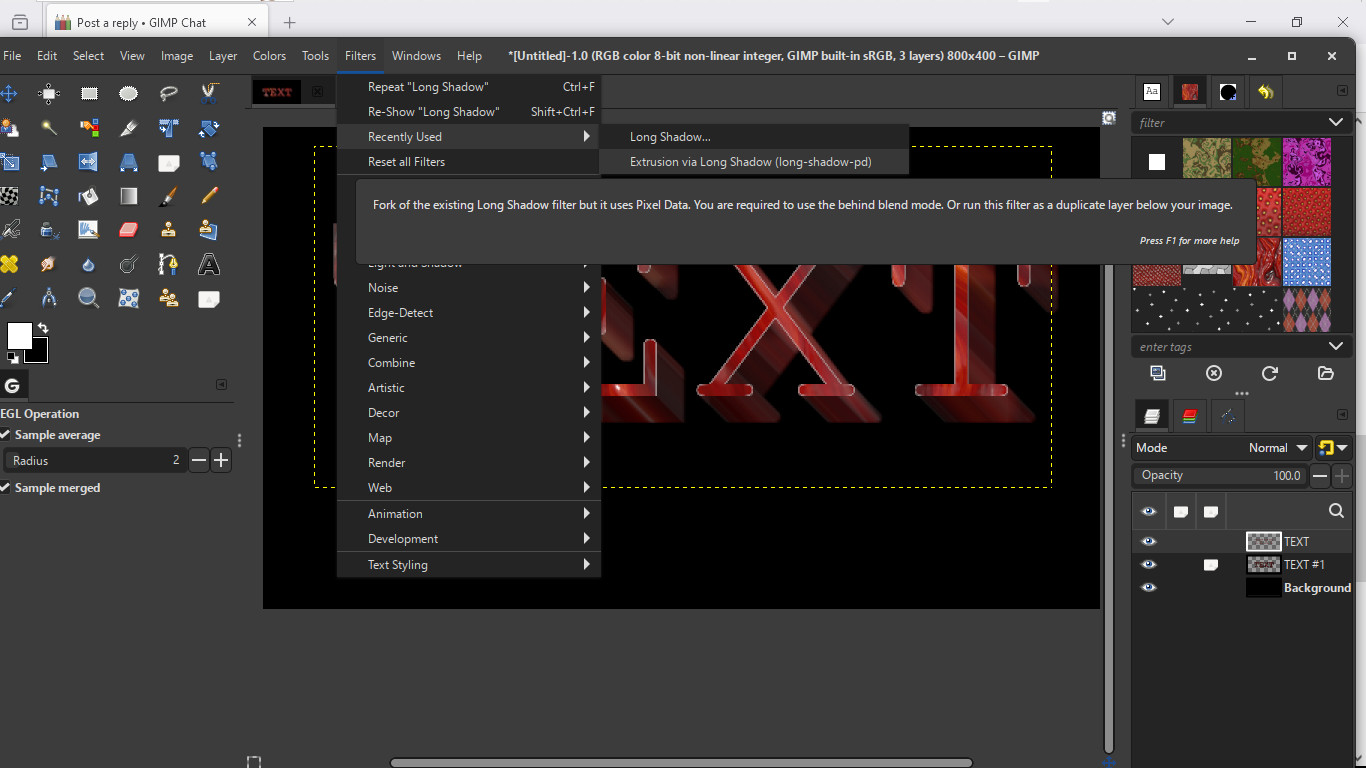
I was always wondering if this would be implemented in the Long Shadows GEGL filter. :bigthup

Image

The only way to run this is to go to Help>search and Run a Command. Type in Long.
The menu will appear with other options. Double click Extrusion Via Long Shadow and the GEGL filter will appear. Seems to be the File-PD that i see load. Now i am wondering what the File-PSP that i see load is?

Image

_________________
Image


Top
Post new topic Reply to topic  [ 94 posts ]  Go to page Previous  1, 2, 3, 4, 5  Next

All times are UTC - 5 hours [ DST ]


* Login  


Powered by phpBB3 © phpBB Group