It is currently Sat Jun 13, 2026 9:39 am


All times are UTC - 5 hours [ DST ]


Post new topic Reply to topic  [ 95 posts ]  Go to page Previous  1, 2, 3, 4, 5  Next
Author Message
 Post subject: Re: GAP
PostPosted: Thu Jul 21, 2011 8:56 am  (#21) 
Offline
Global Moderator
User avatar

Joined: May 16, 2010
Posts: 16023
Yes. :)
Right click number one open with 7-zip to a folder with the same name as the zip.
The other will auto open and join together in the folder for you.
Then just move the entire Gimp-2.7 folder wherever you want it.it's a portable version.
Its 253 MB just to warn you ahead of time.But its packed with lots of goodies! :)

Thanks for the scripts JamesH!

_________________
Image


Top
 Post subject: Re: GAP
PostPosted: Thu Jul 21, 2011 9:03 am  (#22) 
Offline
GimpChat Member
User avatar

Joined: Apr 25, 2011
Posts: 121
Location: Taiwan
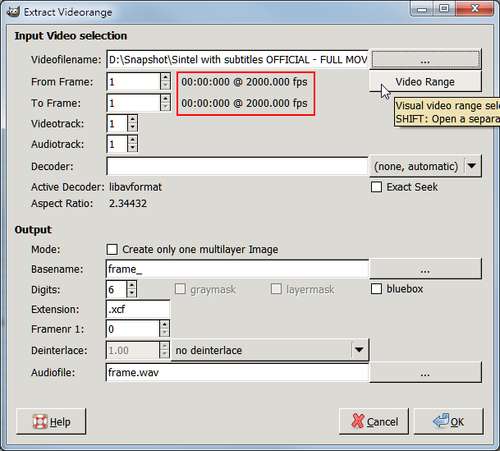
when use Video -> Split Video into Frames-> Extract Videorange to extract video
some time you will find the video had wrong fps, like this one
www.youtube.com Video from : www.youtube.com

Image
as you can see, 2000 fps, that may cause the problem
cancel the dialog
create and edit extract_video_framerate.txt file in the settings folder
just write down the correct fps, like this
24.00
this is correct fps of the video Sintel - Third Open Movie by Blender Foundation
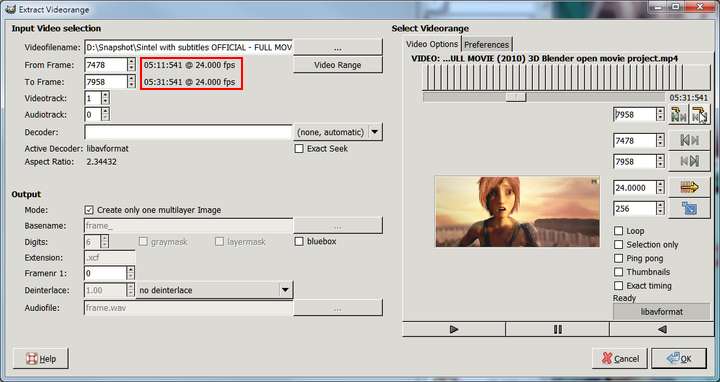
then save the file, reopen "Extract Videorange" dialog
Image
now you can press "Video Range" button to define a range that you want

here is a sample result
Image

_________________
Sorry for my poor English, I use Google Translate.
There may be something wrong, Please understand.

GIMP 2.10.38 rev1 portable+GAP+G'MIC+nufraw+Beautify+MathMap+...


Top
 Post subject: Re: GAP
PostPosted: Thu Jul 21, 2011 9:04 am  (#23) 
Offline
Retired Staff
User avatar

Joined: May 22, 2008
Posts: 6946
Location: Somewhere in GIMP
One other question. Will this work in 64-bit gimp 2.7.4 portable?

_________________
Image
World War IV will be fought with sticks and stones. - Albert Einstein


Top
 Post subject: Re: GAP
PostPosted: Thu Jul 21, 2011 9:11 am  (#24) 
Offline
Global Moderator
User avatar

Joined: May 16, 2010
Posts: 16023
There is a Gimp-2.7.4? :)

_________________
Image


Top
 Post subject: Re: GAP
PostPosted: Thu Jul 21, 2011 10:56 am  (#25) 
Offline
Retired Staff
User avatar

Joined: May 22, 2008
Posts: 6946
Location: Somewhere in GIMP
Whoa! That's astonishing! I had GAP on the brain and wondered why you called it gimp 2.7 instead of gap 2.7. I put the folder on my flash drive and voila! Instant gimp! That is so utterly cool.

I have an 8gb flash drive, so I left Partha's gimp 2.7.3 on it also.

Thanks so much, JamesH.

_________________
Image
World War IV will be fought with sticks and stones. - Albert Einstein


Top
 Post subject: Re: GAP
PostPosted: Thu Jul 21, 2011 1:33 pm  (#26) 
Offline
GimpChat Member
User avatar

Joined: Apr 07, 2010
Posts: 14182
Rod, James and O,

Thank you for all your help for the past 3 days. I was in a real dilemma, (as usual)

JamesH, I ended up downloading your what you call GAP, and it has everything in it that I want. It is great. It has GMIC, mathmap, Gap and Python all in one, besides Gimp 2.7.....

Rod, thank you for all the notes back and forth to help sort out my errors and problems.

O, thanks for helping me to get this super new Gimp installed.

_________________
Image


Top
 Post subject: Re: GAP
PostPosted: Thu Jul 21, 2011 2:01 pm  (#27) 
Offline
Retired Staff
User avatar

Joined: May 22, 2008
Posts: 6946
Location: Somewhere in GIMP
The Soap Bubble 2 dialog window launches under the gimp window for me. Is there any way to fix it so that it comes to the foreground?

_________________
Image
World War IV will be fought with sticks and stones. - Albert Einstein


Top
 Post subject: Re: GAP
PostPosted: Thu Jul 21, 2011 5:29 pm  (#28) 
Offline
GimpChat Member
User avatar

Joined: Jun 04, 2011
Posts: 254
ok so where do i put the two folders?

_________________
Image


Top
 Post subject: Re: GAP
PostPosted: Thu Jul 21, 2011 5:37 pm  (#29) 
Offline
Global Moderator
User avatar

Joined: May 16, 2010
Posts: 16023
Alonte wrote:
ok so where do i put the two folders?

Just place them in any directory together.Right click 001, and select Open with 7zip, and they will both open together and join in a Gimp-2.7 folder. :)

O i have a problem with IWARP opening under the Soap Bubble window dialog.
Not sure how to fix your problem.Is something else (another program) open and interfering with the windows?
Sometimes that can be the issue.

_________________
Image


Top
 Post subject: Re: GAP
PostPosted: Thu Jul 21, 2011 8:05 pm  (#30) 
Offline
Global Moderator
User avatar

Joined: May 16, 2010
Posts: 16023
I was able to add all my extra scripts and plugins in this newer setup.
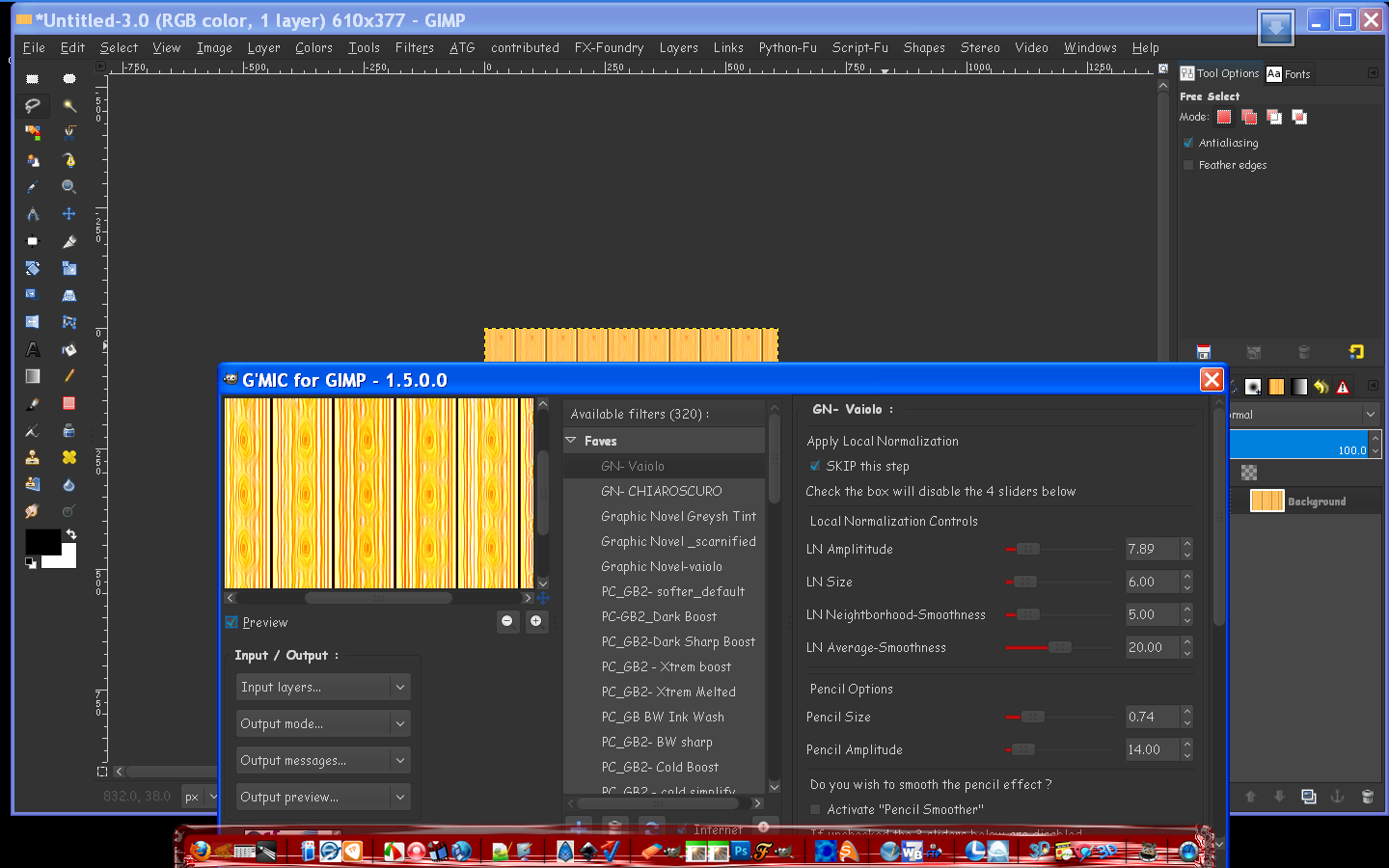
I was also able to update GMIC to 1.5.0 :)
Just make sure to install all new plugins and scripts into the settings folder (gimp-2.7/settings)
All the other sub folders are in there.

I was also able to add themes to it.But i had to copy and paste dll files and theme folders and i wont get into that.
Maybe a tutorial later.
Screen shot -
Image

_________________
Image


Top
 Post subject: Re: Gimp 2.7 with GAP pre-installed
PostPosted: Thu Jul 21, 2011 11:22 pm  (#31) 
Offline
Retired Staff
User avatar

Joined: May 22, 2008
Posts: 6946
Location: Somewhere in GIMP
This post has been split from the original thread named, "GAP," because the remaining discussion was about JamesH's Gimp 2.7 that has GAP pre-installed in it.

Original thread
http://gimpchat.com/viewtopic.php?p=29069#p29069

_________________
Image
World War IV will be fought with sticks and stones. - Albert Einstein


Top
 Post subject: Re: Gimp 2.7 with GAP pre-installed
PostPosted: Fri Jul 22, 2011 10:44 pm  (#32) 
Offline
Script Coder
User avatar

Joined: Feb 18, 2011
Posts: 4826
Location: Bendigo Vic. Australia
JamesH thankyou thankyou very much it downloaded then unzipped perfectly, I pointed a shortcut to the execute file clicked and to my amazment it worked perfectly. I then replaced the settings scripts file with my 473 scripts from 2.6.11, now I am thinking about the plug-ins. But that will be a slower process. But a great job done , I also put in the english version scripts you posted and I hope any missing brushes e.t.c will also get posted. I installed on a usb drive but if you do a 64 bit version i'd be able to put it on my main drive.

_________________
Image
No matter how much you push the envelope, it'll still be stationery.


Top
 Post subject: Re: Gimp 2.7 with GAP pre-installed
PostPosted: Fri Jul 22, 2011 11:21 pm  (#33) 
Offline
Retired Staff
User avatar

Joined: May 22, 2008
Posts: 6946
Location: Somewhere in GIMP
I have mine on my main drive and it works fine. I have 64-bit Win 7.

_________________
Image
World War IV will be fought with sticks and stones. - Albert Einstein


Top
 Post subject: Re: Gimp 2.7 with GAP pre-installed
PostPosted: Sat Jul 23, 2011 1:36 am  (#34) 
Offline
Script Coder
User avatar

Joined: Feb 18, 2011
Posts: 4826
Location: Bendigo Vic. Australia
woops none of the files for saving images work . png-gif-jpg e.t.c. in system plugins.

_________________
Image
No matter how much you push the envelope, it'll still be stationery.


Top
 Post subject: Re: Gimp 2.7 with GAP pre-installed
PostPosted: Sat Jul 23, 2011 4:44 am  (#35) 
Offline
GimpChat Member
User avatar

Joined: Apr 07, 2010
Posts: 14182
James, Thank you for the great Gimp 2.7 version. It is a gift all-in-one package.... woo hoo
Image

_________________
Image


Top
 Post subject: Re: Gimp 2.7 with GAP pre-installed
PostPosted: Sat Jul 23, 2011 4:45 am  (#36) 
Offline
Global Moderator
User avatar

Joined: May 16, 2010
Posts: 16023
Graechan wrote:
JamesH thankyou thankyou very much it downloaded then unzipped perfectly, I pointed a shortcut to the execute file clicked and to my amazment it worked perfectly. I then replaced the settings scripts file with my 473 scripts from 2.6.11, now I am thinking about the plug-ins. But that will be a slower process. But a great job done , I also put in the english version scripts you posted and I hope any missing brushes e.t.c will also get posted. I installed on a usb drive but if you do a 64 bit version i'd be able to put it on my main drive.


When you transfer your plugins , and if you have a copy of zlib1.dll in there)be sure that you do not place that copy of zlib1.dll in the (settings/plugins) folder in Gimp-2.7.3!
Or you will get lots of duplicate zlib errors (like i did) :lol

I just happened to have a zlib1.dll in my gimp-2.6.11 plugins folder and copied everything into settings/plugins.
I received all those errors and removed the zlib dll file i accidentally copied there and all worked fine. :)

Just a heads up.

_________________
Image


Top
 Post subject: Re: Gimp 2.7 with GAP pre-installed
PostPosted: Sat Jul 23, 2011 6:26 am  (#37) 
Offline
GimpChat Member
User avatar

Joined: Apr 22, 2010
Posts: 126
I downloaded and joined my collection GIMP Portable. :bigthup
Thank you very much James.
You did a real portable version.
By the way,I fixed APNG and Heal selection scm versions,the rest later check how it works for win7, 64bit.Thanks

_________________
Image


Top
 Post subject: Re: Gimp 2.7 with GAP pre-installed
PostPosted: Sat Jul 23, 2011 9:35 am  (#38) 
Offline
Retired Staff
User avatar

Joined: May 22, 2008
Posts: 6946
Location: Somewhere in GIMP
Graechan wrote:
woops none of the files for saving images work . png-gif-jpg e.t.c. in system plugins.
Instead of File / Save As, you need to do File / Export and then you can save images in various formats.

_________________
Image
World War IV will be fought with sticks and stones. - Albert Einstein


Top
 Post subject: Re: Gimp 2.7 with GAP pre-installed
PostPosted: Sat Jul 23, 2011 11:36 am  (#39) 
Offline
Global Moderator
User avatar

Joined: May 16, 2010
Posts: 16023
Yeah that's the one thing about Gimp-2.7 versions - you have to export to save as an image.
But the a little item appears in your file menu "export to NamedImage.png"and every time you want to save just click it. :)

_________________
Image


Top
 Post subject: Re: Gimp 2.7 with GAP pre-installed
PostPosted: Sat Jul 23, 2011 1:28 pm  (#40) 
Offline
Retired Staff
User avatar

Joined: May 22, 2008
Posts: 6946
Location: Somewhere in GIMP
Anyone have luck with exporting as apngs? The plug-in is in the userfiles.

_________________
Image
World War IV will be fought with sticks and stones. - Albert Einstein


Top
Post new topic Reply to topic  [ 95 posts ]  Go to page Previous  1, 2, 3, 4, 5  Next

All times are UTC - 5 hours [ DST ]


* Login  


Powered by phpBB3 © phpBB Group