It is currently Tue Jul 14, 2026 2:23 am


All times are UTC - 5 hours [ DST ]


Post new topic Reply to topic  [ 7 posts ] 
Author Message
 Post subject: Custom Font File User Splicer for Gimp 2.10
PostPosted: Fri Sep 27, 2024 3:09 pm  (#1) 
Offline
GimpChat Member
User avatar

Joined: Aug 08, 2016
Posts: 2842
Location: East Midlands of England
Download, unzip and place the filter in your Gimp user plug-ins folder.

Attachment:
Custom_Font_File_User_Splicer_01.zip [4.9 KiB]
Downloaded 105 times


A pdf version of this short guide:

Attachment:
Custom Font File User Splicer for Gimp 2pt10.pdf [123.22 KiB]
Downloaded 74 times


This is another utility for breaking up custom font files into smaller files. This plug-in allows you to choose the number of files and how many layers each file should contain.

You can quickly find out how many layers a file has by opening a custom font file and looking at the title bar.

The one below shows you that the image file contains 87 layers.

Image

If you need more information about the characters contained in the custom font, you can use another custom font utility, Custom Font Size Reducer, to analyse the contents of the file.

Once you have decided how many files you need to make and how many layers you wish to have in each file, open the filter dialog:

Filters>>Custom Fonts>>Utility Tools>>Custom Font File User Splicer v01…

Image

Use the first option to enter the number of files you wish to generate and then enter the number of layers to place in each of the files before clicking on ‘OK’.

The filter will then display and/or save the layers according to the outcome that you select with the last option.

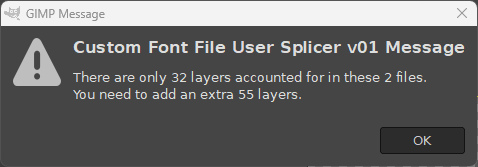
If the number of layers chosen does not add up to the number of layers contained in the file, the plug-in will throw up a message box to suggest how many layers need to be added or removed from your selection options in order to continue.
Image

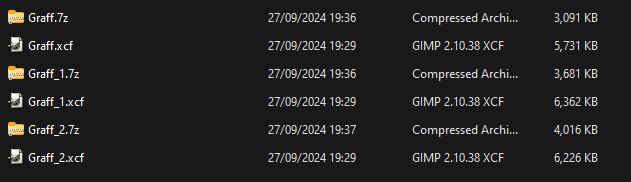
The example folder view below shows one of my recent custom fonts after using the filter, together with compressed versions of the files -
(the original file started out with a size of 17.6 Mb):
Image

The files can be re-assembled with the Stitcher plug-in.

_________________
Image
"Let no one steal your dreams."
Paul Cookson

Custom Font Links
2.10 Tools
Character Paths
White Bases


Share on Facebook Share on Twitter Share on Orkut Share on Digg Share on MySpace Share on Delicious Share on Technorati
Top
 Post subject: Re: Custom Font File User Splicer for Gimp 2.10
PostPosted: Sat Sep 28, 2024 3:03 am  (#2) 
Offline
GimpChat Member
User avatar

Joined: Mar 01, 2014
Posts: 14053
Location: Spain, Aragón
Thank you so much for your awesome work in this new help filter. :tyspin :clap
I have a custom font which has 65 layers and it is 32.5 Mb
I have got 5 split items and they done in zip. but the second one is rather bigger than the others.
Sorry, I don't understand it as there are the same number of layers as the others ones. (used the new plug-in)
I feel :oops: I don't know how to do it correctly.
I post the custom in the thread.

_________________
Image

Gimp 2.10.30(samj) portable _ OS Windows 10 Home_ 64bits
Don’t be afraid to start over. It’s a new chance to rebuild what you want.


Top
 Post subject: Re: Custom Font File User Splicer for Gimp 2.10
PostPosted: Sat Sep 28, 2024 7:10 am  (#3) 
Offline
GimpChat Member
User avatar

Joined: Aug 08, 2016
Posts: 2842
Location: East Midlands of England
:gaah

Have had a look to try and come up with a strategy for you Issabella and how to explain it.
Think I am nearly there.
:hi5
Have had to adjust the layer per file number options to cater for your size of character so a new version will appear soon.

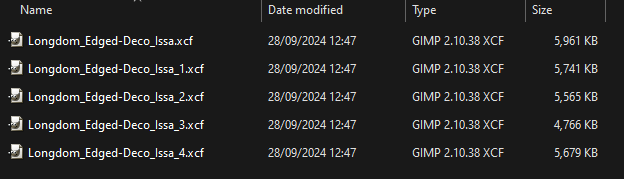
Screenshot to show your file split into 5 smaller files (I do not think that it will not fit into 4 files smaller than 6 Mb):

Image

_________________
Image
"Let no one steal your dreams."
Paul Cookson

Custom Font Links
2.10 Tools
Character Paths
White Bases


Top
 Post subject: Re: Custom Font File User Splicer for Gimp 2.10
PostPosted: Sat Sep 28, 2024 8:50 am  (#4) 
Offline
GimpChat Member
User avatar

Joined: Mar 01, 2014
Posts: 14053
Location: Spain, Aragón
Thank you so much Skinnyhouse. I'm beeing a pain in the neck. Sorry
But you always a find a real solution. It's great you have got all of the files in less than 6 Mb. :tyspin :hi5 :clap

_________________
Image

Gimp 2.10.30(samj) portable _ OS Windows 10 Home_ 64bits
Don’t be afraid to start over. It’s a new chance to rebuild what you want.


Top
 Post subject: Re: Custom Font File User Splicer for Gimp 2.10
PostPosted: Sun Sep 29, 2024 11:31 am  (#5) 
Offline
GimpChat Member

Joined: Sep 26, 2015
Posts: 74
it slices! it dices! it juliennes!!!


Top
 Post subject: Re: Custom Font File User Splicer for Gimp 2.10
PostPosted: Mon Sep 30, 2024 10:05 am  (#6) 
Offline
GimpChat Member
User avatar

Joined: Mar 01, 2014
Posts: 14053
Location: Spain, Aragón
AdmFubar wrote:
it slices! it dices! it juliennes!!!

:hehe

_________________
Image

Gimp 2.10.30(samj) portable _ OS Windows 10 Home_ 64bits
Don’t be afraid to start over. It’s a new chance to rebuild what you want.


Top
 Post subject: Re: Custom Font File User Splicer for Gimp 2.10
PostPosted: Mon Sep 30, 2024 10:07 am  (#7) 
Offline
GimpChat Member
User avatar

Joined: Mar 01, 2014
Posts: 14053
Location: Spain, Aragón
I'm so happy with this plug-in. The large Custom Fonts aren't a problem now.
Thanks a lot. :tyspin :clap

_________________
Image

Gimp 2.10.30(samj) portable _ OS Windows 10 Home_ 64bits
Don’t be afraid to start over. It’s a new chance to rebuild what you want.


Top
Post new topic Reply to topic  [ 7 posts ] 

All times are UTC - 5 hours [ DST ]


* Login  


Powered by phpBB3 © phpBB Group