It is currently Tue Jul 28, 2026 4:40 pm


All times are UTC - 5 hours [ DST ]


Post new topic Reply to topic  [ 15 posts ] 
Author Message
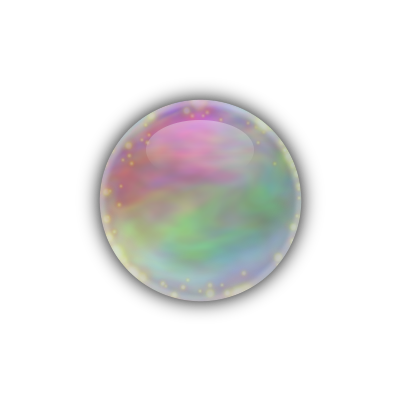
 Post subject: Calling a system brush in a script (soap bubble) [SOLVED]
PostPosted: Thu Jul 21, 2011 8:48 pm  (#1) 
Offline
Retired Staff
User avatar

Joined: May 22, 2008
Posts: 6946
Location: Somewhere in GIMP
This is for gimp 2.6.11.

This is a request for Gimp v 2.6.11. The soap bubble script calls for the Circle Fuzzy (07) brush but it tries to get it from the userfiles brushes. Although it works fine copied into the userfiles, I would like for it to get the one that's already in the brush files that come with gimp.

My 2 attempts at changing it didn't work. I expect there's a way to call a system brush.

(gimp-context-set-foreground '(0 0 0))

(gimp-brushes-set-brush "Circle Fuzzy (07)")

(gimp-selection-load chan1)

(set! space(car (gimp-brushes-get-spacing))) ;in order to preserve previous brush spacing

(gimp-brush-set-spacing "Circle Fuzzy (07)" 0)

(gimp-edit-stroke rim2)

(gimp-brush-set-spacing "Circle Fuzzy (07)" space) ;reload original spacing

(gimp-selection-invert img)

(gimp-edit-clear rim2)

What I changed it to. I also tried it without .vbr in the name.

(gimp-context-set-foreground '(0 0 0))

(gimp-brushes-set-brush "Circle-Fuzzy-7.vbr")

(gimp-selection-load chan1)

(set! space(car (gimp-brushes-get-spacing))) ;in order to preserve previous brush spacing

(gimp-brush-set-spacing "Circle-Fuzzy-7.vbr" 0)

(gimp-edit-stroke rim2)

(gimp-brush-set-spacing "Circle-Fuzzy-7.vbr" space) ;reload original spacing

(gimp-selection-invert img)

(gimp-edit-clear rim2)

O note: I have removed the attached SoapBubble2.4.scm because GnuTux has updated the script to SoapBubble2.6.scm below.

_________________
Image
World War IV will be fought with sticks and stones. - Albert Einstein


Share on Facebook Share on Twitter Share on Orkut Share on Digg Share on MySpace Share on Delicious Share on Technorati
Top
 Post subject: Re: Calling a system brush in a script
PostPosted: Thu Jul 21, 2011 9:30 pm  (#2) 
Offline
GimpChat Founder
User avatar

Joined: May 22, 2008
Posts: 5241
Location: Gimpville
To select the brush, you can use..

(gimp-context-set-brush "Circle Fuzzy (07)")

ImageImage

_________________
“If you reach for the stars, you just might land on a decently sized hill.” - Stuart Hill


Top
 Post subject: Re: Calling a system brush in a script
PostPosted: Thu Jul 21, 2011 9:37 pm  (#3) 
Offline
Retired Staff
User avatar

Joined: May 22, 2008
Posts: 6946
Location: Somewhere in GIMP
I don't understand where to put that in the script.

This is where it is in the original script.

(gimp-context-set-foreground '(0 0 0))

   (gimp-brushes-set-brush "Circle Fuzzy (07)")

   (gimp-selection-load chan1)

   (set! space(car (gimp-brushes-get-spacing)))   ;in order to preserve previous brush spacing

   (gimp-brush-set-spacing "Circle Fuzzy (07)" 0)

   (gimp-edit-stroke rim2)

   (gimp-brush-set-spacing "Circle Fuzzy (07)" space)   ;reload original spacing

   (gimp-selection-invert img)

   (gimp-edit-clear rim2)

_________________
Image
World War IV will be fought with sticks and stones. - Albert Einstein


Top
 Post subject: Re: Calling a system brush in a script
PostPosted: Thu Jul 21, 2011 9:42 pm  (#4) 
Offline
GimpChat Founder
User avatar

Joined: May 22, 2008
Posts: 5241
Location: Gimpville
It would replace

(gimp-brushes-set-brush "Circle Fuzzy (07)")

..which has been depreciated.

Also, I removed the code which saves the brush spacing and replaced it with an overall context push & pop to the stack, so as to maintain your initial settings.

Here's the new black rim block...

;making the black rim

(gimp-context-set-foreground '(0 0 0))
(gimp-context-set-brush "Circle Fuzzy (07)")
(gimp-selection-load chan1)
(gimp-edit-stroke rim2)
(gimp-selection-invert img)
(gimp-edit-clear rim2)


Attachments:
File comment: Soap Bubble (2.6)
SoapBubble2.6.scm [7.54 KiB]
Downloaded 252 times

_________________
“If you reach for the stars, you just might land on a decently sized hill.” - Stuart Hill
Top
 Post subject: Re: Calling a system brush in a script
PostPosted: Thu Jul 21, 2011 10:14 pm  (#5) 
Offline
Retired Staff
User avatar

Joined: May 22, 2008
Posts: 6946
Location: Somewhere in GIMP
Thank you very much. That is much better. :teeth

_________________
Image
World War IV will be fought with sticks and stones. - Albert Einstein


Top
 Post subject: Re: Calling a system brush in a script (soap bubble) [SOLVED]
PostPosted: Fri Jul 22, 2011 2:52 am  (#6) 
Offline
Global Moderator
User avatar

Joined: May 16, 2010
Posts: 16136
Hey Tux is there as way to just call the current brush?
That might make for some cool looking designs in itself. :)

That way if i wanted i could use any same sized circular brush i have like a vector one.

_________________
Image


Top
 Post subject: Re: Calling a system brush in a script (soap bubble) [SOLVED]
PostPosted: Fri Jul 22, 2011 3:04 am  (#7) 
Offline
GimpChat Founder
User avatar

Joined: May 22, 2008
Posts: 5241
Location: Gimpville
Yes. Just comment out...

; (gimp-context-set-brush "Circle Fuzzy (07)")

.... to use the currently selected brush.

_________________
“If you reach for the stars, you just might land on a decently sized hill.” - Stuart Hill


Top
 Post subject: Re: Calling a system brush in a script (soap bubble) [SOLVED]
PostPosted: Fri Jul 22, 2011 3:21 am  (#8) 
Offline
Global Moderator
User avatar

Joined: May 16, 2010
Posts: 16136
Thanks Tux! :bigthup

Here is one with the sparks brush. :)

Image

_________________
Image


Top
 Post subject: Re: Calling a system brush in a script (soap bubble) [SOLVED]
PostPosted: Fri Jul 22, 2011 4:14 am  (#9) 
Offline
Script Coder
User avatar

Joined: Oct 25, 2010
Posts: 4812
Wouldn't it be safer for the script (and maybe more accurate) to create the brush from scratch (gimp-brush-new(), gimp-brush-set-{shape|radius|hardness|spacing|spikes|...})?

_________________
Image


Top
 Post subject: Re: Calling a system brush in a script (soap bubble) [SOLVED]
PostPosted: Fri Jul 22, 2011 6:09 am  (#10) 
Offline
GimpChat Member

Joined: Mar 29, 2011
Posts: 346
Location: Wisconsin
ofnuts wrote:
Wouldn't it be safer for the script (and maybe more accurate) to create the brush from scratch (gimp-brush-new(), gimp-brush-set-{shape|radius|hardness|spacing|spikes|...})?

Many scripts do create a temporary brush.
It depends on the skill and experience of the script writer.

_________________
Image


Top
 Post subject: Re: Calling a system brush in a script (soap bubble) [SOLVED]
PostPosted: Fri Jul 22, 2011 11:31 am  (#11) 
Offline
GimpChat Founder
User avatar

Joined: May 22, 2008
Posts: 5241
Location: Gimpville
Feel free to hack away. It's not my script. :mrgreen:

_________________
“If you reach for the stars, you just might land on a decently sized hill.” - Stuart Hill


Top
 Post subject: Re: Calling a system brush in a script (soap bubble) [SOLVED]
PostPosted: Fri Jul 22, 2011 3:07 pm  (#12) 
Offline
Script Coder
User avatar

Joined: Oct 25, 2010
Posts: 4812
I only hack python, I have high standards :)

Now finding a way to escape the Wrath Of SaulGoode

_________________
Image


Top
 Post subject: Re: Calling a system brush in a script (soap bubble) [SOLVED]
PostPosted: Fri Jul 22, 2011 3:08 pm  (#13) 
Offline
Retired Staff
User avatar

Joined: May 22, 2008
Posts: 6946
Location: Somewhere in GIMP
:teeth

_________________
Image
World War IV will be fought with sticks and stones. - Albert Einstein


Top
 Post subject: Re: Calling a system brush in a script (soap bubble) [SOLVED]
PostPosted: Fri Jul 22, 2011 3:34 pm  (#14) 
Offline
Script Coder
User avatar

Joined: Apr 23, 2010
Posts: 1553
Location: not from Guildford after all
ofnuts wrote:
I only hack python, I have high standards :)

Now finding a way to escape the Wrath Of SaulGoode

Yes, if one wants to use a hack language, Python is the first one that comes to my mind. :drum

Ever notice that the longest threads in the forum are the ones trying to deal with Python problems?

_________________
Any sufficiently primitive technology is indistinguishable from a rock.


Top
 Post subject: Re: Calling a system brush in a script (soap bubble) [SOLVED]
PostPosted: Fri Jul 22, 2011 8:49 pm  (#15) 
Offline
Global Moderator
User avatar

Joined: May 16, 2010
Posts: 16136
saulgoode wrote:
ofnuts wrote:
I only hack python, I have high standards :)

Now finding a way to escape the Wrath Of SaulGoode

Yes, if one wants to use a hack language, Python is the first one that comes to my mind. :drum

Ever notice that the longest threads in the forum are the ones trying to deal with Python problems?

ewwwwwwwwwwwwwwwwww :)

_________________
Image


Top
Post new topic Reply to topic  [ 15 posts ] 

All times are UTC - 5 hours [ DST ]


* Login  


Powered by phpBB3 © phpBB Group