It is currently Tue Jun 23, 2026 8:16 am


All times are UTC - 5 hours [ DST ]


Post new topic Reply to topic  [ 5 posts ] 
Author Message
 Post subject: What Gmic filters does this correspond to?
PostPosted: Mon Feb 24, 2025 10:30 am  (#1) 
Offline
GimpChat Member

Joined: Apr 09, 2018
Posts: 1888
Location: France
GIMP Version: 2.8.14
Operating System: Windows
GIMP Experience: New User


Hello :wvy
In GMIC_Filters\gmic, I have .cimgz files ("clut" or "grain" or "lightleak")
Examples:
clut_amstragram.cimgz
clut_analogfx_anno_1870_color.cimgz
clut_kh_x.cimgz
clut_moviz_x.cimgz
clut_lushgreensummer.cimgz
grain_kodak_trix1600.cimgz

How do I know which Gmic filters this corresponds to?

_________________
Les parfums, les couleurs et les sons se répondent.Baudelaire (Les fleurs du mal)
2.10.36/(Samj) Gimp 2.10.38 OS Windows 10 Home 64 bits


Share on Facebook Share on Twitter Share on Orkut Share on Digg Share on MySpace Share on Delicious Share on Technorati
Top
 Post subject: Re: What Gmic filters does this correspond to?
PostPosted: Tue Feb 25, 2025 12:07 am  (#2) 
Offline
GimpChat Member
User avatar

Joined: Jan 13, 2011
Posts: 2642
Location: Poland
I can't explain much.
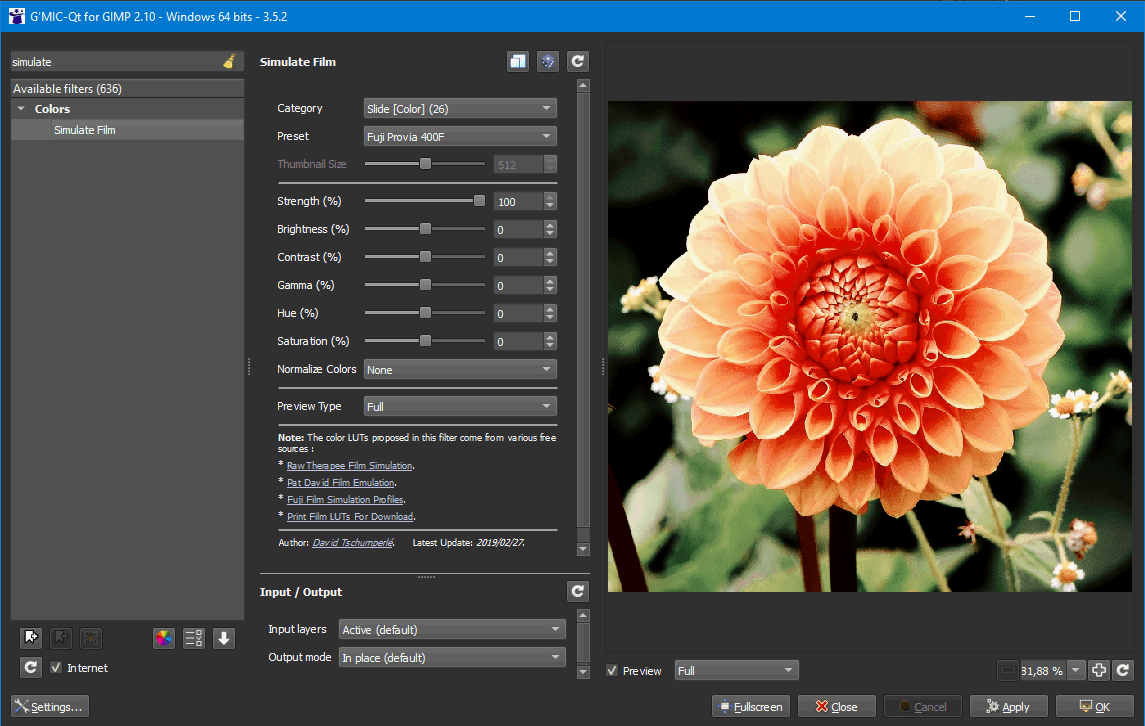
In older versions of G'MIC, *.cimgz files were Simulate Film presets saved on first use (after internet connection, downloaded from here: https://gmic.eu/data_film_presets/ ), which allowed later use without internet connection.

Image

I don't know since when and in which version of G'MIC all presets work without internet connection (or where their source is).

_________________
Image


Top
 Post subject: Re: What Gmic filters does this correspond to?
PostPosted: Tue Feb 25, 2025 3:53 am  (#3) 
Offline
GimpChat Member

Joined: Mar 04, 2011
Posts: 2604
The individual filters have generally been incorporated into (very) compressed .gmz files.
The old clut_xxxxx.cimgz files might still work. Use the Apply External CLUT filter (1) but also find the equivalent in Color Presets -> LUTs Pack -> Drop down menu (2) There are now hundreds of these presets. To help make a choice, render a collage of thumbnails (3)

Attachment:
preset.jpg
preset.jpg [ 186.98 KiB | Viewed 3166 times ]


gimp_gmic_qt keeps a user profile, a gmic folder, same place as the Gimp user profile folder. Contains update files and saved "faves"...
The presets files are different. In linux they are in ~/.cache/gmic/ which on my machine contains two files gmic_cluts.gmz size 3 MB and gmic_lightleaks.gmz 247 kB As far as I know gmic downloads these as required.


Top
 Post subject: Re: What Gmic filters does this correspond to?
PostPosted: Tue Feb 25, 2025 4:22 am  (#4) 
Offline
GimpChat Member
User avatar

Joined: Jan 13, 2011
Posts: 2642
Location: Poland
Thanks Rich for the competent explanations.
A small addition:
The gmic_cluts.gmz and gmic_lightleaks.gmz files are in the installation package.
The equivalent of ~/.cache/gmic/ in Win is
c:\Users\YUR NAME\AppData\Roaming\gmic\ and for the portable version of Samj the GMIC_Filters directory

_________________
Image


Top
 Post subject: Re: What Gmic filters does this correspond to?
PostPosted: Tue Feb 25, 2025 7:42 am  (#5) 
Offline
GimpChat Member

Joined: Apr 09, 2018
Posts: 1888
Location: France
Thanks to both MareroQ :hugme and rich2005 :hugme
I will look into this. ;)

_________________
Les parfums, les couleurs et les sons se répondent.Baudelaire (Les fleurs du mal)
2.10.36/(Samj) Gimp 2.10.38 OS Windows 10 Home 64 bits


Top
Post new topic Reply to topic  [ 5 posts ] 

All times are UTC - 5 hours [ DST ]


* Login  


Powered by phpBB3 © phpBB Group