It is currently Wed Nov 04, 2026 4:49 pm


All times are UTC - 5 hours [ DST ]


Post new topic Reply to topic  [ 37 posts ]  Go to page Previous  1, 2
Author Message
 Post subject: Re: random dowtown
PostPosted: Tue Feb 18, 2025 7:19 pm  (#21) 
Offline
GimpChat Member

Joined: Sep 01, 2024
Posts: 9
Location: Alabama
rich2005 wrote:
@Guitarzan

You can get the plugin to show and sort-of work if you disable line 35 in the plugin eg change import ssl to #import ssl

An alternative is the ivan-hc GNU-Image-Manipulation-Program_2.10.38-2-Hybrid-with-python2-from-Debian-Buster-archimage3.4.1-1-x86_64.AppImage

Much larger appimage, contains the missing file and the plugin works.


Rich, instead of using the Ivan-Hc appimage, I took your advice to change line 35 to #import ssl. In my case I had to change both line 35 and 41 to #import ssl.

Random Downtown now works great and I appreciate your help with this issue. Thanks.


Top
 Post subject: Re: random dowtown
PostPosted: Wed Feb 19, 2025 7:55 am  (#22) 
Offline
GimpChat Member
User avatar

Joined: Jan 13, 2011
Posts: 2648
Location: Poland
Sorry Trandoductin, but I wanted to double check how the code written based on the PixLab tutorial: https://www.gimp-forum.net/Thread-3D-te ... 4#pid29804 will work for buildings.

Due to a bad choice of patterns (random selection failed :mrgreen: ), I removed 20% of the buildings and moved the rest apart.
I'm posting (3 D) as a curiosity. :roll:

Image

This version does not conflict with the original Trandoductin plugin.

In the menu:
Filters ➤ Render ➤ Random 3D Downtown...


Attachments:
3D Downtown.png
3D Downtown.png [ 906.27 KiB | Viewed 11578 times ]
Random Downtown 3D.zip [2.88 KiB]
Downloaded 45 times

_________________
Image
Top
 Post subject: Re: random dowtown
PostPosted: Thu Feb 20, 2025 1:59 am  (#23) 
Offline
Global Moderator
User avatar

Joined: May 16, 2010
Posts: 16240
Thanks MareroQ! :)

Pretty cool. :bigthup

Image

_________________
Image


Top
 Post subject: Re: random dowtown
PostPosted: Thu Feb 20, 2025 6:52 pm  (#24) 
Offline
GimpChat Member
User avatar

Joined: Sep 24, 2010
Posts: 12854
Like the 3D look, but now it needs some streets. ;)

:)

_________________
Lyle

Psalm 109:8

Image


Top
 Post subject: Re: random dowtown
PostPosted: Thu Feb 20, 2025 11:45 pm  (#25) 
Offline
GimpChat Member
User avatar

Joined: Jan 13, 2011
Posts: 2648
Location: Poland
Lots of possibilities for further play.

First of all, you should limit the selection of patterns to one specially prepared catalog.

I think using Map Object looks much better:

Image

_________________
Image


Top
 Post subject: Re: random dowtown
PostPosted: Fri Feb 21, 2025 2:23 pm  (#26) 
Offline
GimpChat Member
User avatar

Joined: Jan 13, 2011
Posts: 2648
Location: Poland
So far I've come up with this result
(houses and trees created randomly, background manualy :hehe ):

Image

_________________
Image


Top
 Post subject: Re: random dowtown
PostPosted: Fri Feb 21, 2025 3:05 pm  (#27) 
Offline
GimpChat Member
User avatar

Joined: Sep 24, 2010
Posts: 12854
Nice MareroQ; trees make it even better but streets complete the view. :)

_________________
Lyle

Psalm 109:8

Image


Top
 Post subject: Re: random dowtown
PostPosted: Fri Feb 21, 2025 3:22 pm  (#28) 
Offline
Global Moderator
User avatar

Joined: May 16, 2010
Posts: 16240
Great looking composition MareroQ! :)

_________________
Image


Top
 Post subject: Re: random dowtown
PostPosted: Sat Feb 22, 2025 5:17 am  (#29) 
Offline
GimpChat Member
User avatar

Joined: Jan 13, 2011
Posts: 2648
Location: Poland
That's all from me - although I'm waiting for critical comments and new suggestions.

The light effect can certainly be improved, but I'll leave it to others (it's unintuitive and requires many attempts at simple code changes).

Image

Just two examples (without modifying the result).

Buildings Type: BOX Light: NO
Image

Buildings Type: RANDOM Light: YES
Image


Attachments:
Random Downtown 3D Ver.7.zip [3.47 KiB]
Downloaded 40 times

_________________
Image
Top
 Post subject: Re: random dowtown
PostPosted: Sat Feb 22, 2025 2:04 pm  (#30) 
Offline
Global Moderator
User avatar

Joined: May 16, 2010
Posts: 16240
Adding Map Object was a brilliant idea. :)

_________________
Image


Top
 Post subject: Re: random dowtown
PostPosted: Thu Feb 27, 2025 11:19 am  (#31) 
Offline
GimpChat Member
User avatar

Joined: Jan 13, 2011
Posts: 2648
Location: Poland
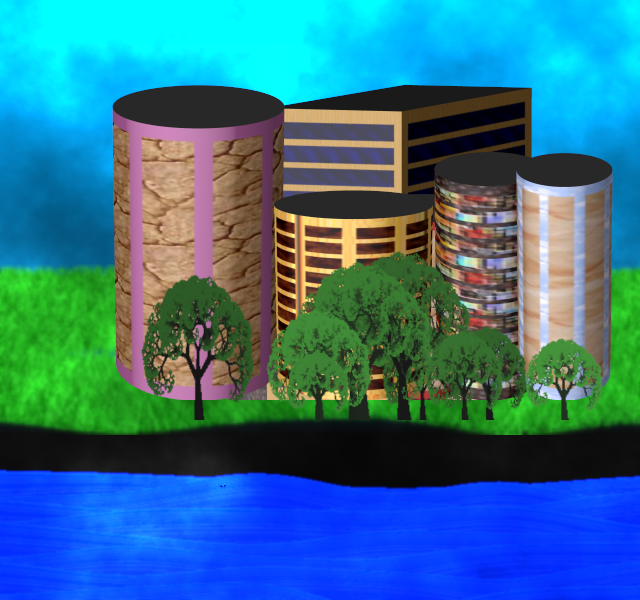
Ver.8.

I didn't intend to play with it any further, but I didn't like the colored roofs ...
... and while I was at it, I added: grass, sky, and ground.

From default settings:

Image

sample result:

Image


Attachments:
Random Downtown 3D Ver.8.zip [4.14 KiB]
Downloaded 38 times

_________________
Image
Top
 Post subject: Re: random dowtown
PostPosted: Fri Feb 28, 2025 9:14 am  (#32) 
Offline
GimpChat Member
User avatar

Joined: Jan 13, 2011
Posts: 2648
Location: Poland
Ver.8.1.

This sky looks weird (too artificial :mrgreen: ) without clouds, so I had to add them. ;)
From default settings sample result:

Image


Attachments:
Random Downtown 3D Ver.8.1.zip [4.32 KiB]
Downloaded 37 times

_________________
Image
Top
 Post subject: Re: random dowtown
PostPosted: Sat Mar 01, 2025 12:27 am  (#33) 
Offline
GimpChat Member
User avatar

Joined: Jan 13, 2011
Posts: 2648
Location: Poland
Ver.8.2.

...and some water to cool down (because there was too much earth :hehe )...
...and now it's probably better (almost like a preschooler's drawing :mrgreen: )

From default settings samples result:

Image

Image

Image


Attachments:
Random Downtown 3D Ver.8.2.zip [4.46 KiB]
Downloaded 33 times

_________________
Image
Top
 Post subject: Re: random dowtown
PostPosted: Sat Mar 01, 2025 1:35 am  (#34) 
Offline
Global Moderator
User avatar

Joined: May 16, 2010
Posts: 16240
This just keeps getting better and better, :bigthup

Only took about 4 min on my 500 MB Ram laptop. That's pretty fast for me. :clap

Thanks for the update MareroQ!

Image

_________________
Image


Top
 Post subject: Re: random dowtown
PostPosted: Sat Mar 01, 2025 3:44 am  (#35) 
Offline
GimpChat Member
User avatar

Joined: Jan 13, 2011
Posts: 2648
Location: Poland
Thank you Rod.
Map Object and some G'MIC filters are not speed demons :cool

Images from post # 33 not generated here by AI but processed by filters G'MIC :yes :

Angoisse Anguish
Image

Freaky B&W
Image

Hough Sketch
Image

_________________
Image


Top
 Post subject: Re: random dowtown
PostPosted: Wed Mar 05, 2025 6:55 am  (#36) 
Offline
GimpChat Member
User avatar

Joined: Jan 13, 2011
Posts: 2648
Location: Poland
Ver.9.

I no longer promise that this is the last version :mrgreen: (but very likely).
Added: MOUNTAINS and NIGHT.
Image

Image

Image

Image


Attachments:
Random Downtown 3D Ver.9.zip [5.1 KiB]
Downloaded 133 times

_________________
Image
Top
 Post subject: Re: random dowtown
PostPosted: Wed Mar 12, 2025 8:26 am  (#37) 
Offline
Script Coder
User avatar

Joined: May 07, 2014
Posts: 4561
Location: Canada
Wow, crazy updates. Great.

_________________
Image
Visualize your and others dreams coming true.


Top
Post new topic Reply to topic  [ 37 posts ]  Go to page Previous  1, 2

All times are UTC - 5 hours [ DST ]


* Login  


Powered by phpBB3 © phpBB Group